
Vega-Altair: A declarative statistical visualization library for Python.


Project description
Vega-Altair 




Vega-Altair is a declarative statistical visualization library for Python. With Vega-Altair, you can spend more time understanding your data and its meaning. Vega-Altair's API is simple, friendly and consistent and built on top of the powerful Vega-Lite JSON specification. This elegant simplicity produces beautiful and effective visualizations with a minimal amount of code.
Vega-Altair was originally developed by Jake Vanderplas and Brian Granger in close collaboration with the UW Interactive Data Lab. The Vega-Altair open source project is not affiliated with Altair Engineering, Inc.
Documentation
See Vega-Altair's Documentation Site as well as the Tutorial Notebooks. You can run the notebooks directly in your browser by clicking on one of the following badges:


Example
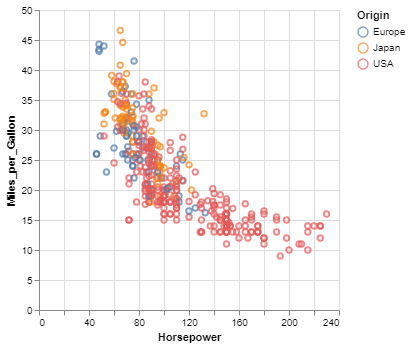
Here is an example using Vega-Altair to quickly visualize and display a dataset with the native Vega-Lite renderer in the JupyterLab:
import altair as alt

# load a simple dataset as a pandas DataFrame
from vega_datasets import data
cars = data.cars()

alt.Chart(cars).mark_point().encode(
    x='Horsepower',
    y='Miles_per_Gallon',
    color='Origin',
)
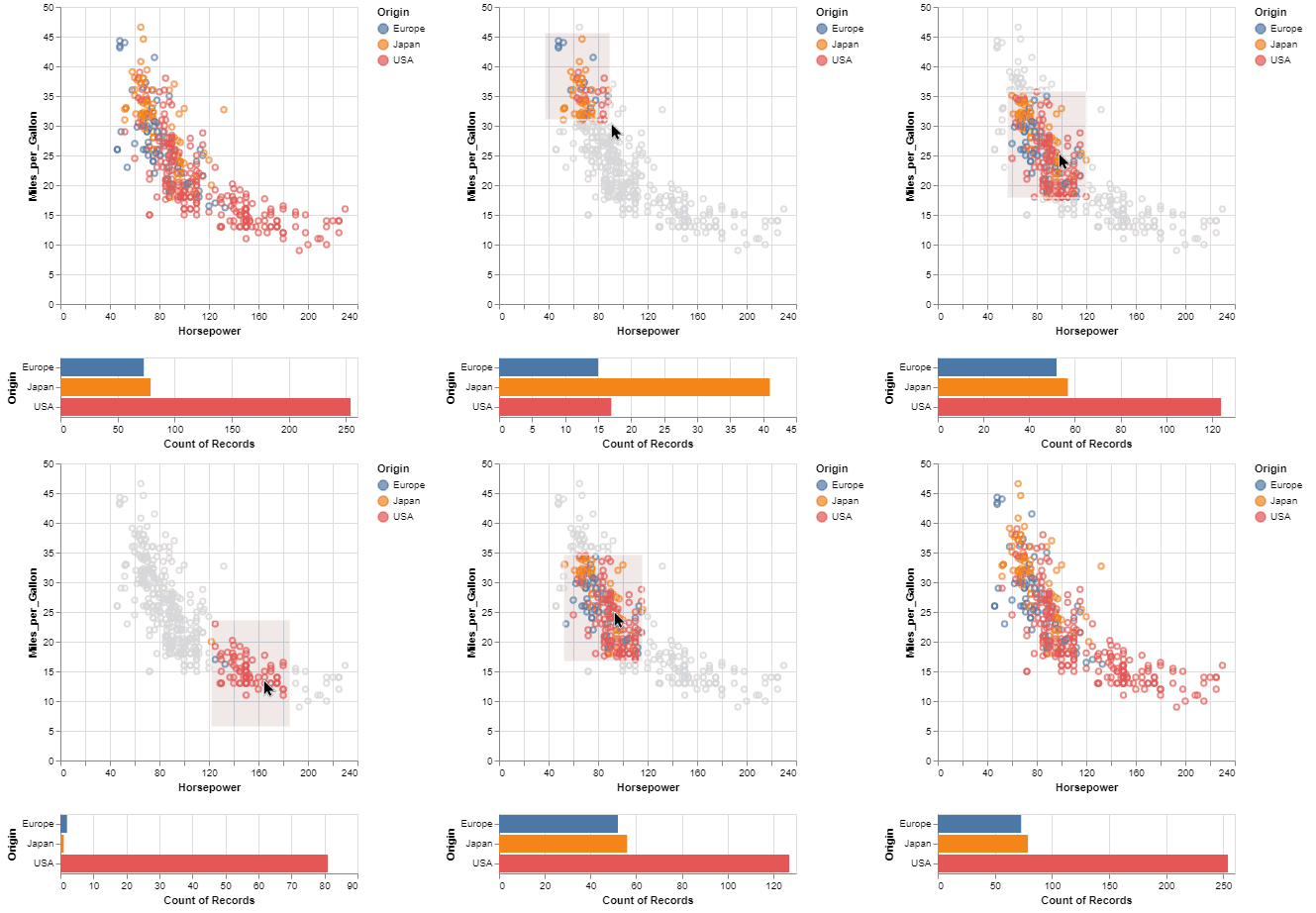
One of the unique features of Vega-Altair, inherited from Vega-Lite, is a declarative grammar of not just visualization, but interaction. With a few modifications to the example above we can create a linked histogram that is filtered based on a selection of the scatter plot.
import altair as alt
from vega_datasets import data

source = data.cars()

brush = alt.selection_interval()

points = alt.Chart(source).mark_point().encode(
    x='Horsepower',
    y='Miles_per_Gallon',
    color=alt.condition(brush, 'Origin', alt.value('lightgray'))
).add_params(
    brush
)

bars = alt.Chart(source).mark_bar().encode(
    y='Origin',
    color='Origin',
    x='count(Origin)'
).transform_filter(
    brush
)

points & bars
Features
- Carefully-designed, declarative Python API.
- Auto-generated internal Python API that guarantees visualizations are type-checked and in full conformance with the Vega-Lite specification.
- Display visualizations in JupyterLab, Jupyter Notebook, Visual Studio Code, on GitHub and nbviewer, and many more.
- Export visualizations to various formats such as PNG/SVG images, stand-alone HTML pages and the Online Vega-Lite Editor.
- Serialize visualizations as JSON files.
Installation
Vega-Altair can be installed with:
pip install altair
If you are using the conda package manager, the equivalent is:
conda install altair -c conda-forge
For full installation instructions, please see the documentation.
Getting Help
If you have a question that is not addressed in the documentation,
you can post it on StackOverflow using the altair tag.
For bugs and feature requests, please open a Github Issue.
Development


You can find the instructions on how to install the package for development in the documentation.
To run the tests and linters, use
hatch run test
For information on how to contribute your developments back to the Vega-Altair repository, see
CONTRIBUTING.md
Citing Vega-Altair
If you use Vega-Altair in academic work, please consider citing https://joss.theoj.org/papers/10.21105/joss.01057 as
@article{VanderPlas2018,
    doi = {10.21105/joss.01057},
    url = {https://doi.org/10.21105/joss.01057},
    year = {2018},
    publisher = {The Open Journal},
    volume = {3},
    number = {32},
    pages = {1057},
    author = {Jacob VanderPlas and Brian Granger and Jeffrey Heer and Dominik Moritz and Kanit Wongsuphasawat and Arvind Satyanarayan and Eitan Lees and Ilia Timofeev and Ben Welsh and Scott Sievert},
    title = {Altair: Interactive Statistical Visualizations for Python},
    journal = {Journal of Open Source Software}
}
Please additionally consider citing the Vega-Lite project, which Vega-Altair is based on: https://dl.acm.org/doi/10.1109/TVCG.2016.2599030
@article{Satyanarayan2017,
    author={Satyanarayan, Arvind and Moritz, Dominik and Wongsuphasawat, Kanit and Heer, Jeffrey},
    title={Vega-Lite: A Grammar of Interactive Graphics},
    journal={IEEE transactions on visualization and computer graphics},
    year={2017},
    volume={23},
    number={1},
    pages={341-350},
    publisher={IEEE}
}
Release history Release notifications | RSS feed


Download files
Download the file for your platform. If you're not sure which to choose, learn more about installing packages.
Source Distribution
Built Distribution
Filter files by name, interpreter, ABI, and platform.
If you're not sure about the file name format, learn more about wheel file names.
Copy a direct link to the current filters
File details
Details for the file altair-5.3.0.tar.gz.
File metadata
- Download URL: altair-5.3.0.tar.gz
- Upload date:
- Size: 826.8 kB
- Tags: Source
- Uploaded using Trusted Publishing? No
- Uploaded via: python-httpx/0.24.1
File hashes
| Algorithm | Hash digest | |
|---|---|---|
| SHA256 |
5a268b1a0983b23d8f9129f819f956174aa7aea2719ed55a52eba9979b9f6675
|
|
| MD5 |
265ddb938d08e0359e5e9e6adca75606
|
|
| BLAKE2b-256 |
bd3ca0934e25e5eed622b35594261edff75bfa342882d651daa33961fdb4fbf0
|
File details
Details for the file altair-5.3.0-py3-none-any.whl.
File metadata
- Download URL: altair-5.3.0-py3-none-any.whl
- Upload date:
- Size: 857.8 kB
- Tags: Python 3
- Uploaded using Trusted Publishing? No
- Uploaded via: python-httpx/0.24.1
File hashes
| Algorithm | Hash digest | |
|---|---|---|
| SHA256 |
7084a1dab4d83c5e7e5246b92dc1b4451a6c68fd057f3716ee9d315c8980e59a
|
|
| MD5 |
cdc246bb17ef46f80b182618f1a7b211
|
|
| BLAKE2b-256 |
46302118537233fa72c1d91a81f5908a7e843a6601ccc68b76838ebc4951505f
|






