
This release is a pre-release and may not be stable for production use.
Vega-Altair 




Vega-Altair is a declarative statistical visualization library for Python. With Vega-Altair, you can spend more time understanding your data and its meaning. Vega-Altair's API is simple, friendly and consistent and built on top of the powerful Vega-Lite JSON specification. This elegant simplicity produces beautiful and effective visualizations with a minimal amount of code.
Vega-Altair was originally developed by Jake Vanderplas and Brian Granger in close collaboration with the UW Interactive Data Lab. The Vega-Altair open source project is not affiliated with Altair Engineering, Inc.
Documentation
See Vega-Altair's Documentation Site as well as the Tutorial Notebooks. You can run the notebooks directly in your browser by clicking on one of the following badges:


Example
Here is an example using Vega-Altair to quickly visualize and display a dataset with the native Vega-Lite renderer in the JupyterLab:
import altair as alt

# load a simple dataset as a pandas DataFrame
from altair.datasets import data
cars = data.cars()

alt.Chart(cars).mark_point().encode(
    x='Horsepower',
    y='Miles_per_Gallon',
    color='Origin',
)
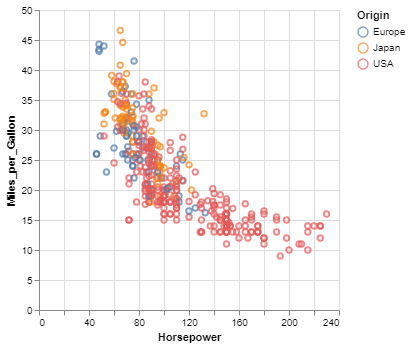
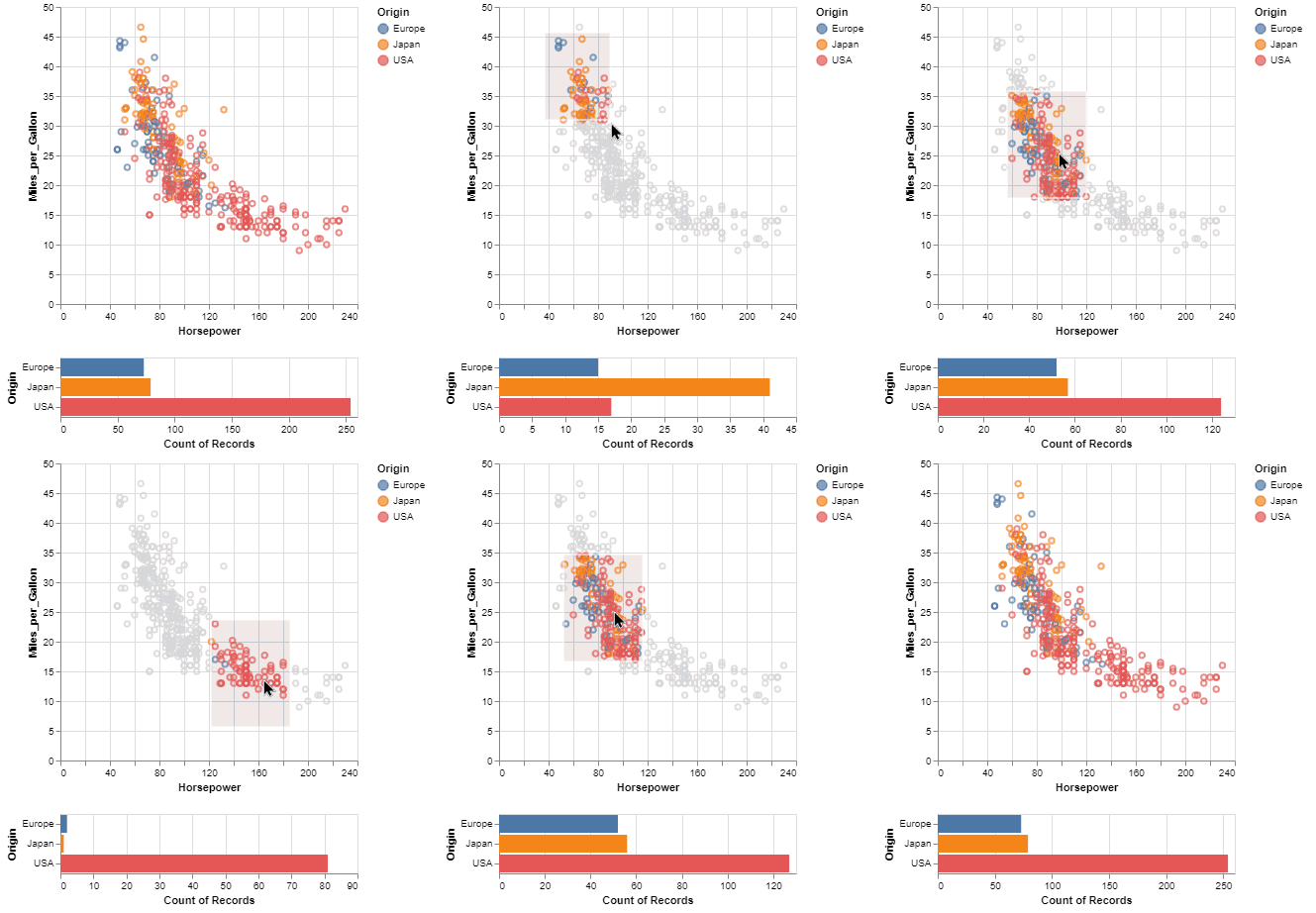
One of the unique features of Vega-Altair, inherited from Vega-Lite, is a declarative grammar of not just visualization, but interaction. With a few modifications to the example above we can create a linked histogram that is filtered based on a selection of the scatter plot.
import altair as alt
from altair.datasets import data

source = data.cars()

brush = alt.selection_interval()

points = alt.Chart(source).mark_point().encode(
    x='Horsepower',
    y='Miles_per_Gallon',
    color=alt.when(brush).then("Origin").otherwise(alt.value("lightgray"))
).add_params(
    brush
)

bars = alt.Chart(source).mark_bar().encode(
    y='Origin',
    color='Origin',
    x='count(Origin)'
).transform_filter(
    brush
)

points & bars
Features
- Carefully-designed, declarative Python API.
- Auto-generated internal Python API that guarantees visualizations are type-checked and in full conformance with the Vega-Lite specification.
- Display visualizations in JupyterLab, Jupyter Notebook, Visual Studio Code, on GitHub and nbviewer, and many more.
- Export visualizations to various formats such as PNG/SVG images, stand-alone HTML pages and the Online Vega-Lite Editor.
- Serialize visualizations as JSON files.
Installation
Vega-Altair can be installed with:
pip install altair
If you are using the conda package manager, the equivalent is:
conda install altair -c conda-forge
For full installation instructions, please see the documentation.
Getting Help
If you have a question that is not addressed in the documentation,
you can post it on StackOverflow using the altair tag.
For bugs and feature requests, please open a Github Issue.
Development


For information on how to contribute your developments back to the Vega-Altair repository, see
CONTRIBUTING.md
Citing Vega-Altair
If you use Vega-Altair in academic work, please consider citing https://joss.theoj.org/papers/10.21105/joss.01057 as
@article{VanderPlas2018,
    doi = {10.21105/joss.01057},
    url = {https://doi.org/10.21105/joss.01057},
    year = {2018},
    publisher = {The Open Journal},
    volume = {3},
    number = {32},
    pages = {1057},
    author = {Jacob VanderPlas and Brian Granger and Jeffrey Heer and Dominik Moritz and Kanit Wongsuphasawat and Arvind Satyanarayan and Eitan Lees and Ilia Timofeev and Ben Welsh and Scott Sievert},
    title = {Altair: Interactive Statistical Visualizations for Python},
    journal = {Journal of Open Source Software}
}
Please additionally consider citing the Vega-Lite project, which Vega-Altair is based on: https://dl.acm.org/doi/10.1109/TVCG.2016.2599030
@article{Satyanarayan2017,
    author={Satyanarayan, Arvind and Moritz, Dominik and Wongsuphasawat, Kanit and Heer, Jeffrey},
    title={Vega-Lite: A Grammar of Interactive Graphics},
    journal={IEEE transactions on visualization and computer graphics},
    year={2017},
    volume={23},
    number={1},
    pages={341-350},
    publisher={IEEE}
}
6 maintainers


Metadata
6 maintainers
Release files for altair 6.1.0.dev20260112
For a detailed explanation of source distributions (sdists) and built distributions (wheels), please see the package formats documentation.
Source distribution (sdist)
| File | Size | Uploaded | Provenance | Actions |
|---|---|---|---|---|
| altair-6.1.0.dev20260112.tar.gz | 764.1 kB | With provenance | Details for altair-6.1.0.dev20260112.tar.gz |
Built distribution (wheel)
| File | Interpreter | ABI | Platform | Actions Reset |
|---|---|---|---|---|
| altair-6.1.0.dev20260112-py3-none-any.whl | Python 3 | none | any | Details for altair-6.1.0.dev20260112-py3-none-any.whl |
Total release size: 1.6 MB
Release files / altair-6.1.0.dev20260112.tar.gz
| Download URL | altair-6.1.0.dev20260112.tar.gz |
|---|---|
| Size | 764.1 kB |
| Tags | Source |
|
SHA-256 checksum How to use checksums |
15dfdb1c5d47375a515d938b65acb089220f98c62d70f6614ef8f46cc2726b64
|
|
BLAKE2b-256 checksum How to use checksums |
98a9d327f56a073000fedd72a82fe5319b6a9ee4951ddaba59175fc1fdac29ed
|
| Upload date | |
|
Uploaded using Trusted Publishing? What is trusted publishing? |
Yes |
| Uploaded via |
twine/6.1.0 CPython/3.13.7
|
Provenance
Provenance describes where a file came from. On PyPI, provenance is shared via attestations, which provide a verifiable record of the build or publishing details. View details, limitations and caveats.


PyPI Publish Attestation
PyPI verified that this artifact, at this checksum, originated from the publisher listed below.
Signed by GitHub Actions, verified by PyPI on Jan 12, 2026.
Transparency logRelease files / altair-6.1.0.dev20260112-py3-none-any.whl
| Download URL | altair-6.1.0.dev20260112-py3-none-any.whl |
|---|---|
| Size | 795.7 kB |
| Tags | Python 3 |
|
SHA-256 checksum How to use checksums |
f8defd100c880b0934c53ca09390fcd04d4fdc0aa91ef76911c35f85dafd0fb9
|
|
BLAKE2b-256 checksum How to use checksums |
3c1a11599d88e750bca12fbd6a9063589868e069b16dc0a13d40ce37cd0f8abb
|
| Upload date | |
|
Uploaded using Trusted Publishing? What is trusted publishing? |
Yes |
| Uploaded via |
twine/6.1.0 CPython/3.13.7
|
Provenance
Provenance describes where a file came from. On PyPI, provenance is shared via attestations, which provide a verifiable record of the build or publishing details. View details, limitations and caveats.
PyPI Publish Attestation
PyPI verified that this artifact, at this checksum, originated from the publisher listed below.
Signed by GitHub Actions, verified by PyPI on Jan 12, 2026.
Transparency logSecurity for altair 6.1.0.dev20260112
Provenance
Provenance describes where a file came from. On PyPI, provenance is shared via attestations, which provide a verifiable record of the build or publishing details. View details, limitations and caveats.
Full provenance
All 2 files in this release have been uploaded with provenance metadata.
Attestation for altair-6.1.0.dev20260112.tar.gz
PyPI Publish Attestation
PyPI verified that this artifact, at this checksum, originated from the publisher listed below.
Signed by GitHub Actions, verified by PyPI on Jan 12, 2026.
Transparency logA note on package security
PyPI is a repository for distributing packages, not a service for auditing them. While third-party security researchers and our staff do their best to detect and remove malicious packages, PyPI cannot guarantee the quality, security or suitability of any given package.
To learn more about protecting yourself from malicious actors, visit our package security documentation.














