
AMBER (Agent-based Modeling with Blazingly Efficient Records)





AMBER is a Python framework for agent-based modeling that uses Polars for
efficient columnar population state. It provides an AgentPy-shaped OOP lane and
a high-performance vectorized lane. Both can use NVIDIA GPUs through CuPy. Multi-run
parallelism is opt-in (Experiment / ParallelRunner / GPUEnsembleRunner),
not automatic from a single .run().
🚀 Performance
AMBER stores population state in Polars columns. CPU and GPU runs automatically
batch eligible agent methods that add or subtract integer constants from an
agent's own fields. A simple condition on that agent's own state can select
which agents update. Other agent methods use the Python loop. Models can also
write bulk updates directly with agents.where(...), agents.at[ids], or
scatter_add. Compatible bulk code can run on a GPU with model.gpu().run().
GPU requirements (read this first)
| Claim | Requires |
|---|---|
| CPU bulk updates | Column operations with pip install ambr (optional ambr[perf] / Numba) |
| Headline AMBER (GPU) vs FLAME table below | NVIDIA GPU + CuPy (pip install 'ambr[gpu]' or a CUDA-matched wheel) |
| Apple Metal / MPS | Not supported — AMBER does not use Mac GPU |
Check the machine before quoting GPU numbers:
import ambr as am
am.print_status()          # must show GPU: yes for FLAME-class claims
print(am.recommend(1_000_000))
Default GitHub CI has no CUDA. Re-verify GPU claim paths on a CUDA host with:
python scripts/run_gpu_claims.py          # full (incl. large-N)
python scripts/run_gpu_claims.py --quick  # fast smoke
Headline comparison (committed evidence)
Single source of truth for the README table (do not mix other tables):
benchmarks/results/benchmark_results_snapshot_correct_10run_10m.json
(summary:
summary_table_snapshot_correct_10run_10m.md).
Other files under benchmarks/results/ (including
summary_table.md) are exploratory / historical and may use different
protocols — never combine them with the headline table without an explicit
caption.
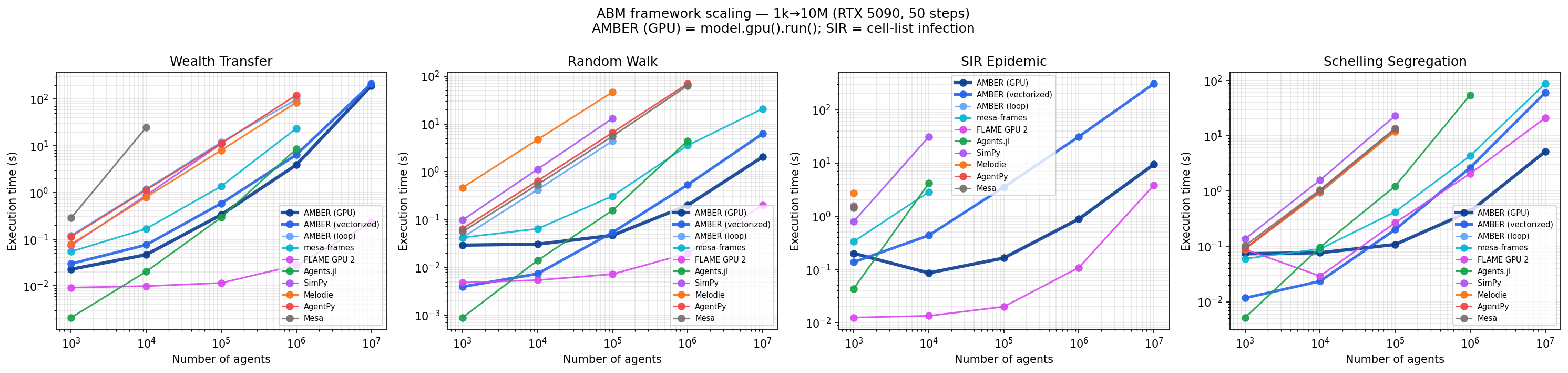
Protocol: NVIDIA RTX 5090; 10M agents; 50 steps; 10 runs retained (no outlier deletion); one untimed warm-up per cell; timed scope = construct + setup + step loop + result assembly. AMBER GPU synchronizes after the run; FLAME GPU 2 returns at a simulation-complete boundary. This is an implementation comparison under that protocol — not a claim of byte-identical dynamics across frameworks.
AMBER (GPU) vs FLAME GPU 2 at 10M agents (mean wall-clock):
| Model | AMBER (GPU) | FLAME GPU 2 | Speedup (FLAME / AMBER) |
|---|---|---|---|
| Wealth | 94 ms | 194 ms | ~2.05× |
| Random walk | 80 ms | 161 ms | ~2.00× |
| SIR (cell-list) | 2.08 s | 3.68 s | ~1.77× |
| Schelling | 295 ms | 18.7 s | ~63× (setup-inclusive; exploratory) |
- Wealth / walk / SIR are the comparable headline class (~1.8–2.1×).
- Schelling includes heavy Python-side setup inside the timed region for the FLAME harness; do not treat ~63× as a pure step-kernel speedup.
- Multi-framework scale-out charts (Mesa, mesa-frames, Agents.jl, …) are
exploratory and live under
benchmarks/results/; some cells OOM or hit budgets — missing cells are not zeros. - Reproducer:
benchmarks/run_all_frameworks.py.
Correctness gates:benchmarks/correctness_check.py.
Details:benchmarks/README.md.
Benchmark API: the vectorized benchmark models implement step_vectorized()
and run with .cpu(mode="vectorized") or .gpu(). Private
optimized GPU loops require an explicit
approve_fast_path(evidence) label (caller-attested provenance; AMBER
checks presence of the label, not the evidence content) and
contract="off" — see docs/going_faster.rst.
Default CI has no CUDA. Optional GPU claims workflow
(.github/workflows/gpu-nightly.yml) runs scripts/run_gpu_claims.py --quick
only when GPU_RUNNER names a self-hosted CUDA runner. If that variable is
unset the job is skipped — that is not a CUDA pass. 0.5.0 GPU claims
were verified locally on an NVIDIA RTX 3090, not by GitHub Actions.
🚀 Quick Start
Write a model with ordinary setup() and step() methods. Choose execution
when you run it. Models can also supply explicit column operations.
AgentPy-shaped (method broadcast, AgentList):
import ambr as am

class WealthAgent(am.Agent):
    def setup(self):
        self.wealth = 1
    def transfer(self):
        if self.wealth > 0:
            other = self.model.agents.by_id(self.model.agents.random())
            other.wealth += 1
            self.wealth -= 1

class WealthModel(am.Model):
    def setup(self):
        self.agents = am.AgentList(self, self.p.n, WealthAgent)
    def step(self):
        self.agents.transfer()
    def update(self):
        self.record_model('total', int(self.agents.wealth.sum()))

results = WealthModel({'n': 50, 'steps': 20, 'seed': 1}).run()
print(results.model.tail(3).to_dicts())      # also results['model']
print(results.agents.head().to_dicts())
print(results.info.get("mode"), results.info.get("execution_lane"))
Automatic CPU and GPU batching
To try this example from a clone, install the current checkout with
python -m pip install . from the project directory.
This model starts with 1,000 people at age zero. Half are active. In each of three steps, a person ages by one if active.
import ambr as am

class Person(am.Agent):
    def setup(self):
        self.age = 0
        self.active = self.id % 2 == 0

    def step(self):
        if self.active:
            self.age += 1

class PopulationModel(am.Model):
    def setup(self):
        self.add_agents(self.p.n, agent_class=Person)

    def step(self):
        self.agents.step()

params = {"n": 1_000, "steps": 3}
results = PopulationModel(params).run()
print(results.info["auto_batch"])
Choose a run call for the same model declaration.
| Run call | What happens behind it |
|---|---|
PopulationModel(params).run() |
AMBER recognizes the rule and uses Polars to select and increment the active rows on CPU. |
PopulationModel(params).vectorize().run() |
Selects vectorized mode on the current device. On CPU, this is the same mode as the default run. |
PopulationModel(params).gpu().run() |
AMBER uses CuPy on NVIDIA CUDA to apply the rule. It keeps the batched columns on the device across steps until host code needs them. |
PopulationModel(params).run(auto_batch=False) |
AMBER calls each agent's Python method. This is the reference run for comparing results. |
Automatic batching handles supported integer additions and subtractions on an
agent's own fields in sequential calls over a sufficiently large group of
agents of one class. A condition can select agents using their own fields or
a comparison such as self.draw("move", index=2) < 0.45. AMBER generates
the same keyed draws on the host for CPU and GPU runs. On GPU, it uploads the
selection mask and applies the updates to device columns. Rules involving other
agents, shared random draws, custom attribute access, or unsupported types use
the Python loop. Contract checking also uses the Python loop. The aging example records
three batches and 3,000 agent calls replaced. After three steps, the active
people are age 3 and the others are age 0. The headline GPU benchmarks above use
explicit vectorized implementations.
Automatic batching implementation
Bounded random walks also batch when their positions are stored as Float64. This agent uses the same rule on CPU and GPU. Its two axes use independent draw keys.
import ambr as am


class Walker(am.Agent):
    def step(self):
        self.x = max(0.0, min(100.0, self.x + (self.draw("x") * 2.0 - 1.0)))
        self.y = max(0.0, min(100.0, self.y + (self.draw("y") * 2.0 - 1.0)))


class Walk(am.Model):
    def setup(self):
        self.add_agents(1_000, agent_class=Walker, x=50.0, y=50.0)

    def step(self):
        self.agents.step()


model = Walk({"seed": 42, "steps": 50})
results = (model.gpu() if am.GPU_AVAILABLE else model.vectorize()).run()
The same rule in other frameworks
Each example below implements the same aging rule for one of the peers in the benchmark runner.
AgentPy
import agentpy as ap

class Person(ap.Agent):
    def setup(self):
        self.age = 0
        self.active = self.id % 2 == 0

    def step(self):
        if self.active:
            self.age += 1

class Population(ap.Model):
    def setup(self):
        self.agents = ap.AgentList(self, self.p.n, Person)

    def step(self):
        self.agents.step()

Population({"n": 1_000, "steps": 3}).run()
AgentList broadcasts the call through AttrIter, which invokes each agent's
bound method in Python. The one broadcast dispatches 1,000 Python calls per
step. AgentPy sequence source
Mesa
import mesa

class Person(mesa.Agent):
    def __init__(self, model):
        super().__init__(model)
        self.age = 0
        self.active = self.unique_id % 2 == 0

    def step(self):
        if self.active:
            self.age += 1

class Population(mesa.Model):
    def __init__(self, n):
        super().__init__()
        for _ in range(n):
            Person(self)

    def step(self):
        self.agents.do("step")

model = Population(1_000)
for _ in range(3):
    model.step()
Mesa registers the agents in the model's AgentSet. do("step") invokes one
Python method per object in the current order. shuffle_do("step") selects a
random activation order. Mesa AgentSet API
mesa-frames
This example uses the same mesa-frames==0.1.0a0 API as the benchmark adapter.
import polars as pl
from mesa_frames import AgentSetPolars, ModelDF

class People(AgentSetPolars):
    def step(self):
        ages = self.agents["age"] + self.agents["active"].cast(pl.Int64)
        self.set("age", ages.to_numpy())

class Population(ModelDF):
    def __init__(self, n):
        super().__init__()
        people = People(self)
        people.add(pl.DataFrame({
            "unique_id": list(range(n)),
            "age": [0] * n,
            "active": [i % 2 == 0 for i in range(n)],
        }))
        self.agents += people

    def step(self):
        self.agents.do("step")

model = Population(1_000)
for _ in range(3):
    model.step()
Each person is a row in a Polars table. The model calls step() once on the
set. Polars computes the updated age column and set() writes it back.
mesa-frames 0.1.0a0,
benchmark adapter
Melodie
import Melodie

class Person(Melodie.Agent):
    def setup(self):
        self.age = 0
        self.active = self.id % 2 == 0

    def step(self):
        if self.active:
            self.age += 1

class Population(Melodie.Model):
    def create(self):
        self.people = self.create_agent_list(Person)

    def setup(self):
        self.people.setup_agents(1_000)

    def run(self):
        for _ in self.iterator(3):
            for person in self.people:
                person.step()
The Melodie simulator supplies the configuration and scenario and calls
create(), setup(), and run(). The period loop invokes each Python agent
object's method. Melodie model lifecycle
SimPy
import simpy

def age_person(env, person):
    for _ in range(3):
        yield env.timeout(1)
        if person["active"]:
            person["age"] += 1

env = simpy.Environment()
people = [{"age": 0, "active": i % 2 == 0} for i in range(1_000)]
for person in people:
    env.process(age_person(env, person))
env.run()
Each person is a generator process. SimPy puts its timeout on an event queue and resumes the process when its event is due. Events for the same time are processed one by one. SimPy time and scheduling
Agents.jl
using Agents

@agent struct Person(NoSpaceAgent)
    age::Int
    active::Bool
end

function age_person!(person, model)
    if person.active
        person.age += 1
    end
end

model = StandardABM(Person; agent_step! = age_person!)
for i in 0:999
    add_agent!(model, 0, iseven(i))
end
step!(model, 3)
The scheduler calls agent_step! once per scheduled agent. Julia specializes
the typed code and compiles it to native CPU code.
Agents.jl API,
Julia compiler specialization
FLAME GPU 2
import pyflamegpu as fg

rule = """
FLAMEGPU_AGENT_FUNCTION(age_person, flamegpu::MessageNone, flamegpu::MessageNone) {
    if (FLAMEGPU->getVariable<int>("active")) {
        int age = FLAMEGPU->getVariable<int>("age");
        FLAMEGPU->setVariable<int>("age", age + 1);
    }
    return flamegpu::ALIVE;
}
"""

model = fg.ModelDescription("population")
person = model.newAgent("person")
person.newVariableInt("age", 0)
person.newVariableInt("active", 0)
model.newLayer().addAgentFunction(person.newRTCFunction("age_person", rule))

people = fg.AgentVector(person, 1_000)
for i in range(0, 1_000, 2):
    people[i].setVariableInt("active", 1)

sim = fg.CUDASimulation(model)
sim.SimulationConfig().steps = 3
sim.setPopulationData(people)
sim.simulate()
Python declares the agent variables, initializes the population, and registers the agent function in a layer. FLAME GPU compiles the function at runtime and executes it in parallel on CUDA. An experimental API also transpiles restricted, decorated Python agent functions to C++. FLAME GPU agent functions
Explicit column operations
import ambr as am

class WealthModel(am.Model):
    model_reporters = {'total_wealth': lambda m: int(m.agents.wealth.sum())}

    def setup(self):
        self.add_agents(100, wealth=self.rng.integers(1, 10, size=100))

    def step_vectorized(self):
        # View API: where / column assign / scatter_add (not agents.array mutate).
        # agents.array(...) returns a read-only snapshot on the CPU Polars path.
        donors = self.agents.where(self.agents.wealth > 0)
        donors.wealth -= 1
        recipients = self.rng.choice(self.agents.ids.to_numpy(), size=len(donors))
        self.agents.at[recipients].scatter_add(wealth=1)

# Fluent placement: device + optional mode; run(mode=...) still overrides.
# GPU when NVIDIA+CuPy available; otherwise CPU vectorized.
_m = WealthModel({'steps': 100, 'seed': 42, 'show_progress': False})
results = _m.gpu().run() if am.GPU_AVAILABLE else _m.cpu(mode="vectorized").run()
print(results.info)
print(results.model.tail(5).to_dicts())
print(results.agents.head(10).to_dicts())
Coming from AgentPy? See docs/from_agentpy.rst.
Going faster / GPU — same Model class; pick placement and lane hooks (see
docs/going_faster.rst):
import ambr as am
am.print_status()                 # GPU? which lane?
print(am.recommend(1_000_000))  # one-line suggestion

# Same view-API model shape as the vectorized quickstart above
class WealthModel(am.Model):
    def setup(self):
        n = int(self.p.get("n", 100_000))
        self.add_agents(n, wealth=1)
    def step_vectorized(self):
        donors = self.agents.where(self.agents.wealth > 0)
        donors.wealth -= 1
        self.agents.at[
            self.rng.choice(self.agents.ids.to_numpy(), size=len(donors))
        ].scatter_add(wealth=1)

# Native path: step_vectorized + .gpu() when NVIDIA+CuPy are available
model = WealthModel({"n": 100_000, "steps": 50, "seed": 0, "show_progress": False})
if am.GPU_AVAILABLE:
    results = model.gpu().run()
else:
    results = model.cpu(mode="vectorized").run()  # Mac / no-CUDA fallback
print(results.info)

# Array-kernel lane (CuPy if available, else NumPy) for pure array state:
class Drift(am.ArrayKernelModel):
    def init_state(self, xp, n, rng, p):
        return {"x": rng.random(n, dtype=xp.float32)}
    def step_state(self, xp, state, rng, p):
        state["x"] = state["x"] + 0.01
        return state
    def metrics(self, xp, state):
        return {"mean_x": float(am.to_host(state["x"].mean()))}

print(Drift({"n": 100_000, "steps": 20, "show_progress": False}).run().info)
self.rng is the canonical seeded RNG (a NumPy Generator); self.random is
the stdlib one. Both are seeded from the seed parameter. Progress printing is
off by default (show_progress=True to re-enable).
New in 0.5.0: production-candidate. Breaking / install: matplotlib moved to
ambr[viz]; scikit-optimize was removed and replaced by SMAC underambr[advanced](SMAC + ConfigSpace + scikit-learn). Python 3.10–3.13 only. API:record_modelinsidestep()is kept; missing optimization metrics raise; SMAC defaults toon_error='raise';RunResults.saveuses a versioned manifest. Upgrade withpip install -U 'ambr>=0.5.0'. Full list: CHANGELOG.md.0.4.7: GPU claim script renamed to
scripts/run_gpu_claims.py; paper-campaign machine labels removed from user-facing docs.
⚡ Vectorized View API
The view API runs bulk operations on whole columns or selected rows:
def step(self):
    # Bulk columnar reads/writes over the entire population
    self.agents.x = self.agents.x + self.rng.uniform(-1, 1, len(self.agents))

    # Filtered writes: only agents matching a condition
    infected = self.agents.where(self.agents.status == 1)
    infected.infection_time += 1

    # scatter_add: flow-of-resources with duplicate-id safety
    self.agents.at[[1, 1, 3]].scatter_add(wealth=1)  # agent 1 gets +2, agent 3 gets +1
Canonical API (0.5)
AMBER 0.5 settles on one obvious verb per task. The legacy spellings still work
(they emit a DeprecationWarning and are scheduled for removal in 1.0); set
AMBER_SUPPRESS_DEPRECATIONS=1 to silence them in benchmark / reproducibility runs.
Batch performance comes from these verbs (columnar writes), not from extra public
batch_* helpers.
| Task | Canonical | Legacy (deprecated → 1.0) |
|---|---|---|
| NumPy RNG | self.rng |
self.nprandom |
| Device / run mode | model.cpu(mode=...).run() / model.gpu().run() |
run(backend=...) |
| Record a model metric | model_reporters = {...} or record_model(k, v) |
record(k, v) |
| Filter agents | agents.where(expr) / agents[mask] / agents.at[ids] |
agents.select(...) |
| Per-agent write | agent.col = v |
agent.record(...), agent.update_data(...), update_agent_data |
| Bulk / multi-column write | agents.set(**cols) or view.col = … |
agents.record / update_data, batch_update_agents, Population.batch_* |
| Accumulate (duplicate ids) | agents.at[ids].scatter_add(...) |
double ordinary writes in one step |
| Array kernels | agents.borrow / agents.commit (or TensorLane) |
hand-maintained parallel NumPy buffers |
| Read agent objects | iterate model.agents, agents.by_id(i) |
agents.agents, agents.agent_ids |
| Bulk numpy round-trip | agents.numpy(...) + agents.set(...) |
.to_numpy() + per-column assign only |
| Typed parameters | params = {'n': (int, 200)}, then self.p.n |
int(self.p.get('n', 200)) |
| Grid wrap | GridEnvironment(torus=True) |
wrap= / .wrap |
| Agent table assign | view / _set_frame |
population.data = ... (setter warns) |
update() is a pure hook — overriding it no longer requires
super().update(). Declare model_reporters / agent_reporters for
declarative metrics, and set record_initial = True to capture a t=0 row.
🔒 Snapshot-view contract
The snapshot-view contract checks instrumented reads and writes. cert.clean
means no monitored hazard was observed. cert.conditional_guarantee is
"established" when AMBER verifies order independence for a supported
CPU activation sweep.
import ambr as am

class Person(am.Agent):
    def step(self):
        if self.draw("earn") < 0.25:
            self.wealth += 1

class WealthModel(am.Model):
    def setup(self):
        self.add_agents(50, agent_class=Person, wealth=1)

    def step(self):
        self.agents.step()

results = WealthModel({"steps": 20, "seed": 7}).run(contract="check")
cert = results["contract"][0]
assert cert.conditional_guarantee == "established"
print(cert.certification)
check records a ContractCertificate per step. warn also emits a warning per
violation. raise stops on the first error. Mode off disables the monitor.
The proof covers supported integer updates and exact, fixed-target integer
reductions for one sequential or shuffled sweep at its observed entry state.
self.draw("earn") gives the same uniform value for a given seed, step,
agent ID, and event. Use index= for multiple draws within one event.
Other rules and GPU runs receive "not_established" with a
cert.certification_reason. Separately written vectorized and GPU kernels
require reference comparisons.
The monitor watches two write paths (and combinations):
- Buffered (OOP) —
agent.col = …/ queued cell writes - Lane / view —
agents.col = …,agents.set(...),borrow/commit - Cross-path — same column via both OOP and view in one step →
cross_path_write - Mutable raw arrays —
agents.array(...)→uncertified_mutable_borrow
Ordinary view writes require unique target IDs. Use scatter_add or
scatter_max for repeated targets.
🎮 GPU backend & batched calibration
Single-run (native): call model.gpu().run() when NVIDIA+CuPy are available.
AMBER batches eligible ordinary agent rules on the GPU and also supports explicit
column updates. It uses step_vectorized() when provided, otherwise step() or
a standalone step_oop(). Numeric columns stay on the device until host access
or teardown. Contract modes use the
instrumented general path; private model-specific fast loops run only with
contract="off" and an explicit per-instance
approve_fast_path(evidence) declaration. The evidence string is a
caller-supplied provenance label, not something AMBER verifies. Without it,
gpu().run() uses the general path. Private loops bypass the monitor.
import ambr as am

class WealthModel(am.Model):
    def setup(self):
        n = int(self.p.get("n", 1_000_000))
        self.add_agents(n, wealth=1)
    def step_vectorized(self):
        donors = self.agents.where(self.agents.wealth > 0)
        donors.wealth -= 1
        self.agents.at[
            self.rng.choice(self.agents.ids.to_numpy(), size=len(donors))
        ].scatter_add(wealth=1)

# Requires NVIDIA + CuPy. On CPU-only machines use .cpu(mode="vectorized").
model = WealthModel({"n": 1_000_000, "steps": 50, "seed": 0, "show_progress": False})
results = model.gpu().run() if am.GPU_AVAILABLE else model.cpu(mode="vectorized").run()
print(results.info)
# Private fast loop (only if the model defines one; evidence is not verified):
# model.approve_fast_path("my-bench-label").gpu().run(contract="off")
Many short runs (calibration): the ensemble axis (B simulations × N
agents) batches into one device pass — the natural fit when you evaluate
thousands of small replicate runs:
import numpy as np
import ambr as am
from ambr.gpu_ensemble import GPUEnsembleRunner, BatchedWellMixedSIR

# Needs NVIDIA + CuPy. B parameter sets in one (B, N) GPU pass.
B = 4
betas = np.full(B, 0.3)
gammas = np.full(B, 0.1)
i0 = np.full(B, 0.01)
runner = GPUEnsembleRunner(BatchedWellMixedSIR())
if am.GPU_AVAILABLE:
    traj = runner.run(
        n_agents=10_000, steps=30,
        params={"beta": betas, "gamma": gammas, "i0_frac": i0},
    )  # -> {metric: (B, steps)}
    print({k: v.shape for k, v in traj.items()})
else:
    print("GPU ensemble requires NVIDIA + CuPy; skip on this host")
# Optional SMAC loop: smac_batch_calibrate(BatchedWellMixedSIR(), bounds, loss_fn, ...)
# (needs pip install 'ambr[advanced]')
ambr.gpu provides the array-module abstraction (get_array_module, to_device,
to_host) and falls back to NumPy when CuPy is unavailable. Requires NVIDIA
GPU + CuPy (not Apple Metal/MPS).
🔬 Optimization
AMBER includes powerful optimization capabilities for parameter tuning:
import ambr as am
from ambr.optimization import ParameterSpace, grid_search

class MyModel(am.Model):
    def setup(self):
        n = int(self.p.get("agents", 50))
        self.add_agents(n, wealth=int(self.p.get("initial_value", 1)))
    def step_vectorized(self):
        donors = self.agents.where(self.agents.wealth > 0)
        donors.wealth -= 1
        self.agents.at[
            self.rng.choice(self.agents.ids.to_numpy(), size=len(donors))
        ].scatter_add(wealth=1)
    def update(self):
        self.record_model("total_wealth", int(self.agents.wealth.sum()))

parameter_space = ParameterSpace({
    "agents": [20, 40],
    "initial_value": [1, 5],
    "steps": 10,
    "seed": 0,
    "show_progress": False,
})
results = grid_search(MyModel, parameter_space, metric="total_wealth", minimize=False)
best_params = results[0]["parameters"]
print(best_params, results[0]["objective"])
Beyond grid_search, AMBER ships random_search, bayesian_optimization
(SMAC RandomForest surrogate; GP is unsupported), and SMACOptimizer
(same RandomForest stack) — plus the GPU batched ensemble above for
derivative-free calibration at scale.
📦 Installation
The automatic-batching examples and .vectorize() use this checkout.
From the project directory, install it with python -m pip install ..
The commands below install the published distribution and its extras.
pip install ambr

# Optional extras
pip install 'ambr[perf]'              # Numba CPU scatter (recommended on Mac)
pip install 'ambr[gpu]'               # NVIDIA + CuPy (not Metal/MPS)
pip install 'ambr[viz]'               # matplotlib plot helpers
pip install 'ambr[advanced]'          # SMAC optimization
pip install 'ambr[advanced,viz]'      # SMAC + matplotlib (example plots)
import ambr as am
print(am.__version__)   # 0.5.0+
am.print_status()
🏗️ Features
- Simple API: AgentPy-shaped OOP lane + vectorized columnar views on one model
- High Performance: Polars DataFrames; optional Numba (
ambr[perf]) for scatters - Device placement: Keras-style
model.cpu(mode=...)/model.gpu()withstep_vectorized/step_oophooks and automatic batching for eligible agent rules - Speed lanes:
am.print_status()/am.recommend(n)/ArrayKernelModel - Snapshot-view monitor: operational diagnostics for observed write/borrow conflicts and uncertified mutable arrays (not a schedule proof)
- GPU backend: native vectorized path + optional approved private loops + CuPy helpers + batched ensemble for calibration
- Optimization: grid / random / Bayesian (SMAC) search, plus GPU-batched calibration
- Declarative reporting:
model_reporters/agent_reportersand a typedparamsschema - Environments: Support for grid, network, and continuous space environments
- OOP activation: optional
activate_agents("random"|"sequential"|"simultaneous")(not a schedule proof) - Plot helpers:
plot_timeseries/plot_gridfrom RunResults (ambr[viz]alias) - Experiments: Run multiple simulations with parameter sampling
- Random Number Generation: Reproducible simulations with controlled randomness
- RunResults:
results.agentsandresults['agents']both work
📚 Examples
Working examples are available in the examples/ directory:
- Schelling (grid) —
examples/schelling_vectorized.py(canonical occupancy helpers) - Wealth Transfer — economic inequality / dual-lane quickstart
- Virus Spread — epidemiological SIR model
- Flocking — Boids + optional tensor-lane variant
- Forest Fire — cellular automata fire spread
- GPU quickstart —
model.gpu().run()on a view-API model, orArrayKernelModel - Ensemble / SMAC smoke —
examples/smac_batch_sir_smoke.py(SMAC needsambr[advanced]) - SMAC calibration — basic / advanced Schelling multi-objective
📖 Documentation
- Docs: https://ambr.readthedocs.io/
- Paper: https://arxiv.org/abs/2601.16292 — package vs paper claims: docs/paper_and_package.rst
- Going faster (lanes / Numba / GPU): docs/going_faster.rst
- Environments & Schelling: docs/environments_schelling.rst
- From AgentPy: docs/from_agentpy.rst
- Deprecations (→ 1.0): docs/deprecations.rst
- Versioning / 1.0 roadmap: docs/versioning.rst, docs/roadmap_1_0.rst
- Public API surface: docs/public_api.rst
- Changelog: CHANGELOG.md
📝 How to cite?
If you use AMBER in academic work, please cite the paper:
@article{pham2026amber,
  title={AMBER: A Columnar Architecture for High-Performance Agent-Based Modeling in Python},
  author={Pham, Anh-Duy},
  journal={arXiv preprint arXiv:2601.16292},
  year={2026}
}
Paper: https://arxiv.org/abs/2601.16292
For the software, this repository also ships CITATION.cff
(GitHub “Cite this repository”). Manuscript drafts and build artifacts are
not kept in the library tree — only the public paper citation and software
metadata.
🤝 Contributing
We welcome contributions! See docs/contributing.rst (or the Contributing page on Read the Docs).
📄 License
This project is licensed under the BSD 3-Clause License - see the LICENSE file for details.
1 maintainer

Metadata
1 maintainer
Release files for ambr 0.6.0
For a detailed explanation of source distributions (sdists) and built distributions (wheels), please see the package formats documentation.
Source distribution (sdist)
| File | Size | Uploaded | Provenance | Actions |
|---|---|---|---|---|
| ambr-0.6.0.tar.gz | 168.3 kB | With provenance | Details for ambr-0.6.0.tar.gz |
Built distribution (wheel)
| File | Interpreter | ABI | Platform | Actions Reset |
|---|---|---|---|---|
| ambr-0.6.0-py3-none-any.whl | Python 3 | none | any | Details for ambr-0.6.0-py3-none-any.whl |
Total release size: 325.9 kB
Release files / ambr-0.6.0.tar.gz
| Download URL | ambr-0.6.0.tar.gz |
|---|---|
| Size | 168.3 kB |
| Tags | Source |
|
SHA-256 checksum How to use checksums |
e3ec81f7aef744d1e24f9b66b247d63469ab57900c191303ccb4053a83087953
|
|
BLAKE2b-256 checksum How to use checksums |
60c8b9a3ae5328cd095a8600673dac604f980cad080a48574f83bd32ed8e7be2
|
| Upload date | |
|
Uploaded using Trusted Publishing? What is trusted publishing? |
Yes |
| Uploaded via |
twine/7.0.0 CPython/3.13.14
|
Provenance
Provenance describes where a file came from. On PyPI, provenance is shared via attestations, which provide a verifiable record of the build or publishing details. View details, limitations and caveats.


PyPI Publish Attestation
PyPI verified that this artifact, at this checksum, originated from the publisher listed below.
Signed by GitHub Actions, verified by PyPI on Nov 18, 2026.
Transparency logRelease files / ambr-0.6.0-py3-none-any.whl
| Download URL | ambr-0.6.0-py3-none-any.whl |
|---|---|
| Size | 157.6 kB |
| Tags | Python 3 |
|
SHA-256 checksum How to use checksums |
43ca198bdea90a295aee17f39debd74130da3b7d38088871fed89e535fbaa7c2
|
|
BLAKE2b-256 checksum How to use checksums |
f672b940f712bc0feb3b597ccb9a9d6a703426c62ea68ad775b9a905d9577941
|
| Upload date | |
|
Uploaded using Trusted Publishing? What is trusted publishing? |
Yes |
| Uploaded via |
twine/7.0.0 CPython/3.13.14
|
Provenance
Provenance describes where a file came from. On PyPI, provenance is shared via attestations, which provide a verifiable record of the build or publishing details. View details, limitations and caveats.
PyPI Publish Attestation
PyPI verified that this artifact, at this checksum, originated from the publisher listed below.
Signed by GitHub Actions, verified by PyPI on Nov 18, 2026.
Transparency logSecurity for ambr 0.6.0
Provenance
Provenance describes where a file came from. On PyPI, provenance is shared via attestations, which provide a verifiable record of the build or publishing details. View details, limitations and caveats.
Full provenance
Both files in this release have been uploaded with provenance metadata.
Attestation for ambr-0.6.0.tar.gz
PyPI Publish Attestation
PyPI verified that this artifact, at this checksum, originated from the publisher listed below.
Signed by GitHub Actions, verified by PyPI on Nov 18, 2026.
Transparency logA note on package security
PyPI is a repository for distributing packages, not a service for auditing them. While third-party security researchers and our staff do their best to detect and remove malicious packages, PyPI cannot guarantee the quality, security or suitability of any given package.
To learn more about protecting yourself from malicious actors, visit our package security documentation.














