
     _____            .__                            __
    /  _  \    _____  |__|   ____    ____    ____  _/  |_
   /  /_\  \  /     \ |  |  / ___\ _/ __ \  /    \ \   __\
  /    |    \|  Y Y  \|  | / /_/  >\  ___/ |   |  \ |  |
  \____|__  /|__|_|  /|__| \___  /  \___  >|___|  / |__|
          \/       \/     /_____/       \/      \/

     complete remote control for a real Amiga, by AI or manually
            tuned for slow Amigas and slow networks

Amigent connects your PC or Mac to your real Amiga over the home network. Then you can:
- let an AI agent do the work, for example Claude Code or Codex: install software, update programs, change settings, copy files, click through programs. Just tell it what you want.
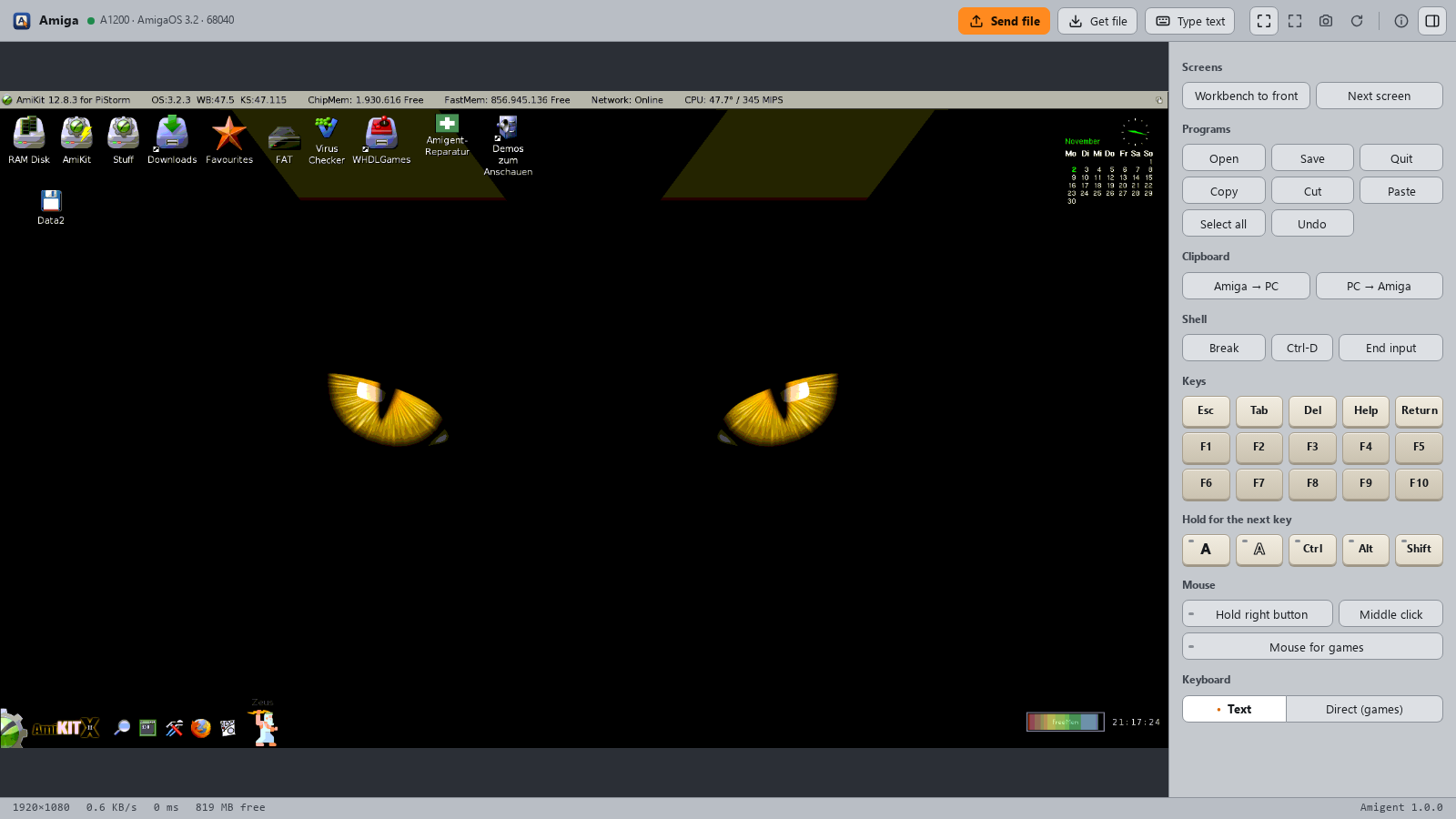
- use the Amiga yourself from your computer, as a remote desktop like TeamViewer or VNC: a window with the live screen, your own mouse and keyboard, file transfer and a shared clipboard.
- and both of these quickly, even on a slow machine. Amigent is tuned for slow Amigas and slow networks: a 7 MHz 68000 sends its whole screen in under a second, and over a plipbox a click shows its result in a fraction of a second. How it stays fast.
Both at the same time: you see every click the agent makes and can take over at any moment.
Installation
On the Amiga
1. Copy amigentd to the Amiga (amigentd.000 on a
68000), or unpack the archive from the
releases.
2. Start it with amigentd SETUP in a Shell, or double-click its icon.
On the PC or Mac
3. Paste this into your AI agent:
Install Amigent for me: run "pipx install amigent" (if pipx or Python 3.10
or newer is missing, install them first: Windows winget, macOS Homebrew,
Linux the package manager). Then run amigent-setup; it finds my Amiga on
the network by itself. Register the MCP server "amigent" with the command
amigent-server, and run amigent-viewer --install so the remote desktop
shows up as a program. Tell me if you need to be restarted.
The agent sets up the Amiga over the network; from then on amigentd starts with it.
Windows: Amigent appears in the Start menu. For an encrypted connection
openssl is needed, which comes with Git for Windows.
macOS: Amigent appears in ~/Applications. On its first start, allow it
access to the local network, or it cannot reach the Amiga. Cmd is the right
Amiga key.
Linux: there is no program entry; start the remote desktop with
amigent-viewer.
Without an AI agent: see the manual installation.
What you need
- An Amiga with AmigaOS 2.04 or newer, any CPU from the 68000 on, a network connection (a plipbox on the parallel port is enough) and a TCP/IP stack such as Roadshow.
- A PC or Mac with Windows, macOS or Linux and Python 3.10 or newer.
What you can ask for
"Check which programs on the Amiga are outdated."
"Install the game from my Downloads folder and add it to the Games menu."
"Copy the demo to the Amiga and start it."
"Open the remote desktop."
Made for slow machines and slow wires
Most of the work in Amigent went into making a slow Amiga on a slow network feel quick, for the AI agent and for you at the mouse:
- The screen travels as the Amiga keeps it. Chipset screens go out as bitplanes, graphics-card screens as small palette tiles, and only the tiles that changed, often as the difference to what you already have.
- Your input comes first. Mouse moves, clicks and keys are carried out even while a picture is still on its way, and the area around the pointer is sent before the rest.
- The Amiga keeps its time. While nothing happens, Amigent asks rarely and costs the Amiga only a few percent of its CPU.
- Files go in one go. Whole folders travel in a single stream, and files that are already there stay where they are.
Measured with a 640×256 Workbench screen:
| Amiga | whole screen | unchanged screen | CPU while watching |
|---|---|---|---|
| 68000, 7 MHz | 0.6–1.0 s | 80–95 ms | under 10 % |
| A1200, 68020 at 14 MHz | 0.1 s | 15 ms | 2–3 % |
On a 1920×1080 graphics-card screen over a plipbox (about 50 KB/s):
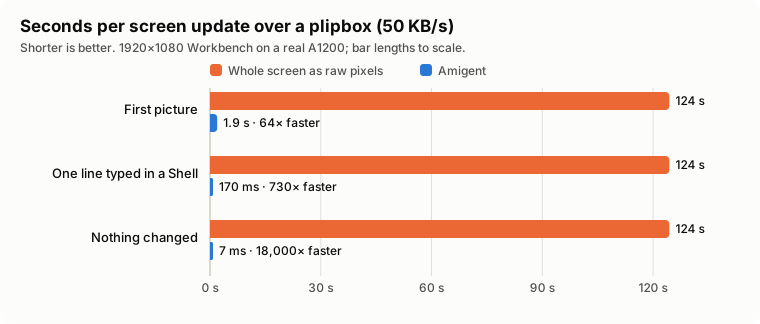
The orange bars are what moving the whole screen as raw 24-bit pixels costs on that wire, every time; the blue ones are Amigent, measured on a real A1200. All numbers, how they were taken and how to repeat them are in docs/PERFORMANCE.md.
Good to know
- New address after a restart? Amigent finds the Amiga again by itself. It takes only the one that proves to be yours.
- Several Amigas?
amigent-fleetshows them side by side with a preview. - After a big OS update,
amigent-repairputs back what the update removed. - Safe at home. A key keeps other computers on the network out, and the connection can be encrypted. Don't open the Amiga to the internet.
More in the guide and the FAQ.
Related projects
amimcp also connects AI agents to real Amigas, MCP-AmigaOS4 does it for AmigaOS 4.1, and WinUAE and Amiberry have MCP servers of their own.
Thanks
tbdye for amigactld, Volker Barthelmann for vbcc, and the PiStorm, Emu68, AmiKit and Aminet people.
License
MIT, see LICENSE. By Andreas Wendorf (Akustikrausch). Changes are in the changelog.
1 maintainer

Metadata
1 maintainer
Release files for amigent 1.1.0
For a detailed explanation of source distributions (sdists) and built distributions (wheels), please see the package formats documentation.
Source distribution (sdist)
| File | Size | Uploaded | Provenance | Actions |
|---|---|---|---|---|
| amigent-1.1.0.tar.gz | 679.8 kB | With provenance | Details for amigent-1.1.0.tar.gz |
Built distribution (wheel)
| File | Interpreter | ABI | Platform | Actions Reset |
|---|---|---|---|---|
| amigent-1.1.0-py3-none-any.whl | Python 3 | none | any | Details for amigent-1.1.0-py3-none-any.whl |
Total release size: 1.4 MB
Release files / amigent-1.1.0.tar.gz
| Download URL | amigent-1.1.0.tar.gz |
|---|---|
| Size | 679.8 kB |
| Tags | Source |
|
SHA-256 checksum How to use checksums |
feb695e2fd03be1b8625786379ae29de1d26f73c4a2abfb8fe53a613dc94083e
|
|
BLAKE2b-256 checksum How to use checksums |
98c9f4f1dff28633b7ba16c892a6fe671159ffdbcebbdca8ba3b1f2865f938ed
|
| Upload date | |
|
Uploaded using Trusted Publishing? What is trusted publishing? |
Yes |
| Uploaded via |
twine/7.0.0 CPython/3.13.16
|
Provenance
Provenance describes where a file came from. On PyPI, provenance is shared via attestations, which provide a verifiable record of the build or publishing details. View details, limitations and caveats.


PyPI Publish Attestation
PyPI verified that this artifact, at this checksum, originated from the publisher listed below.
Signed by GitHub Actions, verified by PyPI on Nov 2, 2026.
Transparency logRelease files / amigent-1.1.0-py3-none-any.whl
| Download URL | amigent-1.1.0-py3-none-any.whl |
|---|---|
| Size | 679.3 kB |
| Tags | Python 3 |
|
SHA-256 checksum How to use checksums |
a1208e9e190ff748561a0fb96831786269ba6047abac8cd91ceed47c4e967513
|
|
BLAKE2b-256 checksum How to use checksums |
f00509bebdf70db248e2a2199faf0a4269b8aebd72f775853ed87ef511f7df1d
|
| Upload date | |
|
Uploaded using Trusted Publishing? What is trusted publishing? |
Yes |
| Uploaded via |
twine/7.0.0 CPython/3.13.16
|
Provenance
Provenance describes where a file came from. On PyPI, provenance is shared via attestations, which provide a verifiable record of the build or publishing details. View details, limitations and caveats.
PyPI Publish Attestation
PyPI verified that this artifact, at this checksum, originated from the publisher listed below.
Signed by GitHub Actions, verified by PyPI on Nov 2, 2026.
Transparency logSecurity for amigent 1.1.0
Provenance
Provenance describes where a file came from. On PyPI, provenance is shared via attestations, which provide a verifiable record of the build or publishing details. View details, limitations and caveats.
Full provenance
All 2 files in this release have been uploaded with provenance metadata.
Attestation for amigent-1.1.0.tar.gz
PyPI Publish Attestation
PyPI verified that this artifact, at this checksum, originated from the publisher listed below.
Signed by GitHub Actions, verified by PyPI on Nov 2, 2026.
Transparency logA note on package security
PyPI is a repository for distributing packages, not a service for auditing them. While third-party security researchers and our staff do their best to detect and remove malicious packages, PyPI cannot guarantee the quality, security or suitability of any given package.
To learn more about protecting yourself from malicious actors, visit our package security documentation.














