
A package for organizing, processing and performing markerless 3D tracking on primate behavior videos using DeepLabCut, Anipose, with a user-friendly GUI.
Verified details
These details have been verified by PyPIProject links
GitHub Statistics
Maintainers

Project description
Ambiguous Monkey
A fully rewritten deeplabcut+anipose data managing and processing package for better efficiency and data clarity.
Mel
2025.6
Overview
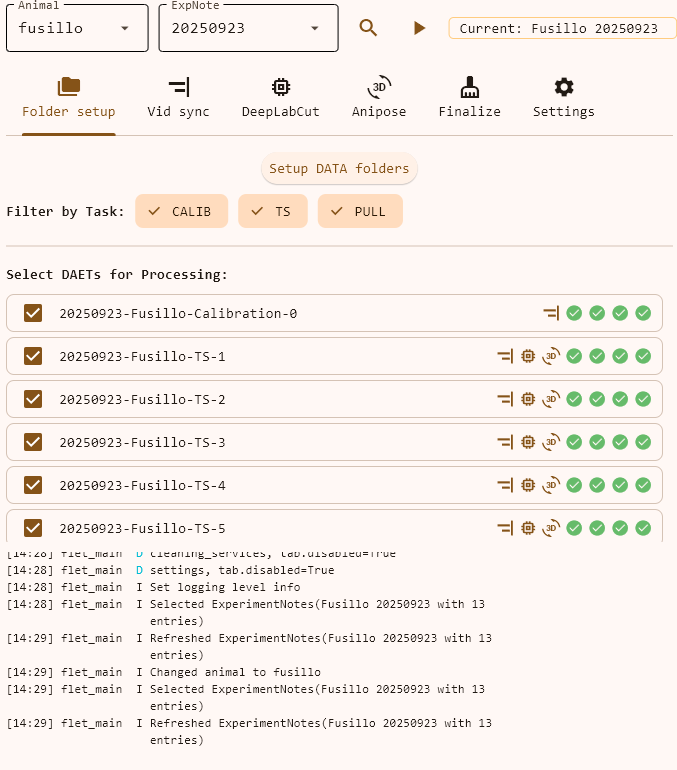
Currently it runs as separate sub-modules and uses command lines. Previous GUI is kept and still works itself but the file structure is outdated for dlc and anipose steps.
Dependency
Considering that deeplabcut requires conda environment, it is recommended to install this package with deeplabcut in the same conda environment.
See amm-env.yaml. Some syntaxes require Python >= 3.10.
Installation
To install ammonkey, you will need to create a conda env per amm-env.yaml. The new env is named amm by default.
conda env create -f "whatever-path/amm-env.yaml"
Due to the package resolving and installation, this might take a while to finish.
Then the GUI can be started with:
ammonkey
Basic setups can be configured in site-packages/ammonkey/cfgs/amm-config.yaml.
If there is already an env with deeplabcut installed, [this hasn't been tested for compatibility yet]ammonkey can also be installed via:
pip install ammonkey
Workflow
Code examples are in ammonkey_example.py. Here explains the ideas how it works
Some terms
-
Experiment note is the source according to which the package processes data.
- Object is
ExpNote()
- Object is
-
DAET
- refers to a combination of Date-Animal-Experiment-Task;
- Created by and according to
ExpNote - Used as a unique identifier of each experiment entry (one row in
ExpNote).
-
Raw path is the path where raw data is dumped.
- Must contain string
'DATA_RAW'. This behavior can be changed by modifying.core.expNote.getDataPath(). - Must follow
DATA_RAW/(animal_name)/yyyy/mm/dd/yyyymmdd. This is parsed inExpNote._parsePathInfo() - Data in the path should be kept intact and not allowed to modify for integrity.
- Must contain string
-
Data path is the path where all processed data will appear.
- Converted from raw path by just replacing
DATA_RAW->DATA.
- Converted from raw path by just replacing
-
dlc == deeplabcut
-
ani == anipose
Steps
- Data setup
- Create data folders for storage
- Vid sync;
- DLC;
- Anipose;
- Collect final CSVs.
Details are covered in sections below and in example code ammonkey_example.py.
Batch process
The modular architecture of this package allows for date-wide processing which can be very useful if one looks back and realize multiple datasets are not processed yet.
- Batch sync:
ammonkey/scripts/batch_sync.py; - Batch DLC:
ammonkey/scripts/batch_dlc.py.
Tech Details
Below are module-specific docs generated by chatGPT.
ExpNote / DAET
1. Purpose
ExpNote and DAET together provide a lightweight, hash-friendly way to label, load, and query experimental video-note spreadsheets. DAET is an immutable identifier (Date-Animal-Experiment-Task), while ExpNote is a high-level interface that turns an Excel sheet plus a folder tree into easily filterable Python objects.:contentReference[oaicite:0]{index=0} :contentReference[oaicite:1]{index=1}
2. Key Concepts
| Concept | What it means |
|---|---|
| DAET | A frozen dataclass stringified as YYYYMMDD-Animal-Experiment-Task; unique & hashable. Two DAET objects w/ same four fields are exactly the same. Thus, it is not recommended to write same experiment-task fields when taking notes. Upon creation, if there are entries with same four fields, they will be auto-renamed, so will the output folders. |
| Task | Enum describing experiment categories (TS, BBT, BRKM, PULL, CALIB, ALL). |
| ExpNote | Loader/manager that converts an Excel notes file into DAET-centric records and video paths. |
3. Quick-start Example
from pathlib import Path
from ammonkey.expNote import ExpNote, Task

root = Path(r'P:\projects\monkeys\DATA_RAW\Pici\2025\04\20250403')
notes = ExpNote(root)          # auto-parses animal/date and loads Excel
print(notes)                   # ➜ ExperimentNotes(Pici 20250403 with N entries)

# Access all DAETs
for daet in notes.daets:
    print(daet)

# Filter for a specific task
ts_df = notes.filterByTask(Task.TS)
print(ts_df[['daet', 'Experiment']])

# Get video existence map for the first valid entry
first_valid = notes.getValidDaets()[0]
print(notes.checkVideoExistence(first_valid))
4. Public API Summary
4.1 class DAET(date:str, animal:str, experiment:str, task:str)
| Member | Description |
|---|---|
.d |
Alias for str(daet) |
.year |
Four-digit int year |
.isCalib |
True if "calib" in experiment |
fromString(s) |
Parse a YYYYMMDD-Animal-Exp-Task string |
fromRow(row, date, animal) |
Build from a Pandas row inside ExpNote |
4.2 class ExpNote(path, *, header_key='Experiment', …)
| Member | Use |
|---|---|
.daets / getDaets() |
List of all DAET objects in the sheet |
dupWithBlackList(daets:list[DAET]) |
Creates new ExpNote object that excludes any entry in the input list. |
dupWithWhiteList(daets:list[DAET]) |
Creates new ExpNote object that keeps only entries in the input list. |
getAllTaskTypes() -> list[Task] |
Returns all task types involved in this note. e.g. returns [Task.CALIB, Task.TS, Task.PULL] |
applyTaskFilter(tasks:list[Task]) |
Creates new ExpNote object that keeps only entries that match tasks in the list. |
checkSanity() -> bool |
Returns whether this note looks okay. |
is_daet_void(daet) -> bool |
Returns whether this DAET entry is marked as void ("do not process" mark) |
getRow(daet) |
Return Pandas row for an entry (DAET) |
getVidSetIdx(daet) |
Returns a list[int] of all the videos' index of given DAET. |
getVidPath(daet, cam_idx) |
Absolute Path to a single video file |
checkVideoExistence(daet) |
{cam_idx: bool} map of found files. e.g. {1:True, 2:False, 3:True, 4:True} |
getValidDaets(min_videos=2, skip_void=True) |
DAETs that are ready for processing |
getSummary() |
Dict with counts for quick reporting |
5. Typical Workflow
- Instantiate
ExpNotewith the raw-data folder that contains anAnimal_Date.xlsx. - Inspect
notes.getSummary()to verify entry counts. - Filter/Select DAETs via
getValidDaets()orfilterByTask(). - Locate Videos by calling
getVidPath()orgetVidSetPaths(). - Process only when
checkVideoExistence()confirms required files.
6. Error Handling & Logging
- Missing Excel columns raise
ValueError; missing files log warnings but do not crash. - Duplicate DAETs or malformed rows are reported through the module’s logger (
__name__). - Incorrect date formats in
DAETraiseValueErrorat construction time.
7. Best Practices
- Keep Excel headers exactly matched; customize
header_keyonly if the sheet layout differs. - Use the
Taskenum everywhere instead of raw strings to avoid typos. - Because
DAETis frozen and hashable, it can be used as a dictionary key or set element safely across a session. - For reproducibility across runs, store the string form of a DAET rather than relying on Python
hash()values, which vary per interpreter session.
8. Version Compatibility
Both classes rely only on the Python ≥ 3.10 standard library plus pandas ≥ 1.5. If your workflow touches on video paths, ensure the folder layout remains:
root/
│  Animal_Date.xlsx
├─ cam1/
├─ cam2/
├─ cam3/
└─ cam4/
Any deviation requires overriding cam_headers or extending getVidPath.
Video Synchronization
1. Purpose
sync.py implements a complete pipeline to detect and correct timestamp offsets across multi-camera video sets using LED flashes and audio cues. It produces per-DAET JSON configs and optionally writes synchronized output videos. :contentReference[oaicite:0]{index=0}
2. Key Components
| Class / Function | Role |
|---|---|
SyncConfig |
Holds thresholds, durations, file extensions and flags for detection & override. |
SyncResult |
Immutable record of LED starts, audio starts, corrected frames, status & message. |
VidSynchronizer |
Orchestrates detection (audio + LED), cross-validation, config writing, and final video sync. |
syncVideos(...) |
Convenience function: prepares folders, invokes VidSynchronizer, returns results. |
3. Quick-start Example
from ammonkey.expNote import ExpNote, Task
from ammonkey.sync import syncVideos, SyncConfig, CamConfig

notes = ExpNote(r'P:\projects\monkeys\DATA_RAW\Pici\2025\04\20250403')
cam_cfg = CamConfig()                  # default camera ROIs & LED colors
sync_cfg = SyncConfig(override_existing=True)

# Run full sync for Task.BBT only
results = syncVideos(notes,
                     cam_cfg=cam_cfg,
                     sync_cfg=sync_cfg,
                     task=Task.BBT)

# Inspect outcomes
for res in results:
    print(f"{res.daet}: {res.status} — {res.message}")
4. Public API Summary
4.1 SyncConfig(...)
audio_test_duration: seconds for detection windowled_threshold,cross_validation_threshold: pixel & frame-offset tolerancesvideo_extension,output_size: format & resolution for outputoverride_existing: reprocess existing detections/syncs
4.2 SyncResult
.daet: associated DAET.led_starts,.audio_starts,.corrected_starts: per-cam frame lists.status:'success','warning', or'failed'.message: diagnostic text.config_path: JSON file location if created
4.3 VidSynchronizer
.setROI(daet=None, frame=500): launch ROI selector for LED zones..syncAll(task, skip_existing=True): run detection + video sync for all valid DAETs.._runAudioSync(daets),._runLEDSync(daet, audio_starts): low-level detectors.._crossValidate(led_starts, audio_starts): align LED vs audio, interpolate or flag errors.._createSyncConfig(...): write per-DAET JSON forSyncLED.process_videos.
4.4 syncVideos(...)
- Prepares folders via
dataSetup - Instantiates
VidSynchronizerand runs ROI setup - Returns list of
SyncResultobjects
5. Typical Workflow
- Prepare raw folder with Excel notes (
ExpNote) and camera subfolders. - Import and configure: instantiate
SyncConfig(tuning thresholds) and optionalCamConfig. - Run
syncVideos(notes, cam_cfg, sync_cfg, task)to detect & sync. - Review console/log for
SyncResultstatuses. - Inspect generated JSON configs in each DAET’s
SynchronizedVideosfolder. - Locate final synced videos under
SynchronizedVideos/{group}/subfolders.
6. Error Handling & Logging
- Uses
Woodlogger to write per-phase logs undernotes.data_path. - Falls back to audio-only if LED fails; marks as warning or failed based on deviation counts.
- Missing videos or ROI configs emit warnings but continue processing other cams.
- Exceptions during detection/sync produce a
SyncResultwithstatus='failed'and error message.
7. Best Practices
- ROI Configuration: call
.setROI()once interactively before batch runs. - Threshold Tuning: adjust
led_thresholdandcross_validation_thresholdon a small sample to minimize false detections. - Data Organization: maintain consistent camera folders (
cam1–cam4) and file naming to matchExpNoteconventions. - Idempotency: use
override_existing=FalseinSyncConfigto skip already processed entries.
8. Version Compatibility
- Python ≥ 3.10, pandas ≥ 1.5, plus dependencies for
SyncLED,SyncAud, andROIConfig. - Relies on the same folder layout as
ExpNote. - Tested on Windows & Linux file paths but uses
pathlibfor cross-platform support.
DLC Analysis
1. Purpose
dlc.py defines DLCModel and DLCProcessor to run DeepLabCut pose estimation on synchronized video folders. dlcCollector.py adapts and merges per-model outputs into a single folder for downstream analysis.
2. Key Components
| Component | Role |
|---|---|
initDlc() |
Lazy-imports DeepLabCut, sets ready flag. |
DLCModel |
Frozen dataclass wrapping model config; methods: runOnce(), pee(), path helpers. |
DLCProcessor |
Orchestrates batch processing: loads sync roots, skips calibration, merges outputs. |
mergeDlcOutput(*folders) |
Combines separate model outputs into a merged folder, writes combined inherit.json. |
copyH5(src, dst) |
Copies filtered H5 files for merging. |
getDLCMergedFolderName(...) |
Generates merged folder names from per-model final names. |
3. Quick-start Example
from ammonkey.expNote import ExpNote
from ammonkey.sync import syncVideos, Task
from ammonkey.dlc import initDlc, createProcessor_BBT

# 1. Initialize DLC
initDlc()

# 2. Load experiment notes and synchronize videos
notes = ExpNote(r'P:\projects\monkeys\DATA_RAW\Pici\2025\04\20250403')
syncVideos(notes, task=Task.BBT)

# 3. Create processor for BBT and run batch DLC
processor = createProcessor_BBT(notes)
results = processor.batchProcess()  # dict of DAET → success flag
4. Public API Summary
initDlc() → int
Imports DeepLabCut; returns 1 on success, 0 on failure.
class DLCModel
.runOnce(vid_path, override_exist=True) → bool— run DLC on one folder..md5_short,.final_folder_name— unique identifiers..information() → list[str]— diagnostic info..pee(vid_path)— isolates output files, writes logs andinherit.json.
class DLCProcessor
.analyzeSingleDaet(daet) → bool— process one DAET..batchProcess(daets=None, min_videos=2) → dict[DAET, bool]— loop over DAETs.
mergeDlcOutput(*folders) → int
Validates input folders, copies H5 files, writes merged inherit.json.
5. Typical Workflow
- Call
initDlc()at startup. - Instantiate
ExpNoteand synchronize videos withsyncVideos(). - Create a
DLCProcessorvia a factory (createProcessor_TS/Pull/BBT/Brkm). - Run
processor.batchProcess()to perform DLC analysis. - Find merged outputs under
{DAET}/DLC/{merged_folder}.
6. Error Handling & Logging
- Initialization errors and missing models log via Python
logging. runOnce()logs and returnsFalseon import errors, missing paths, or analysis failures.mergeDlcOutput()raises on nonexistent folders or invalid argument counts.- All per-DAET logs and merged JSON live under
note.data_path / 'SynchronizedVideos'.
7. Best Practices
- Use processor factories (
createProcessor_*) to ensure consistent model presets. - Skip calibration DAETs automatically; no extra filtering needed.
- Inspect JSON logs (
inherit.json) for reproducibility rather than relying on in-memory hashes.
8. Version Compatibility
- Python ≥ 3.10
- DeepLabCut installed in the same environment
- pandas ≥ 1.5 (for
ExpNote) - Compatible with Windows & Linux via
pathlib
Anipose Processing & Finalization
1. Purpose
ani.py automates camera-calibration, video preparation, and 3D triangulation via the Anipose CLI. finalize.py gathers all generated 3D-pose CSVs into a clean folder structure and logs the collection.
2. Key Components
| Component / Function | Role |
|---|---|
getH5Rename(file_name, stem_only=False) |
Strip DLC postfix from H5 filenames |
insertModelToH5Name(...) |
(stub) Intended to inject model tag into H5 filename |
CalibLib |
Indexes historical calibration TOML files and finds closest match by date |
AniposeProcessor |
Manages per-DAET folder setup, calibration copy, CLI calls (calibrate, triangulate), and log writing |
violentCollect(ani_path, clean_path) |
Copy all *.csv from pose-3d subfolders into a single "clean" directory |
writeProcedureSummaryCsv(note, ani_path, clean_path) |
(stub) Intended to summarize DAET procedures into a single CSV |
3. Quick-start Example
from pathlib import Path
from monkeylab.expNote import ExpNote
from monkeylab.ani import AniposeProcessor, CalibLib
from monkeylab.finalize import violentCollect

# 1. Load notes and configure Anipose
notes = ExpNote(r'P:\projects\monkeys\DATA_RAW\Pici\2025\04\20250403')
processor = AniposeProcessor(note=notes, model_set_name='BBT-LR')

# 2. Prepare calibration files and root config
processor.setupCalibs()
processor.setupRoot()

# 3. Batch-setup 2D outputs and run triangulation
processor.batchSetup(use_filtered=True)
processor.calibrate()       # runs `anipose calibrate`
processor.triangulate()     # runs `anipose triangulate`

# 4. Collect all final CSVs
clean_dir = Path(r'P:\projects\monkeys\CLEAN_CSV')
violentCollect(processor.ani_root_path, clean_dir)
4. Public API Summary
getH5Rename(file_name, stem_only=False) → str
Remove auto-generated DLC postfix (_DLC_resnet…_shuffle…) from H5 filenames.
class CalibLib(lib_path: Path)
.updateLibIndex()— scan*.tomlcalibration files into a date→list index..lookUp(date: int) → Path | None— return exact or closest‐prior TOML; logs fallback.
class AniposeProcessor(note, model_set_name, ...)
.setupCalibs()— copy each DAET’s raw videos into per-DAET calibration folders..setupRoot()— copyconfig.tomland ensurecalibration.tomlexist in root..setupSingleDaet(daet, use_filtered, copy_videos)— prepare H5, logs, and calibs for one DAET..batchSetup(use_filtered, copy_videos)— runsetupSingleDaetfor all DAETs..calibrate()/.triangulate()— invoke Anipose CLI viasubprocess..pee(daet_root)— append triangulation record toscent.log.
violentCollect(ani_path: Path, clean_path: Path) → None
Copy all CSVs under ani_path/pose-3d into clean_path/{ani_name} and write a timestamped log.
writeProcedureSummaryCsv(...)
(to be implemented) Summarize per-DAET processing steps into a master CSV.
5. Typical Workflow
- Instantiate
ExpNoteand createAniposeProcessor. - Populate calibration library with
setupCalibs(). - Initialize root with
setupRoot(). - Copy filtered or unfiltered H5 and calibration files via
batchSetup(). - Run Anipose CLI commands:
.calibrate()then.triangulate(). - Collect final CSVs using
violentCollect()(and later implementwriteProcedureSummaryCsv()).
6. Error Handling & Logging
- Missing calibration folder raises
FileNotFoundError. - Fallback calibration selection logs a
WARNING. - Copy errors log via
logger.errorand continue. violentCollectskips existing CSVs; raises on invalid paths.
7. Best Practices
- Pre-populate
calib historywith well-named TOML files (calibration-YYYYMMDD…). - Run
setupCalibs()once per model set before any triangulation. - Verify that
config.tomlandcalibration.tomlexist underani_root_path. - Use
use_filtered=Trueto process only filtered 2D poses. - Implement
writeProcedureSummaryCsvto automate batch reporting.
8. Version Compatibility
- Python ≥ 3.10 (relies on
dataclasses,pathlib,subprocess). - Anipose CLI installed in specified
conda_env. - pandas ≥ 1.5 (for
ExpNoteintegration). - Compatible with Windows & POSIX paths via
pathlib.
Project details
Verified details
These details have been verified by PyPIProject links
GitHub Statistics
Maintainers


Download files
Download the file for your platform. If you're not sure which to choose, learn more about installing packages.
Source Distribution
Built Distribution
Filter files by name, interpreter, ABI, and platform.
If you're not sure about the file name format, learn more about wheel file names.
Copy a direct link to the current filters
File details
Details for the file ammonkey-3.3.1.tar.gz.
File metadata
- Download URL: ammonkey-3.3.1.tar.gz
- Upload date:
- Size: 280.1 kB
- Tags: Source
- Uploaded using Trusted Publishing? Yes
- Uploaded via: twine/6.1.0 CPython/3.13.7
File hashes
| Algorithm | Hash digest | |
|---|---|---|
| SHA256 |
68e4341aa787cf9af6f068b0f5be56ca252a9fd13c2529ba4d6b2508b7884b78
|
|
| MD5 |
81efbf7fab96b2fd96cc788dae9190b6
|
|
| BLAKE2b-256 |
2b803b30b75f1f30c004d3a1259f2f1c4dbd7c9abf3c7461da37152ec7191b74
|
Provenance
The following attestation bundles were made for ammonkey-3.3.1.tar.gz:
Publisher:
python-publish.yml on Melokeo/AmbiguousMonkey
-
Statement:
-
Statement type:
https://in-toto.io/Statement/v1 -
Predicate type:
https://docs.pypi.org/attestations/publish/v1 -
Subject name:
ammonkey-3.3.1.tar.gz -
Subject digest:
68e4341aa787cf9af6f068b0f5be56ca252a9fd13c2529ba4d6b2508b7884b78 - Sigstore transparency entry: 663612172
- Sigstore integration time:
-
Permalink:
Melokeo/AmbiguousMonkey@4ef1f51fc59360aa2d3a3c699fa24e37c4f7a525 -
Branch / Tag:
refs/tags/v3.3.1 - Owner: https://github.com/Melokeo
-
Access:
public
-
Token Issuer:
https://token.actions.githubusercontent.com -
Runner Environment:
github-hosted -
Publication workflow:
python-publish.yml@4ef1f51fc59360aa2d3a3c699fa24e37c4f7a525 -
Trigger Event:
release
-
Statement type:
File details
Details for the file ammonkey-3.3.1-py3-none-any.whl.
File metadata
- Download URL: ammonkey-3.3.1-py3-none-any.whl
- Upload date:
- Size: 296.5 kB
- Tags: Python 3
- Uploaded using Trusted Publishing? Yes
- Uploaded via: twine/6.1.0 CPython/3.13.7
File hashes
| Algorithm | Hash digest | |
|---|---|---|
| SHA256 |
8a2fcaf811ee23629689501a7651bdcc3f9de64434527faebe6c47ac06b02ad4
|
|
| MD5 |
e2c40b0cee1a5e9c4f2378e7a17f67fb
|
|
| BLAKE2b-256 |
d977f04c7b0559a68bb229e4d640f8e2391ee6a9b16c372a61c73913a93d5590
|
Provenance
The following attestation bundles were made for ammonkey-3.3.1-py3-none-any.whl:
Publisher:
python-publish.yml on Melokeo/AmbiguousMonkey
-
Statement:
-
Statement type:
https://in-toto.io/Statement/v1 -
Predicate type:
https://docs.pypi.org/attestations/publish/v1 -
Subject name:
ammonkey-3.3.1-py3-none-any.whl -
Subject digest:
8a2fcaf811ee23629689501a7651bdcc3f9de64434527faebe6c47ac06b02ad4 - Sigstore transparency entry: 663612211
- Sigstore integration time:
-
Permalink:
Melokeo/AmbiguousMonkey@4ef1f51fc59360aa2d3a3c699fa24e37c4f7a525 -
Branch / Tag:
refs/tags/v3.3.1 - Owner: https://github.com/Melokeo
-
Access:
public
-
Token Issuer:
https://token.actions.githubusercontent.com -
Runner Environment:
github-hosted -
Publication workflow:
python-publish.yml@4ef1f51fc59360aa2d3a3c699fa24e37c4f7a525 -
Trigger Event:
release
-
Statement type:






