
amplicon_coverage_plot





The script will generate an interactive barplot given amplicon info in bed6/bedpe format and coverage information in cov/bam file.
Dependencies
Programming/Scripting languages
- Python >=v3.8
- The pipeline has been tested in v3.8.10
Python packages
Third party softwares/packages
- samtools >=1.9 - process bam file
Installation
Install by pip
pip install amplicov
Install by conda
conda install -c bioconda amplicon_coverage_plot
Install from source
Clone the amplicon_coverage_plot repository.
git clone https://github.com/chienchi/amplicon_coverage_plot
Then change directory to amplicon_coverage_plot and install.
cd amplicon_coverage_plot
python setup.py install
If the installation was succesful, you should be able to type amplicov -h and get a help message on how to use the tool.
amplicov -h
Usage
usage: amplicov [-h] (--bed [FILE] | --bedpe [FILE])
                (--bam [FILE] | --cov [FILE]) [-o [PATH]] [-p [STR]] [--pp]
                [--mincov [INT]] [--version]

Script to parse amplicon region coverage and generate barplot in html

optional arguments:
  -h, --help            show this help message and exit
  --pp                  process proper paired only reads from bam file
                        (illumina)
  --count_primer        count overlapped primer region to unqiue coverage
  --mincov [INT]        minimum coverage to count as ambiguous N site
                        [default:10]
  -r [STR], --refID [STR]
                        reference accession (bed file first field)
  --depth_lines DEPTH_LINES [DEPTH_LINES ...]
                        Add option to display lines at these depths (provide depths as a list of integers) [default:5 10 20 50]
  --gff [FILE]          gff file for data hover info annotation
  --version             show program's version number and exit

Amplicon Input (required, mutually exclusive):
  --bed [FILE]          amplicon bed file (bed6 format)
  --bedpe [FILE]        amplicon bedpe file

Coverage Input (required, mutually exclusive):
  --bam [FILE]          sorted bam file (ex: samtools sort input.bam -o
                        sorted.bam)
  --cov [FILE]          coverage file [position coverage]

Output:
  -o [PATH], --outdir [PATH]
                        output directory
  -p [STR], --prefix [STR]
                        output prefix
Test
cd tests
./runTest.sh
Outputs
-- prefix_amplicon_coverage.txt
| ID | Whole_Amplicon | Unique | Whole_Amplicon_Ns(cov<10) | Unique_Amplicon_Ns(cov<10) |
|---|---|---|---|---|
| nCoV-2019_1 | 217.74 | 53.00 | 0.00 | 0.00 |
| nCoV-2019_2 | 1552.83 | 1235.50 | 0.00 | 0.00 |
| nCoV-2019_3 | 3164.22 | 2831.73 | 0.00 | 0.00 |
| nCoV-2019_4 | 2005.16 | 1658.00 | 0.00 | 0.00 |
| etc... |
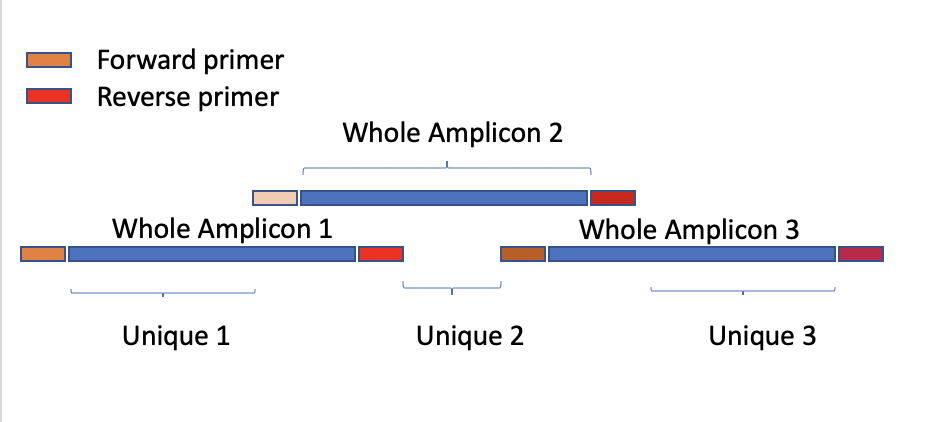
Table Header Definition in the amplicon_coverage.txt
-
Whole_Amplicon_Ns(cov<10): The number of aligned position with coverage < 10 or (--mincov) in the Whole Amplicon region
-
Unique_Amplicon_Ns(cov<10): The number of aligned position with coverage < 10 or (--mincov) in the Unique region
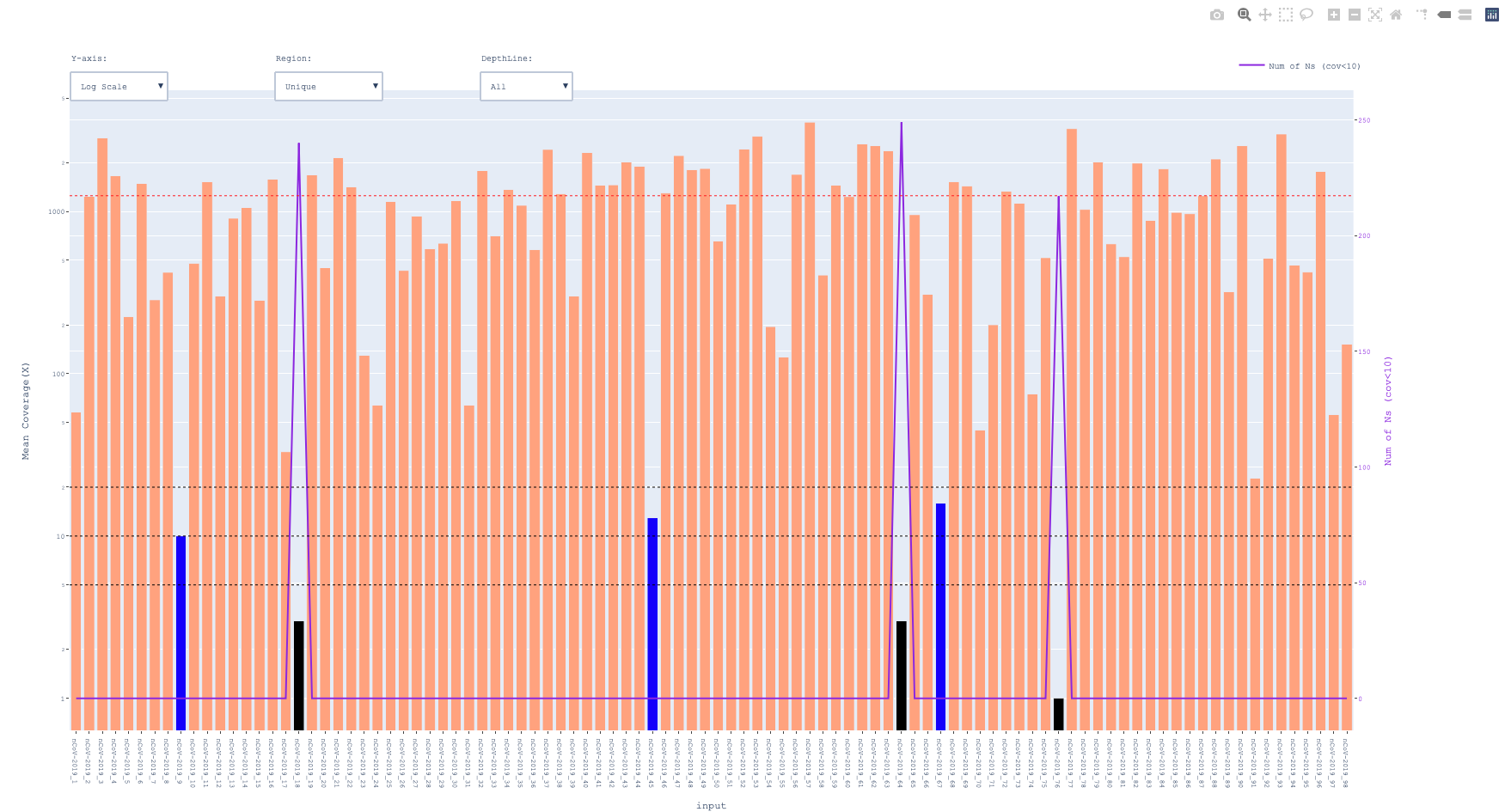
-- prefix_amplicon_coverage.html
color black for < 5x and blue for <20x
1 maintainer

Metadata
1 maintainer
Release files for amplicov 0.3.4
For a detailed explanation of source distributions (sdists) and built distributions (wheels), please see the package formats documentation.
Built distribution (wheel)
| File | Interpreter | ABI | Platform | Reset |
|---|---|---|---|---|
| amplicov-0.3.4-py3-none-any.whl | Python 3 | none | any | Details |
Release files / amplicov-0.3.4-py3-none-any.whl
| Download URL | amplicov-0.3.4-py3-none-any.whl |
|---|---|
| Size | 20.8 kB |
| Tags | Python 3 |
|
SHA-256 checksum How to use checksums |
1c787bb4a536e75bfc4ccbf30c62094420a527ba033070631e477b055017a8e4
|
|
BLAKE2b-256 checksum How to use checksums |
057d5306aff2d071ab644b6e7f0147527a63d35cd0399b328133663cab848f90
|
| Upload date | |
|
Uploaded using Trusted Publishing? What is trusted publishing? |
No |
| Uploaded via |
twine/6.0.1 CPython/3.12.4
|














