

Andromity — AI Coding Agent for VS Code & Terminal
Trust-governed, BYOK, autonomous coding agent with subagents, live plans, native diffs & one-click rollback.




English | 简体中文 | Русский | Português (Brasil) | 日本語 | Deutsch | Français | Español | हिन्दी

Andromity is a private, BYOK (Bring Your Own Key) autonomous AI coding agent. Use it inside VS Code with the extension, or run it as a standalone terminal workspace. It plans complex tasks, manages parallel subagents, shows live step-by-step blueprints, lets you review diffs before applying, and gives you instant one-click rollback.
Connect your preferred AI model (Claude 3.7 Sonnet, GPT-4o, Gemini 2.5 Pro, DeepSeek R1 & V3, Groq, OpenRouter) or run 100% locally and free with Ollama.
⚡ Quick Install & Get Started
🚀 Option A: VS Code Extension (Recommended)

👉 Recommended: Install directly from the marketplace:
🔗 Andromity AI Coding Agent for VS Code - Visual Studio Marketplace
Or install instantly via terminal:
code --install-extension agenticmarket.andromity-agent
💻 Option B: Terminal CLI
# Linux / macOS
curl -fsSL https://raw.githubusercontent.com/agenticmarket/andromity/main/install.sh | bash

# Windows (PowerShell)
irm https://raw.githubusercontent.com/agenticmarket/andromity/main/install.ps1 | iex

# Or with pipx
pipx install andromity
✨ Key Features

📝 Live Task Planner & Blueprints
Andromity analyzes your codebase, creates an interactive step-by-step implementation plan, and waits for your approval before writing a single line of code. Review, approve, or skip any step.
🌊 Live Execution Waterfall Profiler
Inspect agent reasoning turns, tool execution latencies (bash commands, file operations, web queries), and parallel subagents in real time on an interactive chronological timeline grid directly inside VS Code (/waterfall).

🤖 396+ Models — Including Free Local Ollama
Connect Claude 3.7, GPT-4o, Gemini 2.5 Pro, DeepSeek R1, Groq, or run 100% offline with Ollama. Swap models mid-session with Ctrl+L.

🔐 Trust Governance — You Are Always in Control
| Mode | Plans | File Writes | Terminal Commands |
|---|---|---|---|
| SAFE (default) | Approve each | Approve each | Approve each |
| TRUST | Approve | Direct | Direct |
| FULL | Auto | Direct | Direct |
| YOLO | Auto | Silent | Silent |
Nothing runs until you say a folder is trusted. Start in SAFE, move to YOLO when you know what the agent does.
How it compares
| Andromity | Aider | Cursor | Claude Code | |
|---|---|---|---|---|
| Folder trust model | ✅ | ❌ | ❌ | ❌ |
| Permission levels (SAFE → YOLO) | ✅ | ❌ | Partial | ❌ |
| Live execution waterfall profiler | ✅ | ❌ | ❌ | ❌ |
| Built-in cron scheduler | ✅ | ❌ | ❌ | ❌ |
| Parallel sessions & subagents | ✅ | ❌ | ❌ | Partial |
| Inline diff viewer | ✅ | ✅ | ✅ | ✅ |
Session management + /undo |
✅ | ❌ | Partial | ❌ |
| Agent profiles | ✅ | ❌ | ❌ | Partial |
| Local-first / Ollama / BYOK | ✅ | ✅ | ❌ | ❌ |
| MCP support | ✅ | ❌ | Partial | ✅ |
| VS Code Extension | ✅ | ❌ | ✅ | ✅ |
⏰ Cron Scheduler — AI That Works While You Sleep
No other AI coding agent has this. Open /cron inside Andromity, write your task, set a schedule — and the agent executes it autonomously on a timer while you're away.
# Example: auto-run test suite and fix failures every night at 2 AM
/cron  →  "run pytest, fix any failing tests, commit the fix"  →  0 2 * * *
Jobs persist in .andromity/crons.json per project. Use FULL or YOLO mode for fully unattended overnight runs. Wake up to commits already made.
🤖 Parallel Sessions & Subagents
Spawn background subagents for parallel workstreams without interrupting your main session. Example: while one subagent researches an unfamiliar library, another implements a feature, and you review the plan in the main session — all simultaneously.
Main session      → Plan & implement Feature A
Subagent 1        → Research the best auth library
Subagent 2        → Write unit tests for Feature B
Switch between all sessions with Ctrl+O. Every session has its own context, history, and file change log. /undo reverts only the current session's changes.
What's inside the terminal workspace
The VS Code extension and the terminal share the same agent core. The terminal workspace gives you the raw power.
Profiles. Switch what the agent is trying to do mid-session.
builder— plans first, then implementscoder— implements directly, no planning phasereviewer— read-only, produces findingsplanner— plans only, touches nothing
MCP support. Drop a mcp.json in your project. Tool schemas load on demand — keeps token use sane with 50+ tools connected.
Sessions. Everything is saved. /sessions or Ctrl+O to switch. /compact when context gets heavy. /undo to revert the last turn and all its file changes.
Headless / scripted runs.
andromity run "add error handling to auth.py"
andromity run "refactor this to async" --yes      # auto-approve everything
andromity run "review session.py" --dry-run       # see what it would do
Model-agnostic. LiteLLM under the hood. Anthropic, OpenAI, Gemini, Groq, OpenRouter, Ollama, NVIDIA NIM. Swap mid-session with Ctrl+L.
Privacy
Your code goes to one place: the LLM provider you configure. Not us.
- API keys live in
~/.andromity/config.toml— encrypted locally - Sessions stored locally in
~/.andromity/sessions/ - Opt out of telemetry:
export DO_NOT_TRACK=1
SWE-bench Lite: local evaluation
Andromity resolved 150 of 300 SWE-bench Lite tasks (50.0%) in our local evaluation dated October 4, 2026. The evaluation produced 296 task reports; the remaining four tasks count as unresolved in the full-dataset score. This is a self-reported result, not an official leaderboard ranking or a guarantee of contamination-free model training.
The agent workspace was initialized from each task's base commit. Tool execution used command restrictions, proxy settings, and Python socket guards; these are not an OS-enforced air gap. Model inference used a remote provider.
See benchmark methodology and limitations and the evaluation evidence for deduplicated predictions, per-task outcomes, and hashes. The model alias was recorded as Space Bunny Alpha; the archived predictions identify the system as andromity/auto, so the underlying model identity is not independently established.
🚀 #BuiltWithAndromity Showcase & Hackathons
Are you building an open-source project, university coursework, or commercial application using Andromity?
- Showcase Your Work: Tag your project or PR with
#BuiltWithAndromityon X (Twitter) or drop it in the#showcasechannel on Discord. - Get Featured: Top community projects and contributions are spotlighted on agenticmarket.dev and receive official ecosystem contributor recognition and goodies.
- Community Hackathons: Stay tuned in Discord for global community hackathons benefiting open-source developers worldwide.
💬 Community & Discord
Join our growing community of autonomous AI developers, students, and engineers:
- Discord: Join the Andromity Community Discord for live discussions, local Ollama setups, prompt engineering, and MCP skill sharing.
- Skills & MCP Hub: Discover and publish community agent skills, custom prompts, and MCP tool servers on AgenticMarket.
⭐ Loved the Live Waterfall profiler or saved hours debugging? Consider giving Andromity a star on GitHub — it helps more developers discover 100% free, private, open-source AI tooling!
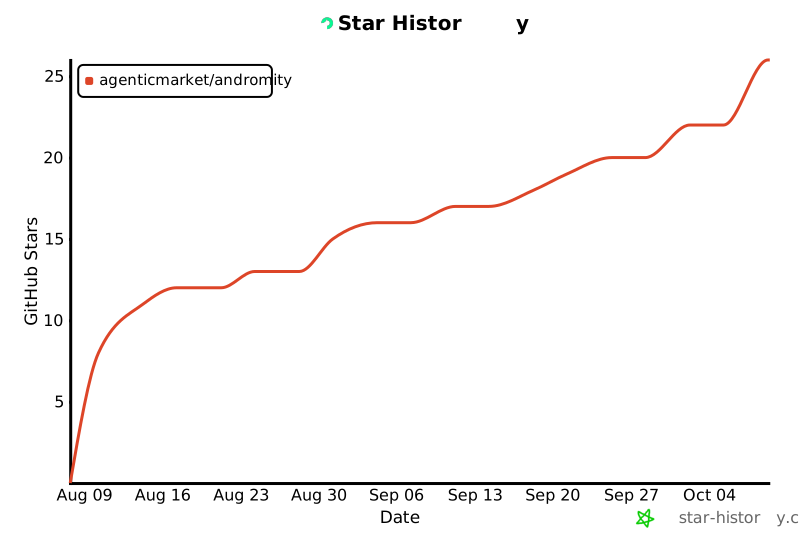
Star History
Changelog
See CHANGELOG.md for detailed release history and version notes.
Maintainer & Authors
Andromity is created and actively maintained by:
- Shekhar Pachlore (@shekharP1536) — Creator & Lead Maintainer (Core Architecture & Autonomous Runtimes)
Contributing
Open an issue or PR. Honest feedback and bug reports are more useful than feature requests right now.
See CONTRIBUTING.md for project layout and dev setup.
MIT — see LICENSE.
1 maintainer

Metadata
1 maintainer
Release files for andromity 0.2.18
For a detailed explanation of source distributions (sdists) and built distributions (wheels), please see the package formats documentation.
Source distribution (sdist)
| File | Size | Uploaded | Provenance | |
|---|---|---|---|---|
| andromity-0.2.18.tar.gz | 592.6 kB | Without provenance | Details |
Built distribution (wheel)
| File | Interpreter | ABI | Platform | Reset |
|---|---|---|---|---|
| andromity-0.2.18-py3-none-any.whl | Python 3 | none | any | Details |
Total release size: 1.1 MB
Release files / andromity-0.2.18.tar.gz
| Download URL | andromity-0.2.18.tar.gz |
|---|---|
| Size | 592.6 kB |
| Tags | Source |
|
SHA-256 checksum How to use checksums |
aada5eb0bcb25243b79c3bc0a635a8ac9ed2ed51bb724da0a69fb3bd7cd4ceec
|
|
BLAKE2b-256 checksum How to use checksums |
50eb40500b52b1af736a932226784cbca9028dca06e25df837712b4fc6499aec
|
| Upload date | |
|
Uploaded using Trusted Publishing? What is trusted publishing? |
No |
| Uploaded via |
twine/7.0.0 CPython/3.13.14
|
Release files / andromity-0.2.18-py3-none-any.whl
| Download URL | andromity-0.2.18-py3-none-any.whl |
|---|---|
| Size | 486.1 kB |
| Tags | Python 3 |
|
SHA-256 checksum How to use checksums |
49e52d45532d1c421c292278a9691c730d7e8a75782a62ccf4122b9082b5462f
|
|
BLAKE2b-256 checksum How to use checksums |
efc9bab0cdaef09da6b8b936ba4a81fb0936e0f5611b7a6b9a1ecbefd1749467
|
| Upload date | |
|
Uploaded using Trusted Publishing? What is trusted publishing? |
No |
| Uploaded via |
twine/7.0.0 CPython/3.13.14
|
Security for andromity 0.2.18
Provenance
Provenance describes where a file came from. On PyPI, provenance is shared via attestations, which provide a verifiable record of the build or publishing details. View details, limitations and caveats.
No provenance found
None of the files in this release were uploaded with provenance metadata.
A note on package security
PyPI is a repository for distributing packages, not a service for auditing them. While third-party security researchers and our staff do their best to detect and remove malicious packages, PyPI cannot guarantee the quality, security or suitability of any given package.














