

Andromity — AI Coding Agent for VS Code & Terminal
The open-source coding agent that shows you exactly what it did. Waterfall, Fingerprint and Blast radius trace every model call, file read, edit and command. Bring your own key.




Website · Documentation · Integrations · Quickstart · Blog
English | 简体中文 | Русский | Português (Brasil) | 日本語 | Deutsch | Français | Español | हिन्दी

Andromity is an open-source (MIT), BYOK (Bring Your Own Key) autonomous AI coding agent for VS Code and the terminal. Most coding agents edit dozens of files and run commands while you watch a spinner. Andromity records the whole run: a live Waterfall of every model call, tool call and subagent; a Fingerprint of what the agent read, changed, ran and delegated in each turn; and a Blast radius map of everything a turn touched, with sensitive files flagged. It also plans complex tasks, runs parallel subagents, lets you review diffs before applying, and rolls back a turn with one click.
Connect your preferred AI provider (Anthropic Claude, OpenAI, Google Gemini, DeepSeek, Groq, OpenRouter, NVIDIA NIM, or any OpenAI-compatible endpoint) or run models locally and free with Ollama.
⚡ Quick Install & Get Started
🚀 Option A: VS Code Extension (Recommended)

👉 Recommended: Install directly from the marketplace:
🔗 Andromity AI Coding Agent for VS Code - Visual Studio Marketplace
Or install instantly via terminal:
code --install-extension agenticmarket.andromity-agent
💻 Option B: Terminal CLI
# Linux / macOS
curl -fsSL https://raw.githubusercontent.com/agenticmarket/andromity/main/install.sh | bash

# Windows (PowerShell)
irm https://raw.githubusercontent.com/agenticmarket/andromity/main/install.ps1 | iex

# Or with pipx
pipx install andromity
✨ Key Features
🔎 See Exactly What Your Agent Did
Three views in VS Code, built from the same session record:
- 🌊 Waterfall. A live timeline of reasoning turns, model calls, terminal commands, file operations, web queries and parallel subagents, with the timing and details of every span. Open it from the waterfall button in the chat toolbar or with Andromity: Waterfall Trace.
- 🧬 Fingerprint. What the agent read, changed, ran and delegated, turn by turn: agent time, files changed, files read, commands run, and sensitive files accessed or blocked. Filter by changed, read, shell, subagents or sensitive; open any file at the line the agent touched; drill into a subagent's own run; export the session as JSON.
- 💥 Blast radius. Each turn drawn as a hub with everything it touched around it, so a turn that edited 3 files looks different from one that edited 30 and ran a migration. Paths matching the agent's sensitive-path rules (
.envfiles, SSH keys, cloud credentials, files named like secrets or tokens) are flagged.
Open Fingerprint and Blast radius from the Waterfall panel or with Andromity: Fingerprint Trace & Blast Radius.
📝 Live Task Planner & Blueprints

Andromity analyzes your codebase and writes a step-by-step implementation plan. In SAFE and TRUST modes it waits for your approval before editing; review the plan, approve it, or send feedback. FULL and YOLO modes approve plans automatically.
🤖 Any Model — Cloud Providers or Free Local Ollama

Connect Anthropic Claude, OpenAI, Google Gemini, DeepSeek, Groq, or OpenRouter with your own API key, or run local models with Ollama. Andromity uses LiteLLM, so models LiteLLM supports work too. Swap models mid-session with Ctrl+L.
🔐 Trust Governance — You Are Always in Control

| Mode | Plans | File edits | Terminal commands |
|---|---|---|---|
| SAFE (default) | You approve | You approve (VS Code asks per edit; the terminal app reviews the turn's edits as a batch) | You approve each |
| TRUST | You approve | Applied directly, except sensitive or execution-control files (.git, .vscode, .andromity, package.json, …), which ask |
Allowlisted commands run directly; others ask |
| FULL | Auto-approved | Applied directly | Run directly |
| YOLO | Auto-approved | Applied directly | Run directly. In the terminal app YOLO lasts for the current session only and resets to SAFE on restart |
Folder trust comes first: in an untrusted folder the agent cannot read files, edit them, or run commands, whatever the mode. Planner and reviewer profiles are read-only in every mode. Start in SAFE, and move up when you know what the agent does.
How it compares
Checked against each tool's official documentation on October 14, 2026. These tools change quickly; if something here is out of date, please open an issue.
| Andromity | Claude Code | Cursor | Cline | Aider | |
|---|---|---|---|---|---|
| License | MIT | Proprietary | Proprietary | Apache-2.0 | Apache-2.0 |
| Where it runs | VS Code extension, terminal app, headless CLI | Terminal, VS Code extension, desktop app, web | Its own editor (a VS Code fork) | VS Code extension, CLI, SDK | Terminal; works alongside any editor via --watch-files |
| Models | Any provider via LiteLLM with your own key, or local Ollama | Claude models only | Cursor's models, or your own OpenAI, Anthropic, Google, Azure or Bedrock key for chat (requests still go through Cursor) | Your own key for many providers, or local Ollama / LM Studio | Your own key for many providers, or local Ollama |
| Local models | Yes (Ollama) | No | Not in official docs | Yes | Yes |
| Folder / workspace trust | Required before any file read, edit, or command (andromity run --yes grants it to the current folder) |
Trust prompt in interactive sessions (not shown with -p) |
Not in official docs | Not in official docs | Not in official docs |
| Approval modes | SAFE, TRUST, FULL, YOLO | 6 modes, from default to bypassPermissions |
Not in official docs | Per-category auto-approve, plus YOLO | Not in official docs |
| Undo / checkpoints | /undo reverts the last turn's file changes |
/rewind restores code and/or conversation |
Checkpoints restore files | Checkpoints restore files, task, or both | /undo reverts Aider's last git commit |
| Subagents | Yes, parallel and in the background | Yes, parallel and in the background | Not in official docs | CLI and desktop app only | Not in official docs |
| MCP | Yes; tool schemas load on demand | Yes; tool search loads tools on demand | Yes | Yes | Not built in (open request) |
| Scheduled tasks | /cron, saved per project |
/loop and cron within a session (expire after 7 days), desktop scheduled tasks, cloud routines |
Not in official docs | Cron scheduler in the CLI and SDK | Not in official docs |
| Live execution waterfall | Yes, in VS Code | Not in official docs | Not in official docs | Not in official docs | Not in official docs |
"Not in official docs" means we could not find the feature in the tool's documentation; it does not prove the feature is absent.
Sources: Claude Code permissions, security, checkpointing, subagents, MCP, VS Code, scheduled tasks, LLM gateways · Cursor API keys, MCP, checkpoints · Cline local models, MCP, checkpoints, auto-approve, subagents, scheduling · Aider commands, watch mode, Ollama
⏰ Cron Scheduler — AI That Works While You Sleep
Open /cron inside Andromity, write your task, set a schedule, and the agent runs it on a timer while you're away.
# Example: auto-run test suite and fix failures every night at 2 AM
/cron  →  "run pytest, fix any failing tests, commit the fix"  →  0 2 * * *
Jobs persist in .andromity/crons.json per project, and in an untrusted folder they cannot edit files or run commands. Each job has its own permission mode: in SAFE, TRUST, and FULL, a scheduled job runs only terminal commands on your allowlist (for the example above, allow pytest and git commit); a YOLO job runs any command.
🤖 Parallel Sessions & Subagents
Spawn background subagents for parallel workstreams without interrupting your main session. Example: while one subagent researches an unfamiliar library, another implements a feature, and you review the plan in the main session — all simultaneously.
Main session      → Plan & implement Feature A
Subagent 1        → Research the best auth library
Subagent 2        → Write unit tests for Feature B
Switch between all sessions with Ctrl+O. Every session has its own context, history, and file change log. /undo reverts only the current session's changes.
What's inside the terminal workspace
The VS Code extension and the terminal share the same agent core. The terminal workspace gives you the raw power.
Profiles. Switch what the agent is trying to do mid-session.
builder— plans first, then implementscoder— implements directly, no planning phasereviewer— read-only, produces findingsplanner— plans only, touches nothing
App connectors. Connect Notion, Linear, Jira & Confluence, Gmail, Google Calendar, Google Drive, Stripe, Sentry, Supabase, Neon and 55 more apps in one click. Each connector is the app's own official remote MCP server: you sign in once in your browser, and the app is available in every trusted project. GitHub, Airtable, Render and PagerDuty connect with an access token instead; Andromity checks the token before saving it and keeps it in the encrypted token store. Open /settings → MCP → Connect an app in the terminal, or MCP Servers → Discover in VS Code. Browse every app and its setup guide at andromity.agenticmarket.dev/integrations. Gmail, Calendar and Drive are in Google's Workspace Developer Preview and need your own Google OAuth client, because Google doesn't let apps register themselves.
MCP support. Add any other server in .andromity/mcp.json or .vscode/mcp.json in your project, or ~/.andromity/mcp.json for all projects. Tool schemas load on demand, which keeps token use down when many tools are connected.
Sessions. Everything is saved. /sessions or Ctrl+O to switch. /compact when context gets heavy. /undo to revert the last turn and all its file changes.
Headless / scripted runs.
andromity run "add error handling to auth.py"
andromity run "refactor this to async" --yes      # auto-approve everything (also marks the current folder as trusted)
andromity run "review session.py" --dry-run       # see what it would do
Model-agnostic. LiteLLM under the hood. Anthropic, OpenAI, Gemini, Groq, OpenRouter, Ollama, NVIDIA NIM. Swap mid-session with Ctrl+L.
Privacy
Your code goes to the model provider you configure. With a local Ollama model, inference stays on your machine. The built-in andromity provider routes requests through the Andromity edge gateway, which forwards them without storing prompts, source code, or completions.
- API keys stay on your machine in
~/.andromity/config.toml(%APPDATA%\andromity\config.tomlon Windows); keep that file private - Sessions stored locally in
~/.andromity/sessions/ - Opt out of anonymous usage telemetry:
export DO_NOT_TRACK=1orANDROMITY_NO_TELEMETRY=1
FAQ
What is Andromity? Andromity is an open-source AI coding agent for VS Code and the terminal. It reads your repository, proposes a plan, edits files, and runs commands such as your tests. Folder trust and permission modes control what it may do, and you choose the model: a cloud provider with your own API key or a local Ollama model.
Is Andromity free? Yes. Andromity is open source under the MIT license. With your own API key, your model provider bills its own usage. Local Ollama models have no API charge; performance depends on your hardware and model.
Can Andromity run locally with Ollama?
Yes. Select Ollama in the model picker (or /model in the terminal) and choose an installed model that supports tool calling. Inference then runs on your machine. See the local Ollama guide.
Can the agent run commands without asking? Not in an untrusted folder: file writes and commands are blocked there whatever the permission mode. In a trusted folder, SAFE mode asks before each plan, edit, and command; YOLO runs without prompts. See workspace trust and permission modes.
Does Andromity support MCP?
Yes. Connect apps such as Notion, Linear, Gmail or Stripe in one click from Settings (all apps and setup guides), or add any MCP server in a project mcp.json. Tool schemas load on demand instead of filling the prompt up front, so many connected tools don't exhaust the context window.
🚀 #BuiltWithAndromity Showcase & Hackathons
Are you building an open-source project, university coursework, or commercial application using Andromity?
- Showcase Your Work: Tag your project or PR with
#BuiltWithAndromityon X (Twitter) or drop it in the#showcasechannel on Discord. - Get Featured: Top community projects and contributions are spotlighted on agenticmarket.dev and receive official ecosystem contributor recognition and goodies.
- Community Hackathons: Stay tuned in Discord for global community hackathons benefiting open-source developers worldwide.
💬 Community & Discord
Join our growing community of autonomous AI developers, students, and engineers:
- Discord: Join the Andromity Community Discord for live discussions, local Ollama setups, prompt engineering, and MCP skill sharing.
- Skills & MCP Hub: Discover and publish community agent skills, custom prompts, and MCP tool servers on AgenticMarket.
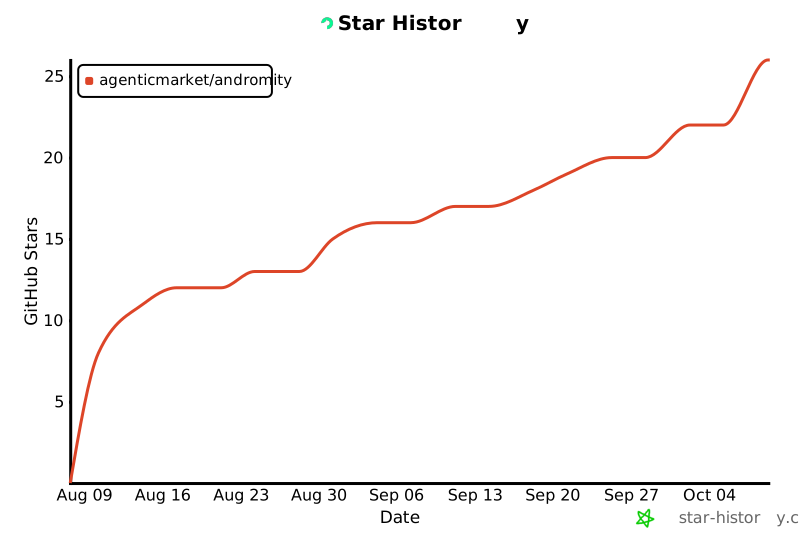
⭐ Loved the Live Waterfall profiler or saved hours debugging? Consider giving Andromity a star on GitHub — it helps more developers discover free, open-source AI tooling!
Star History
Changelog
See CHANGELOG.md for detailed release history and version notes.
Maintainer & Authors
Andromity is created and actively maintained by:
- Shekhar Pachlore (@shekharP1536) — Creator & Lead Maintainer (Core Architecture & Autonomous Runtimes)
Contributing
Open an issue or PR. Honest feedback and bug reports are more useful than feature requests right now.
See CONTRIBUTING.md for project layout and dev setup.
MIT — see LICENSE.
1 maintainer

Metadata
1 maintainer
Release files for andromity 0.2.22
For a detailed explanation of source distributions (sdists) and built distributions (wheels), please see the package formats documentation.
Source distribution (sdist)
| File | Size | Uploaded | Provenance | |
|---|---|---|---|---|
| andromity-0.2.22.tar.gz | 687.4 kB | Without provenance | Details |
Built distribution (wheel)
| File | Interpreter | ABI | Platform | Reset |
|---|---|---|---|---|
| andromity-0.2.22-py3-none-any.whl | Python 3 | none | any | Details |
Total release size: 1.2 MB
Release files / andromity-0.2.22.tar.gz
| Download URL | andromity-0.2.22.tar.gz |
|---|---|
| Size | 687.4 kB |
| Tags | Source |
|
SHA-256 checksum How to use checksums |
b8718f01ff663f4be131e3a2aec6f16c49f4228493c1d5021a43585e1d9ab595
|
|
BLAKE2b-256 checksum How to use checksums |
cea2384e4d05a9eb6cc1f88ada267fe36ffd10fa3f7ed2b62f5f520d7519c27a
|
| Upload date | |
|
Uploaded using Trusted Publishing? What is trusted publishing? |
No |
| Uploaded via |
twine/7.0.0 CPython/3.13.14
|
Release files / andromity-0.2.22-py3-none-any.whl
| Download URL | andromity-0.2.22-py3-none-any.whl |
|---|---|
| Size | 541.0 kB |
| Tags | Python 3 |
|
SHA-256 checksum How to use checksums |
8798461bb9472810a7fabc79065af0040a04d11d071dde5fbcf06116f4a04688
|
|
BLAKE2b-256 checksum How to use checksums |
2f5dc3753453384cd324e5b066e5f6bd61933746b5bfbab257e5299403112f74
|
| Upload date | |
|
Uploaded using Trusted Publishing? What is trusted publishing? |
No |
| Uploaded via |
twine/7.0.0 CPython/3.13.14
|
Security for andromity 0.2.22
Provenance
Provenance describes where a file came from. On PyPI, provenance is shared via attestations, which provide a verifiable record of the build or publishing details. View details, limitations and caveats.
No provenance found
None of the files in this release were uploaded with provenance metadata.
A note on package security
PyPI is a repository for distributing packages, not a service for auditing them. While third-party security researchers and our staff do their best to detect and remove malicious packages, PyPI cannot guarantee the quality, security or suitability of any given package.














