

aNETomy
A neat instrument designed for visualizing neural networks.
Experience seamless visualization without the burden of conversion.




🚀 Spotlight
🎯 Effortless Visualization
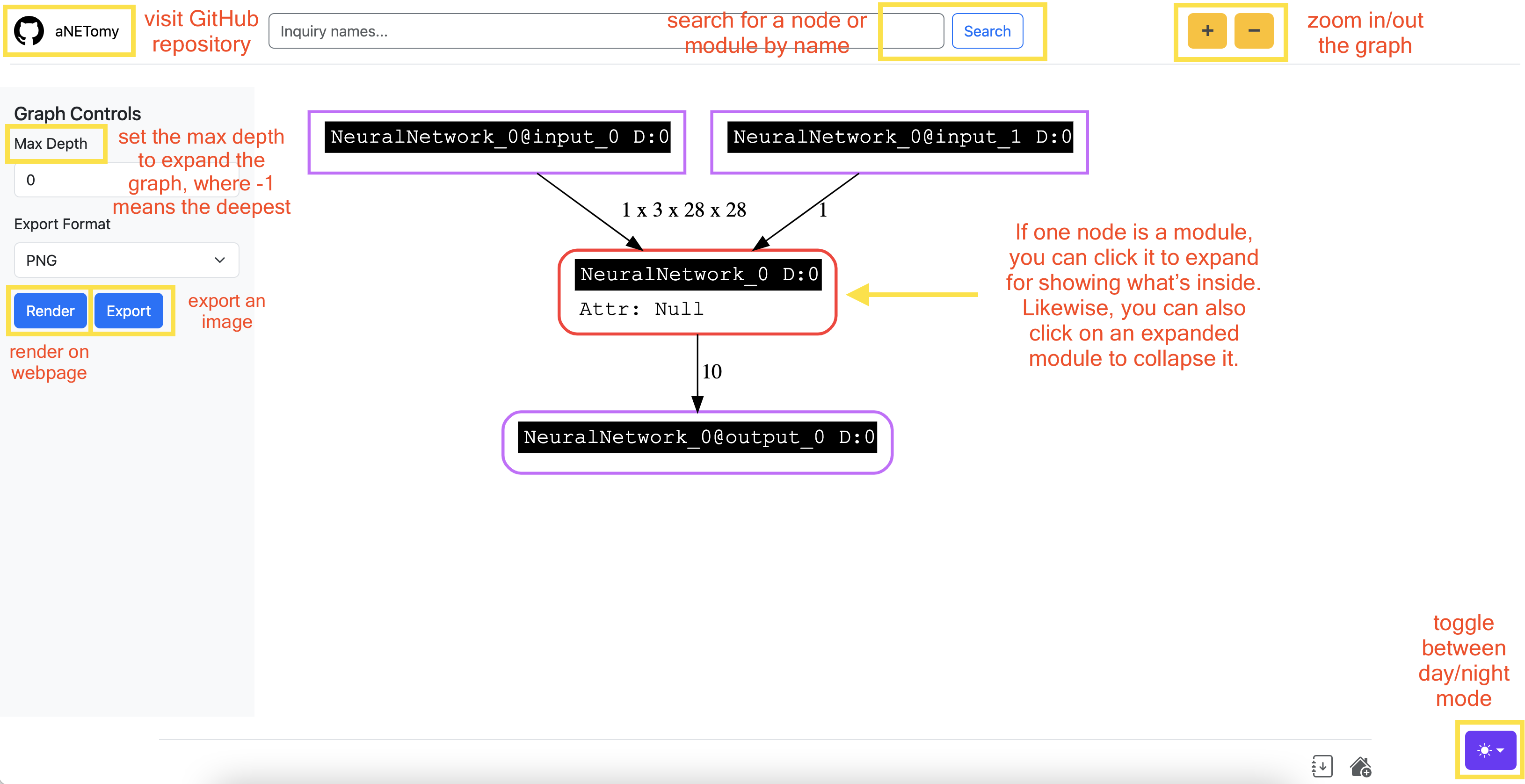
Given that PyTorch is an imperative framework, to visualize on the fly could be very useful for developers. aNETomy sidesteps the prep and conversion while keeping the accessibility and compatibility.
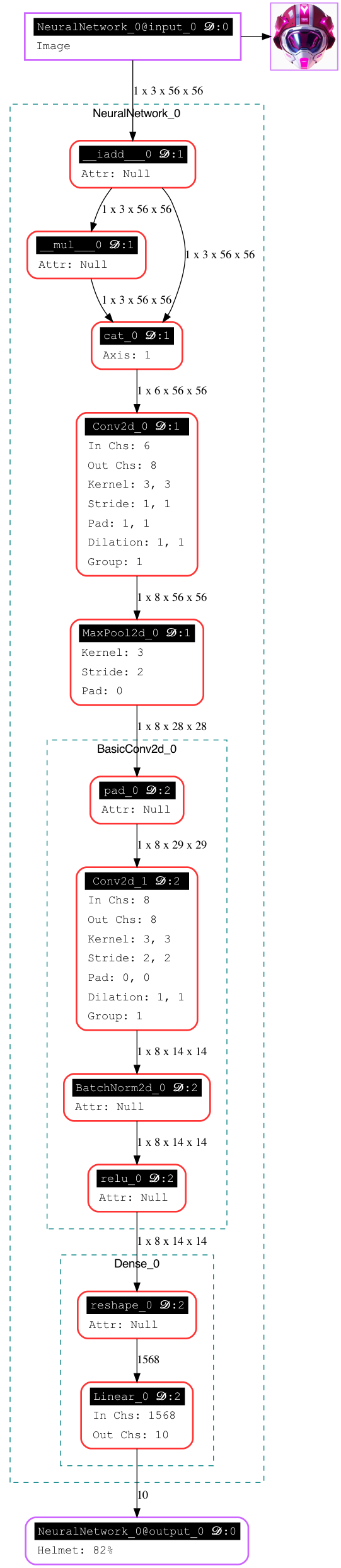
The fully expanded graph looks like below.
📊 Comparison
The following comparison are concluded according to hands-on practical experience. It could be wrong somewhere.
| Feature | aNETomy | Netron | TensorBoard | torchviz | torchinfo | torchview | torchlens | torchexplorer |
|---|---|---|---|---|---|---|---|---|
| Less Preparation | ✅ | ❌ | ✅ | ✅ | ✅ | ✅ | ✅ | ✅ |
| Handles Dynamic Models | ✅ | ❌ | ⚠️ | ❌ | ⚠️ | ✅ | ✅ | ❌ |
| Interactive Graphs | ✅ | ✅ | ✅ | ❌ | ❌ | ❌ | ❌ | ✅ |
| Tensor Shapes | ✅ | ✅ | ❌ | ✅ | ✅ | ✅ | ✅ | ✅ |
| Structure Completeness | ✅ | ✅ | ✅ | ❌ based on autograd | ⚠️ some functions are missing | ⚠️ | ✅ | ❌ based on autograd |
| Compatibility | ✅ | ⚠️ unfriendly to some ops | ⚠️ limited | ✅ | ❌ No | ✅ | ✅ | ✅ |
⚡ Quick Start
Add several lines to your python code for visualizing and saving graphs.
import anetomy
import torch
from torch import nn
import torch.nn.functional as F

# define the toy model
class Dense(nn.Module):
    def __init__(self):
        super().__init__()
        self.lin = nn.Linear(28*28*2, 10)

    def forward(self, x):
        x = F.relu(x, inplace=True)
        x = x.reshape(-1,)
        y = self.lin(x)
        return y

class NeuralNetwork(nn.Module):
    def __init__(self):
        super().__init__()
        self.conv1 = nn.Conv2d(3, 8, 3, padding=1)
        self.mpool1 = nn.MaxPool2d(3, stride=2, ceil_mode=True)
        self.dense = Dense()

    def forward(self, x, scale=1):
        x *= scale
        y = self.conv1(x)
        y = self.mpool1(y)
        y = self.dense(y)
        return y

# input dummy data to visualize
net = NeuralNetwork()
dummy_x = torch.randn(1, 3, 28, 28)
dummy_s = 2
anv = anetomy.NetVue(graph_path='./toynn.png')
anv.dissect(net, dummy_x, scale=dummy_s)
# use render() to save network image directly
anv.render(3) # set the max depth to expand as 3
# use launch() to run a web server for inspection
anv.launch('127.0.0.1', port=7880)
📦 Installation
At first, install graphviz beforehand.
🍎 macOS
Use Homebrew for a quick installation:
brew install graphviz
🐧 Linux
For Debian-based systems (Ubuntu, Debian):
sudo apt update && sudo apt install graphviz
For Arch-based systems (Arch, Manjaro):
sudo pacman -S graphviz
For RHEL-based systems (Fedora, CentOS):
sudo dnf install graphviz
🐍 Python
Then install the bindings.
pip install graphviz
Finally, install anetomy via pip.
pip install anetomy
❤️ Support
If you find aNETomy helpful, please give it a ⭐ on GitHub! ▶️ https://github.com/SeriaQ/aNETomy
1 maintainer

Metadata
1 maintainer
Release files for anetomy 0.2.1
For a detailed explanation of source distributions (sdists) and built distributions (wheels), please see the package formats documentation.
Source distribution (sdist)
| File | Size | Uploaded | |
|---|---|---|---|
| anetomy-0.2.1.tar.gz | 85.1 kB | Details |
Built distribution (wheel)
| File | Interpreter | ABI | Platform | Reset |
|---|---|---|---|---|
| anetomy-0.2.1-py3-none-any.whl | Python 3 | none | any | Details |
Total release size: 169.4 kB
Release files / anetomy-0.2.1.tar.gz
| Download URL | anetomy-0.2.1.tar.gz |
|---|---|
| Size | 85.1 kB |
| Tags | Source |
|
SHA-256 checksum How to use checksums |
942149b9d891ec0827ade839ad04135e819250175d3bc22db73043d5f1168d53
|
|
BLAKE2b-256 checksum How to use checksums |
0c7bc8a0b84147ae4bdbb11068a7647c0eec40eb4ba6ba3583e2fa7ea9e7728b
|
| Upload date | |
|
Uploaded using Trusted Publishing? What is trusted publishing? |
No |
| Uploaded via |
twine/6.1.0 CPython/3.10.12
|
Release files / anetomy-0.2.1-py3-none-any.whl
| Download URL | anetomy-0.2.1-py3-none-any.whl |
|---|---|
| Size | 84.3 kB |
| Tags | Python 3 |
|
SHA-256 checksum How to use checksums |
79b88fcf7ac8c945db9ccd05c3dc3b7996d4deabb3fc9b175c78bf4c640349f2
|
|
BLAKE2b-256 checksum How to use checksums |
08b5e42835a46ef83a7d49677c4e55f9b8674992ac2c9bae6f8a949620be5270
|
| Upload date | |
|
Uploaded using Trusted Publishing? What is trusted publishing? |
No |
| Uploaded via |
twine/6.1.0 CPython/3.10.12
|














