
A neat instrument designed for visualizing neural networks.

Project description

aNETomy
A neat instrument designed for visualizing neural networks.
Experience seamless visualization without the burden of conversion.




🚀 Spotlight
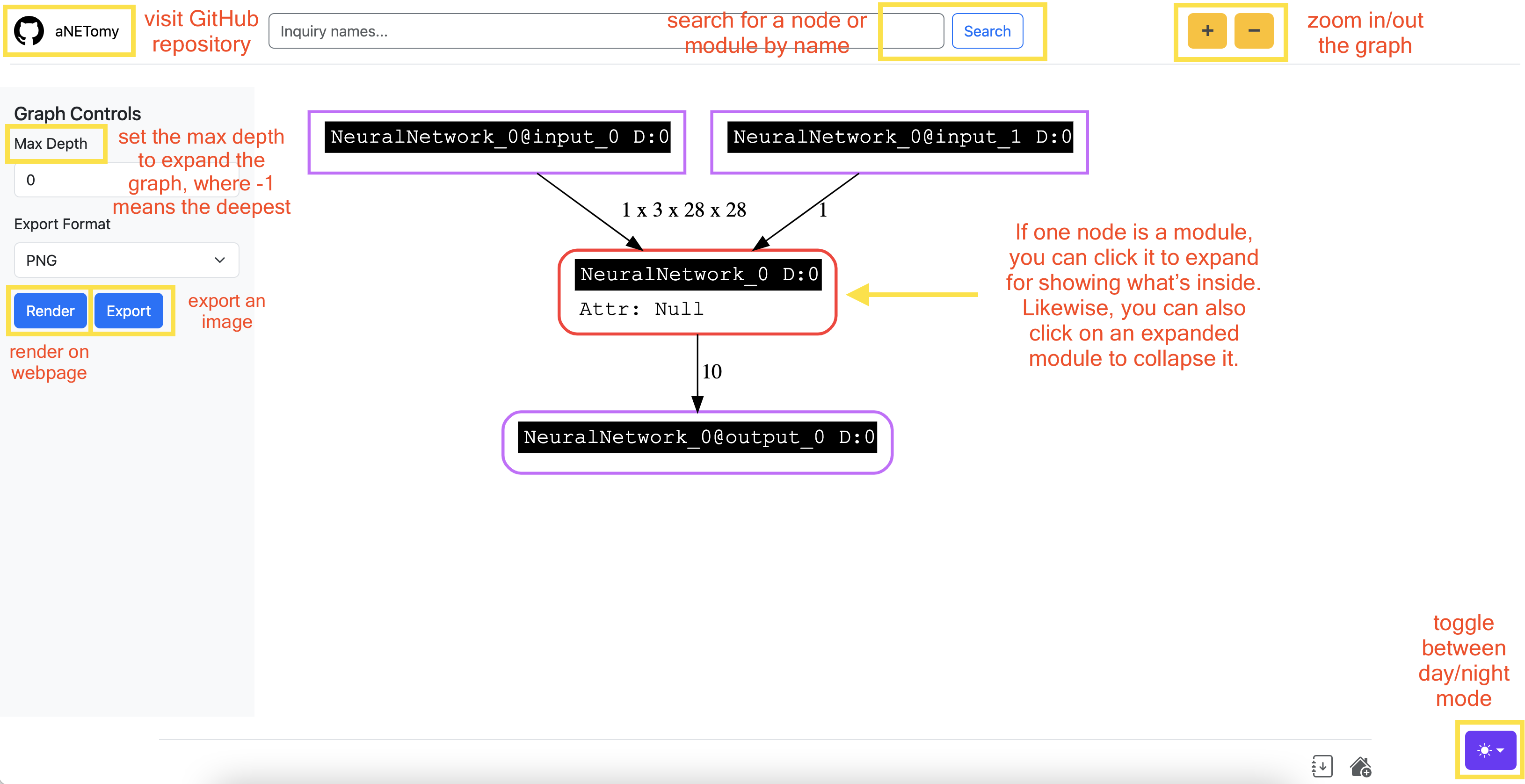
🎯 Effortless Visualization
Given that PyTorch is an imperative framework, to visualize on the fly could be very useful for developers. aNETomy sidesteps the prep and conversion while keeping the accessibility and compatibility.
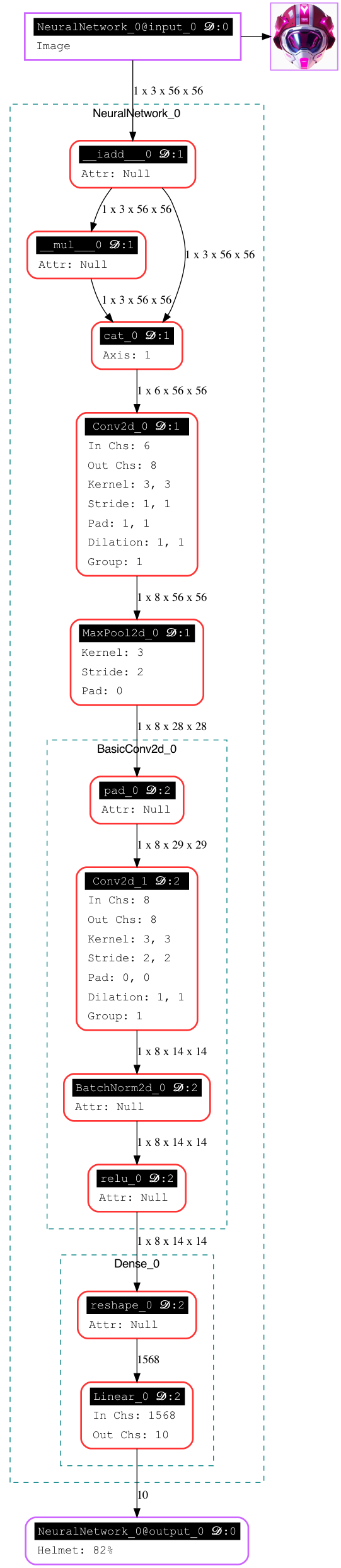
The fully expanded graph looks like below.
📊 Comparison
The following comparison are concluded according to hands-on practical experience. It could be wrong somewhere.
| Feature | aNETomy | Netron | TensorBoard | torchviz | torchinfo | torchview | torchlens | torchexplorer |
|---|---|---|---|---|---|---|---|---|
| Less Preparation | ✅ | ❌ | ✅ | ✅ | ✅ | ✅ | ✅ | ✅ |
| Handles Dynamic Models | ✅ | ❌ | ⚠️ | ❌ | ⚠️ | ✅ | ✅ | ❌ |
| Interactive Graphs | ✅ | ✅ | ✅ | ❌ | ❌ | ❌ | ❌ | ✅ |
| Tensor Shapes | ✅ | ✅ | ❌ | ✅ | ✅ | ✅ | ✅ | ✅ |
| Structure Completeness | ✅ | ✅ | ✅ | ❌ based on autograd | ⚠️ some functions are missing | ⚠️ | ✅ | ❌ based on autograd |
| Compatibility | ✅ | ⚠️ unfriendly to some ops | ⚠️ limited | ✅ | ❌ No | ✅ | ✅ | ✅ |
⚡ Quick Start
You can simply take it as a wrapper or help you plot curves.
from anetomy import Inspector
import torch
from torch import nn
import torch.nn.functional as F

# define the toy model
class Dense(nn.Module):
    def __init__(self):
        super().__init__()
        self.lin = nn.Linear(28*28*2, 10)

    def forward(self, x):
        x = F.relu(x, inplace=True)
        x = x.reshape(-1,)
        y = self.lin(x)
        return y

class NeuralNetwork(nn.Module):
    def __init__(self):
        super().__init__()
        self.conv1 = nn.Conv2d(3, 8, 3, padding=1)
        self.mpool1 = nn.MaxPool2d(3, stride=2, ceil_mode=True)
        self.dense = Dense()

    def forward(self, x, scale=1):
        x *= scale
        y = self.conv1(x)
        y = self.mpool1(y)
        y = self.dense(y)
        return y

# input dummy data to visualize
net = NeuralNetwork()
dummy_x = torch.randn(1, 3, 28, 28)
dummy_s = 2
ant = Inspector(graph_path='./toynn.png')
ant.dissect(net, dummy_x, scale=dummy_s)
# use render() to save network image directly
ant.render(3) # 3 is the max depth to expand
# use launch() to run a web server for inspection
ant.launch('127.0.0.1', port=7880)
📦 Installation
At first, install graphviz beforehand.
🍎 macOS
Use Homebrew for a quick installation:
brew install graphviz
🐧 Linux
For Debian-based systems (Ubuntu, Debian):
sudo apt update && sudo apt install graphviz
For Arch-based systems (Arch, Manjaro):
sudo pacman -S graphviz
For RHEL-based systems (Fedora, CentOS):
sudo dnf install graphviz
🐍 Python
Then install the bindings.
pip install graphviz
Finally, install anetomy via pip.
pip install anetomy
❤️ Support
If you find aNETomy helpful, please give it a ⭐ on GitHub! ▶️ https://github.com/SeriaQ/aNETomy


Download files
Download the file for your platform. If you're not sure which to choose, learn more about installing packages.
Source Distribution
Built Distribution
Filter files by name, interpreter, ABI, and platform.
If you're not sure about the file name format, learn more about wheel file names.
Copy a direct link to the current filters
File details
Details for the file anetomy-0.1.2.tar.gz.
File metadata
- Download URL: anetomy-0.1.2.tar.gz
- Upload date:
- Size: 17.4 kB
- Tags: Source
- Uploaded using Trusted Publishing? No
- Uploaded via: twine/6.1.0 CPython/3.10.12
File hashes
| Algorithm | Hash digest | |
|---|---|---|
| SHA256 |
235f72a6af1ce243606245ca9f8ff63bb6efa32f258d62b85a3d7394f270c7c7
|
|
| MD5 |
a53e6dfab752c05e8186a5f62422a052
|
|
| BLAKE2b-256 |
bd5d70af11fac75d88f48a5116a163dd95fbb149687d8dfb3480fd5b2aa6c0de
|
File details
Details for the file anetomy-0.1.2-py3-none-any.whl.
File metadata
- Download URL: anetomy-0.1.2-py3-none-any.whl
- Upload date:
- Size: 18.1 kB
- Tags: Python 3
- Uploaded using Trusted Publishing? No
- Uploaded via: twine/6.1.0 CPython/3.10.12
File hashes
| Algorithm | Hash digest | |
|---|---|---|
| SHA256 |
b5f370b55edde6a2bdadd1d4c1b06702addb8e0552f374b776c23f68c1daac27
|
|
| MD5 |
dc33d4debd0bb5e45fdcd531286ec204
|
|
| BLAKE2b-256 |
36dd005592fb7846e536aade25371fe136aa335f5969a3b1e85ca4c7c3692683
|






