
Download anime from `anikoto.tv` / `anikoto.bz` / `anikoto.net` / `anikoto.cz`

Project description
🌀 Anikoto Downloader
Download anime from
anikoto.tv/anikoto.bz/anikoto.net/anikoto.cz
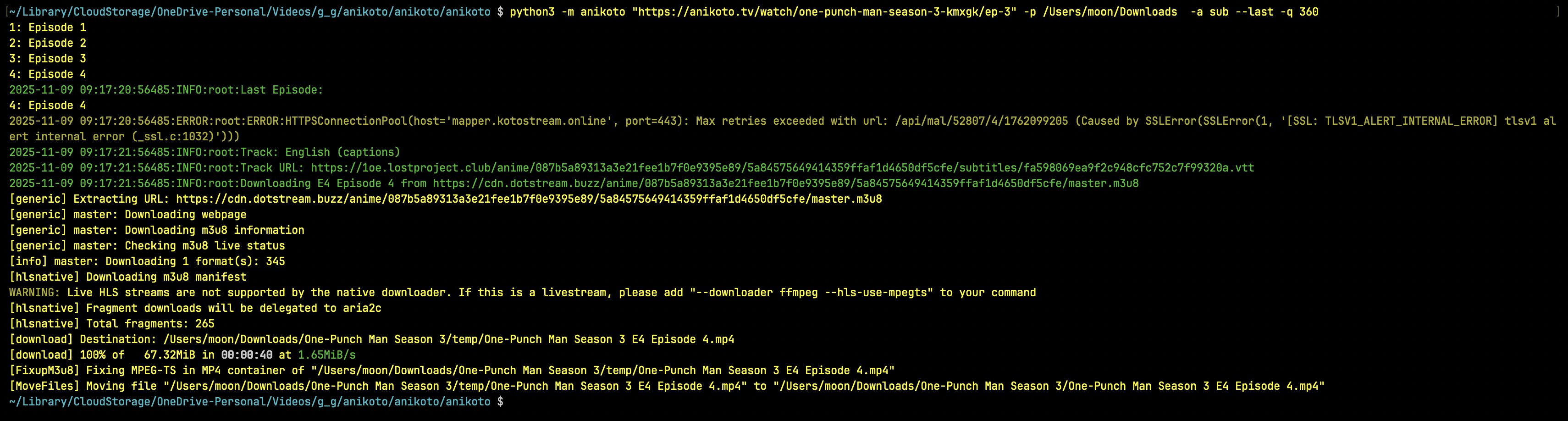
Screenshot


Installation
Install from Pypie
python3 -m pip install anikoto
Install from Github
python3 -m pip install git+https://github.com/testingbetaversion/anikoto.git
Usage/Examples
anikoto https://anikoto.tv/watch/one-piece-odmau -p /Users/Downloads -a sub --range 1129-1129
anikoto "https://anikoto.tv/watch/solo-leveling-ilh08/ep-1"
anikoto "https://anikoto.tv/watch/frieren-beyond-journey-s-end-c6fbj/ep-1" -p /Users/Downloads
anikoto "https://anikoto.tv/watch/bottom-tier-character-tomozaki-2nd-stage-0et8i" -p /Users/Downloads
Default Audio is Dub Subs for sub/dub will be downloaded by default
help
 $ anikoto --help
usage: anikoto [-h] [--version] [--debug]
                  [--quality {2160,1440,1080,720,480,360}] [--audio {sub,dub}]
                  [--downloader {yt-dlp,N_m3u8DL-RE,ffmpeg}] [--subtitles]
                  [--list] [--last] [--subtitle-lang LANG] [--path PATH]
                  [--source SOURCE] [--episode EPISODE] [--range RANGE]
                  url

Anikoto (https://anikoto.tv/) Downloader

positional arguments:
  url                   Video Url like: https://anikoto.tv/watch/solo-
                        leveling-ilh08/ep-1

options:
  -h, --help            show this help message and exit
  --version, -v         show program's version number and exit
  --debug               Enable debug mode
  --quality, -q {2160,1440,1080,720,480,360}
                        Choose a Quality
  --audio, -a {sub,dub}
                        Download Audio
  --downloader, -d {yt-dlp,N_m3u8DL-RE,ffmpeg}
                        Downloader
  --subtitles, -ss      Download Subs
  --list                List Episodes
  --last                Only Download Last Episode
  --subtitle-lang, -sl LANG
                        Subtitle language to download (matches track label,
                        e.g. English, Spanish, Arabic)
  --path, -p PATH       path to save the file
  --source, -s SOURCE   Comma-separated list of sources to download from
                        ['megaplay', 'vidstream', 'kiwi', 'vidcloud',
                        'vidplay']
  --episode, -e EPISODE
                        Comma-separated list of Episodes to download
  --range, -r RANGE     Specify episode range (e.g. 1-5) if you want to
                        download only episode 1129 use 1129-1129
❤️ Thanks
This project was made with love. If it has helped you, a ⭐ on GitHub would be greatly appreciated.
Release history Release notifications | RSS feed


Download files
Download the file for your platform. If you're not sure which to choose, learn more about installing packages.
Source Distribution
Built Distribution
Filter files by name, interpreter, ABI, and platform.
If you're not sure about the file name format, learn more about wheel file names.
Copy a direct link to the current filters
File details
Details for the file anikoto-5.0.0.tar.gz.
File metadata
- Download URL: anikoto-5.0.0.tar.gz
- Upload date:
- Size: 10.8 kB
- Tags: Source
- Uploaded using Trusted Publishing? No
- Uploaded via: twine/6.2.0 CPython/3.14.6
File hashes
| Algorithm | Hash digest | |
|---|---|---|
| SHA256 |
3a32d9e14ce5791b25e3542cdc8d412925ba72ea914088d4b084a153de708d47
|
|
| MD5 |
08873c2395d549d1b9835050d87a6d3e
|
|
| BLAKE2b-256 |
2e850e83fb61efc81391d7d72f937e99aa1973ac926c3a8ff779c50424ca705e
|
File details
Details for the file anikoto-5.0.0-py3-none-any.whl.
File metadata
- Download URL: anikoto-5.0.0-py3-none-any.whl
- Upload date:
- Size: 9.8 kB
- Tags: Python 3
- Uploaded using Trusted Publishing? No
- Uploaded via: twine/6.2.0 CPython/3.14.6
File hashes
| Algorithm | Hash digest | |
|---|---|---|
| SHA256 |
4bb92eb3652d85c791079479bbad0cff8e356de737bdac33b81c3794ea4a7a54
|
|
| MD5 |
c064d0cfc05aec78d96ba739262d48a0
|
|
| BLAKE2b-256 |
d4a17295224247a81113c9b81452243c646a34143f46026f288274d042809cbd
|






