
Automated Japanese vocabulary mining from anime subtitles with Anki integration
Verified details
These details have been verified by PyPIProject links
GitHub Statistics
Maintainers

Project description
Anki Miner




Turn native Japanese content into Anki vocabulary cards - with screenshots, sentence audio, furigana, pitch accent, and frequency data.
Please leave a ⭐ star if Anki Miner helped you - it helps others find it.
Showcase
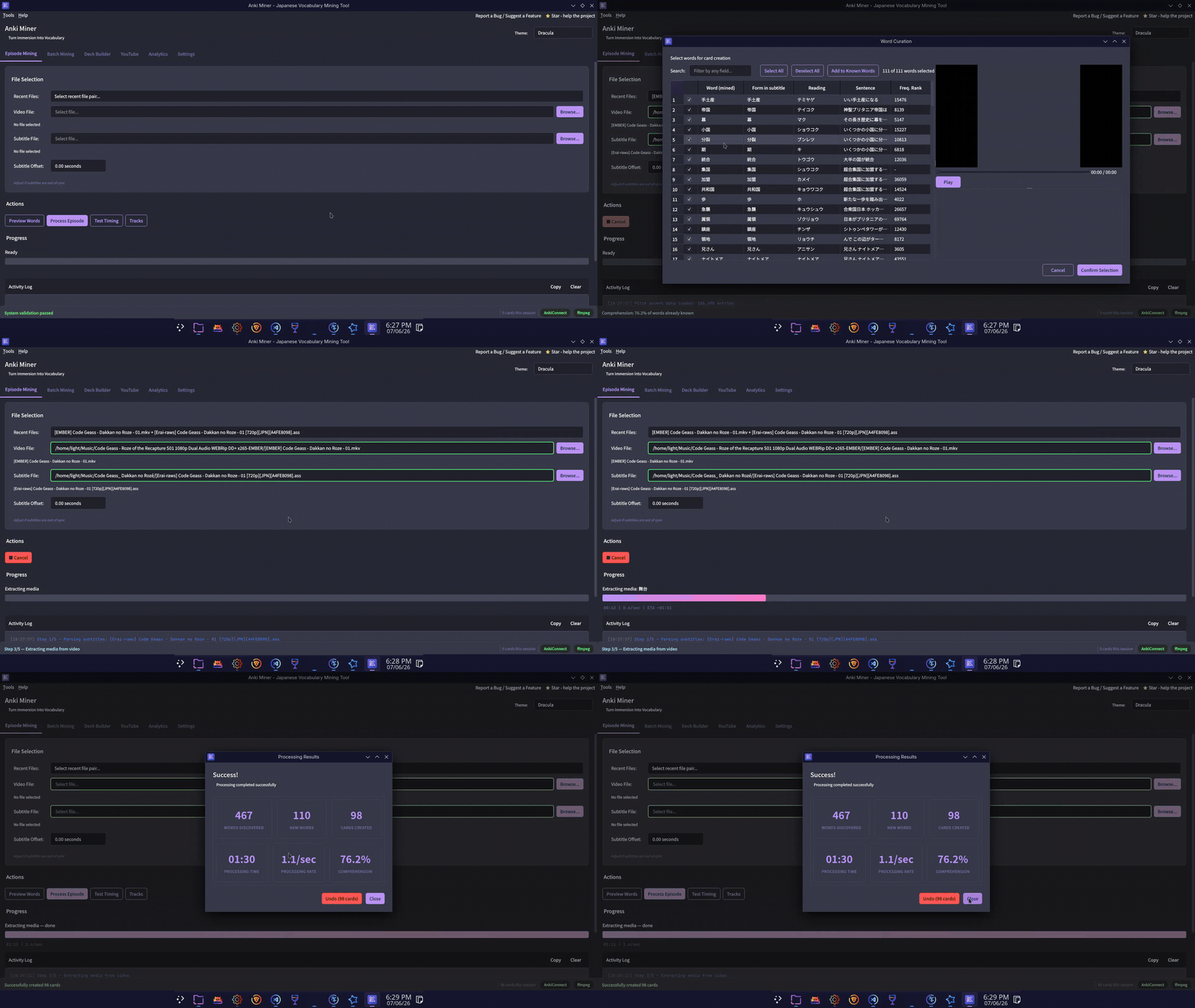
Example cards
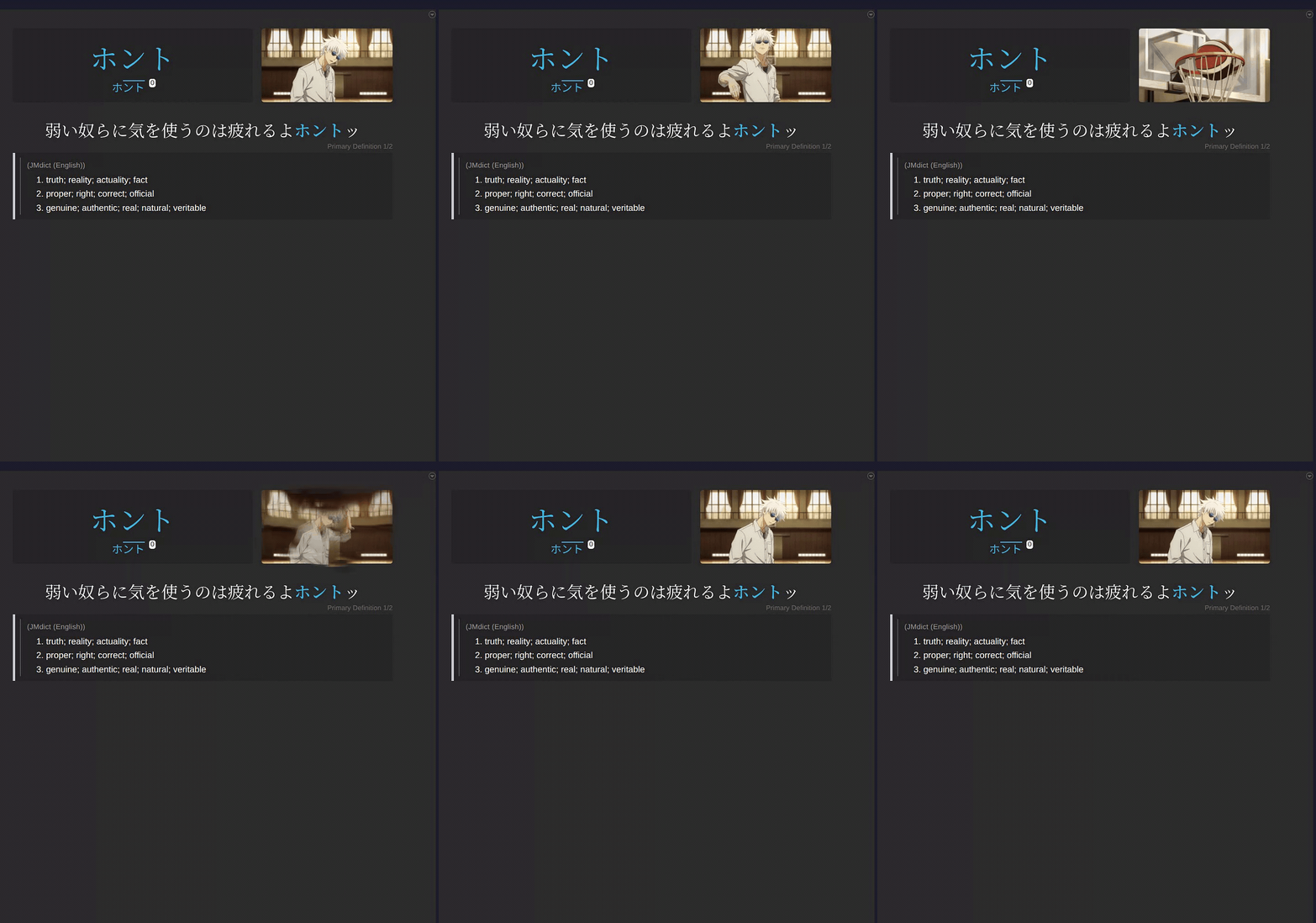 |
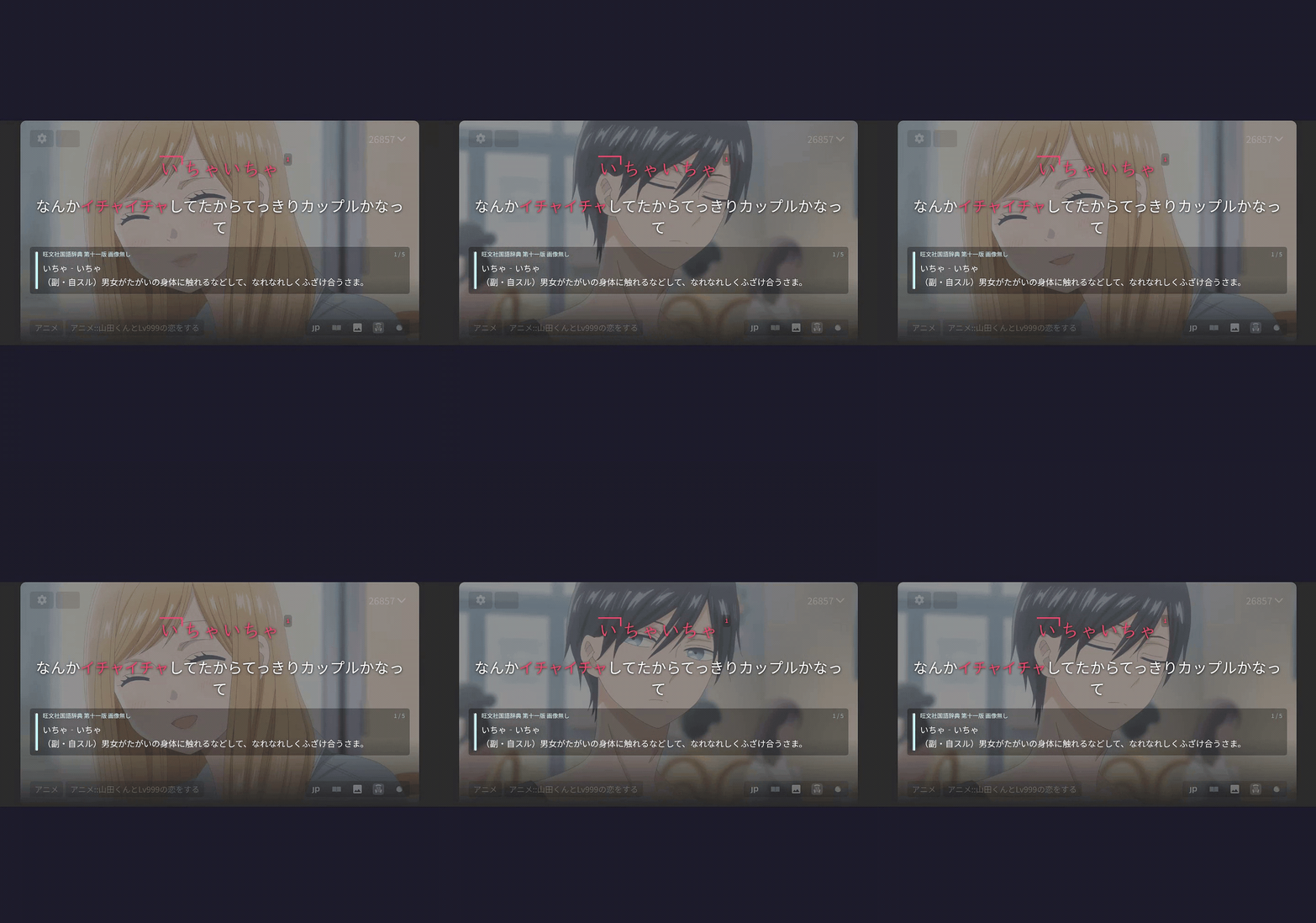 |
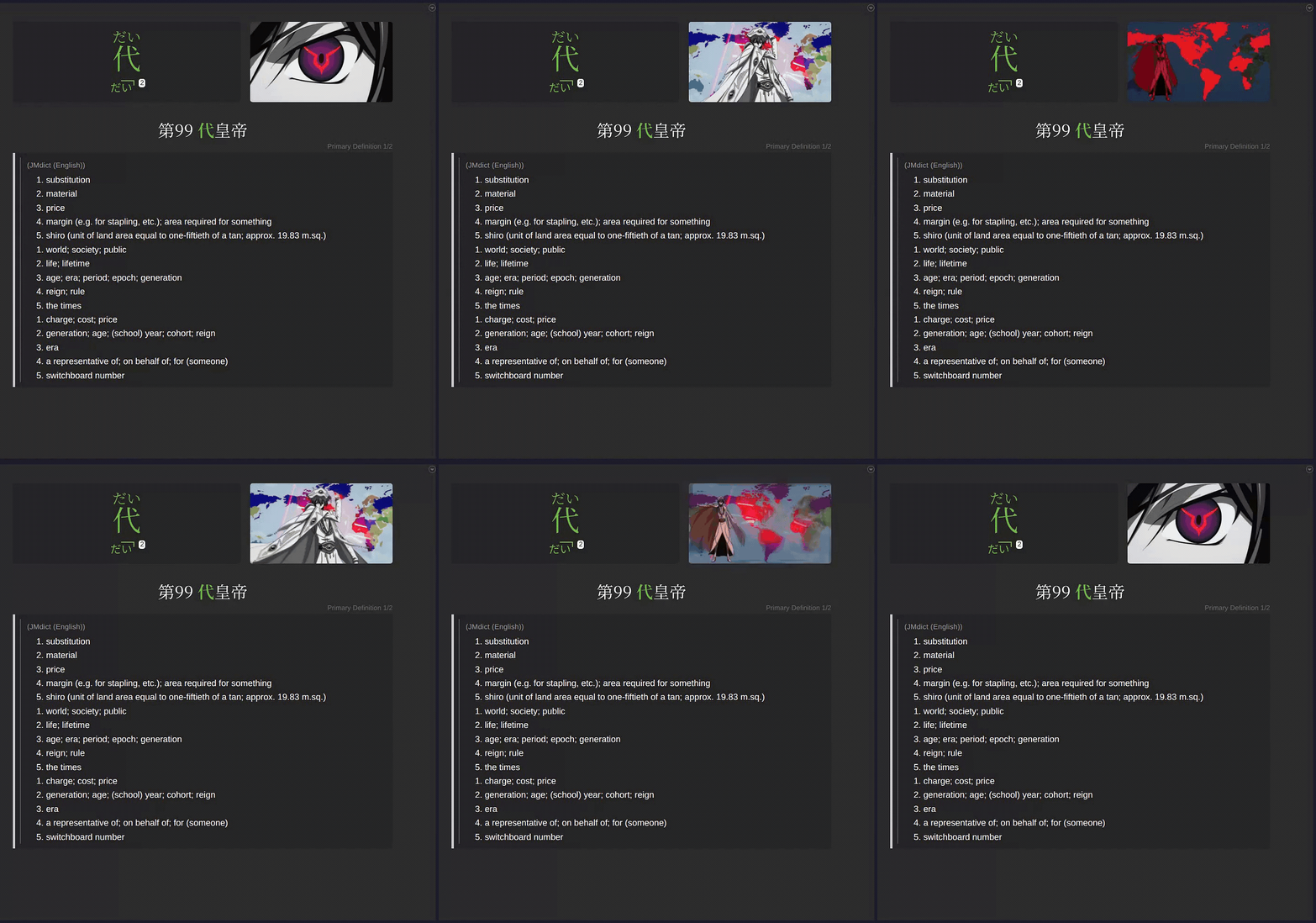 |
|---|---|---|
| ⬇️ MP4 (sound) | ⬇️ MP4 (sound) | ⬇️ MP4 (sound) |
Installation
Requirements
- ffmpeg — bundled with the standalone builds (Windows
.exe/.zip, macOS tarball, Linux AppImage/tarball), so most users need nothing. You only need ffmpeg on PATH if you install via PyPI/pipx, from source, or the.deb(which ships without bundled ffmpeg for licensing reasons and uses your system copy).- macOS:
brew install ffmpeg - Ubuntu/Debian:
sudo apt install ffmpeg - Windows: download from ffmpeg.org and add to PATH.
- macOS:
- Anki with the AnkiConnect add-on. In Anki: Tools → Add-ons → Get Add-ons, paste code
2055492159, restart.
Download
Grab the installer for your platform from the latest release:
| Platform | Installer | Portable |
|---|---|---|
| Windows | AnkiMiner-*-Setup.exe |
AnkiMiner-Windows-x86_64.zip |
| Linux (Debian/Ubuntu) | anki-miner_*_amd64.deb |
AnkiMiner-*-Linux-x86_64.AppImage |
| Linux (other) | — | AnkiMiner-Linux-x86_64.tar.gz |
| macOS (Apple Silicon) | — | AnkiMiner-macOS-arm64.tar.gz |
No Python required. Installers and portable archives bundle all dependencies.
Install from PyPI (Python 3.10+)
pipx install anki-miner # or: pip install anki-miner
Install from source
git clone https://github.com/0xzerolight/anki_miner.git
cd anki_miner
pip install .
Quick Start
After installing, launch Anki Miner from your Start Menu, Applications folder, or app menu. If you installed from PyPI or source, run anki_miner_gui from a terminal. A desktop shortcut is created on first launch; re-run it from Tools → Create Desktop Shortcut… inside the app.
Anki must be running with AnkiConnect installed before mining starts.
Tabs:
- Episode Mining: mine one video/subtitle pair with file selectors and progress tracking.
- Batch Mining: queue a folder of episode/subtitle pairs for sequential processing. Files are paired by episode number, so each folder / queue item should hold a single show (use Multi-Anime Queue for mining multiple series at a time).
- Deck Builder: point at a folder of episode/subtitle pairs and mine the full series into one named deck. Lemmas are ranked by in-series frequency; pick how many to include (all, top N, or a coverage target) and preview before cards are created.
- YouTube: paste one or more URLs, then mine the queue.
- Analytics: history, series difficulty rankings, milestones, undo.
- Settings: Anki, Media, Dictionary, Filtering, YouTube, Themes. Saved to
~/.anki_miner/gui_config.json.
Features
- Deck Builder: point it at a folder with all episodes of a show and it mines the whole series into a single named deck, frequency-ordered, deduped across episodes. Inspired by the approach of jiten.moe / jpdb — free, using media you already have.
- Anki cards with furigana, pitch accent, and word frequency.
- Bold the target word in the sentence so it stands out on the card front.
- Glossary field that combines every enabled dictionary into one card field, compatible with the Senren dictionary-toggle template.
- Word Curator with embedded video player — hear each sentence before you decide, and see every enabled offline dictionary's hit side-by-side.
- Custom card styling — generated cards render cleanly out of the box; no manual Anki note-type styling required.
- User-curated known-words list — add words straight from the curator; they're skipped on every future run.
- Load any Yomitan dictionaries you like, reorder them, and optionally enable Jisho as a slower, rate-limited online fallback (offline dictionaries are recommended for speed).
- YouTube queue: paste a list of URLs, mine the whole list in one click.
- Batch a folder of episode/subtitle pairs for unattended processing.
- Review and edit the word list before any cards are created — in single-episode mining, and as an opt-in popup for batch runs too.
- Word filtering: skip words already in your collection, cap by frequency rank, exclude proper nouns via bundled name wordsets, and optionally drop hiragana-only or katakana-only words.
- Text size control: scale the whole UI from 0.5× to 2× under Settings → Themes.
- Audio in MP3 or Opus, at the bitrate you choose — Opus produces much smaller files for the same listening quality.
- Animated screenshots in AVIF or WebP for cards that show a moment of motion instead of a still frame.
- Analytics dashboard with history, undo, milestones, and series difficulty rankings.
- 29 built-in themes (Catppuccin, Gruvbox, Nord, Tokyo Night, Rosé Pine, Dracula, and more) with a favorites list,
Ctrl+Tto cycle, and custom themes from a JSON file. See the full list below.
Built-in themes (29)
- Ayu — Light, Mirage, Dark
- Catppuccin — Latte (light); Frappé, Macchiato, Mocha (dark)
- Dracula — Dracula, Alucard
- Everforest — Light, Dark
- GitHub — Light; Dark, Dark Dimmed
- Gruvbox — Light Medium, Dark Medium
- Kanagawa — Lotus (light), Wave (dark)
- Rosé Pine — Dawn (light); Main, Moon (dark)
- Solarized — Light, Dark
- Standalone — Light, Dark, Sakura, Nord, One Dark, Tokyo Night
Upstream attribution: LICENSE-THEMES.md.
Custom themes: drop a JSON file matching the schema in anki_miner/gui/resources/styles/themes/ into your config dir. Or suggest in an Issue and it will be added for all users.
How It Works
- Read the subtitles and split Japanese into individual words.
- Filter to content words you don't already know.
- Grab a screenshot and audio clip from the video for each line.
- Look up definitions in your configured offline dictionaries, optionally falling back to Jisho online if enabled (slower, rate-limited).
- Send the finished cards to Anki.
Recommended Resources
None of these ship with Anki Miner — load the ones you want, all free. Definitions are looked up through a provider chain (first hit wins); Jisho is a slower, rate-limited online fallback, off by default.
| Type | Resource | What you get | Download | Add via |
|---|---|---|---|---|
| Dictionary | Jitendex | JMdict successor; structured formatting, examples, tags | Yomitan zip | Add Dictionary… |
| Dictionary | JMdict | Plain glosses; smaller, faster to index | Yomitan zip | Add Dictionary… |
| Pitch | Kanjium | ~124k patterns; drop-in TSV, no import step | TSV | Dictionary → Pitch Accent File |
| Pitch | アクセント辞典v2 | Richer NHK notation | Drive | Dictionary → Pitch Accent File |
| Frequency | JPDB v2.2 Kana | All-round default for media | Yomitan zip | Filtering → Frequency List File |
| Frequency | BCCWJ SUW+LUW | Balanced corpus; pairs well with news/novels | Yomitan zip | Filtering → Frequency List File |
Dictionaries are indexed once into ~/.anki_miner/dicts/ (drag to reorder the chain).
The pitch and frequency pickers accept a raw CSV/TSV or a Yomitan zip, auto-converted to ~/.anki_miner/pitch_accent.csv / frequency.csv on Save.
Proper-noun filtering uses bundled name wordsets derived from JMnedict (JMdict/EDICT project, EDRDG, CC BY-SA 4.0).
YouTube Mining
Paste one or more URLs into the YouTube tab. Each row shows its title, length, and subtitle source as you add it; click Mine to process the whole list. Transient download errors are retried once before a row is marked failed. Cancel is safe at any point.
Manual Japanese subtitles are used when available. Auto-captions are accepted only when YouTube generated them natively from Japanese audio — captions that YouTube produced by machine-translating from another language are skipped, because they don't make usable cards. Even native auto-captions are rougher than manual subtitles, since they lack sentence boundaries.
Gotchas:
- Bot-detection prompts: if YouTube asks "Sign in to confirm you're not a bot", open Settings → Cookies → Browser and pick Firefox or Chrome. Anki Miner pulls cookies from that browser's profile on every fetch.
- Age-restricted videos: same fix.
- Max duration: defaults to 120 minutes. The probe aborts before downloading if the video is longer. Adjust in Settings.
Updates
Anki Miner checks GitHub for new releases on startup (toggle in Settings). When an update is available, a banner offers a one-click download of the asset that matches your install: .deb for Debian/Ubuntu, .AppImage for AppImage, the Inno installer on Windows, the macOS arm64 archive, or the release page for pip/source installs. "Skip this version" suppresses the prompt for that release; the next release prompts again.
Troubleshooting
| Issue | Solution |
|---|---|
| "Cannot connect to Anki" | Start Anki and ensure AnkiConnect is installed. |
| "Deck not found" | Create the deck in Anki or update the deck name in Settings. |
| "Note type not found" | Configure your note type's field names in Settings → Anki. |
| "ffmpeg not found" | Install ffmpeg and add it to PATH. |
| No definitions found | Add a Yomitan dictionary in Settings → Add Dictionary… (recommended), or enable the Jisho fallback (slower, rate-limited). |
| Audio is wrong language | The tool tries Japanese audio tracks first, then falls back to the default. |
| Subtitles out of sync | Use the subtitle offset control in the GUI (range ±300 seconds). |
| AV1 video won't preview | In-app preview is disabled for AV1 to avoid decoder error spam. Mining still works normally — only the preview is skipped. |
Contributing
Contributions are welcome — bug fixes, dictionary integrations, GUI polish, doc improvements, all sizes.
- New here? Start with CONTRIBUTING.md.
- Architecture overview: ARCHITECTURE.md.
- Testing strategy: TESTING.md.
- Code of Conduct: CODE_OF_CONDUCT.md.
- Security: SECURITY.md.
Bug reports and feature requests → Issues. General questions and discussion → Discussions.
Special Thanks
Sincere thanks to people who made exceptional contributions to the project:
★ StyraxBenzoin - Brilliant feature suggestions, new release testing, community building
See CONTRIBUTORS.md for everyone who has made any kind of contribution to the project.
License
GNU General Public License v3.0. See LICENSE.
Project details
Verified details
These details have been verified by PyPIProject links
GitHub Statistics
Maintainers
Release history Release notifications | RSS feed


Download files
Download the file for your platform. If you're not sure which to choose, learn more about installing packages.
Source Distribution
Built Distribution
Filter files by name, interpreter, ABI, and platform.
If you're not sure about the file name format, learn more about wheel file names.
Copy a direct link to the current filters
File details
Details for the file anki_miner-2.6.1.tar.gz.
File metadata
- Download URL: anki_miner-2.6.1.tar.gz
- Upload date:
- Size: 2.3 MB
- Tags: Source
- Uploaded using Trusted Publishing? Yes
- Uploaded via: twine/6.1.0 CPython/3.13.12
File hashes
| Algorithm | Hash digest | |
|---|---|---|
| SHA256 |
c60a841134befd2a6cdae8b065cc4804ec096df8f65a9c78272434fdc429a508
|
|
| MD5 |
3d121573dd20dd8f9ecd1d0ee4ac0858
|
|
| BLAKE2b-256 |
97561ebd65b8c549062780686cd8301f2df2ed1336ebd1aeef1a24c871423766
|
Provenance
The following attestation bundles were made for anki_miner-2.6.1.tar.gz:
Publisher:
publish.yml on 0xzerolight/anki_miner
-
Statement:
-
Statement type:
https://in-toto.io/Statement/v1 -
Predicate type:
https://docs.pypi.org/attestations/publish/v1 -
Subject name:
anki_miner-2.6.1.tar.gz -
Subject digest:
c60a841134befd2a6cdae8b065cc4804ec096df8f65a9c78272434fdc429a508 - Sigstore transparency entry: 1748961673
- Sigstore integration time:
-
Permalink:
0xzerolight/anki_miner@397f0bd30e3e8b615bc1e9d5c66be3717e9765a6 -
Branch / Tag:
refs/tags/v2.6.1 - Owner: https://github.com/0xzerolight
-
Access:
public
-
Token Issuer:
https://token.actions.githubusercontent.com -
Runner Environment:
github-hosted -
Publication workflow:
publish.yml@397f0bd30e3e8b615bc1e9d5c66be3717e9765a6 -
Trigger Event:
push
-
Statement type:
File details
Details for the file anki_miner-2.6.1-py3-none-any.whl.
File metadata
- Download URL: anki_miner-2.6.1-py3-none-any.whl
- Upload date:
- Size: 2.3 MB
- Tags: Python 3
- Uploaded using Trusted Publishing? Yes
- Uploaded via: twine/6.1.0 CPython/3.13.12
File hashes
| Algorithm | Hash digest | |
|---|---|---|
| SHA256 |
d91a773c9a90e3cb50a2df6536dde52d6775de48e2d5c92748abef475b19bc16
|
|
| MD5 |
8d01e5838bf5fb5e2a1effabb60d8b09
|
|
| BLAKE2b-256 |
19bc2621a2b915de0dcc0bcef671e8d7dd8d413cee3827a991454ffd4faa8b31
|
Provenance
The following attestation bundles were made for anki_miner-2.6.1-py3-none-any.whl:
Publisher:
publish.yml on 0xzerolight/anki_miner
-
Statement:
-
Statement type:
https://in-toto.io/Statement/v1 -
Predicate type:
https://docs.pypi.org/attestations/publish/v1 -
Subject name:
anki_miner-2.6.1-py3-none-any.whl -
Subject digest:
d91a773c9a90e3cb50a2df6536dde52d6775de48e2d5c92748abef475b19bc16 - Sigstore transparency entry: 1748961847
- Sigstore integration time:
-
Permalink:
0xzerolight/anki_miner@397f0bd30e3e8b615bc1e9d5c66be3717e9765a6 -
Branch / Tag:
refs/tags/v2.6.1 - Owner: https://github.com/0xzerolight
-
Access:
public
-
Token Issuer:
https://token.actions.githubusercontent.com -
Runner Environment:
github-hosted -
Publication workflow:
publish.yml@397f0bd30e3e8b615bc1e9d5c66be3717e9765a6 -
Trigger Event:
push
-
Statement type:






