
A universal metric for Generative Large Language Models (GLLMs)


Project description
ANLS ★
🌟 A Universal Metric for Generative Large Language Models 🌟 Now with benchmarks for gpt-4.5 preview as well as claude-37 and llama-3.1-405B


@misc{anls_star,
    title={ANLS* -- A Universal Document Processing Metric for Generative Large Language Models},
    author={David Peer and Philemon Schöpf and Volckmar Nebendahl and Alexander Rietzler and Sebastian Stabinger},
    year={2024},
    eprint={2402.03848},
    archivePrefix={arXiv},
    primaryClass={cs.CL}
}
How to use the ANLS* score?
pip install anls_star- Add to your code
from anls_star import anls_score
anls = anls_score("Hello World", "Hello Wrld")
print(anls)
- Thats it!
Returning the closest match
The anls_score function can also be used to return the object which best matches the prediction and can be derived from the ground truth by re-ordering lists, selecting options from tuples etc. by setting the return_gt argument to True (default is False).
As an example:
gt = {'a': ('hello', 'world'), 'b': ['this', 'is', 'a', 'test']}
pred = {'a': 'hello!', 'b': ['a', 'test', 'this', 'be']}
score, closest_gt = anls_score(gt, pred, return_gt=True)
# score = 0.766...
# closest_gt = {'a': 'hello', 'b': ['a', 'test', 'this', 'is']}
This result can then be used e.g. with the deepdiff package for further analysis:
from deepdiff import DeepDiff
diff = DeepDiff(closest_gt, pred)
# diff = {'values_changed': {"root['a']": {'new_value': 'hello!', 'old_value': 'hello'},
#                            "root['b'][3]": {'new_value': 'be', 'old_value': 'is'}}}
Returning key scores
The anls_score function can also return a dictionary containing aggregated ANLS* scores for dictionary keys in the ground truth and prediction. This is useful for gaining insights into what parts of the predictions are correct and what parts are incorrect. To use this feature, set the return_key_scores argument to True.
Here's an example that demonstrates the use of return_key_scores:
from anls_star import anls_score

gt = {
    "a": "Hello",
    "b": [{"l1": "aa", "l2": "b"}, {"l1": "c", "l2": "d"}],
    "c": "Test",
    "second_order": {
        "name": "Fluffy",
        "age": "3",
        "items": [{"id": "1", "value": "12.3"}, {"id": "2", "value": "13.4"}],
    },
}
pred = {
    "a": "Helloo",
    "b": [{"l1": "a", "l2": "q"}, {"l1": "c", "l2": "d"}],
    "second_order": {
        "name": "Fluffy",
        "age": "31",
        "items": [{"id": "1", "value": "12.1"}, {"id": "3", "value": "13.4"}],
    },
}

anls, key_scores = anls_score(gt, pred, return_key_scores=True)
print("Key scores:")
print(key_scores)
This would output:
Key scores:
{
    'a': ScoreNode(anls_score=0.8333333333333334),
    'b': ScoreNode(
        anls_score=0.4166666666666667,
        children={
            'l1': ScoreNode(anls_score=0.75),
            'l2': ScoreNode(anls_score=0.5),
        }
    ),
    'c': ScoreNode(anls_score=0.0),
    'second_order': ScoreNode(
        anls_score=0.7083333333333334,
        children={
            'age': ScoreNode(anls_score=0.5),
            'items': ScoreNode(
                anls_score=0.6875,
                children={
                    'id': ScoreNode(anls_score=0.5),
                    'value': ScoreNode(anls_score=0.875),
                }
            ),
            'name': ScoreNode(anls_score=1.0),
        }
    ),
}
The key_scores dictionary contains ScoreNode objects, which have anls_score and children attributes. The anls_score attribute represents the ANLS* score for that specific key, while the children attribute contains nested dictionaries of the same structure for nested keys.
This detailed breakdown allows you to identify which parts of the prediction are accurate and which parts need improvement, providing valuable insights for error analysis and model refinement.
The return_key_scores and return_gt arguments can be used together to get both the closest match and key scores in a single call to anls_score, in which case the return will be (score, closest_gt, key_scores).
Supported Types
Simply copy this file to your project and import the anls_score function from it. Then call the function with the ground truth and the predictions.
The following types (and all combinations of it) are supported:
String: To compare strings against each other using the normalized Levenshtein similarity.None: Sometimes questions are not answerable. With this type it can be checked, whether the model does not answer. Any answer other than None will be penalized. On the other hand, if a model generates e.g. a None key in a dictionary that is not in the ground truth, ANLS* ignores it rather than penalizing or rewarding it.Tuple: Compare the given answer with each element in the tuple and select the element that produces the maximum ANLS* score. This is also provided by the classical ANLS metric.List: Sometimes it is required to information in the form of lists from a document. For example, extracting all purchased items found in an invoice. While the order is not important, the list should contain all items. Note that the same item can occur multiple times in lists. Hungarian matching is used to compare the ground truth and the predicted list against each other. Both missing elements as well as hallucinated elements are penalized as previously introduced.Dict: For document information extraction it is usually required to extract key-value pairs. For example, when extracting the date and total value from an invoice. Missing keys as well as hallucinated keys are penalized.
Benchmarks
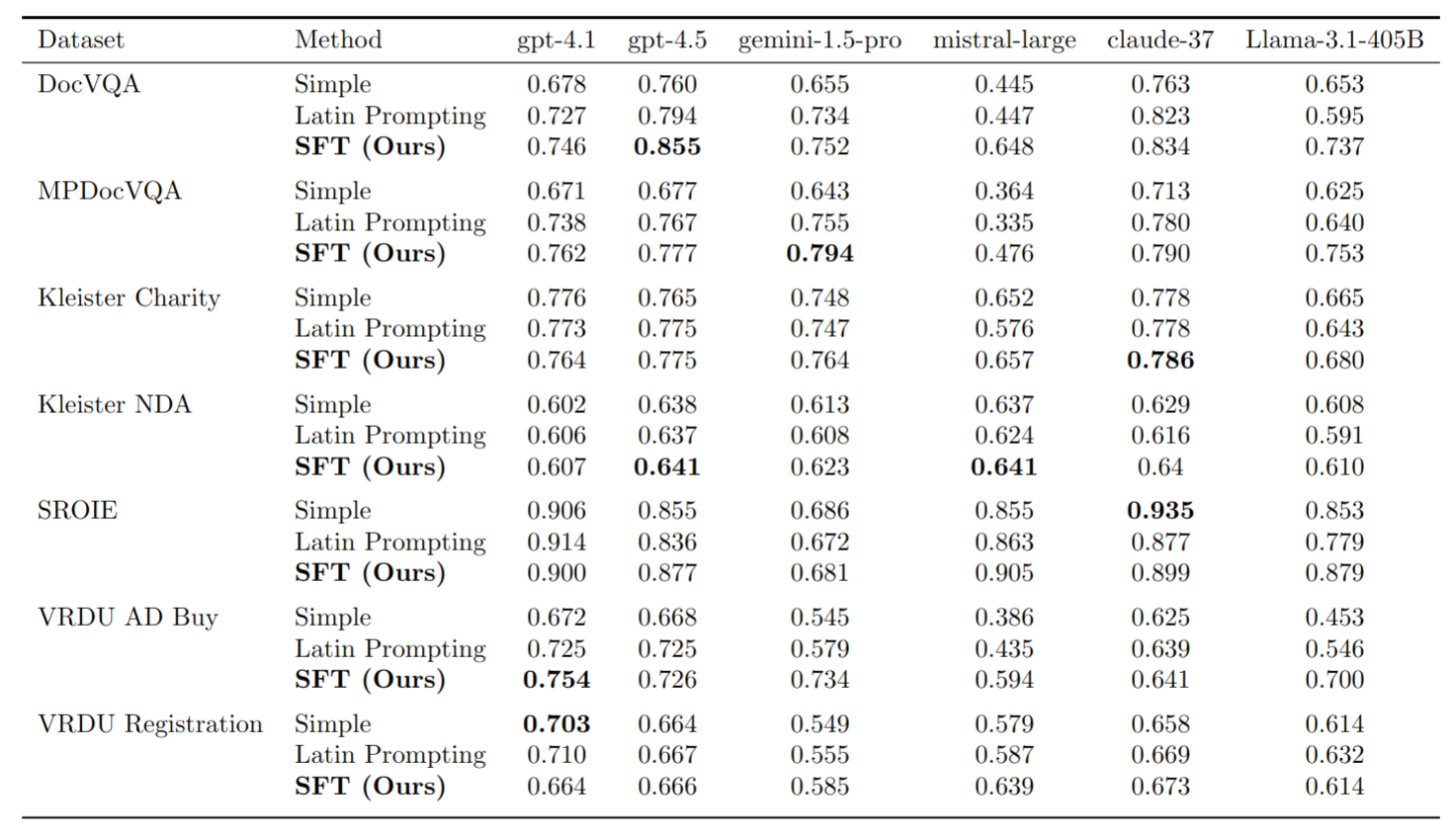
The following table shows the ANLS* score for the different models and prompt methods on different datasets. Note that we evaluate the models and prompt methods on 100 samples for single page datasets and 20 samples for multi page datasets in order to reduce the execution time and costs. Note that the provided validation set is used for the report.
How to Execute all Unit Tests
To run all unit tests simply execute uv run pytest
Packaging
See https://packaging.python.org/en/latest/tutorials/packaging-projects/
Release history Release notifications | RSS feed


Download files
Download the file for your platform. If you're not sure which to choose, learn more about installing packages.
Source Distribution
Built Distribution
Filter files by name, interpreter, ABI, and platform.
If you're not sure about the file name format, learn more about wheel file names.
Copy a direct link to the current filters
File details
Details for the file anls_star-0.1.0.tar.gz.
File metadata
- Download URL: anls_star-0.1.0.tar.gz
- Upload date:
- Size: 9.2 kB
- Tags: Source
- Uploaded using Trusted Publishing? No
- Uploaded via: uv/0.9.11 {"installer":{"name":"uv","version":"0.9.11"},"python":null,"implementation":{"name":null,"version":null},"distro":{"name":"Ubuntu","version":"24.04","id":"noble","libc":null},"system":{"name":null,"release":null},"cpu":null,"openssl_version":null,"setuptools_version":null,"rustc_version":null,"ci":true}
File hashes
| Algorithm | Hash digest | |
|---|---|---|
| SHA256 |
ae68ad0b3703e31875a9c8e2c92249d5e36da226580c3e837d0916331e5b99da
|
|
| MD5 |
6d3849a900a5e24a0f0b2e8451f5ae1a
|
|
| BLAKE2b-256 |
46686b581b8cf6e1563d86a3e2474d335c24bbb7115a62ace803087d5aaf0502
|
File details
Details for the file anls_star-0.1.0-py3-none-any.whl.
File metadata
- Download URL: anls_star-0.1.0-py3-none-any.whl
- Upload date:
- Size: 10.9 kB
- Tags: Python 3
- Uploaded using Trusted Publishing? No
- Uploaded via: uv/0.9.11 {"installer":{"name":"uv","version":"0.9.11"},"python":null,"implementation":{"name":null,"version":null},"distro":{"name":"Ubuntu","version":"24.04","id":"noble","libc":null},"system":{"name":null,"release":null},"cpu":null,"openssl_version":null,"setuptools_version":null,"rustc_version":null,"ci":true}
File hashes
| Algorithm | Hash digest | |
|---|---|---|
| SHA256 |
ef661f81e22881812e948852c99b8de19e87d70fcd5916fe7088c85ecd7b4a55
|
|
| MD5 |
44927d985329610a20d74493bfc3f69b
|
|
| BLAKE2b-256 |
aed0957c5b7d335264a27d5708312cc7ae72c0e46eb4607e1b4d7a39b01d74b9
|






