





A data loader and io utilities for mini-batched data loading of on-disk AnnData files as well as in-memory data, co-developed by Lamin Labs and scverse
Getting started
Please refer to the documentation, in particular, the API documentation.
Installation
pip install annbatch
Please see our installation page for full documentation about extras, especially zarrs-python which is essential for local filesystems but not for remote ones. numba is needed for in-memory sparse data.
Performance
We provide a speed comparison to other comparable dataloaders below:
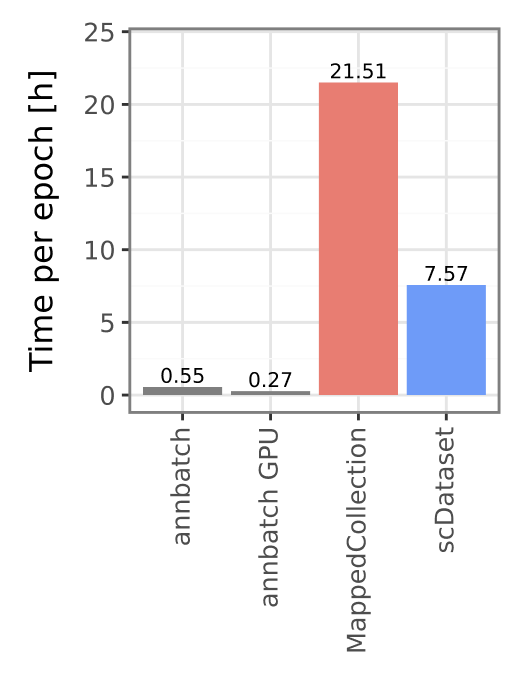
A more in-depth comparison and performance analysis is available in our paper (from which the above figure originates, see our citation).
Detailed tutorial
For a detailed tutorial, please see the in-depth section of our docs
Basic usage example
Basic preprocessing:
from annbatch import DatasetCollection

import zarr
from pathlib import Path

# Using zarrs is necessary for local filesystem performance.
# Ensure you installed it using our `[zarrs]` extra i.e., `pip install "annbatch[zarrs]"` to get the right version.
zarr.config.set(
    {"codec_pipeline.path": "zarrs.ZarrsCodecPipeline"}
)

# Create a collection at the given path. The subgroups will all be anndata stores.
collection = DatasetCollection("path/to/output/collection.zarr")
collection.add_adatas(
    adata_paths=[
        "path/to/your/file1.h5ad",
        "path/to/your/file2.h5ad"
    ],
    shuffle=True,  # shuffling is needed if you want to use chunked access, but is the default
)
Data loading:
from pathlib import Path

from annbatch import DatasetCollection, Loader
import anndata as ad
import zarr

# Using zarrs is necessary for local filesystem performance, but should not be used for remote file systems.
# Ensure you installed it using our `[zarrs]` extra i.e., `pip install "annbatch[zarrs]"` to get the right version.
zarr.config.set(
    {"codec_pipeline.path": "zarrs.ZarrsCodecPipeline"}
)


# WARNING: Without custom loading *all* obs columns will be loaded and yielded potentially degrading performance.
def custom_load_func(g: zarr.Group) -> ad.AnnData:
    return ad.AnnData(
        X=ad.io.sparse_dataset(g["layers"]["counts"]),
        obs=ad.io.read_elem(g["obs"])[some_subset_of_columns_useful_for_training]
    )


# A non empty collection
collection = DatasetCollection("path/to/output/collection.zarr")
# This settings override ensures that you don't lose/alter your categorical codes when reading the data in!
with ad.settings.override(remove_unused_categories=False):
    ds = Loader(
        batch_size=4096,
        chunk_size=32,
        preload_nchunks=256,
        to="torch"
    )
    # `use_collection` automatically uses the on-disk `X` and full `obs` in the `Loader`
    # but the `load_adata` arg can override this behavior
    # (see `custom_load_func` above for an example of customization).
    ds = ds.use_collection(collection, load_adata=custom_load_func)

# Iterate over dataloader (plugin replacement for torch.utils.DataLoader)
for batch in ds:
    x, obs = batch["X"], batch["obs"]
    # Important: For performance reasons convert to dense on GPU
    x = x.cuda().to_dense()
Release notes
See the changelog.
Contact
For questions and help requests, you can reach out in the scverse discourse. If you found a bug, please use the issue tracker.
Citation
If you use annbatch in your work, please cite the annbatch publication as follows:
annbatch unlocks terabyte-scale training of biological data in anndata
Gold, I., Fischer, F., Arnoldt, L., Wolf, F. A., & Theis, F. J. (2026b). annbatch unlocks terabyte-scale training of biological data in anndata. arXiv (Cornell University). https://doi.org/10.48550/arxiv.2604.01949
Metadata
Release files for annbatch 0.3.0
For a detailed explanation of source distributions (sdists) and built distributions (wheels), please see the package formats documentation.
Source distribution (sdist)
| File | Size | Uploaded | |
|---|---|---|---|
| annbatch-0.3.0.tar.gz | 200.0 kB | Details |
Built distribution (wheel)
| File | Interpreter | ABI | Platform | Reset |
|---|---|---|---|---|
| annbatch-0.3.0-py3-none-any.whl | Python 3 | none | any | Details |
Total release size: 254.5 kB
Release files / annbatch-0.3.0.tar.gz
| Download URL | annbatch-0.3.0.tar.gz |
|---|---|
| Size | 200.0 kB |
| Tags | Source |
|
SHA-256 checksum How to use checksums |
bf099f391927308678c04044c4c50af148fa6205ad5f889f26b6631b22a702cf
|
|
BLAKE2b-256 checksum How to use checksums |
08da1ba56574b15e86842ba57bd12aafd6905af57d69493c3f89106438d3afc3
|
| Upload date | |
|
Uploaded using Trusted Publishing? What is trusted publishing? |
Yes |
| Uploaded via |
twine/7.0.0 CPython/3.13.14
|
Provenance
Provenance describes where a file came from. On PyPI, provenance is shared via attestations, which provide a verifiable record of the build or publishing details. View details, limitations and caveats.


PyPI Publish Attestation
PyPI verified that this artifact, at this checksum, originated from the publisher listed below.
Signed by GitHub Actions, verified by PyPI on Sep 22, 2026.
Transparency logRelease files / annbatch-0.3.0-py3-none-any.whl
| Download URL | annbatch-0.3.0-py3-none-any.whl |
|---|---|
| Size | 54.6 kB |
| Tags | Python 3 |
|
SHA-256 checksum How to use checksums |
5b4c3613c5e36c31158f90921ac442f7244e4d991caf111fc07da09d9bd22ccd
|
|
BLAKE2b-256 checksum How to use checksums |
defb14a97c94b9a440450b73b5fc600ab5a501d3abca3b86cd2b662110560216
|
| Upload date | |
|
Uploaded using Trusted Publishing? What is trusted publishing? |
Yes |
| Uploaded via |
twine/7.0.0 CPython/3.13.14
|
Provenance
Provenance describes where a file came from. On PyPI, provenance is shared via attestations, which provide a verifiable record of the build or publishing details. View details, limitations and caveats.
PyPI Publish Attestation
PyPI verified that this artifact, at this checksum, originated from the publisher listed below.
Signed by GitHub Actions, verified by PyPI on Sep 22, 2026.
Transparency log













