
An annotation and instance segmentation-based multiple animal tracking and behavior analysis package.

Project description
Annolid





Annotate, segment, track, and analyze animals or other research targets in video with one reproducible toolchain.
Table of Contents
- Overview
- What Annolid Is For
- Documentation & Support
- Quick Start
- Installation
- Using Annolid
- Core Workflows
- Annotation Guide
- Labeling Best Practices
- Tutorials & Examples
- Troubleshooting
- Docker
- Citing Annolid
- Publications
- Additional Resources
- Acknowledgements
- Contributing
- License
Overview
Annolid is a deep learning toolkit for behavior analysis and video annotation. It brings annotation, instance segmentation, tracking, keypoint workflows, behavior scoring, and downstream analysis into one GUI and CLI environment.
The common path is practical and iterative: label a representative frame, propagate or track instances, review difficult frames, repair identities, and export annotations or metrics for analysis. Annolid is designed for real lab data, including overlap, occlusion, variable lighting, long videos, and projects where saved annotations need to remain readable and reproducible.
Python support: Annolid runs on Python 3.10–3.14 for the default GUI/core workflow. The optional remote network video path uses
ffpyplayer; installannolid[remote_video]only when you need that feature, especially on Python 3.14 where native FFmpeg development libraries may be required.
What Annolid Is For
- Markerless multi-animal tracking from a small number of labeled frames.
- LabelMe-compatible image and video annotation with polygons, keypoints, zones, and behavior events.
- Foundation-model assisted segmentation and tracking workflows, including Cutie, SAM-family workflows, Grounding DINO, CoTracker-style point tracking, TAPNext ONNX, EfficientTAM, and CowTracker where installed.
- Behavior scoring, timeline flags, zone analysis, time-budget summaries, and classifier workflows.
- GUI-first review and correction, plus
annolid-runCLI commands for reproducible model training, prediction, evaluation, and automation. - Optional Annolid Bot workflows for multimodal assistance, model/plugin execution, MCP tools, and lab automation integrations.
- Large TIFF and atlas-overlay work with optional tiled backends for OME-TIFF, BigTIFF, SVG, and Illustrator/PDF-compatible overlays.
Annolid keeps heavier runtime features behind extras so a standard GUI install stays usable on common lab machines. See Installation for the maintained extras and installer profiles.
Documentation & Support
- Latest documentation and user guide: https://annolid.com (mirror: https://cplab.science/annolid)
- Community updates and tutorials are shared on the Annolid YouTube channel.
- Sample datasets, posters, and publications are available in the
docs/folder of this repository. - Join the discussion on the Annolid Google Group.
Featured Use Case
- Tracking Four Interacting Mice with One Labeled Frame | 10-Minute Experiment See how Annolid bootstraps multi-animal tracking from a single labeled frame in a fast end-to-end workflow: https://youtu.be/PNbPA649r78
- For more practical examples and walkthroughs, visit the Annolid YouTube channel.
Quick Start
The fastest maintained path is the one-line installer:
macOS / Linux:
curl -sSL https://raw.githubusercontent.com/healthonrails/annolid/main/install.sh | bash
Windows PowerShell:
irm https://raw.githubusercontent.com/healthonrails/annolid/main/install.ps1 | iex
After installation:
annolid --help
annolid-run --help
annolid
If you prefer Anaconda:
conda create -n annolid-env python=3.11
conda activate annolid-env
conda install git ffmpeg
git clone --recurse-submodules https://github.com/healthonrails/annolid.git
cd annolid
pip install -e ".[gui]"
annolid  # launches the GUI
For source development, use a repository-local .venv:
git clone --recurse-submodules https://github.com/healthonrails/annolid.git
cd annolid
uv venv .venv --python 3.11
source .venv/bin/activate
uv pip install -e ".[gui]"
annolid
Installation
One-Line Installation (Recommended)
Get Annolid running in minutes with the automated installer. It clones the repository, creates an isolated environment, bootstraps uv when needed, installs GUI dependencies, and validates the ONNX Runtime provider setup.
macOS / Linux:
curl -sSL https://raw.githubusercontent.com/healthonrails/annolid/main/install.sh | bash
Windows PowerShell:
irm https://raw.githubusercontent.com/healthonrails/annolid/main/install.ps1 | iex
The script will:
- Clone the repository.
- Detect your OS and hardware.
- Create an isolated virtual environment.
- Install and validate ONNX Runtime CPU/GPU providers.
- Prompt for optional features such as SAM3 and text-to-speech when requested.
- Offer to launch Annolid immediately.
For a full breakdown of one-line installer choices, including GPU vs CPU, interactive vs non-interactive, custom paths, Conda, and extras, see One-Line Installer Choices.
Common maintained workstation profile:
curl -sSL https://raw.githubusercontent.com/healthonrails/annolid/main/install.sh | bash -s -- --profile workstation
Other Installation Methods
For advanced users, Docker, Conda, or manual Pip installation, please see the Detailed Installation Guide.
Using Annolid
- Launch the GUI:
conda activate annolid-env
annolid
- Provide custom labels:
annolid --labels=/path/to/labels_custom.txt
- Draw shapes on a seed frame, often frame
0, and use stable instance names when cross-frame identity matters. - Mark zones directly in the label popup with Zone type, or use Video Tools → Zones for bulk zone management, presets, and zone JSON save/load.
- Use View → Show Zones On All Frames to control whether saved zone overlays are displayed across the full timeline.
- Open Video Tools → Zone Analysis to export legacy place-preference CSVs, generic zone metrics, or profile-aware assay summaries. See Zone Analysis and Zone Analysis Workflow.
- For behavior scoring with shared behavior names across Flags, Timeline, and Annolid Bot, see Behavior labeling with Timeline, Flags, and Annolid Bot.
- Use
annolid-run list-models,annolid-run help train, andannolid-run help predictfor CLI model workflows. - Open AI & Models → Annolid Bot… when you need multimodal chat, typed model/plugin execution, MCP integrations, or optional lab-automation channels. See Agent and Automation, MCP, and Annolid Agent and annolid-run.
- Summarize annotated behavior events into a time-budget report (GUI: File → Behavior Time Budget; CLI example with 60 s bins and a project schema):
python -m annolid.behavior.time_budget exported_events.csv \
    --schema project.annolid.json \
    --bin-size 60 \
    -o time_budget.csv
- Compute aggression-bout counts (for example
slap_in_face,run_away, andfight_initiation) and export a_bouts.csvsidecar:python -m annolid.behavior.time_budget exported_events.csv \ --bout-profile aggression \ --bout-gap-seconds 2 \ -o time_budget.csv
- Compress videos when storage is limited:
ffmpeg -i input.mp4 -vcodec libx264 output_compressed.mp4
Core Workflows
- Getting Started: shortest path from install to a working GUI session.
- Workflows: supported GUI, Bot, CLI, behavior, depth, 3D, identity-repair, and simulation paths.
- Tutorials: maintained walkthroughs and notebooks.
- TAPNext ONNX point tracking: point-seeded tracking workflow and model-cache behavior.
- SAM3 guide: SAM3 tracking and agent-assisted long-video tracking.
- Large TIFF and Atlas Overlay Workflow: large image and vector overlay workflow.
Video Depth Anything
- Run depth estimation on the currently loaded video via View → Video Depth Anything…. Use View → Depth Settings… to pick the encoder, resolution, FPS downsampling, and which outputs to save.
- Pretrained weights belong under
annolid/depth/checkpoints. Download just what you need via the bundled Python helper (useshuggingface-hub, already listed in dependencies):cd annolid python -m annolid.depth.download_weights --model video_depth_anything_vitl
Pass--allto fetch every checkpoint, or runpython -m annolid.depth.download_weights --listfor the full menu. Existing files are never re-downloaded. - The GUI runner now auto-downloads whichever checkpoint you select in the dialog, so you only need to invoke the helper when you want to prefetch models ahead of time.
- Depth run now streams inference frame-by-frame, emits a single
depth.ndjsonrecord alongside the video (with per-frame base64 depth PNGs plus scale metadata) instead of writing separate JSON files per frame, and still shows a live blended overlay while processing. Enablesave_depth_videoorsave_depth_framesonly if you also need rendered outputs. - Optional exports include
depth_frames/,<video_stem>_vis.mp4, point cloud CSVs,*.npz, and*_depths_exr/(EXR requiresOpenEXR/Imath). - Full walkthrough and updates: https://annolid.com/portal/workflows/.
CoWTracker Setup
If you want to run the CoWTracker backend, install Annolid with the CowTracker extra:
pip install "annolid[cowtracker]"
# or from source
pip install -e ".[cowtracker]"
If Annolid is already installed, add only the CowTracker dependency:
pip install "safetensors>=0.4.0"
Then select CoWTracker in the model dropdown. The model checkpoint is fetched from Hugging Face on first use.
CowTracker uses a minimal vendored VGGT runtime subset under:
annolid/tracker/cowtracker/cowtracker/thirdparty/vggt
If that vendored subset is not present, CowTracker can also use an externally
installed vggt package. See annolid/tracker/cowtracker/README.md for the
required vendored file list and packaging notes.
TAPNext ONNX Setup
Select TAPNext (ONNX) in the model dropdown. Annolid downloads the official TAPNext ONNX model on first use, verifies its SHA256 checksum, and caches it at:
~/.annolid/workspace/downloads/tapnext.onnx
The published model URL is:
https://github.com/healthonrails/annolid/releases/download/v1.6.6/tapnext.onnx
Expected checksum:
sha256:4fca0951802f0b745de254930c880938a74bf8b54b10786fc68d0ab4ba5c5300
Annolid runs the model in fixed-length clips, pads or batches query points to
match the exported Q capacity, and writes tracked points as LabelMe JSON files
like the CoTracker backend.
See the TAPNext ONNX point tracking guide for the full GUI workflow, prompt tips, output format, and troubleshooting notes.
Annotation Guide

Atlas Overlay Workflow
Annolid now supports a practical atlas workflow for large TIFF-family images and Illustrator-exported overlays.
- Open
.tif,.tiff,.ome.tif, or.ome.tiffimages. - Import Illustrator-exported
SVGoverlays or PDF-compatible.aifiles. - Use the
Vector Overlaysdock for visibility, opacity, transform, landmark pairing, and affine alignment. - Edit polygons and other supported shapes directly inside the tiled large-image viewer, and create native point/line/linestrip/polygon/rectangle/circle annotations there.
- Keep immutable source provenance for imported overlays while editing a derived correction layer.
- Export corrected overlays as
SVG, overlayJSON, or*.labelme.json.
Imported vector overlays now skip definition-only geometry such as clip paths, PDF-compatible Illustrator .ai files can be opened directly, small atlas drawings can auto-fit to the current image on import when their coordinates are clearly not already in image space, and PDF-compatible .ai/.pdf overlays preserve the source art box when available, then the page box and image origin during auto-fit so the imported geometry stays aligned to the underlying raster coordinate system. Explicit landmark pairs are stored with the overlay record instead of only existing as transient point metadata.
For step-by-step instructions, install notes, and landmark pairing details, see Large TIFF and Atlas Overlay Workflow. For a broader overview of large TIFF support, viewing backends, caches, tile-native editing, and canvas fallback behavior, see Large Image Guide.
Large-image support is optional by design. A standard annolid[gui] install still works normally for the usual GUI and annotation workflows. If you need large TIFF / OME-TIFF metadata, optimized cache generation, or faster whole-slide style navigation, install annolid[large_image].
When Annolid opens a large TIFF, it reports which backend it used. If it says tifffile for a very large file, installing the native libvips or OpenSlide runtime can improve pan/zoom responsiveness.
For large flat TIFF files, File -> Optimize Large TIFF for Fast Viewing... builds a pyramidal cache that later opens can reuse. The same File menu also exposes cache info, cache-folder access, configurable cache limits, and safe cache cleanup actions, and Annolid prunes old optimized TIFF caches automatically so disk usage does not grow without bound.
During large-image work, the status bar is kept minimal so it mainly carries the page controls. Backend, page, zoom, tile, cache, and mode information are shown in the tiled viewer’s debug/status overlay instead.
Large TIFF sessions also expose a unified Layers dock built from the shared large-image layer model, so label-image overlays, vector overlays, and manual annotations can be inspected and toggled from one place instead of only through specialized overlay actions.
- Label polygons and keypoints clearly. Give each animal a unique instance name when tracking across frames (for example,
vole_1,mouse_2). Use descriptive behavior names (rearing,grooming) for polygons dedicated to behavioral events, and name body-part keypoints (nose,tail_base) consistently. - Tune instance colors for review. In the GUI, right-click a label in Labels or a shape row in Label Instances, then choose Change color. Annolid applies the color to every visible instance with that label and remembers the preference in app settings without changing LabelMe JSON files. Use Reset color to return to the automatic palette or project-schema color.
- Accelerate timestamp annotation. While scoring behaviors, press
sto mark the start,eto mark the end,f/bto step ±10 frames, andrto remove events directly from the video slider. - Enable frame-level flags. Launch Annolid with
--flags "digging,rearing,grooming"to open a multi-select list of behaviors. Save selections withCtrl+Sor the Save button; remove events by pressingR. - Customize configuration. The first run creates
~/.labelmerc(orC:\Users\<username>\.labelmercon Windows). Edit this file to change defaults such asauto_save: true, or supply an alternative path viaannolid --config /path/to/file. - Learn more. Additional annotation tips live in
annolid/annotation/labelme.md.
Labeling Best Practices
- Label 20–100 frames per video to reach strong performance; the curve in
docs/imgs/AP_across_labeled_frames.pngshows how accuracy scales with annotation volume. - Close the loop with human-in-the-loop training (see
docs/imgs/human_in_the_loop.png): train on initial annotations, auto-label, correct, and retrain until predictions align with human expectations. - Draft labeling guidelines up front—start with this template and adapt it to your species and behaviors.
- Treat each animal instance as its own class when you need cross-frame identity. Use generic class names only when identity consistency is unnecessary, or when you are aggregating across many individuals.
- To generalize to new animals or videos, include diverse examples of each behavior and adjust the training set iteratively.
Tutorials & Examples
- Featured demo: Tracking Four Interacting Mice with One Labeled Frame | 10-Minute Experiment
- Behavior workflow tutorial: Behavior labeling with Timeline, Flags, and Annolid Bot
- DINOv3 Keypoint Tracking tutorial: book/tutorials/DINOv3_keypoint_tracking.md
- DINOv3 model selection/download helper:
annolid-run dinov3-models --list


| YouTube Channel | Annolid documentations |
|---|---|
 |
 |

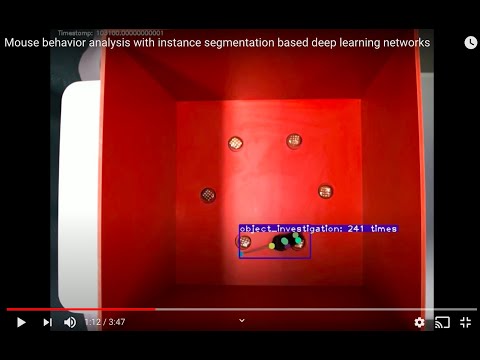
| Instance segmentations | Behavior prediction |
|---|---|
 |
 |
Troubleshooting
- Video playback errors (
OpenCV: FFMPEG: tag ...or missing codecs): Install FFmpeg via your package manager orconda install -c conda-forge ffmpegto extend codec support. - macOS Qt warning (
Class QCocoaPageLayoutDelegate is implemented in both ...):conda install qtpyresolves the conflict between OpenCV and PyQt. - If the GUI does not launch, confirm the correct environment is active and run
annolid --helpfor CLI usage. - If you see
qtpy.QtBindingsNotFoundError, install GUI dependencies in the active environment:pip install -e ".[gui]"(source) orpip install "annolid[gui]"(PyPI). - For model training/inference from the terminal, use
annolid-run list-models,annolid-run help train,annolid-run help predict,annolid-run help train <model>, andannolid-run help predict <model>. Older--help-modelforms still work. - Built-in model plugins now show curated quick-reference groups such as
Required inputs,Model and runtime, andTraining controlsbefore the full flag list. - Shared YAML run-configs are supported for multiple training plugins (for example
dino_kpseg,maskrcnn_detectron2,yolo,behavior_classifier):annolid-run train <model> --run-config annolid/configs/runs/<template>.yaml(CLI flags still override YAML fields). - YOLOE-26 prompting (text, visual, prompt-free) is available via
annolid-run predict yolo_labelmeand in the GUI video inference workflow (see https://annolid.com/portal/workflows/). - For an interactive TensorBoard embedding projector view of DinoKPSEG DINOv3 patch features, run
annolid-run dino-kpseg-embeddings --data /path/to/data.yaml [--weights /path/to/best.pt]and thentensorboard --logdir <run_dir>/tensorboard(some DINOv3 checkpoints require a Hugging Face token).
Docker
Ensure Docker is installed, then run:
cd annolid/docker
docker build .
xhost +local:docker  # Linux only; allows GUI forwarding
docker run -it -v /tmp/.X11-unix:/tmp/.X11-unix/ -e DISPLAY=$DISPLAY <IMAGE_ID>
Replace <IMAGE_ID> with the identifier printed by docker build.
Citing Annolid
If you use Annolid in your research, please cite:
- Preprint: Annolid: Annotation, Instance Segmentation, and Tracking Toolkit
- Zenodo: Find the latest release DOI via the badge at the top of this README.
@misc{yang2024annolid,
      title={Annolid: Annotate, Segment, and Track Anything You Need},
      author={Chen Yang and Thomas A. Cleland},
      year={2024},
      eprint={2403.18690},
      archivePrefix={arXiv},
      primaryClass={cs.CV}
}

@article{yang2023automated,
  title={Automated Behavioral Analysis Using Instance Segmentation},
  author={Yang, Chen and Forest, Jeremy and Einhorn, Matthew and Cleland, Thomas A},
  journal={arXiv preprint arXiv:2312.07723},
  year={2023}
}

@misc{yang2020annolid,
  author = {Chen Yang and Jeremy Forest and Matthew Einhorn and Thomas Cleland},
  title = {Annolid: an instance segmentation-based multiple animal tracking and behavior analysis package},
  howpublished = {\url{https://github.com/healthonrails/annolid}},
  year = {2020}
}
Publications
- 2022 – Ultrasonic vocalization study. Pranic et al. relate mouse pup vocalizations to non-vocal behaviors (bioRxiv).
- 2022 – Digging and pain behavior. Pattison et al. link digging behaviors to wellbeing in mice (Pain, 2022).
- SfN Posters:
- 2021: Annolid — instance segmentation-based multiple-animal tracking
- 2023: PSTR512.01 Scoring rodent digging behavior with Annolid
- 2023: PSTR512.02 Annolid: Annotate, Segment, and Track Anything You Need
- For more applications and datasets, visit https://cplab.science/annolid.
Additional Resources
- Example dataset (COCO format): Download from Google Drive.
- Pretrained models: Available in the shared Google Drive folder.
- Feature requests & bug reports: Open an issue at github.com/healthonrails/annolid/issues.
- Additional videos: Visit the Annolid YouTube channel for demonstrations and talks.
Acknowledgements
Annolid's tracking module integrates Cutie for enhanced video object segmentation. If you use this feature, please cite Putting the Object Back into Video Object Segmentation (Cheng et al., 2023) and the Cutie repository.
The counting tool integrates CountGD; cite the original CountGD publication and repository when you rely on this module in your research.
Contributing
Contributions are welcome! Review the guidelines in CONTRIBUTING.md, open an issue to discuss major changes, and run relevant tests before submitting a pull request.
License
Annolid is distributed under the Creative Commons Attribution-NonCommercial 4.0 International License.
Release history Release notifications | RSS feed


Download files
Download the file for your platform. If you're not sure which to choose, learn more about installing packages.
Source Distribution
Built Distribution
Filter files by name, interpreter, ABI, and platform.
If you're not sure about the file name format, learn more about wheel file names.
Copy a direct link to the current filters
File details
Details for the file annolid-1.6.8.tar.gz.
File metadata
- Download URL: annolid-1.6.8.tar.gz
- Upload date:
- Size: 8.4 MB
- Tags: Source
- Uploaded using Trusted Publishing? No
- Uploaded via: twine/6.1.0 CPython/3.13.12
File hashes
| Algorithm | Hash digest | |
|---|---|---|
| SHA256 |
73b0fbc3c7c8edd74829385c815df0b11994facb81204836a8da6be9e49764b9
|
|
| MD5 |
2b968e6a357a473d3a7cd87a7ace99f4
|
|
| BLAKE2b-256 |
9683b3a63d6ae49686fedc6b680aaa3d83a8231760bb39786e53830986e26ea9
|
File details
Details for the file annolid-1.6.8-py3-none-any.whl.
File metadata
- Download URL: annolid-1.6.8-py3-none-any.whl
- Upload date:
- Size: 8.4 MB
- Tags: Python 3
- Uploaded using Trusted Publishing? No
- Uploaded via: twine/6.1.0 CPython/3.13.12
File hashes
| Algorithm | Hash digest | |
|---|---|---|
| SHA256 |
a0a39efa8c9b78185b524c5e9d0b40bb56fe475b718c400187eeff9357c5222f
|
|
| MD5 |
6371345aa008e0e0bc4c1f38f839dd59
|
|
| BLAKE2b-256 |
b5cff6610fe405e1b3d4b1f4d636eb69acbafab4ab2d5f1b88dd86fdfa40191c
|






