This release is a pre-release and may not be stable for production use.
PyDynamicReporting







Overview
PyDynamicReporting is the Python client library for Ansys Dynamic Reporting, previously documented as Nexus. Ansys Dynamic Reporting is a service for pushing items of many types, including images, text, 3D scenes, and tables, into a database, where you can keep them organized and create dynamic reports from them. When you use PyDynamicReporting to connect to an instance of Ansys Dynamic Reporting, you have a Pythonic way of accessing all capabilities of Ansys Dynamic Reporting.
Documentation and issues
Documentation for the latest stable release of PyDynamicReporting is hosted at PyDynamicReporting documentation.
In the upper right corner of the documentation’s title bar, there is an option for switching from viewing the documentation for the latest stable release to viewing the documentation for the development version or previously released versions.
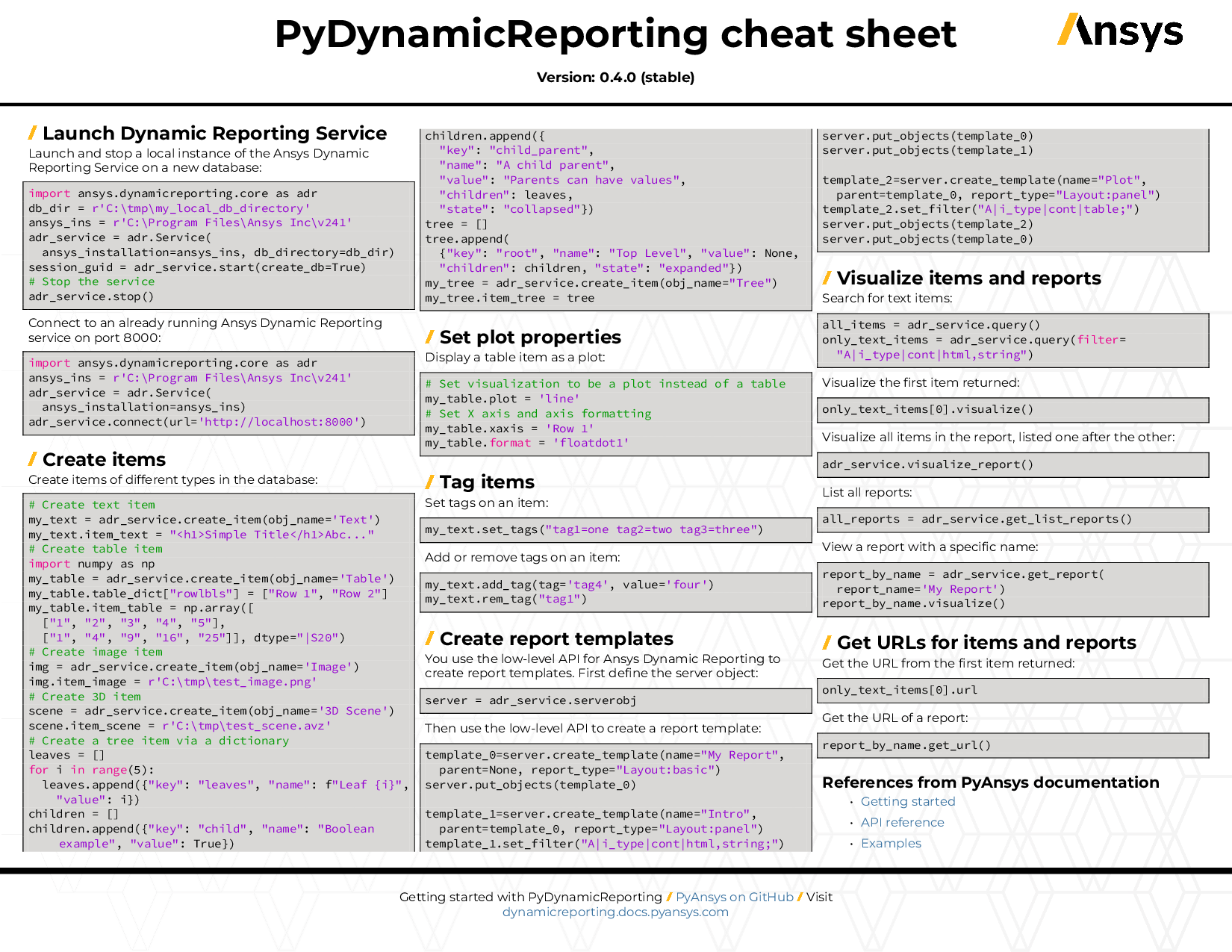
You can also view or download the PyDynamicReporting cheat sheet. This one-page reference provides syntax rules and commands for using PyDynamicReporting.
On the PyDynamicReporting Issues page, you can create issues to report bugs and request new features. On the Discussions page on the Ansys Developer portal, you can post questions, share ideas, and get community feedback.
To reach the project support team, email pyansys.core@ansys.com.
Installation
The pydynamicreporting package supports Python 3.10 through 3.13 on Windows and Linux. It is currently available on PyPI.
For the base client package, run:
pip install ansys-dynamicreporting-coreDeveloper installation
This project uses uv for fast dependency management and virtual environment handling. To set up a development environment:
Prerequisites
Install uv by following the official installation guide.
You’ll also need make:
# On Windows, install using chocolatey:
choco install make

# On Linux, make is usually pre-installed. If not, install via:
sudo apt-get install build-essential  # Ubuntu/Debian
sudo yum groupinstall "Development Tools"  # RHEL/CentOS/Fedora
Clone and Install
git clone https://github.com/ansys/pydynamicreporting
cd pydynamicreporting
make install
The make install command does the following:
Synchronizes dependencies from uv.lock (includes all optional extras)
Creates a .venv virtual environment automatically
Installs the package in editable mode
This creates an “editable” installation that lets you develop and test PyDynamicReporting simultaneously.
Developer workflow note
After making changes, run the pre-commit hooks (via uv) before committing. Otherwise, the code-style CI check will fail.
make checkAvailable Make Commands
The Makefile provides several useful commands:
make check        # Run code quality checks (pre-commit hooks)
make version      # Display the current project version
make build        # Build source distribution and wheel
make check-dist   # Validate built artifacts
make test         # Run the full test suite with coverage
make smoketest    # Quick import test
make docs         # Build documentation
make clean        # Remove build artifacts and caches
Running Tests
To run tests with coverage reporting:
make testFor a quick sanity check:
make smoketestUpdating Dependencies
If you see an error like The lockfile at `uv.lock` needs to be updated, run the following commands to update the lock file:
uv sync --upgrade --all-extras
uv lock --upgrade
Then make sure to commit the updated uv.lock file. This ensures your local environment is synchronized with the latest dependency constraints.
Resolving CI Security Scan Errors
If CI reports a Security Scan error, first activate the virtual environment and then refresh the environment and lock file:
# Windows PowerShell
.\.venv\Scripts\Activate.ps1

# Linux/macOS
source .venv/bin/activate

uv sync --upgrade --all-extras
uv lock --upgrade
After these commands finish, commit the updated uv.lock file.
For serverless compatibility work, keep the base dependency set broad enough to span the supported ADR product lines and place release-specific pins in constraints/.
Local GitHub Actions
To run GitHub Actions on your local desktop, install the act package:
choco install act-cli  # Windows
# or: brew install act  # macOS/Linux with Homebrew
To run a specific job from the CI/CD workflow, use:
act -W '.github/workflows/ci_cd.yml' -j style --bind      # Run code style checks
act -W '.github/workflows/ci_cd.yml' -j smoketest --bind # Run smoke testsNote: Deploy and upload steps are guarded with if: ${{ !env.ACT }} to prevent them from running locally. Only build and validation steps will execute with act.
Creating a Release
This project now uses tag-driven releases and dynamic versions powered by hatch-timestamp-version (based on hatch-vcs). Stable releases are cut from Git tags (vX.Y.Z). Development builds use UTC timestamped versions derived from the most recent tag. Version numbers come from tags, but maintained product lines can still use long-lived stable/ branches.
Versioning model
Stable releases: The version is the exact Git tag (for example, v0.10.0 -> package version 0.10.0).
Development builds: Version is computed from the latest tag plus a timestamp, for example 0.10.1.devYYYYMMDDHHMMSS.
No manual editing of pyproject.toml for versions; [tool.hatch.version] drives everything.
Product compatibility is declared separately from SemVer. The package version stays plain SemVer, while the package metadata declares the bundled ADR product release and the supported annual product lines.
Maintenance branch policy
main is reserved for the next ADR product line under development.
Long-lived maintenance branches use the stable/<product-line>.x naming convention.
Stable releases are still cut from tags, but the tag should be created from the maintenance branch that owns that product line.
Backport only the specific fixes you want to ship on an older supported line. Forward-port maintenance fixes from stable/<product-line>.x back to main after they are released.
Product compatibility policy
Each client major line represents one ADR compatibility epoch.
A client line supports the current ADR annual product line and the previous annual product line.
Minor and patch releases do not widen the compatibility window.
A new client major advances the window by one annual product line and drops the oldest supported line.
Policy start point
0.x is the legacy transition line. 0.10.x remains the last legacy line tied to ADR 26.1 behavior.
1.0.0 is the first fully policy-driven line. It starts the product-release-aligned scheme with ADR 27.1 as the bundled release and support for the 26.* and 27.* annual product lines.
Every future client major advances the supported window by exactly one ADR annual product line.
The client major line determines the ADR compatibility epoch:
0.x is bundled with ADR 26.1 and supports the 25.* and 26.* annual product lines.
1.x is bundled with ADR 27.1 and supports the 26.* and 27.* annual product lines.
2.x is bundled with ADR 28.1 and supports the 27.* and 28.* annual product lines.
ADR 25.2 was the final half-year release. Starting with ADR 26.1, there is only one release per annual line, so 26.* currently means 26.1, 27.* means 27.1, and so on.
For example, under this policy:
1.0.0 is bundled with ADR 27.1 and supports 26.* and 27.*.
1.2.0 and 1.2.2 would still support 26.* and 27.*.
2.0.0 could bundle ADR 28.1 and support 27.* and 28.*, dropping support for 26.*.
What the automation does
Create Draft Release (on tag push): builds wheels/sdist and opens a draft GitHub Release attaching artifacts. Tags ending in rcN are marked as prereleases.
Publish Release (when the GitHub Release is published): uploads the reviewed GitHub Release artifacts to PyPI via Trusted Publisher, then builds and publishes the versioned documentation. Release-candidate documentation is published under its exact version while the stable documentation continues to point to the latest final release.
Failure notifications: posts to Microsoft Teams on workflow failure.
Prerequisites
Ensure CHANGELOG.md has a section for the release dated today. The helper script validates this.
Use a fresh checkout of main or the applicable stable/* maintenance branch. It must track and exactly match the same branch on origin.
Working tree must be clean, including untracked files, and the CI-CD push workflow for the exact release commit must have completed successfully.
Authenticate GitHub CLI (gh) for the repository so the helper can verify the CI run before creating the tag.
CI secrets for publishing and docs deployment are configured in GitHub.
The GitHub pypi environment and PyPI Trusted Publisher are configured for release tags matching v*.
Cutting a Release
Make sure your CHANGELOG.md entry for the version is dated today. This check runs automatically from make tag.
Create and push the release tag:
make tagThis validates the tag syntax, changelog date, clean working tree, release branch and upstream commit, and successful CI-CD push run. It then creates and pushes the Git tag (for example, v0.10.0).
For a release candidate, pass the exact pre-release version explicitly:
make tag RELEASE_VERSION=1.0.0rc1An rcN tag creates a draft GitHub Release already marked as a prerelease. Keep that setting enabled when reviewing and publishing the draft.
Once the tag is pushed:
The Create Draft Release workflow builds the package and opens a draft GitHub Release with artifacts.
After reviewing and finalizing notes, publish the GitHub Release. For an RC, verify that the release is marked as a prerelease before publishing.
Publishing the release automatically triggers the Release workflow, which:
Downloads the artifacts attached to the reviewed GitHub Release and uploads those exact files to PyPI using Trusted Publisher.
Builds and publishes the versioned documentation.
Publishes RC documentation under its exact version, such as version/1.0.0rc1/, without replacing the stable documentation.
Patch releases
For a patch, update the changelog, ensure the working tree is clean, then run make tag again. This tags the next patch version determined by hatch version from your last tag.
Use the maintenance branch for the supported product line when cutting the tag.
Local dry-runs (optional)
You can use act to exercise non-publishing parts locally. Steps that publish or deploy are already guarded in workflows (for example, with if: ${{ !env.ACT }}). Build and validation steps still run:
act workflow_dispatch -W '.github/workflows/release-docs.yml' \
  -j build --bind
Manual release recovery
Manual release or documentation deployment must be dispatched from the exact existing release tag. Do not dispatch from main and pass a separate source reference. For example:
gh workflow run create-draft-release.yml --ref v1.0.0rc1
# OR
gh workflow run release.yml --ref v1.0.0rc1 \
  -f deploy_versioned_docs=true
# OR
gh workflow run release-docs.yml --ref v1.0.0rc1 \
  -f deploy_versioned_docs=true
Use release.yml only when the PyPI upload has not completed. If PyPI already contains the release, use the documentation-only workflow.
CI workflows (reference)
.github/workflows/create-draft-release.yml
Triggers on tag push v* or manual dispatch.
Builds artifacts and opens a draft GitHub Release attaching dist/*. An rcN tag is marked as a prerelease automatically.
.github/workflows/release.yml
Triggers on a published GitHub Release or manual dispatch.
Manual dispatches must select the exact existing release tag with --ref.
Promotes the reviewed GitHub Release artifacts to PyPI without rebuilding them, then publishes versioned docs. RC docs are kept separate from stable docs. A manual dispatch must explicitly enable documentation deployment.
CLI helpers
Print the resolved version (dev or stable):
make versionBuild locally (sdist + wheel):
make build
make check-dist
Clean:
make clean
Changelog guards
Releases are blocked if today’s dated entry is missing:
ERROR: CHANGELOG.md is not ready for release.
   Expected line: ## [0.10.0] - YYYY-MM-DD
   Tip: Check if it's still marked as '[Unreleased]' and update it to today's date.
Troubleshooting
“No Git tag found” during checks: Create a tag via make tag (or git tag vX.Y.Z && git push origin vX.Y.Z).
Draft asset upload failed: Re-run create-draft-release.yml from the same tag. The workflow reuses the existing draft and replaces incomplete assets; it never creates a missing tag or modifies a published release.
Version mismatch: hatch version determines the version from the last tag. Ensure you pushed the intended tag and your clone has all tags (git fetch --tags).
Dependencies
PyDynamicReporting 1.x supports licensed ADR installations from the 26.* and 27.* annual product lines. This requirement applies to both connected service mode and ansys.dynamicreporting.core.serverless.
Basic usage
This code shows how to start the simplest PyDynamicReporting session:
>>> import ansys.dynamicreporting.core as adr
>>> adr_service = adr.Service(ansys_installation=r"C:\\Program Files\\ANSYS Inc\\v261\\")
>>> ret = adr_service.connect()
>>> my_img = adr_service.create_item()
>>> my_img.item_image = "image.png"
>>> adr_service.visualize_report()
License and acknowledgements
PyDynamicReporting is licensed under the MIT license.
PyDynamicReporting makes no commercial claim over Ansys whatsoever. This library extends the functionality of Ansys Dynamic Reporting by adding a Python interface to Ansys Dynamic Reporting without changing the core behavior or license of the original software. The use of PyDynamicReporting requires a legally licensed copy of an Ansys product that supports Ansys Dynamic Reporting.
To get a copy of Ansys, visit the Ansys website.
1 maintainer

Metadata
1 maintainer
Release files for ansys-dynamicreporting-core 1.0.0rc1
For a detailed explanation of source distributions (sdists) and built distributions (wheels), please see the package formats documentation.
Source distribution (sdist)
| File | Size | Uploaded | |
|---|---|---|---|
| ansys_dynamicreporting_core-1.0.0rc1.tar.gz | 235.6 kB | Details |
Built distribution (wheel)
| File | Interpreter | ABI | Platform | Reset |
|---|---|---|---|---|
| ansys_dynamicreporting_core-1.0.0rc1-py3-none-any.whl | Python 3 | none | any | Details |
Total release size: 481.3 kB
Release files / ansys_dynamicreporting_core-1.0.0rc1.tar.gz
| Download URL | ansys_dynamicreporting_core-1.0.0rc1.tar.gz |
|---|---|
| Size | 235.6 kB |
| Tags | Source |
|
SHA-256 checksum How to use checksums |
1b9c73bcec617dba24fc15ac9e5b88c444e6e9831a7a20df4bdb094d55b159f3
|
|
BLAKE2b-256 checksum How to use checksums |
5ed9d7268db2c6b90c90411ced29cbbb4f985365d9ba4ce3852bcaa92a907204
|
| Upload date | |
|
Uploaded using Trusted Publishing? What is trusted publishing? |
Yes |
| Uploaded via |
twine/6.1.0 CPython/3.13.13
|
Provenance
Provenance describes where a file came from. On PyPI, provenance is shared via attestations, which provide a verifiable record of the build or publishing details. View details, limitations and caveats.


PyPI Publish Attestation
PyPI verified that this artifact, at this checksum, originated from the publisher listed below.
Signed by GitHub Actions, verified by PyPI on Aug 28, 2026.
Transparency logRelease files / ansys_dynamicreporting_core-1.0.0rc1-py3-none-any.whl
| Download URL | ansys_dynamicreporting_core-1.0.0rc1-py3-none-any.whl |
|---|---|
| Size | 245.7 kB |
| Tags | Python 3 |
|
SHA-256 checksum How to use checksums |
8452d045412d46efa6c58e4802dffb85514f892408de0a64f7c530d50f5362b0
|
|
BLAKE2b-256 checksum How to use checksums |
86c592e11b9505b7879a8cc070f358cf02e8168bc9fbe00bf5117eda368f5bee
|
| Upload date | |
|
Uploaded using Trusted Publishing? What is trusted publishing? |
Yes |
| Uploaded via |
twine/6.1.0 CPython/3.13.13
|
Provenance
Provenance describes where a file came from. On PyPI, provenance is shared via attestations, which provide a verifiable record of the build or publishing details. View details, limitations and caveats.
PyPI Publish Attestation
PyPI verified that this artifact, at this checksum, originated from the publisher listed below.
Signed by GitHub Actions, verified by PyPI on Aug 28, 2026.
Transparency log