
Antback: Lightweight Backtesting with Heavyweight Insight

Project description
Antback
Antback: Fast, Transparent, and Debuggable Backtesting
A lightweight, event-loop-style backtest engine that allows a function-driven imperative style using efficient stateful helper functions and data containers.
Key Features
- Transparency: Every step is visible and debuggable. No black-box logic.
- Balances simplicity with robustness - ideal for rapid strategy prototyping.
- Interactive HTML Reports: Detailed reports with sorting and filtering capabilities via DataTables.
- High Performance: Optimized data structures for speed - very fast.
- Easy to use with different data sources - only needs
dateandpricevalues. - Avoids Lookahead Bias: by processing data sequentially. Use wait functions to enforce delays between signals.
Installation
A key feature is the generation of interactive HTML reports, which allow for easy inspection of trades. The lightweight df2tables module is used for this purpose. For Excel reports, xlreport is used.
pip install antback df2tables xlreport
Core functionality requires only numpy and pandas (pandas for reporting only).
Demo
import antback as ab
ab.demo()
The demo feature generates random trades of several stocks at random prices and generates an interactive report. A profit is slightly more likely than a loss—it's a demo, after all.
Quick Start
Simple SMA Crossover Strategy
import numpy as np
import antback as ab

import yfinance as yf
symbol = "QQQ"
data = yf.Ticker(symbol).history(period='10y')

port = ab.Portfolio(10_000, single=True)
fast, slow  = 10, 30

prices = ab.RollingList(maxlen=slow)
cross = ab.new_cross_func()

for date, price in data["Close"].items():
    prices.append(price)
    price_history = prices.values()
    signal = "update"  # Reset signal - just update portfolio position

    if len(price_history) >= slow:
        fast_ma, slow_ma = np.mean(price_history[-fast:]), np.mean(price_history[-slow:])
        direction = cross(fast_ma, slow_ma)  # active crosses  passive
        if direction == "up":
            signal = "buy"
        elif direction == "down":
            signal = "sell"
    port.process(signal, symbol, date, price)

port.basic_report(show=True)

descr = f"Simple SMA Crossover on {symbol}"
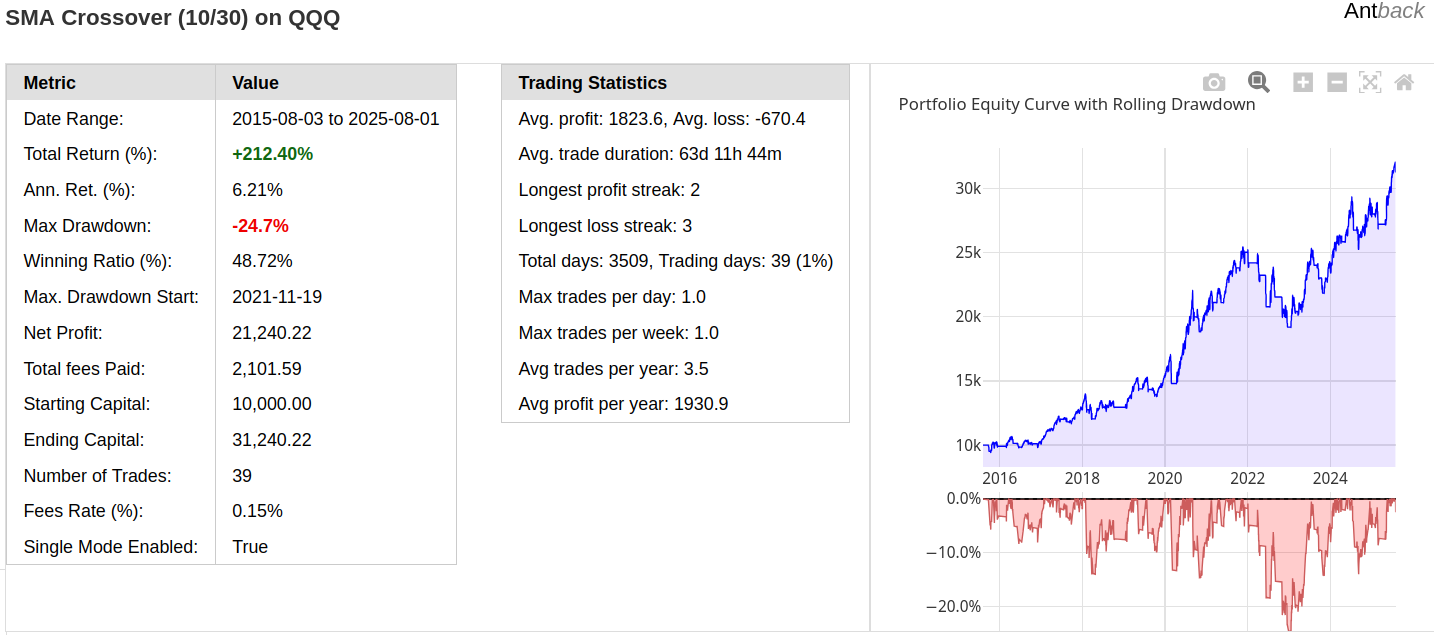
port.full_report("html", outfile=f"{descr}_report.html", title=descr)
Html report screenshot
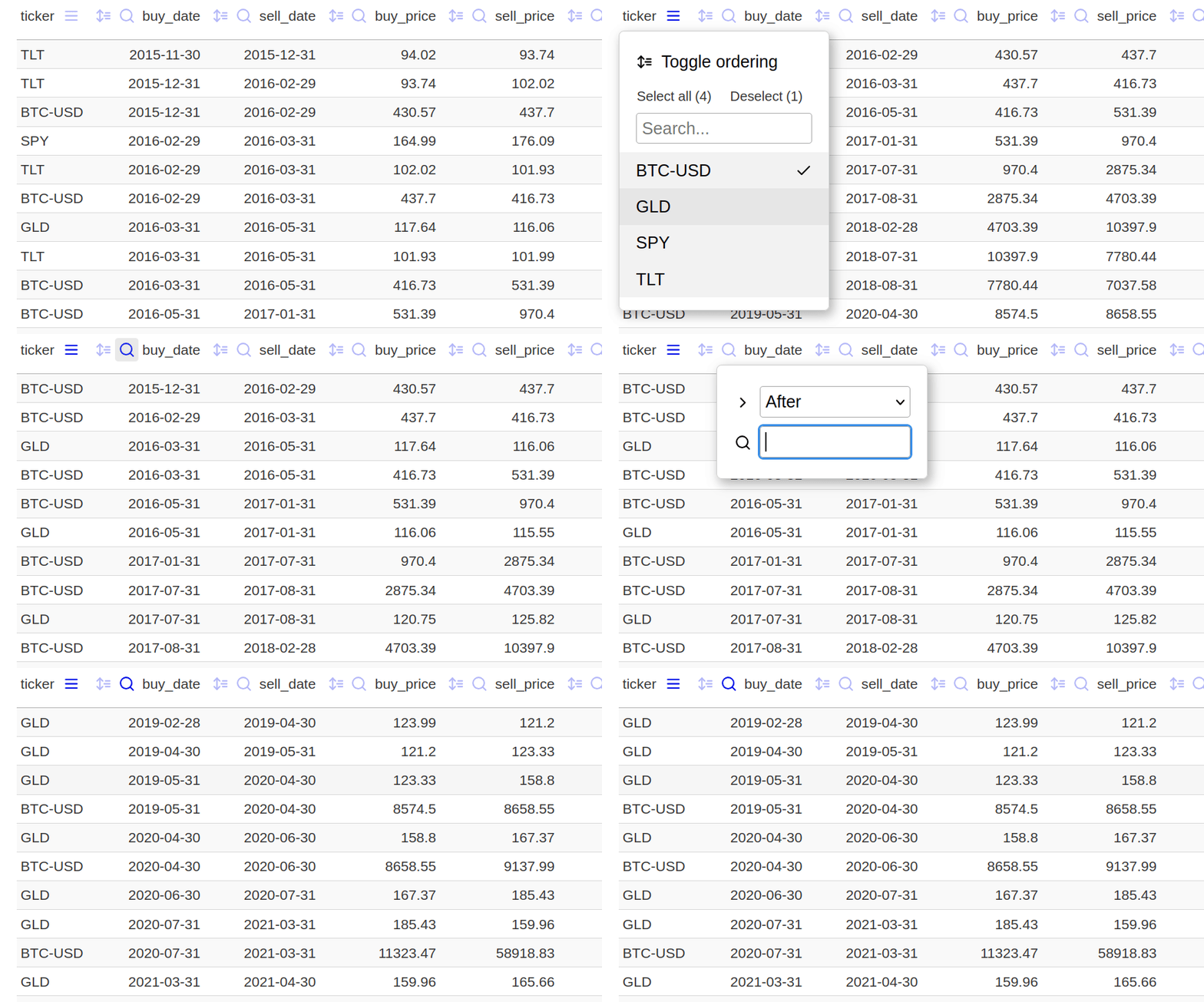
Interactive Filtering trades
Generate excel report
port.full_report('excel', outfile=f'{descr}_report.xlsx', title=descr)
See detailed excel report generated with above example.
Note: In fact, the average lengths in this case are slightly optimized; see: examples/07_optimization.py. The results may be even better if trailing ATR stop is used (examples/04_atr_stop.py) for the sell signal instead of the averages.
Core Components
Portfolio Class
The main trading engine that handles position management, trade execution, and performance tracking:
port = ab.Portfolio(
    cash=10_000,              # Starting capital (minimum 10,000)
    single=True,              # Single asset mode
    warn=False,               # Show warnings
    allow_fractional=False,   # Allow fractional shares
    fees=0.0015              # Trading fees (0.15%)
)
Trading Patterns:
- Simple strategies: Use
port.process()
if direction == "up":
    signal = 'buy'
elif direction == "down":
    signal = 'sell'
port.process(signal, symbol, date, price)
- Complex strategies: Use
port.buy(),port.sell(),port.update()
if direction == "up":
    port.buy(symbol, date, price)
elif direction == "down":
    port.sell(symbol, date, price)
port.update(symbol, date, price)
See 06_simple_2_assets_rotation.py.
Important Notes
- No re-buying or re-selling: Duplicate signals are ignored (set
warn=Trueto see warnings) - Multi-position support - Currently supported with manual trade sizing via
fixed_valparameter. (set single=False, example ). - Intraday support: Available but not extensively tested
- Long-only: Currently, only long positions are possible.
Useful functions
Wait Functions - Preventing Lookahead Bias
Example use of a wait function.
sell_timer = ab.new_wait_n_bars(4) # wait 4 bars, then sell

for date, price in data:
    signal = None
    ready_to_sell = sell_timer(bar=date)
    if ready_to_sell:
        signal = 'sell'
    if buy_conditon:
        signal = 'buy'
        sell_timer(start=True)
    port.process(signal, symbol, date, price)
See examples 05_easter_effect_test.py.
There is also a per-ticker wait version (new_multi_ticker_wait) that creates separate functions for each symbol: wait demo
Cross Function
new_cross_func() returns a stateful crossover detector function that tracks when one time series crosses another.
ℹ️ Note: In most cases, the active series is a shorter time frame indicator compared to the passive series. This means it reacts faster to changes, making crossovers more responsive.
The returned function compares an active and passive series value at each call and returns:
upwhen the active value moves from below to above the passive valuedownwhen the active value moves from above to below the passive valueNoneif there's no crossover or insufficient data
Optimized Data Structures
RollingArray
Fast numpy-based rolling window (Uses manual slice assignment ([:] = [...]) In-place operation; avoids temporary memory allocations. can be 2 to 10 times faster than np.roll.
prices = ab.RollingArray(window_size=50)
prices.append(new_price)
price_history = prices.values()
RollingList
Efficient deque-based storage for objects:
prices = ab.RollingList(maxlen=30)
prices.append(price_data)
recent_prices = prices.values()
Multi-ticker strategies
For more advanced multi-ticker strategies or those using machine learning, it's often necessary to track more than a few dozen rolling features. The NamedRollingArrays and PerTickerNamedRollingArrays classes are available for this purpose (rolling demo).
More Examples & Use Cases
Explore the examples to see Antback in action—from basic strategies to multi-asset rotations.
Mebane Faber–Style Asset Rotation (10-Month SMA)
This example implements a variation of the tactical asset allocation strategy popularized by Mebane Faber in The Ivy Portfolio.
It compares a 3-month SMA with a 10-month SMA for multiple assets and rotates into assets whose short-term trend is above the long-term trend, rebalancing at month-end only.
Key points in this implementation:
- No resampling to monthly closes: The 10-month SMA is calculated using daily data, but trading decisions are only made on month-end dates obtained from
antback.get_monthly_points(). This avoids distortions caused by monthly bar aggregation. - Equal-weight allocation to selected assets.
- Multi-asset support (e.g., SPY, GLD, TLT).
- Uses
ab.NamedRollingListsto efficiently maintain rolling daily prices for SMA calculation.
💡Puzzle for the reader: Try adding Bitcoin to the mix by including 'BTC-USD' in the ticker list… see what happens.
See the full script in
06_faber_assets_rotation.py.
Machine Learning Trading Strategy Example
This example demonstrates how to implement a machine learning-based trading strategy using Antback with technical features and scikit-learn classifiers. Uses NamedRollingLists maintains multiple synchronized rolling windows optimized for high-frequency feature updates.
Feature Engineering
- Market timing features (day of month, weekday)
- Price action metrics (gaps, drawdowns)
- Technical indicators (RSI, ROC)
- Candle patterns and characteristics
Rolling Window Calculations: feature calculations, such as get_indicator_value_and_score, use data only from the past within a defined rolling window.
Use of Transformers:
Use fit_transform on the training data and only transform on the test data. This ensures that information from the test set (like its data distribution for binning or categories for encoding) does not "leak" into the transformation process.
- Training:
discretizer.fit_transform(...) - Testing:
discretizer.transform(...)
Training Process
- Calculates forward returns as targets
- Encodes categorical features
- Discretizes numerical features
- Trains the classifier
To-do
Implement Walk-Forward Optimization: Instead of a single train/test split, use a walk-forward approach.
See complete example: 14_machine_learning.py
Performance & Technical Indicators
Antback does not include its own indicators (except for a useful ATR stop line), but you can use any technical analysis (TA) library. Antback is most suitable with event-driven technical indicators. For optimal performance, talipp indicators, which is designed for streaming data may be used:
from talipp.indicators import SMA

fast_sma, slow_sma = SMA(period=10), SMA(period=30)

for date, price in data.items():
    fast_sma.add(price)
    slow_sma.add(price)

    if fast_sma[-1] and slow_sma[-1]:  # Check if indicators have valid data
        signal = determine_signal(fast_sma[-1], slow_sma[-1])
Performance
Although Antback was not specifically designed for speed, it is surprisingly fast. Run the benchmark included with the examples (30-year SPY moving average crossover).
License
MIT
Perfect for teaching, prototyping, and production backtesting. Excellent clarity and control per bar.


Download files
Download the file for your platform. If you're not sure which to choose, learn more about installing packages.
Source Distribution
Built Distribution
Filter files by name, interpreter, ABI, and platform.
If you're not sure about the file name format, learn more about wheel file names.
Copy a direct link to the current filters
File details
Details for the file antback-0.0.3.tar.gz.
File metadata
- Download URL: antback-0.0.3.tar.gz
- Upload date:
- Size: 62.3 kB
- Tags: Source
- Uploaded using Trusted Publishing? No
- Uploaded via: twine/6.1.0 CPython/3.12.3
File hashes
| Algorithm | Hash digest | |
|---|---|---|
| SHA256 |
73bbdccdf5efa20ea6c94d86ccc84d61fbf091683b5984f42d5f012fb00e6954
|
|
| MD5 |
0ee0e86e8e2983eb969099acbbfe55ae
|
|
| BLAKE2b-256 |
b81e1c0e88965533aed44d549a4e3420a3d9663d35f772924701da036f32fcf0
|
File details
Details for the file antback-0.0.3-py2.py3-none-any.whl.
File metadata
- Download URL: antback-0.0.3-py2.py3-none-any.whl
- Upload date:
- Size: 62.0 kB
- Tags: Python 2, Python 3
- Uploaded using Trusted Publishing? No
- Uploaded via: twine/6.1.0 CPython/3.12.3
File hashes
| Algorithm | Hash digest | |
|---|---|---|
| SHA256 |
abf606177826ae3fb771e9d358a9a7e478699a17d7a7a44a470b7e2c11d4d1b8
|
|
| MD5 |
ee9c1a3ab2a5d3e5641ef7d955e95b9c
|
|
| BLAKE2b-256 |
78720e8521bc8e4f7fa6ec0f0a4ee19f1ef745e49b8610da85bc1b56c7cdf70c
|






