
Antback: Lightweight Backtesting with Heavyweight Insight

Project description
Antback

Antback: Fast, Transparent, and Debuggable Backtesting
A lightweight, event-loop-style backtest engine that allows a function-driven imperative style using efficient stateful helper functions and data containers.
Key Features
- Transparency: Every step is visible and debuggable. No black-box logic.
- Balances simplicity with robustness - ideal for rapid strategy prototyping.
- Interactive HTML Reports: Detailed reports with sorting and filtering capabilities via DataTables.
- High Performance: Optimized data structures for speed - very fast.
- Easy to use with different data sources - only needs
dateandpricevalues. - Avoids Lookahead Bias: by processing data sequentially. Use wait functions to enforce delays between signals.
Installation
A key feature is the generation of interactive HTML reports, which allow for easy inspection of trades. The lightweight df2tables module is used for this purpose. For Excel reports, xlreport is used.
So the full install command is:
pip install antback df2tables xlreport
Demo
import antback as ab
ab.demo()
The demo feature generates random trades of several stocks at random prices and generates an interactive report. A profit is slightly more likely than a loss - it's a demo, after all.
Quick Start
Simple SMA Crossover Strategy
import numpy as np
import yfinance as yf

import antback as ab

symbol = "QQQ"
data = yf.Ticker(symbol).history(period="10y")

port = ab.Portfolio(10_000, single=True)
fast, slow = 10, 30

prices = ab.RollingList(maxlen=slow)
cross = ab.new_cross_func()

for date, price in data["Close"].items():
    prices.append(price)
    price_history = prices.values()
    signal = "update"  # Reset signal - just update portfolio position

    if len(price_history) >= slow:
        fast_ma = np.mean(price_history[-fast:])
        slow_ma = np.mean(price_history[-slow:])
        direction = cross(fast_ma, slow_ma)  # active crosses  passive
        if direction == "up":
            signal = "buy"
        elif direction == "down":
            signal = "sell"
    port.process(signal, symbol, date, price)

port.basic_report(show=True)

port.full_report(outfile=f"Porfolio_report.html", title=f"SMA Crossover on {symbol}")
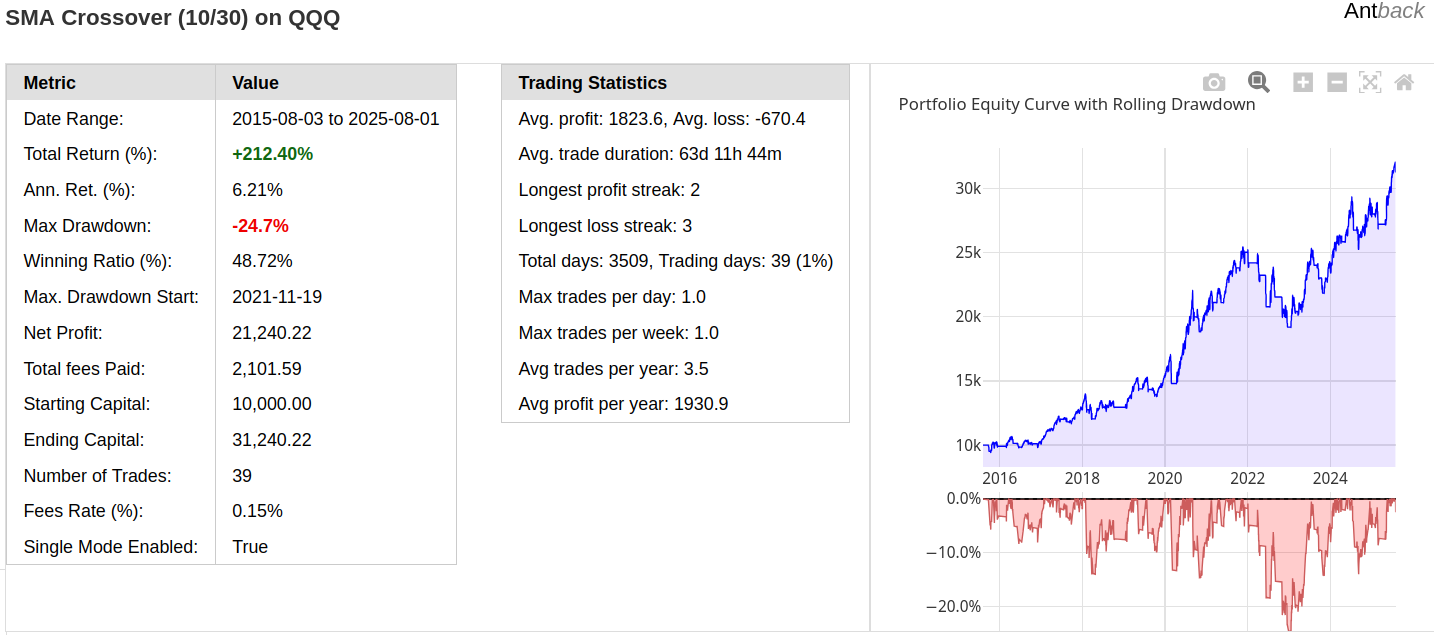
Full report screenshot (html)
Excel version is also avaliable
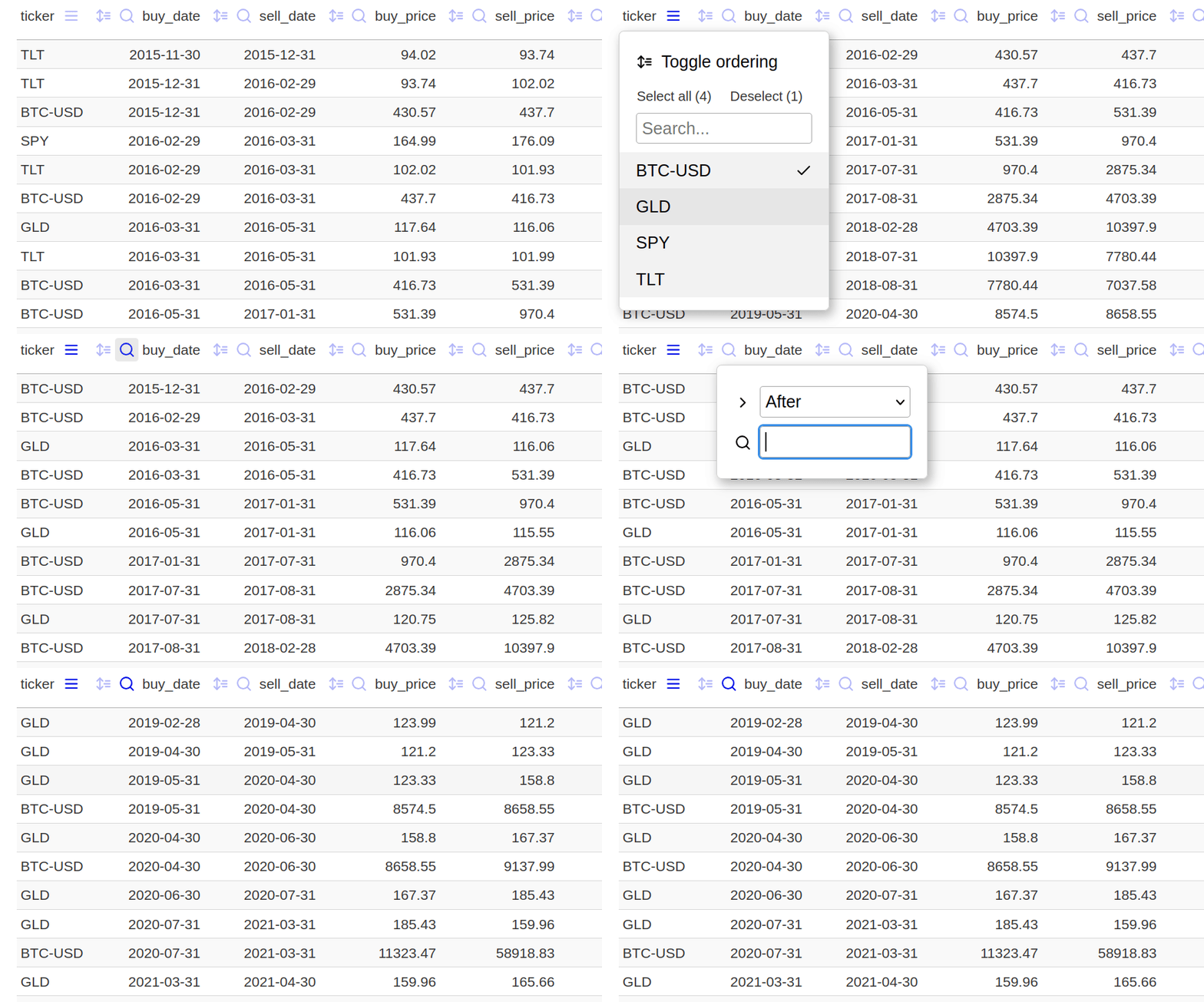
Interactive filtering trades (default html report)
Generate excel report
port.full_report('excel', outfile=f'{descr}_report.xlsx', title=descr)
See detailed excel report generated with above example.
Note: The implementation above is not the most efficient because
np.meanis called separately for each new row of data. See alternative, faster versions in: examples/10_simple_benchmark.pyOptimization: In fact, the average lengths in this case are slightly optimized; see: examples/08_optimization.py. The results may be even better if trailing ATR stop is used for the sell signal instead of the averages.
Core Components
Portfolio Class
The main trading engine that handles position management, trade execution, and performance tracking:
port = ab.Portfolio(
    cash=10_000,
    single=True,     # Single asset mode - default
    warn=False,
    allow_fractional=False,
    fees=0.0015
)
Trading Patterns:
port.process(signal, symbol, date, price)
Signal can be buy, sell or None (also explicit update)
Example:
...
if direction == "up":
    signal = 'buy'
elif direction == "down":
    signal = 'sell'
port.process(signal, symbol, date, price)
Methods can be also called directly: port.buy(), port.sell(), port.update()
See 06_simple_2_assets_rotation.py.
Important Notes
- No re-buying or re-selling: Duplicate signals are ignored (set
warn=Trueto see warnings) - Multi-position support - Currently supported with manual trade sizing via
fixed_valparameter. (set single=False, example ). - Long-only: Currently, only long positions are possible.
CFDAccount Class
Trading engine for CFD and FX trading with margin requirements, leverage, and both long/short positions:
cfd = ab.CFDAccount(
    cash=50_000,
    margin_requirement=0.1,   # Required margin as fraction (0.1 = 10%)
    leverage=2,
    warn=False,
    allow_fractional=True,
    fees=0.00015,
    margin_call_level=0.5
)
long/short example - intraday BTC 15min
CFD Trading Patterns:
# Long position
cfd.process("long", symbol, date, price)

# Short position
cfd.process("short", symbol, date, price)

# Close current position
cfd.process("close", symbol, date, price)

# Update position value
cfd.process(None, symbol, date, price)  # or "update"
Key CFD Features:
- Long and short positions
- Only single position at time is supported
- Margin trading: backtest with leverage while managing margin requirements
More Examples & Use Cases
Explore the examples to see Antback in action - from basic strategies to multi-asset rotations.
Useful functions
Cross Function
new_cross_func() returns a stateful crossover detector function that tracks when one time series crosses another.
ℹ️ Note: In most cases, the active series is a shorter time frame indicator compared to the passive series. This means it reacts faster to changes, making crossovers more responsive.
The returned function compares an active and passive series value at each call and returns:
upwhen the active value moves from below to above the passive valuedownwhen the active value moves from above to below the passive valueNoneif there's no crossover or insufficient data
Wait Functions - Preventing Lookahead Bias
Example use of a wait function.
sell_timer = ab.new_wait_n_bars(4) # wait 4 bars, then sell

for date, price in data:
    signal = None
    ready_to_sell = sell_timer(bar=date)
    if ready_to_sell:
        signal = 'sell'
    if buy_conditon:
        signal = 'buy'
        sell_timer(start=True)
    port.process(signal, symbol, date, price)
See examples 05_easter_effect_test.py.
There is also a per-ticker wait version (new_multi_ticker_wait) that creates separate functions for each symbol: wait demo
Optimized Data Structures
RollingArray
Fast numpy-based rolling window (Uses manual slice assignment ([:] = [...]) In-place operation; avoids temporary memory allocations. can be 2 to 10 times faster than np.roll. Best suited for numeric data.
prices = ab.RollingArray(window_size=50)
prices.append(new_price)
price_history = prices.values()
RollingList
An efficient, deque-based container for arbitrary objects (e.g., candle objects):
prices = ab.RollingList(maxlen=30)
prices.append(price_data)
recent_prices = prices.values()
Multi-ticker strategies
For more advanced multi-ticker strategies or those using machine learning, it's often necessary to track more than a few dozen rolling features. The NamedRollingArrays and PerTickerNamedRollingArrays classes are available for this purpose (rolling demo).
Performance & Technical Indicators
Antback does not include its own indicators (except for clousure based SMA and ATR functions), but you can use any technical analysis (TA) library. Antback is most suitable with event-driven technical indicators. For optimal performance, talipp indicators, which is designed for streaming data may be used:
from talipp.indicators import SMA

fast_sma, slow_sma = SMA(period=10), SMA(period=30)

for date, price in data.items():
    fast_sma.add(price)
    slow_sma.add(price)

    if fast_sma[-1] and slow_sma[-1]:  # Check if indicators have valid data
        signal = determine_signal(fast_sma[-1], slow_sma[-1])
Performance
Although Antback was not specifically designed for speed, it is surprisingly fast. Run the benchmark included with the examples (30-year SPY moving average crossover and BTC-USD intraday 10min).
Disclaimer & Warning
This library is provided for educational and research purposes only. It is not intended for live trading or financial advice.
Backtesting results are hypothetical and do not guarantee future performance. Markets are unpredictable, and using this library may result in financial losses.
Use this library at your own risk — the author is not responsible for any losses or damages.
License
MIT
Perfect for teaching, prototyping, and production backtesting. Excellent clarity and control per bar.


Download files
Download the file for your platform. If you're not sure which to choose, learn more about installing packages.
Source Distribution
Built Distribution
Filter files by name, interpreter, ABI, and platform.
If you're not sure about the file name format, learn more about wheel file names.
Copy a direct link to the current filters
File details
Details for the file antback-0.0.7.tar.gz.
File metadata
- Download URL: antback-0.0.7.tar.gz
- Upload date:
- Size: 50.2 kB
- Tags: Source
- Uploaded using Trusted Publishing? No
- Uploaded via: twine/6.1.0 CPython/3.12.3
File hashes
| Algorithm | Hash digest | |
|---|---|---|
| SHA256 |
18a3e7f0bcbc7f08ec3daf832e7f02611a535fb2dcfa5faeea3157f38048cfe7
|
|
| MD5 |
3a659d6c6d06612b10e9fe2365b6a133
|
|
| BLAKE2b-256 |
8f6a117590d07f0e9b262804fc91cdbb9af142df35e89960a97b0b443f4fc053
|
File details
Details for the file antback-0.0.7-py2.py3-none-any.whl.
File metadata
- Download URL: antback-0.0.7-py2.py3-none-any.whl
- Upload date:
- Size: 51.7 kB
- Tags: Python 2, Python 3
- Uploaded using Trusted Publishing? No
- Uploaded via: twine/6.1.0 CPython/3.12.3
File hashes
| Algorithm | Hash digest | |
|---|---|---|
| SHA256 |
43a45cced3a3bd595e47397f6fbdc987ac6490b9850e6fdee87630cb7f5b6b14
|
|
| MD5 |
fe9062c683e9a09d5561710dcf26b979
|
|
| BLAKE2b-256 |
b1a1077d391a35544e2016f847450c49289021d099854842ed87b4017e0e980c
|






