
antenati





antenati downloads the digitised pages of a register from the Italian Portale Antenati — the state civil/parish record archive — as a folder of image files on your computer.
Point it at the URL of a register you found on the portal, and it downloads that register: full resolution or a smaller size, with a desktop app or a command line, no Python required if you use the standalone app. One run always covers a single gallery/register; it never searches the portal, crawls an archive, or mirrors search results.
Install
There are several supported ways to run the program. If you do not use Python, the standalone GUI from GitHub Releases is the simplest option.
1. Standalone graphical application — recommended for most users
Open the project's GitHub Releases, choose the latest release and download the archive for your operating system from Assets:
- Windows —
antenati_gui_windows.exe.zip; extract the ZIP and runantenati_gui.exe. - macOS Apple Silicon —
antenati_gui_macos-14.zip; extract it and runantenati_gui. - Ubuntu/Linux x86_64 —
antenati_gui_ubuntu-22.04.zip; extract it and runantenati_gui.
These are standalone applications built by the release workflow: Python and pip are not required. On macOS/Linux you may need to allow execution according to your operating system's security settings.
2. Install from PyPI — recommended for Python/command-line users
Python 3.10 or newer is required:
pip install antenati
This installs both:
antenati— command-line interface;antenati-gui— Tk desktop interface.
To upgrade an existing PyPI installation:
pip install --upgrade antenati
3. Run/install from the source repository — for developers
Clone the repository and install it in a virtual environment. For an editable development installation:
git clone https://github.com/gcerretani/antenati.git
cd antenati
python -m venv .venv
pip install -e ".[dev]"
Activate the virtual environment using the command appropriate for your operating system, then run antenati or antenati-gui. This method is intended for development and testing; normal users should prefer a release executable or PyPI.
Pull requests to master require the CI passed check (offline lint and test matrix) before they can be merged. The live-download canary and dependency security scan run on every push too, but are informational and don't block merging.
Quick start
1. Find the register on the portal
Browse or search antenati.cultura.gov.it for the register you need, open its gallery, and copy the URL from your browser's address bar. It looks like this:
https://antenati.cultura.gov.it/ark:/12657/an_ua19944535/w9DWR8x
(A direct IIIF manifest URL, such as one under dam-antenati.cultura.gov.it/.../manifest, also works and can be handy if the gallery page itself is unreachable — see TROUBLESHOOTING.md.)
2. Download it
-
Desktop app — paste the URL into Gallery or manifest URL and click Download.
-
Command line:
antenati https://antenati.cultura.gov.it/ark:/12657/an_ua19944535/w9DWR8x
Running
antenatiwith no URL in an interactive terminal starts a guided wizard instead.
3. What you get
A folder named after the register's own portal metadata, containing one image per page plus two hidden files used to verify and resume the download:
archivio-di-stato-di-lucca-stato-civile-napoleonico-viareggio-1807-matrimoni-19944535/
├── pag-001.jpg
├── pag-002.jpg
├── ...
├── .antenati-manifest.json
└── .antenati-index.json
By default the folder is created in the current directory; use -o/--output (or the GUI's Save in) to choose an exact destination. See "Output files and resume" below for what the two hidden files are for.
Everyday use
| I want to... | Do this |
|---|---|
| Download only some pages | -f 19 -l 40 — zero-based, -l excluded (pages 20 to 40) |
| Save time/disk with smaller images | -s 2000 — longest side in pixels; 0 requests full resolution |
| Resume an interrupted download | --existing resume |
| See what would be downloaded before committing | --dry-run |
| Drive it from another program or script | --format json |
Options
| Option | Description |
|---|---|
-s, --size N |
Maximum image size in pixels; 0 requests full resolution. |
-n, --workers N |
Maximum number of image workers. Deprecated --nthreads alias kept for v6 script compatibility. |
-f, --first N |
Zero-based index of the first page to include. |
-l, --last N |
Zero-based exclusive end index. |
-d, --descriptive-names |
Include archive/image identifiers in filenames. |
-o, --output PATH |
Exact output directory. |
--existing {ask,error,overwrite,skip,resume} |
Policy when the output already exists. Default: ask. |
--dry-run |
Resolve the source and print the planned pages/filenames without downloading image bodies or creating the output directory. |
--format {text,json} |
Human-readable Rich output (default) or stable machine-readable JSON. |
-v, --verbose |
Increase logging verbosity; repeat (-vv) for DEBUG logging, full tracebacks and a linear diagnostic log instead of the animated UI. |
-V, --version |
Print the version and exit. |
Run antenati -h for the authoritative option list.
If the destination already contains files
| Policy | Behavior |
|---|---|
ask (default) |
Interactively asks what to do; the recommended answer is resume. |
resume |
Verifies existing files and redownloads only missing, stale or corrupt pages. |
skip |
Reuses only verified files; refuses to overwrite an unverified file already at a planned path. |
overwrite |
Downloads again and replaces every planned file. |
error |
Refuses to proceed if the destination is non-empty. |
ask needs an interactive terminal, so scripts and --format json runs must select an explicit policy such as resume or error.
Scripting
Use --format json for a stable, versioned JSON result on stdout; logging and diagnostics stay on stderr:
antenati https://antenati.cultura.gov.it/ark:/12657/an_ua19944535/w9DWR8x --existing resume --format json
--dry-run --format json returns the planned filenames, canvas IDs and IIIF source URLs instead of downloading anything.
Desktop app
If you downloaded a standalone release executable, launch that application directly. If you installed from PyPI, run:
antenati-gui
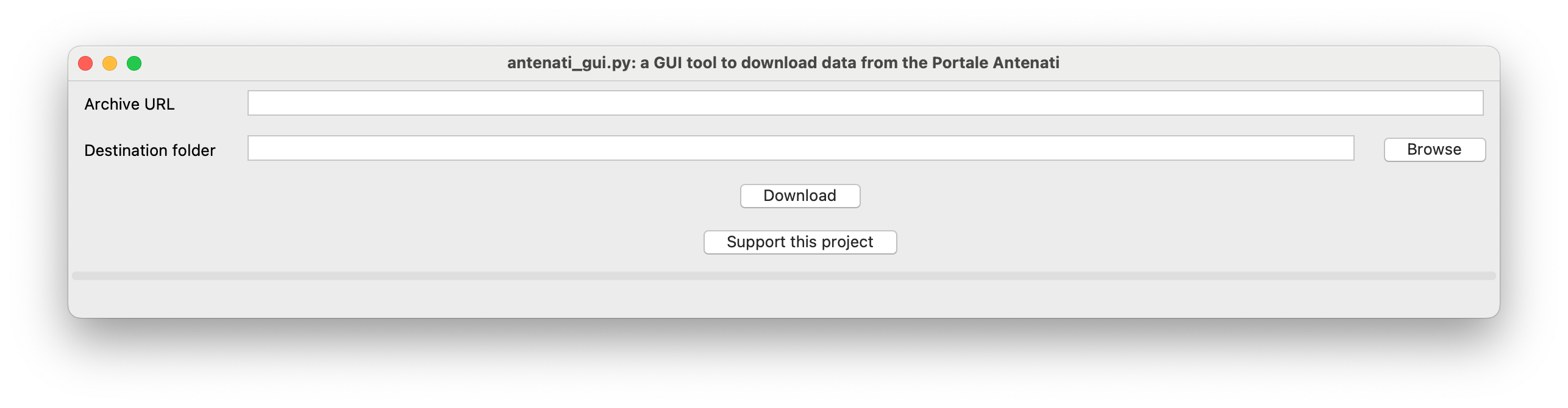
Paste a gallery or manifest URL. When you leave the field (or press Enter), the Register panel on the right shows the register's metadata and page count, so you can check it is the right one before downloading. Then set:
- Size (px) / Maximum size — keep Maximum size checked (the default) for full resolution, or clear it to choose a pixel size.
- First page / Last page — zero-based; Last page is excluded.
- Workers — concurrent image downloads.
- Filenames — include archive/image IDs.
- Existing files —
ask,error,overwrite,skiporresume.
The Destination panel keeps a fixed Save in base folder. With Create a separate folder for each register enabled (the default), each register gets its own metadata-derived subfolder without the base path ever changing, so consecutive downloads land side by side instead of nesting into each other. Use Change… to pick another base folder, or clear the checkbox to save directly into the selected folder.
The desktop app runs the same download engine, validation and reporting as the command line, except for the --dry-run preview, which is CLI-only for now.
Language
The desktop app and the command line follow your system language: English, Italian, French or Spanish, with English for any other language. To force a language, set ANTENATI_LANG (for example ANTENATI_LANG=it). Option names, policy keywords such as resume, --format json output and technical error messages always stay in English.
Output files and resume
The output folder name is derived from the register's own portal metadata (archival context, title, typology) plus its archive ID, so it stays meaningful and unique across registers.
Image filenames follow the register's own page labels, zero-padded to the size of the full register (pag-001.jpg, pag-002.jpg, ...), so a partial download uses the same names as a full one. Add -d/--descriptive-names to also include the archive and image IDs, for example pag-001+an_ua19944535+5gGAbBp.jpg.
Two hidden files travel alongside the images:
.antenati-manifest.json— the IIIF manifest for this register, as fetched..antenati-index.json— one entry per downloaded image, with its source URL, requested size, byte size and SHA-256.
These are what make resume/skip reliable: a file is reused only when the manifest, the requested size, and the on-disk byte size and hash all still match; anything stale, mismatched or corrupt is redownloaded instead of silently accepted. See SECURITY.md for what these checks do and don't guarantee.
Using antenati from Python
antenati can also be used as a library:
from antenati import Downloader, ProgressBar

downloader = Downloader(url, first=0, last=None)
progress = ProgressBar(set_total=lambda total: None, update=lambda: None)
report = downloader.run(n_workers=2, size=0, progress=progress)
if not report.successful:
    for failure in report.failed:
        print(f'{failure.label}: {failure.reason}')
Pass strict=True to run() to raise DownloadFailedError on any failure instead of returning a partial report; the full report remains available as exc.report.
Troubleshooting
Getting a WAF/HTTP 403 error on the gallery page, an "incomplete" download, or a resource-limit message? See TROUBLESHOOTING.md.
Disclaimer
antenati is an independent, unofficial tool. It is not affiliated with, endorsed by, or sponsored by the Direzione Generale Archivi, the Ministero della Cultura, or the Portale Antenati.
Finding a register still requires browsing the portal yourself, exactly as when viewing it in a web browser: the tool takes the URL of a register you already located and downloads its pages, it does not search, index or crawl the portal. Downloaded images remain subject to the Portale Antenati's own terms of use, including their personal/non-commercial use restriction and the prohibition on republishing or mirroring them elsewhere; using this tool does not change or waive those terms, and users remain solely responsible for complying with them.
License
Released under the GNU General Public License v3 or later.
See the changelog for release history, SECURITY.md for the network trust model and how to report a vulnerability, and the issue tracker for known limitations and planned work.
Support
If antenati saved you time, consider supporting it on Ko-fi.
1 maintainer

Release files for antenati 7.0
For a detailed explanation of source distributions (sdists) and built distributions (wheels), please see the package formats documentation.
Source distribution (sdist)
| File | Size | Uploaded | |
|---|---|---|---|
| antenati-7.0.tar.gz | 87.0 kB | Details |
Built distribution (wheel)
| File | Interpreter | ABI | Platform | Reset |
|---|---|---|---|---|
| antenati-7.0-py3-none-any.whl | Python 3 | none | any | Details |
Total release size: 154.5 kB
Release files / antenati-7.0.tar.gz
| Download URL | antenati-7.0.tar.gz |
|---|---|
| Size | 87.0 kB |
| Tags | Source |
|
SHA-256 checksum How to use checksums |
981889e1d228286bbf0e9c2c44863071ce9b846ee21e8ccc1051d3a2a2a9a859
|
|
BLAKE2b-256 checksum How to use checksums |
b2bcd6b71734ac11adb43f139efdc4168beb374aa55794136393e789a0e1352c
|
| Upload date | |
|
Uploaded using Trusted Publishing? What is trusted publishing? |
Yes |
| Uploaded via |
twine/7.0.0 CPython/3.13.14
|
Provenance
Provenance describes where a file came from. On PyPI, provenance is shared via attestations, which provide a verifiable record of the build or publishing details. View details, limitations and caveats.


PyPI Publish Attestation
PyPI verified that this artifact, at this checksum, originated from the publisher listed below.
Signed by GitHub Actions, verified by PyPI on Sep 25, 2026.
Transparency logRelease files / antenati-7.0-py3-none-any.whl
| Download URL | antenati-7.0-py3-none-any.whl |
|---|---|
| Size | 67.5 kB |
| Tags | Python 3 |
|
SHA-256 checksum How to use checksums |
8cff64323e5904cce83fc08118b1c8efb7bab1007180bb2d2b0b5a0aafc14f71
|
|
BLAKE2b-256 checksum How to use checksums |
76a05596f709c685da7dc63eb0ac73d232136837a4b8a74d7d9e07cd5b5ad836
|
| Upload date | |
|
Uploaded using Trusted Publishing? What is trusted publishing? |
Yes |
| Uploaded via |
twine/7.0.0 CPython/3.13.14
|
Provenance
Provenance describes where a file came from. On PyPI, provenance is shared via attestations, which provide a verifiable record of the build or publishing details. View details, limitations and caveats.
PyPI Publish Attestation
PyPI verified that this artifact, at this checksum, originated from the publisher listed below.
Signed by GitHub Actions, verified by PyPI on Sep 25, 2026.
Transparency log













