
antenati




The only tool that lets you download full-resolution images from the Portale Antenati, the genealogy digital archive of the Italian Ministero della Cultura.
The Portale Antenati hosts millions of digitised civil and parish records, but
its web viewer only lets you look at one page at a time — and the servers slow
to a crawl in the evening. antenati reads the standard
IIIF manifest behind each gallery and downloads every
image of an entire archive in one shot, at the highest resolution available,
with no clicking and no waiting. Launch it, grab a coffee, and come back to a
folder full of records ready for your family tree.
Highlights
- 🖼️ Full-resolution downloads — the only tool that still retrieves images at maximum size from the portal.
- 📚 Whole archives at once — point it at a gallery and it fetches every page automatically.
- ⚡ Fast & parallel — multi-threaded downloads with automatic retry/backoff on transient errors.
- 🖥️ CLI and GUI — a scriptable command line and a friendly desktop window, from the same package.
- 🧩 IIIF-native — works directly with the portal's IIIF manifests, so it keeps working when the web viewer changes.
- 🌍 Cross-platform — Windows, macOS and Linux; install with
pipor grab a standalone executable.
Installation
The recommended way to install antenati is from PyPI:
pip install antenati
This requires Python 3.10 or newer and gives you two commands on your PATH:
antenati— the command-line downloaderantenati-gui— the graphical interface
On Windows the Python build from the Microsoft Store works fine; on Linux use your distribution's package manager to get Python first.
Standalone executables (no Python needed)
If you'd rather not install Python and pip at all, prebuilt standalone
executables of the GUI for Windows, macOS and Linux are attached to every
release. Just download the one for your system from the
latest release artifacts
and run it — no installation required.
Usage
Command line
Pass the URL of a gallery page (or of its IIIF manifest) to the antenati command:
antenati <URL of the album>
The images are saved to a new folder named after the archive, in the form ARCHIVE-PLACE-YEAR-TYPE-ID.
Example — to download the people born in Viareggio in 1807, find the gallery page on the portal:
https://antenati.cultura.gov.it/ark:/12657/an_ua19944535/w9DWR8x
then copy the link to the first page and pass it to the tool:
antenati https://antenati.cultura.gov.it/ark:/12657/an_ua19944535/w9DWR8x
The results land in a folder named archivio-di-stato-di-lucca-stato-civile-napoleonico-viareggio-1807-nati-19944549.
If you didn't install the package, you can still run it as a module:
python3 -m antenati <URL of the album>
Options
| Option | Description |
|---|---|
-s, --size N |
Image size in pixels (0 = full size, the default). |
-n, --nthreads N |
Maximum number of download threads. |
-f, --first N |
Index of the first image to download. |
-l, --last N |
Index of the first image not to download. |
-d, --descriptive-names |
Include the archive and image IDs in the file names (e.g. pag-1+an_ua19944535+w9DWR8x.jpg). |
--verbose |
Increase log verbosity (--verbose → INFO, --verbose --verbose → DEBUG). |
-v, --version |
Print the version and exit. |
Run antenati -h for the full, up-to-date list.
Graphical interface
Launch the GUI with the antenati-gui command (or the standalone executable
described above):
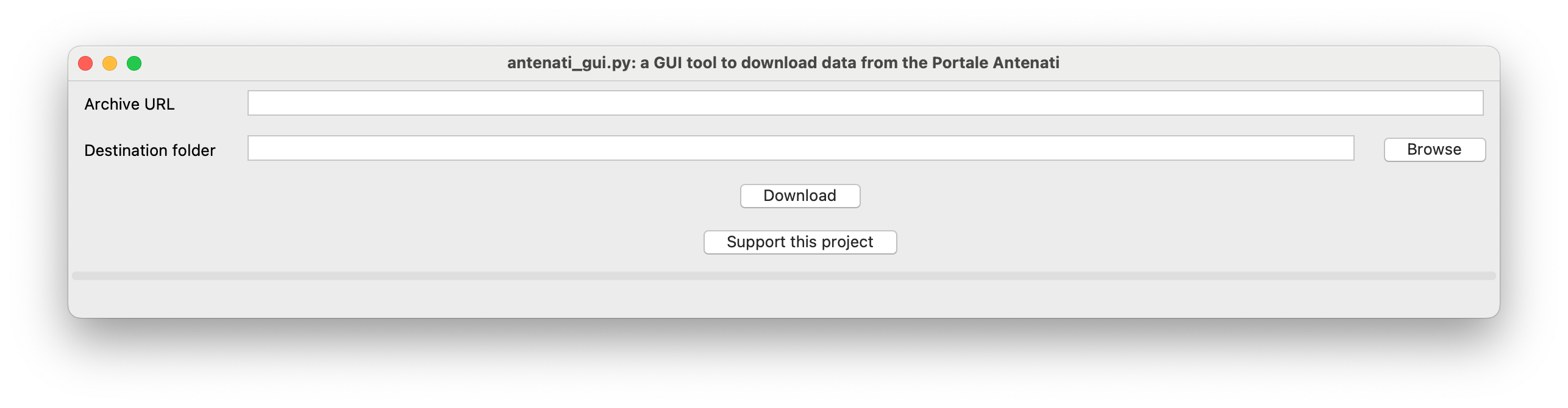
- Paste the link to the first page of the archive into the Archive URL field
(e.g.
https://antenati.cultura.gov.it/ark:/12657/an_ua19944535/w9DWR8x). - Choose a destination folder.
- The results are saved into a new subfolder named after the archive, such as archivio-di-stato-di-lucca-stato-civile-napoleonico-viareggio-1807-nati-19944549.
AWS WAF challenge
Outside Italy, the Portale Antenati gallery pages are often protected by an AWS WAF challenge that this tool cannot solve, and the download fails with an AWS WAF challenge cannot be bypassed error (see #25). The IIIF manifest and the images themselves are not behind the WAF, so you can work around it:
- open the gallery page in your browser;
- copy the IIIF manifest link at the bottom of the left side panel (it
looks like
https://dam-antenati.cultura.gov.it/antenati/containers/.../manifest); - pass that URL to the tool (both CLI and GUI) instead of the gallery page URL.
License
Released under the GNU General Public License v3 or later. See the changelog for release history.
1 maintainer

Release files for antenati 6.2
For a detailed explanation of source distributions (sdists) and built distributions (wheels), please see the package formats documentation.
Source distribution (sdist)
| File | Size | Uploaded | |
|---|---|---|---|
| antenati-6.2.tar.gz | 41.5 kB | Details |
Built distribution (wheel)
| File | Interpreter | ABI | Platform | Reset |
|---|---|---|---|---|
| antenati-6.2-py3-none-any.whl | Python 3 | none | any | Details |
Total release size: 74.9 kB
Release files / antenati-6.2.tar.gz
| Download URL | antenati-6.2.tar.gz |
|---|---|
| Size | 41.5 kB |
| Tags | Source |
|
SHA-256 checksum How to use checksums |
e0a5c1f64b9719072b3cd8a62dcf6159991e9f73d6384435b8f857492a60957f
|
|
BLAKE2b-256 checksum How to use checksums |
25acfe05d632cf0ccb16ca8ad8cb1e7484ad56651d977c5c702dd5aa2d246ff0
|
| Upload date | |
|
Uploaded using Trusted Publishing? What is trusted publishing? |
Yes |
| Uploaded via |
twine/7.0.0 CPython/3.13.14
|
Provenance
Provenance describes where a file came from. On PyPI, provenance is shared via attestations, which provide a verifiable record of the build or publishing details. View details, limitations and caveats.


PyPI Publish Attestation
PyPI verified that this artifact, at this checksum, originated from the publisher listed below.
Signed by GitHub Actions, verified by PyPI on Sep 6, 2026.
Transparency logRelease files / antenati-6.2-py3-none-any.whl
| Download URL | antenati-6.2-py3-none-any.whl |
|---|---|
| Size | 33.4 kB |
| Tags | Python 3 |
|
SHA-256 checksum How to use checksums |
6fd2638c7ab5420f5308a547255ad89b282a94785de78c2cd6ed159adda0ae38
|
|
BLAKE2b-256 checksum How to use checksums |
dc29582fae70f13b3a4ca0928fabbe186ceff08aac64931d18f9c75cf9f1e4e9
|
| Upload date | |
|
Uploaded using Trusted Publishing? What is trusted publishing? |
Yes |
| Uploaded via |
twine/7.0.0 CPython/3.13.14
|
Provenance
Provenance describes where a file came from. On PyPI, provenance is shared via attestations, which provide a verifiable record of the build or publishing details. View details, limitations and caveats.
PyPI Publish Attestation
PyPI verified that this artifact, at this checksum, originated from the publisher listed below.
Signed by GitHub Actions, verified by PyPI on Sep 6, 2026.
Transparency log













