
anyscribe
Let your AI agent transcribe anything. Turns YouTube videos, Instagram reels, and local audio/video files into structured, searchable markdown, browsable in Obsidian.
Built agent-first, with three ways to reach it, in priority order:
- With your AI agent (primary) — anyscribe ships as a Claude Code skill that installs itself the first time you run a command like
anyscribe uiwhen Claude Code is set up on this machine (or runanyscribe install-skill), plus an MCP server (pip install "anyscribe[mcp]", ten tools) for Claude Desktop, Cursor, and any MCP host. Most commands that report results also take--json, and the ones that would stop to ask take--yes— for agents, CI, and scripts. - The web UI (
anyscribe ui) — a clean local dashboard at127.0.0.1:8457for when you want to see it: paste a URL, watch progress live, browse history, change settings, first-run wizard included. - The CLI (
anyscribe "<url>",anyscribe onboard) — one command with arrow-key prompts, for when you want your hands on it.
Shared backend, shared state: a transcription started from any surface is visible to all of them.
Private by default, local-first
- The Web UI is a local server, not a cloud service. It runs at
127.0.0.1:8457on your own machine. No account, no sign-up, no telemetry. There is no "anyscribe.com" backend. If you use Tailscale, you can opt in to opening it from your own other devices (anyscribe config set tailnet on, off by default); it stays off the public internet. The dashboard has no login, so anyone on your tailnet can use it while it is shared. - Internet is only involved when you ask for it:
- Downloading a YouTube or Instagram source — obvious; you gave it the URL.
- Calling an API provider (OpenAI, Deepgram, ElevenLabs, Sarvam, Groq, OpenRouter) — your audio goes to the provider you picked, and nothing else. Your data stays between you and them.
- Installing what you set up — for example, local transcription installs faster-whisper and downloads Whisper model weights from Hugging Face.
- Fully offline is available. Local files + the local provider (
anyscribe local setup --model base) work with no internet connection. Your audio never leaves your machine. Same pipeline, same output format as the cloud providers. - No analytics or telemetry. Besides the above, anyscribe checks for new versions when you run
anyscribe update --checkoranyscribe doctor(through pip's package index, or your git remote if you installed from a cloned repo). A download also upgrades yt-dlp first if your copy is over 60 days old.




What you need
- Python 3.11 or newer — python.org
- ffmpeg and yt-dlp — the installers below put both in place. Installing anyscribe with pip includes yt-dlp and its default extras; install ffmpeg separately (
brew install ffmpeg, or ffmpeg.org) - Deno or Node 22+ for YouTube — YouTube makes downloaders solve a small JavaScript puzzle, and yt-dlp runs it on one of these. The installers add Deno when neither is present; with the pip route,
brew install denoor deno.com. Without one, YouTube downloads warn and may miss formats. - An API key for one cloud provider (OpenAI, Deepgram, ElevenLabs, Sarvam, Groq, OpenRouter) — or none at all if you run offline with the local provider
anyscribe doctor checks all of this at any time, and the setup wizard checks it for you on first run.
Install
macOS / Linux — installs Python, ffmpeg, yt-dlp, Deno (unless you have Node 22+), and anyscribe, then sets up desktop mode: an anyscribe app in ~/Applications (the Applications folder inside your home folder; on Linux, your app menu), started at login, with the dashboard opened for you:
curl -fsSL https://raw.githubusercontent.com/rishmadaan/anyscribe/main/install.sh | bash
Windows (PowerShell) — same, for Windows (the app goes in your Start menu):
irm https://raw.githubusercontent.com/rishmadaan/anyscribe/main/install.ps1 | iex
Command-line tool only, no app or login item? Add --no-desktop (... | bash -s -- --no-desktop), or on Windows run & ([scriptblock]::Create((irm https://raw.githubusercontent.com/rishmadaan/anyscribe/main/install.ps1))) -NoDesktop. Remove desktop mode later with anyscribe desktop uninstall; your transcripts, settings and keys stay.
Already have Python 3.11 or newer, ffmpeg, and Deno or Node 22+?
pip install "anyscribe[tray]"
Then start it:
anyscribe ui                  # opens the web dashboard — guides you through setup
anyscribe desktop install     # optional: the app icon + start at login, like the installer
On first launch the web UI opens a full-screen onboarding wizard — pick a provider, paste the API key (with a Test key button), optionally enable offline transcription, confirm your workspace, done. Prefer the terminal? anyscribe onboard does the same thing with arrow keys, and anyscribe onboard --provider openai --api-key "$OPENAI_API_KEY" --yes --json does it headlessly for agents and CI.
Windows: if
anyscribeisn't recognized, usepython -m anyscribe ui.
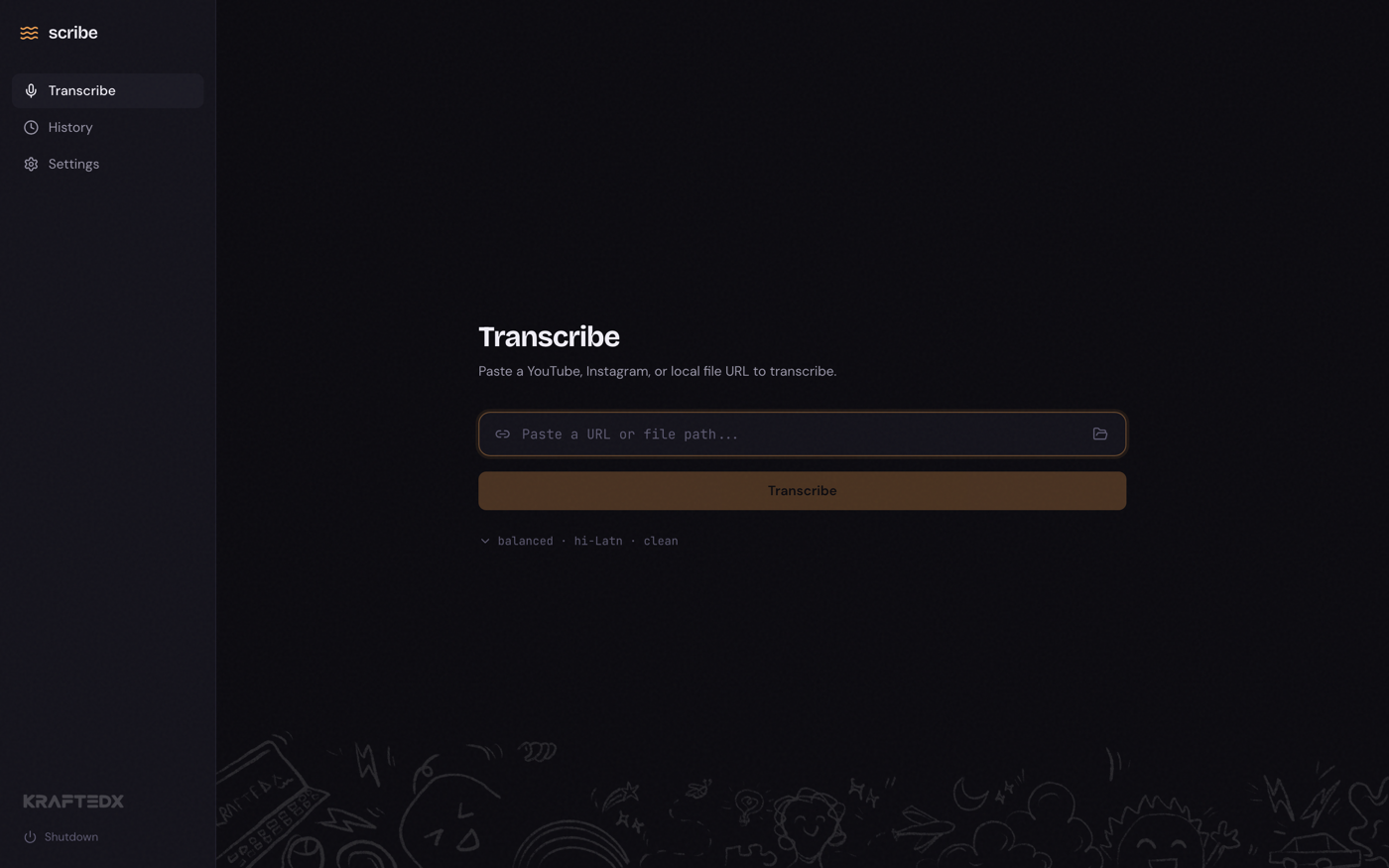
Then transcribe something:
anyscribe "https://www.youtube.com/watch?v=VIDEO_ID"   # always quote URLs — shells break on ? and &
anyscribe /path/to/podcast.mp3
Docs
| Start here | What it covers |
|---|---|
| Use it from your AI agent | The primary path — Claude Code skill and MCP setup, what your agent can drive |
| Getting started | Install to first transcript, step by step |
| Commands | Every command and flag, with examples |
| Providers | The seven providers compared — accuracy, cost, languages |
| Configuration | Every setting, where it lives, what it changes |
| Troubleshooting | Common errors and plain-English fixes |
| Changelog | What changed in each release, and whether you need to do anything |
For contributors: CLAUDE.md, AGENTS.md, and docs/building/.
Development
git clone https://github.com/rishmadaan/anyscribe.git
cd anyscribe
pip install -e ".[dev]"

ruff check src/          # lint
ruff format src/         # format
pytest                   # test
Upgrading from anyscribecli
The package, command, and app folder were renamed (the scribe and ascli commands still work as permanent aliases). After pip install --upgrade anyscribe, run anyscribe migrate once — it moves your config and API keys from ~/.anyscribecli/ to ~/.anyscribe/ without overwriting anything. Add --dry-run to preview first.
License
Copyright (c) 2026 Rishabh Madaan. Licensed under the
GNU Affero General Public License v3.0 or later (AGPL-3.0-or-later),
with no warranty. You may use, modify, and redistribute anyscribe, including
commercially, under those terms. Modified versions used over a network must
offer their corresponding source to interacting users as required by AGPL.
This release uses AGPLv3 or later; previously published MIT releases keep their original permissions. Third-party components retain their own licenses; see NOTICE. Your transcripts are not automatically AGPL-licensed. See CONTRIBUTING.md for source builds and distribution guidance.
1 maintainer

Metadata
1 maintainer
Release files for anyscribe 0.18.2
For a detailed explanation of source distributions (sdists) and built distributions (wheels), please see the package formats documentation.
Source distribution (sdist)
| File | Size | Uploaded | Provenance | Actions |
|---|---|---|---|---|
| anyscribe-0.18.2.tar.gz | 5.5 MB | With provenance | Details for anyscribe-0.18.2.tar.gz |
Built distribution (wheel)
| File | Interpreter | ABI | Platform | Actions Reset |
|---|---|---|---|---|
| anyscribe-0.18.2-py3-none-any.whl | Python 3 | none | any | Details for anyscribe-0.18.2-py3-none-any.whl |
Total release size: 7.4 MB
Release files / anyscribe-0.18.2.tar.gz
| Download URL | anyscribe-0.18.2.tar.gz |
|---|---|
| Size | 5.5 MB |
| Tags | Source |
|
SHA-256 checksum How to use checksums |
fdc89ce6ea72e2284a3a9a25f5603bfeebd300358ceba2f930f6380774bf7d43
|
|
BLAKE2b-256 checksum How to use checksums |
fa00fbf1b19ef3913fa2f17da023292aa9ce3247d6261db9a4a57dbd9370e761
|
| Upload date | |
|
Uploaded using Trusted Publishing? What is trusted publishing? |
Yes |
| Uploaded via |
twine/7.0.0 CPython/3.13.16
|
Provenance
Provenance describes where a file came from. On PyPI, provenance is shared via attestations, which provide a verifiable record of the build or publishing details. View details, limitations and caveats.


PyPI Publish Attestation
PyPI verified that this artifact, at this checksum, originated from the publisher listed below.
Signed by GitHub Actions, verified by PyPI on Nov 9, 2026.
Transparency logRelease files / anyscribe-0.18.2-py3-none-any.whl
| Download URL | anyscribe-0.18.2-py3-none-any.whl |
|---|---|
| Size | 1.9 MB |
| Tags | Python 3 |
|
SHA-256 checksum How to use checksums |
0907b3aab9a4e77b7a3365e5dc1ab265632bc659e7967583baff7f3695a1e6ac
|
|
BLAKE2b-256 checksum How to use checksums |
3e2fe0e006ee21234a4d1e3c8d38979f642234b635dc21a22d387afcc16e3b88
|
| Upload date | |
|
Uploaded using Trusted Publishing? What is trusted publishing? |
Yes |
| Uploaded via |
twine/7.0.0 CPython/3.13.16
|
Provenance
Provenance describes where a file came from. On PyPI, provenance is shared via attestations, which provide a verifiable record of the build or publishing details. View details, limitations and caveats.
PyPI Publish Attestation
PyPI verified that this artifact, at this checksum, originated from the publisher listed below.
Signed by GitHub Actions, verified by PyPI on Nov 9, 2026.
Transparency logSecurity for anyscribe 0.18.2
Provenance
Provenance describes where a file came from. On PyPI, provenance is shared via attestations, which provide a verifiable record of the build or publishing details. View details, limitations and caveats.
Full provenance
Both files in this release have been uploaded with provenance metadata.
Attestation for anyscribe-0.18.2.tar.gz
PyPI Publish Attestation
PyPI verified that this artifact, at this checksum, originated from the publisher listed below.
Signed by GitHub Actions, verified by PyPI on Nov 9, 2026.
Transparency logA note on package security
PyPI is a repository for distributing packages, not a service for auditing them. While third-party security researchers and our staff do their best to detect and remove malicious packages, PyPI cannot guarantee the quality, security or suitability of any given package.
To learn more about protecting yourself from malicious actors, visit our package security documentation.














