



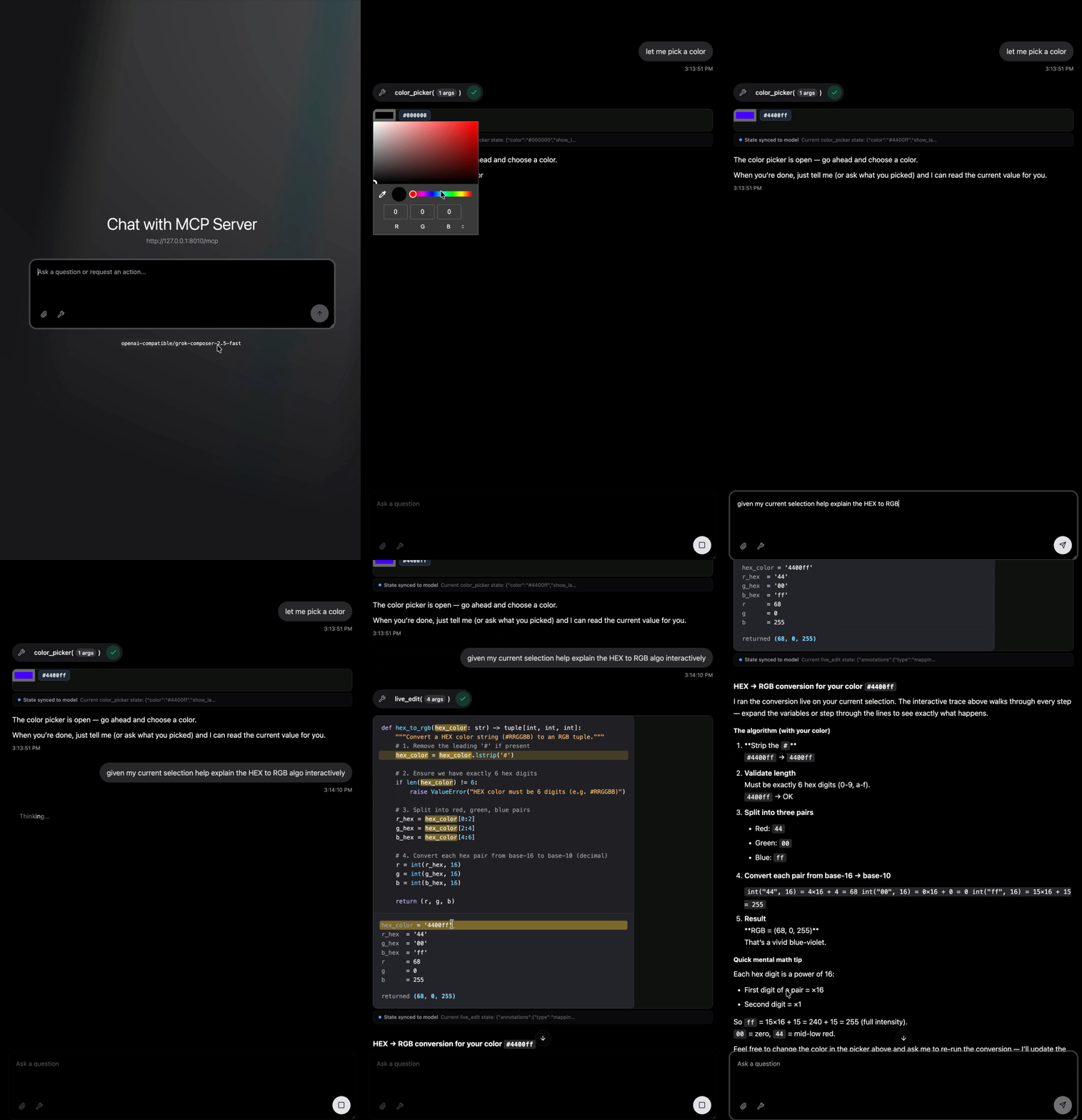
anywidget-mcp runs AnyWidgets inside AI
conversations. Interact with a Python widget, then let the model respond to its
current state. Connect through a host that supports
MCP Apps, the Model
Context Protocol extension for interactive interfaces.
It also exposes widgets already running in a notebook as WebMCP tools for browser agents, including notebooks running Python in WebAssembly.
- Bring existing widgets. Serve widgets from a package or reuse the ones you develop in Jupyter and marimo.
- Accept conversational input. Typed Python factories become tools that create a fresh widget for each call.
- Share selected state. Python validates interactions, and you choose which values the model can read.
- Explore large datasets. Serve query-backed viewers such as Embedding Atlas and share their current filter with the model.
- Compose interfaces. Expose several tools, return a group of widgets, or create widgets from source in a sandbox.
Try it
Requires Python 3.10+ and uv, a Python package runner:
uvx --from 'anywidget-mcp[server]' --with wigglystuff anywidget-mcp serve wigglystuff:ColorPicker --port 8010
Connect your MCP Apps host to http://127.0.0.1:8010/mcp, ask to pick a color,
and change the selection. Getting started
walks through this in Inspector Chat.
Use Python
Install in the environment that owns your widgets:
uv pip install 'anywidget-mcp[server]' wigglystuff
from anywidget_mcp.server import serve
from wigglystuff import ColorPicker

serve(ColorPicker, state="color")
state="color" gives the model the current color while the full widget remains
interactive. Use AnyWidgetMCP
to register several tools or attach() to add widgets to an existing server.
Use a browser agent
Install anywidget-mcp in your notebook environment, then enable WebMCP:
from anywidget_mcp import webmcp

webmcp.enable()
Current and future AnyWidgets expose read and update tools. Python validates updates and runs observers before returning state. The notebook host keeps rendering and synchronizing its widgets, including when Python runs in Pyodide, a Python runtime for the browser.
Pass installed widget classes or typed creation functions to offer tools that
create new widgets. With wigglystuff installed:
from wigglystuff import ColorPicker

webmcp.enable(widgets=[ColorPicker], discover=False)
Display the returned session as the cell's final expression. Browser tool calls
create widgets inside its output. discover=False includes supplied instances
and widgets created through the session. Use a mapping in widgets= to configure
private or read-only traits per class, function, or instance.
Requires a WebMCP-enabled browser and a compatible AnyWidget 0.11+ frontend.
webmcp.disable() withdraws tools and leaves widgets open.
WebMCP covers creation signatures,
state exposure, host permissions, and composition with MCP Apps.
Documentation
Getting started · Write a widget · Pass input · Share state · WebMCP · API reference · Deployment
Experimental software. The API may change between releases.
1 maintainer

Metadata
1 maintainer
Release files for anywidget-mcp 0.2.0
For a detailed explanation of source distributions (sdists) and built distributions (wheels), please see the package formats documentation.
Source distribution (sdist)
| File | Size | Uploaded | Provenance | Actions |
|---|---|---|---|---|
| anywidget_mcp-0.2.0.tar.gz | 189.9 kB | Without provenance | Details for anywidget_mcp-0.2.0.tar.gz |
Built distribution (wheel)
| File | Interpreter | ABI | Platform | Actions Reset |
|---|---|---|---|---|
| anywidget_mcp-0.2.0-py3-none-any.whl | Python 3 | none | any | Details for anywidget_mcp-0.2.0-py3-none-any.whl |
Total release size: 398.3 kB
Release files / anywidget_mcp-0.2.0.tar.gz
| Download URL | anywidget_mcp-0.2.0.tar.gz |
|---|---|
| Size | 189.9 kB |
| Tags | Source |
|
SHA-256 checksum How to use checksums |
ada01aa69e9a90980bd585a285678dd6a9c6a4e723cd30938e09f0281475831d
|
|
BLAKE2b-256 checksum How to use checksums |
06639f062cf1ccbbfcbe4600d0059d9a630c1727ddcccc303e84999868559d56
|
| Upload date | |
|
Uploaded using Trusted Publishing? What is trusted publishing? |
Yes |
| Uploaded via |
uv/0.12.10 {"installer":{"name":"uv","version":"0.12.10","subcommand":["publish"]},"python":null,"implementation":{"name":null,"version":null},"distro":{"name":"Ubuntu","version":"24.04","id":"noble","libc":null},"system":{"name":null,"release":null},"cpu":null,"openssl_version":null,"setuptools_version":null,"rustc_version":null,"ci":true}
|
Release files / anywidget_mcp-0.2.0-py3-none-any.whl
| Download URL | anywidget_mcp-0.2.0-py3-none-any.whl |
|---|---|
| Size | 208.3 kB |
| Tags | Python 3 |
|
SHA-256 checksum How to use checksums |
4dd3dc460f0eb56e3967bd387b7746285a09d72be3177ce4ac42b0aa2474e78b
|
|
BLAKE2b-256 checksum How to use checksums |
dd98327be85bc32fbc4620e8f70a6f9af8249059cf5cd181e3d43bec501d75be
|
| Upload date | |
|
Uploaded using Trusted Publishing? What is trusted publishing? |
Yes |
| Uploaded via |
uv/0.12.10 {"installer":{"name":"uv","version":"0.12.10","subcommand":["publish"]},"python":null,"implementation":{"name":null,"version":null},"distro":{"name":"Ubuntu","version":"24.04","id":"noble","libc":null},"system":{"name":null,"release":null},"cpu":null,"openssl_version":null,"setuptools_version":null,"rustc_version":null,"ci":true}
|
Security for anywidget-mcp 0.2.0
Provenance
Provenance describes where a file came from. On PyPI, provenance is shared via attestations, which provide a verifiable record of the build or publishing details. View details, limitations and caveats.
No provenance found
None of the files in this release were uploaded with provenance metadata.
A note on package security
PyPI is a repository for distributing packages, not a service for auditing them. While third-party security researchers and our staff do their best to detect and remove malicious packages, PyPI cannot guarantee the quality, security or suitability of any given package.
To learn more about protecting yourself from malicious actors, visit our package security documentation.














