





Apparser
Apparser is a Python library for automating desktop applications and interacting with UIs using AI-powered tools such as OCR and object detection models.
Installation
# Base Apparser package with base OCR model
pip install apparser

# Apparser with text recognition support
pip install "apparser[ocr]"

# Apparser with text-to-speech support
pip install "apparser[speak]"

# Apparser with object detection support
pip install "apparser[cv]"

# Apparser with all optional features
pip install "apparser[all]"
Examples
Disclaimer: This example is provided for educational purposes only to demonstrate UI automation concepts. Do not use it with Counter-Strike 2, Steam, multiplayer games, VAC-protected games, ranking/progression systems, or any application/service where automation is prohibited by its terms of service. This project is not affiliated with, endorsed by, or sponsored by Valve, Steam, or Counter-Strike 2.
- Open CS2 and start a game
Code
from apparser import App
from apparser.instructions import OCRAlgorithm
from apparser.instructions.ocr import WaitText, ClickOnText

# Text labels that the OCR algorithm will look for on the screen.
play_button = "play"
deathmatch_button = "deathmatch"
group_button = "hostage group"
start_button = "go"

# Create OCR-based algorithm.
algorithm = OCRAlgorithm([
    # Wait for the main menu and open the play screen.
    WaitText(play_button),
    ClickOnText(play_button),
    # Select the deathmatch mode.
    WaitText(deathmatch_button),
    ClickOnText(deathmatch_button),
    # Select the hostage group and start the match.
    WaitText(group_button),
    ClickOnText(group_button),
    ClickOnText(start_button, min_similarity=0.5)
])

# Launch CS2
app = App(['cmd', '/c', 'start', 'steam://rungameid/730'], timeout=20)

# Run the prepared scenario against the application UI.
algorithm.perform(app.ui)
Video
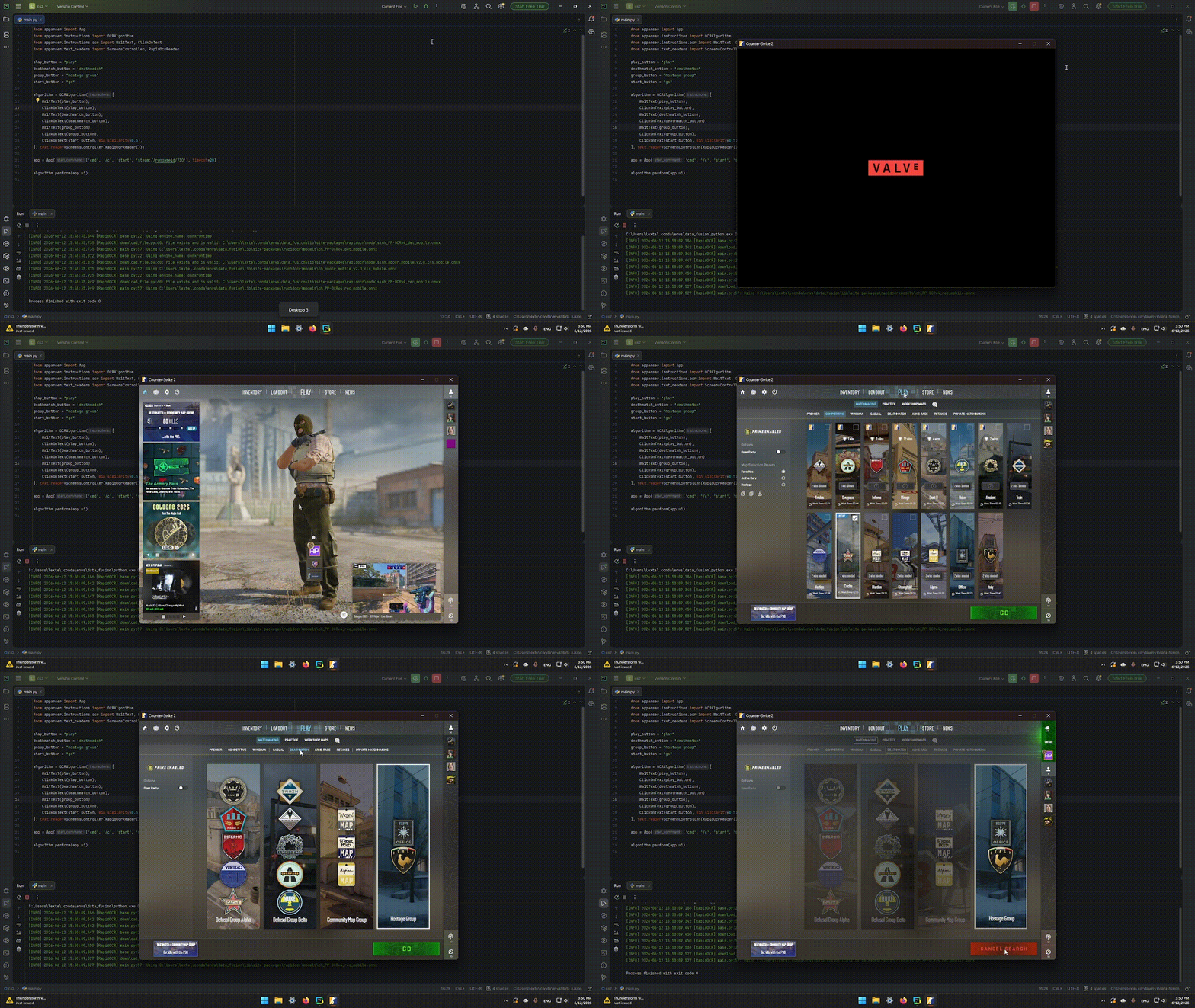
Docs
Full documentation is available here
Package page on PyPI
Donation
If you'd like to financially support the developers' work:
For Developers
- If something doesn't work, open an issue.
- If you want something fixed, open an issue.
- If you can help with the library, email us.
apparser.development@gmail.com
Contributions are welcome!
1 maintainer

Metadata
1 maintainer
Release files for apparser 1.1.2
For a detailed explanation of source distributions (sdists) and built distributions (wheels), please see the package formats documentation.
Source distribution (sdist)
| File | Size | Uploaded | |
|---|---|---|---|
| apparser-1.1.2.tar.gz | 39.0 kB | Details |
Built distribution (wheel)
| File | Interpreter | ABI | Platform | Reset |
|---|---|---|---|---|
| apparser-1.1.2-py3-none-any.whl | Python 3 | none | any | Details |
Total release size: 117.9 kB
Release files / apparser-1.1.2.tar.gz
| Download URL | apparser-1.1.2.tar.gz |
|---|---|
| Size | 39.0 kB |
| Tags | Source |
|
SHA-256 checksum How to use checksums |
2016515e08ead627ecea8300941d8a5a887a05e14de381d99e74e513bf66708e
|
|
BLAKE2b-256 checksum How to use checksums |
365357e42397590c71625f93a9be21a12293bfbd0e40aa8e7db861df24bfbc58
|
| Upload date | |
|
Uploaded using Trusted Publishing? What is trusted publishing? |
No |
| Uploaded via |
twine/6.2.0 CPython/3.12.13
|
Release files / apparser-1.1.2-py3-none-any.whl
| Download URL | apparser-1.1.2-py3-none-any.whl |
|---|---|
| Size | 78.9 kB |
| Tags | Python 3 |
|
SHA-256 checksum How to use checksums |
1cd43d73a858164570cf647810fda8d2ba11917d1de120199e9202bbff7f76b5
|
|
BLAKE2b-256 checksum How to use checksums |
a2dff790378aebbabf4a8940a51c5c2dbdce5854eebf02f5c65ac8c88ce89f60
|
| Upload date | |
|
Uploaded using Trusted Publishing? What is trusted publishing? |
No |
| Uploaded via |
twine/6.2.0 CPython/3.12.13
|














