
Apparser is a Python library designed for automating desktop applications and managing UI interfaces using artificial intelligence, such as OCR or object detection models.

Project description





Apparser
Apparser is a Python library for automating desktop applications and interacting with UIs using AI-powered tools such as OCR and object detection models.
Installation
# Base Apparser package with base ocr model
pip install apparser

# Apparser with text recognition support
pip install "apparser[ocr]"

# Apparser with text-to-speech support
pip install "apparser[speak]"

# Apparser with object detection support
pip install "apparser[cv]"

# Apparser with all optional features
pip install "apparser[all]"
Examples
Disclaimer: This example is provided for educational purposes only to demonstrate UI automation concepts. Do not use it with Counter-Strike 2, Steam, multiplayer games, VAC-protected games, ranking/progression systems, or any application/service where automation is prohibited by its terms of service. This project is not affiliated with, endorsed by, or sponsored by Valve, Steam, or Counter-Strike 2.
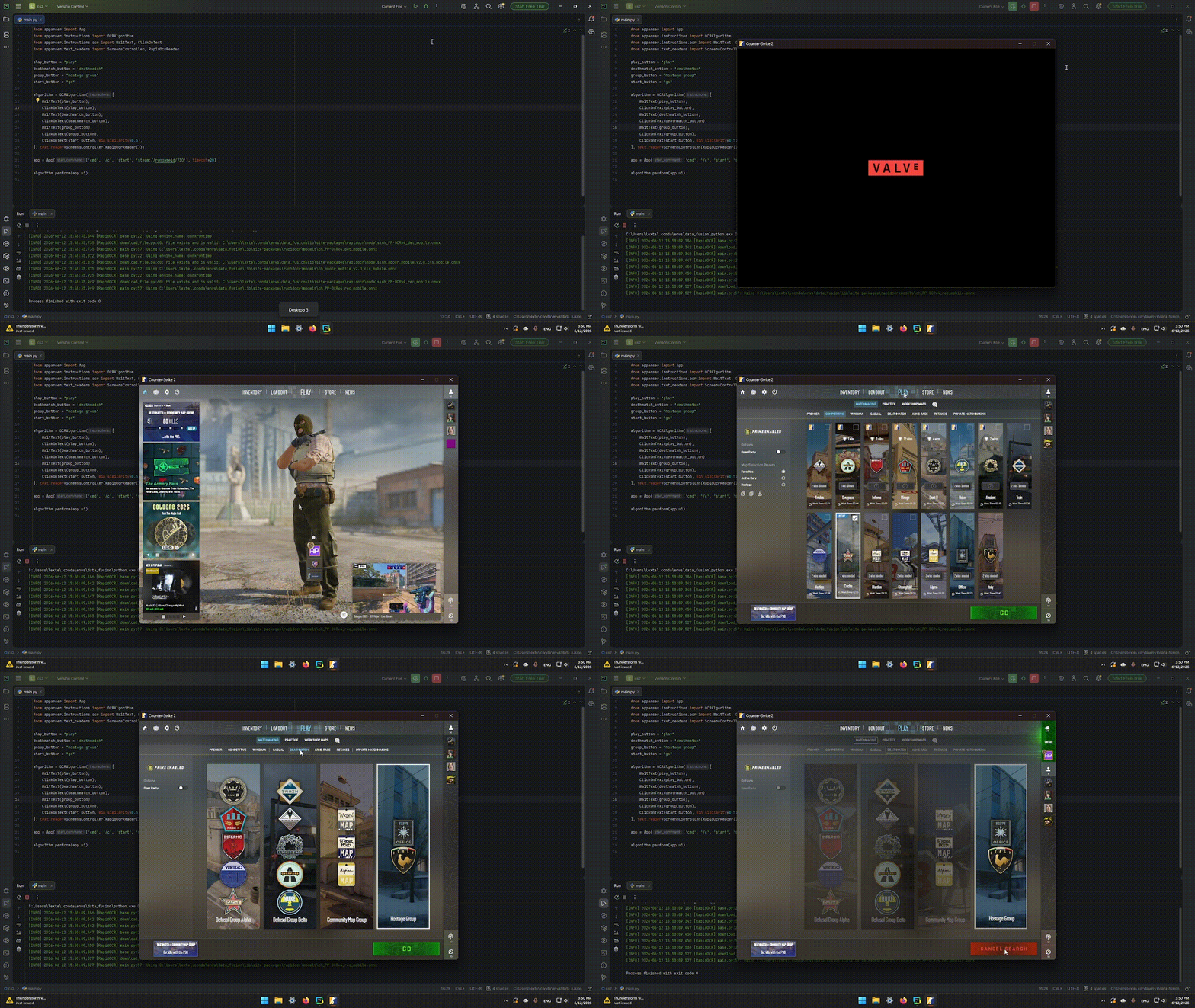
- Open CS2 and start a game
Code
from apparser import App
from apparser.instructions import OCRAlgorithm
from apparser.instructions.ocr import WaitText, ClickOnText

# Text labels that the OCR algorithm will look for on the screen.
play_button = "play"
deathmatch_button = "deathmatch"
group_button = "hostage group"
start_button = "go"

# Create OCR-based algorithm.
algorithm = OCRAlgorithm([
    # Wait for the main menu and open the play screen.
    WaitText(play_button),
    ClickOnText(play_button),
    # Select the deathmatch mode.
    WaitText(deathmatch_button),
    ClickOnText(deathmatch_button),
    # Select the hostage group and start the match.
    WaitText(group_button),
    ClickOnText(group_button),
    ClickOnText(start_button, min_similarity=0.5)
])

# Launch CS2
app = App(['cmd', '/c', 'start', 'steam://rungameid/730'], timeout=20)

# Run the prepared scenario against the application UI.
algorithm.perform(app.ui)
Video
Docs
Full documentation is available here
Package page on PyPI
Donation
If you'd like to financially support the developers for their work:
For Developers
- If something doesn't work, open an issue.
- If you want something fixed, open an issue.
- If you can help with the library, email us.
apparser.development@gmail.com
Contributions are welcome!


Download files
Download the file for your platform. If you're not sure which to choose, learn more about installing packages.
Source Distribution
Built Distribution
Filter files by name, interpreter, ABI, and platform.
If you're not sure about the file name format, learn more about wheel file names.
Copy a direct link to the current filters
File details
Details for the file apparser-1.1.1.tar.gz.
File metadata
- Download URL: apparser-1.1.1.tar.gz
- Upload date:
- Size: 39.1 kB
- Tags: Source
- Uploaded using Trusted Publishing? No
- Uploaded via: twine/6.2.0 CPython/3.12.13
File hashes
| Algorithm | Hash digest | |
|---|---|---|
| SHA256 |
d049fd69ea66ee24e1fff2f2e6023a1a50dd23548d222e04cdaf5a17d81864ac
|
|
| MD5 |
5eb414d0bb06995577e74965c69bf0e9
|
|
| BLAKE2b-256 |
2a78482c23cad47f31d4a2b9ccecaba13f765058182d7bd393bf28205215acc9
|
File details
Details for the file apparser-1.1.1-py3-none-any.whl.
File metadata
- Download URL: apparser-1.1.1-py3-none-any.whl
- Upload date:
- Size: 78.8 kB
- Tags: Python 3
- Uploaded using Trusted Publishing? No
- Uploaded via: twine/6.2.0 CPython/3.12.13
File hashes
| Algorithm | Hash digest | |
|---|---|---|
| SHA256 |
d68836f5725a8e12133365fdc6127ec7e95662e3c674b2022c39202092706789
|
|
| MD5 |
ed97e976512ebcaccc631e868a5eafd9
|
|
| BLAKE2b-256 |
c0fd73d01d8b9022d5573f819d4b48b85a6acd6903487908d0e9cbeff6b96d8f
|






