
appkit-assistant


AI assistant component for Reflex applications with MCP server integration.
appkit-assistant provides a complete conversational AI interface built on Reflex, featuring OpenAI and Perplexity integrations, Model Context Protocol (MCP) server management, and secure credential handling. It includes both backend processing services and ready-to-use UI components for building AI-powered applications.
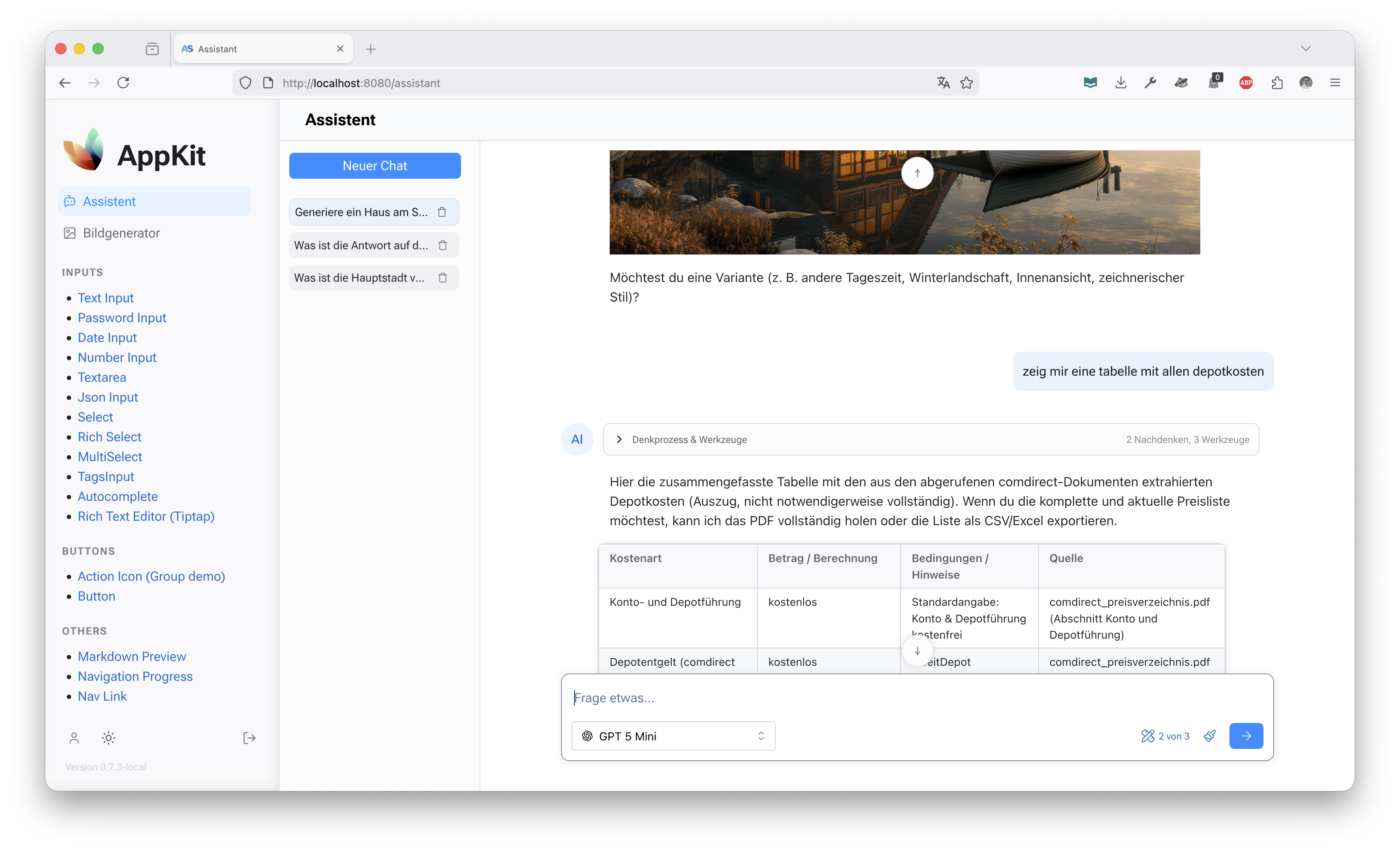
✨ Features
- Multi-Model Support - OpenAI Chat Completions, OpenAI Responses API, Perplexity, and fallback Lorem Ipsum processor
- MCP Server Integration - Manage and connect to Model Context Protocol servers as tools
- System Prompt Management - Versioned system prompts with admin editor interface
- Secure Credential Management - Encrypted storage and handling of API keys and server credentials
- Reflex UI Components - Pre-built assistant interface with composer, thread management, and message display
- Streaming Responses - Real-time streaming of AI responses with chunked content
- Thread Management - Persistent conversation threads with state management
🚀 Installation
As Part of AppKit Workspace
If you're using the full AppKit workspace:
git clone https://github.com/jenreh/appkit.git
cd appkit
uv sync
Standalone Installation
Install from PyPI:
pip install appkit-assistant
Or with uv:
uv add appkit-assistant
Dependencies
appkit-commons(shared utilities)openai>=2.3.0(OpenAI API client)
🏁 Quick Start
Basic Setup
- Configure your API keys in your application's configuration:
from appkit_assistant.configuration import AssistantConfig

# In your app configuration
assistant_config = AssistantConfig(
    openai_api_key="your-openai-key",
    perplexity_api_key="your-perplexity-key",
    # Optional: custom OpenAI base URL
    openai_base_url="https://api.openai.com/v1",
)
- Register processors with the ModelManager:
from appkit_assistant.backend.model_manager import ModelManager
from appkit_assistant.backend.processors.openai_chat_completion_processor import (
    OpenAIChatCompletionProcessor,
)
from appkit_assistant.backend.processors.perplexity_processor import PerplexityProcessor

manager = ModelManager()
manager.register_processor("openai", OpenAIChatCompletionProcessor(assistant_config))
manager.register_processor("perplexity", PerplexityProcessor(assistant_config))
- Use the assistant component in your Reflex app:
import reflex as rx
from appkit_assistant.components import Assistant


def assistant_page():
    return rx.container(Assistant(), height="100vh")
📖 Usage
Model Management
The ModelManager singleton handles all AI processors and models:
from appkit_assistant.backend.model_manager import ModelManager

manager = ModelManager()

# Get all available models
models = manager.get_all_models()

# Get a specific model
model = manager.get_model("gpt-4")

# Set default model
manager.set_default_model("gpt-4")
Processing Messages
Process conversations using the registered processors:
from appkit_assistant.backend.models import Message, MessageType

messages = [Message(role="user", content="Hello, how are you?", type=MessageType.TEXT)]

async for chunk in manager.get_processor_for_model("gpt-4").process(messages, "gpt-4"):
    print(f"Received: {chunk.content}")
MCP Server Management
Manage MCP servers for tool integration:
from appkit_assistant.backend.models import MCPServer

mcp_server = MCPServer(
    name="my-server",
    command="python",
    args=["-m", "my_mcp_server"],
    headers={"Authorization": "Bearer token"},
)

# Use in processing
async for chunk in processor.process(messages, "gpt-4", mcp_servers=[mcp_server]):
    # Handle response with MCP tools
    pass
UI Components
Assistant Interface
The main Assistant component provides a complete chat interface:
from appkit_assistant.components import Assistant


def chat_page():
    return Assistant()
Individual Components
Use individual components for custom layouts:
import reflex as rx
from appkit_assistant.components import ThreadList, composer


def custom_assistant():
    return mn.stack(ThreadList(), composer(), spacing="4")
MCP Server Management UI
Display and manage MCP servers:
from appkit_assistant.components import mcp_servers_table


def servers_page():
    return mcp_servers_table()
System Prompt Editor
Admin interface for managing versioned system prompts:
from appkit_assistant.components.system_prompt_editor import system_prompt_editor


def prompt_editor_page():
    return system_prompt_editor()
🔧 Configuration
AssistantConfig
Configure API keys and settings:
from appkit_assistant.configuration import AssistantConfig

config = AssistantConfig(
    openai_api_key="sk-...",
    openai_base_url="https://custom.openai.endpoint/v1",
    perplexity_api_key="pplx-...",
    google_api_key="AIza...",  # For future Google integrations
)
Processor Registration
Register processors based on available credentials:
from appkit_assistant.backend.processors import (
    OpenAIChatCompletionProcessor,
    PerplexityProcessor,
    LoremIpsumProcessor,
)

manager = ModelManager()

if config.openai_api_key:
    manager.register_processor("openai", OpenAIChatCompletionProcessor(config))

if config.perplexity_api_key:
    manager.register_processor("perplexity", PerplexityProcessor(config))

# Always available fallback
manager.register_processor("lorem", LoremIpsumProcessor())
📋 API Reference
Core Classes
ModelManager- Singleton model and processor registryProcessor- Abstract base for AI processorsAIModel- Model metadata and configurationMessage- Conversation message structureMCPServer- MCP server configuration
Component API
Assistant- Complete assistant interfacecomposer- Message input componentThreadList- Conversation thread listMessageComponent- Individual message displaymcp_servers_table- MCP server management tablesystem_prompt_editor- Admin interface for system prompts
State Management
ThreadState- Individual thread stateThreadListState- Thread list management
🔒 Security
- Use
SecretStrfor sensitive configuration values - Credentials are encrypted at rest when stored in the database
- MCP server headers support encrypted storage
🤝 Integration Examples
With AppKit User Management
Combine with appkit-user for authenticated assistants:
from appkit_user import authenticated, requires_role


@authenticated()
@requires_role("assistant_user")
def protected_assistant_page():
    return assistant.Assistant()
Custom Processor Implementation
Implement your own AI processor:
from appkit_assistant.backend.processor import Processor
from appkit_assistant.backend.models import AIModel, Chunk, Message


class CustomProcessor(Processor):
    def get_supported_models(self):
        return {
            "custom-model": AIModel(
                id="custom-model", text="Custom AI Model", icon="🤖"
            )
        }

    async def process(self, messages, model_id, files=None, mcp_servers=None):
        # Your AI processing logic here
        yield Chunk(content="Response from custom model", type="text")
📚 Related Components
- appkit-mantine - UI components used in the assistant interface
- appkit-user - User authentication and authorization
- appkit-commons - Shared utilities and configuration
1 maintainer

Metadata
1 maintainer
Release files for appkit-assistant 1.16.0
For a detailed explanation of source distributions (sdists) and built distributions (wheels), please see the package formats documentation.
Source distribution (sdist)
| File | Size | Uploaded | |
|---|---|---|---|
| appkit_assistant-1.16.0.tar.gz | 1.9 MB | Details |
Built distribution (wheel)
| File | Interpreter | ABI | Platform | Reset |
|---|---|---|---|---|
| appkit_assistant-1.16.0-py3-none-any.whl | Python 3 | none | any | Details |
Total release size: 2.1 MB
Release files / appkit_assistant-1.16.0.tar.gz
| Download URL | appkit_assistant-1.16.0.tar.gz |
|---|---|
| Size | 1.9 MB |
| Tags | Source |
|
SHA-256 checksum How to use checksums |
da5663910197bcfe7f09798d625a0dba9a8df5569edf3b4485b8685eaa654ec6
|
|
BLAKE2b-256 checksum How to use checksums |
9eee78ec9ac54da93a5c6fad41dadd963a198e9ab70a9a9919a6866c08dd0338
|
| Upload date | |
|
Uploaded using Trusted Publishing? What is trusted publishing? |
No |
| Uploaded via |
uv/0.12.23 {"installer":{"name":"uv","version":"0.12.23","subcommand":["publish"]},"python":null,"implementation":{"name":null,"version":null},"distro":{"name":"Ubuntu","version":"24.04","id":"noble","libc":null},"system":{"name":null,"release":null},"cpu":null,"openssl_version":null,"setuptools_version":null,"rustc_version":null,"ci":true}
|
Release files / appkit_assistant-1.16.0-py3-none-any.whl
| Download URL | appkit_assistant-1.16.0-py3-none-any.whl |
|---|---|
| Size | 212.5 kB |
| Tags | Python 3 |
|
SHA-256 checksum How to use checksums |
7dfb0b9c8e24920d0c7c8e79bc2677523351df64577106646f78e7b00eb275f3
|
|
BLAKE2b-256 checksum How to use checksums |
e06929173a69a42d606a0acefffe660a3e96c96a06617288c92bfe86c50e8ab8
|
| Upload date | |
|
Uploaded using Trusted Publishing? What is trusted publishing? |
No |
| Uploaded via |
uv/0.12.23 {"installer":{"name":"uv","version":"0.12.23","subcommand":["publish"]},"python":null,"implementation":{"name":null,"version":null},"distro":{"name":"Ubuntu","version":"24.04","id":"noble","libc":null},"system":{"name":null,"release":null},"cpu":null,"openssl_version":null,"setuptools_version":null,"rustc_version":null,"ci":true}
|














