
appkit-imagecreator


Multi-provider AI image generation component for Reflex applications.
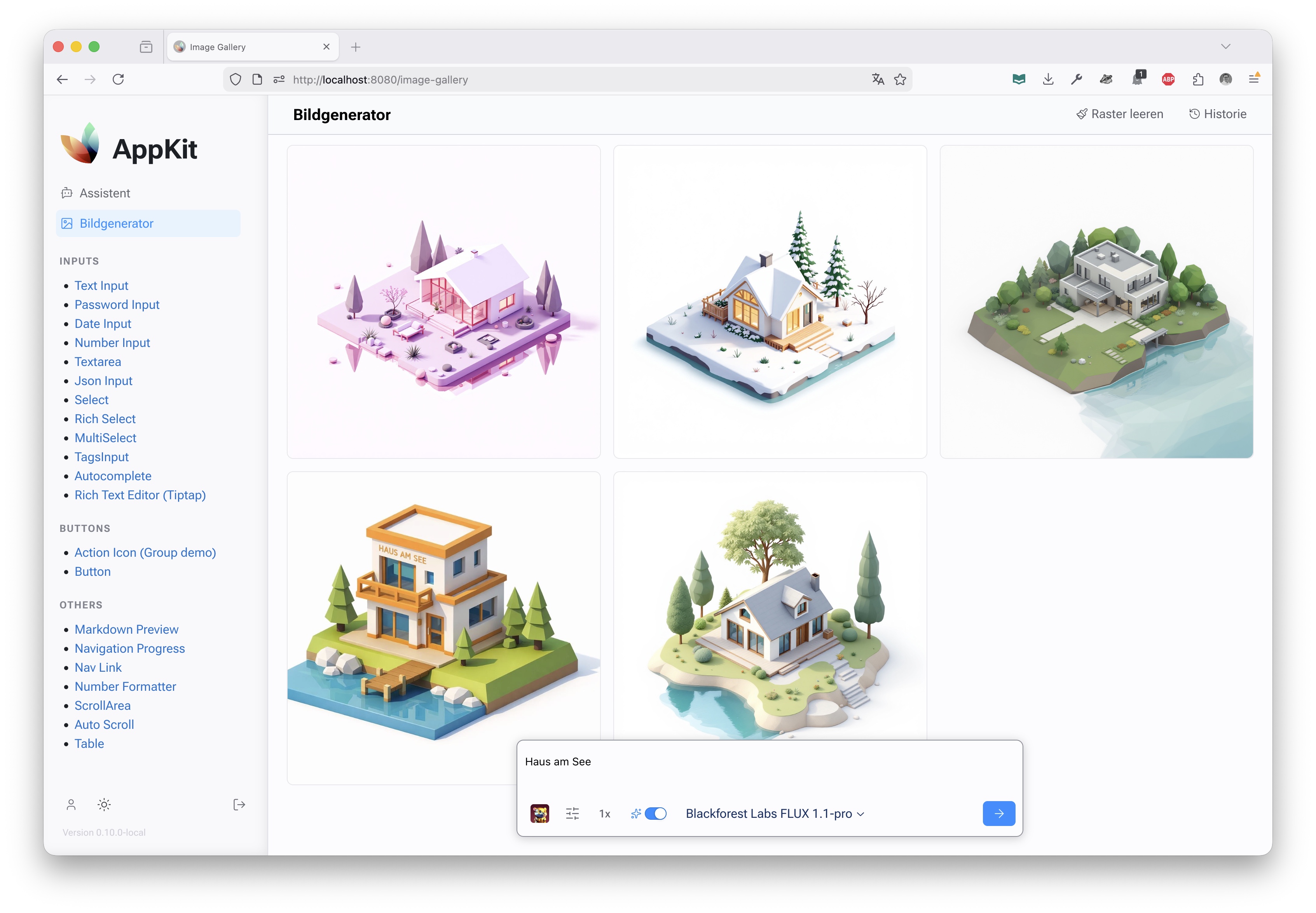
appkit-imagecreator provides a unified interface for generating images using multiple AI providers including Google Gemini (Nano Banana), Azure OpenAI (GPT-Image), and Black Forest Labs (FLUX via Azure). It includes a complete Reflex UI for image generation workflows with prompt enhancement, parameter controls, and image management features.
✨ Features
- Multi-Provider Support - Google Nano Banana (Gemini 2.5/3.0), Azure OpenAI GPT-Image-1, Black Forest Labs FLUX (Azure)
- Unified API - Consistent interface across all image generation providers
- Prompt Enhancement - AI-powered prompt improvement using GPT models
- Interactive UI - Complete image generation interface with scrollable grid, floating prompt bar, and history drawer
- Parameter Control - Configurable image dimensions, steps, negative prompts, and seeds
- Image Management - Download, copy, and organize generated images
- Error Handling - Robust error handling and user feedback
- Streaming Support - Real-time generation progress and results
🚀 Installation
As Part of AppKit Workspace
If you're using the full AppKit workspace:
git clone https://github.com/jenreh/appkit.git
cd appkit
uv sync
Standalone Installation
Install from PyPI:
pip install appkit-imagecreator
Or with uv:
uv add appkit-imagecreator
Dependencies
google-genai>=1.26.0(Google Gemini API)httpx>=0.28.1(HTTP client)appkit-commons(shared utilities)openai>=2.3.0(OpenAI API)
🏁 Quick Start
Basic Configuration
Configure API keys for your preferred providers:
from appkit_imagecreator.configuration import ImageGeneratorConfig

config = ImageGeneratorConfig(
    google_api_key="secret:google_api_key",
    openai_api_key="secret:openai_api_key",
    blackforestlabs_api_key="secret:blackforestlabs_api_key",
    tmp_dir="./generated_images",  # Optional: custom temp directory
)
Using the Image Generator
Generate images using the registry:
from appkit_imagecreator.backend.generator_registry import generator_registry
from appkit_imagecreator.backend.models import GenerationInput

# Get a generator (e.g., Azure GPT-Image-1 Mini)
generator = generator_registry.get("azure-gpt-image-1-mini")

# Create generation input
input_data = GenerationInput(
    prompt="A beautiful sunset over mountains",
    width=1024,
    height=1024,
    negative_prompt="blurry, low quality",
    steps=4,
    enhance_prompt=True,
)

# Generate image
response = await generator.generate(input_data)
if response.state == "succeeded":
    print(f"Generated images: {response.images}")
else:
    print(f"Error: {response.error}")
Using the UI Component
Add the image generator page to your Reflex app:
import reflex as rx
from appkit_imagecreator.pages import image_generator_page

app = rx.App()
app.add_page(image_generator_page, title="Image Generator", route="/images")
📖 Usage
Generator Registry
The registry manages all available image generators:
from appkit_imagecreator.backend.generator_registry import generator_registry

# List all generators
generators = generator_registry.list_generators()
print(generators)
# [
#   {"id": "azure-gpt-image-1-mini", "label": "OpenAI GPT-Image-1 mini (Azure)"},
#   {"id": "nano-banana", "label": "Google Nano Banana"},
#   ...
# ]

# Get a specific generator
generator = generator_registry.get("nano-banana")

# Get default generator
default_gen = generator_registry.get_default_generator()
Generation Input
Configure image generation parameters:
from appkit_imagecreator.backend.models import GenerationInput

input_data = GenerationInput(
    prompt="A cyberpunk city at night with neon lights",
    width=1024,  # Image width
    height=1024,  # Image height
    negative_prompt="blurry, distorted, ugly",  # What to avoid
    steps=4,  # Generation steps (higher = better quality)
    n=1,  # Number of images to generate
    seed=42,  # Random seed for reproducible results
    enhance_prompt=True,  # Use AI to improve the prompt
)
Custom Generators
Implement your own image generator:
from appkit_imagecreator.backend.models import (
    ImageGenerator,
    GenerationInput,
    ImageGeneratorResponse,
    ImageResponseState,
)


class CustomGenerator(ImageGenerator):
    def __init__(self, api_key: str, backend_server: str):
        super().__init__(
            id="custom-gen",
            label="Custom Generator",
            model="custom-model",
            api_key=api_key,
            backend_server=backend_server,
        )

    async def _perform_generation(
        self, input_data: GenerationInput
    ) -> ImageGeneratorResponse:
        # Your generation logic here
        # Save image to temp and return URL
        image_url = await self._save_image_to_tmp_and_get_url(
            image_bytes, "custom", "png"
        )
        return ImageGeneratorResponse(
            state=ImageResponseState.SUCCEEDED, images=[image_url]
        )


# Register your generator
generator_registry.register(CustomGenerator(api_key, backend_server))
UI Components
Main Page
The complete image generator interface:
from appkit_imagecreator.pages import image_generator_page

# Add to your app
app.add_page(image_generator_page, route="/image-generator")
Individual Components
Use specific UI components:
from appkit_imagecreator.components.images import image_grid
from appkit_imagecreator.components.prompt import prompt_input_bar
from appkit_imagecreator.components.history import history_drawer


def custom_layout():
    return rx.box(
        image_grid(),  # Image display grid
        prompt_input_bar(),  # Floating generation controls
        history_drawer(),  # Sidebar history
    )
🔧 Configuration
ImageGeneratorConfig
Configure API keys and settings:
from appkit_imagecreator.configuration import ImageGeneratorConfig

config = ImageGeneratorConfig(
    google_api_key="secret:google_gemini_key",  # For Nano Banana (Gemini) models
    openai_api_key="secret:openai_key",  # For Azure GPT-Image models
    blackforestlabs_api_key="secret:bfl_key",  # For Azure Flux models
    openai_base_url="https://api.openai.com/v1",  # Optional custom endpoint
    tmp_dir="./tmp/images",  # Temp directory for generated images
)
Provider-Specific Setup
Google (Nano Banana / Gemini)
Uses the Google GenAI SDK. Configuration uses google_api_key.
Available Generators:
nano-banana: Google Nano Banana (Gemini 2.5 Flash Image)nano-banana-pro: Google Nano Banana Pro (Gemini 3 Pro Image Preview)
generator = generator_registry.get("nano-banana")
OpenAI (Azure)
Configured for Azure OpenAI endpoints via openai_api_key and openai_base_url.
Available Generators:
azure-gpt-image-1-mini: OpenAI GPT-Image-1 mini (Azure)azure-gpt-image-1.5: OpenAI GPT-Image-1.5 (Azure)FLUX.1-Kontext-pro: Blackforest Labs FLUX.1-Kontext-pro (via compatible endpoint)
gpt_gen = generator_registry.get("azure-gpt-image-1-mini")
Black Forest Labs (Azure)
Uses blackforestlabs_api_key and blackforestlabs_base_url.
Available Generators:
azure-flux-2-pro: Blackforest Labs FLUX.2-pro (Azure)
flux_gen = generator_registry.get("azure-flux-2-pro")
📋 API Reference
Core Classes
ImageGenerator- Abstract base class for image generatorsGenerationInput- Input parameters for image generationImageGeneratorResponse- Response containing generated images or errorsImageGeneratorRegistry- Registry managing all generators
Generators
NanoBananaImageGenerator- Google Nano Banana (Gemini) integrationGoogleImageGenerator- Base Google GenAI integration (for Nano Banana)OpenAIImageGenerator- OpenAI/Azure GPT-Image integrationBlackForestLabsImageGenerator- Black Forest Labs FLUX integration
Component API
image_generator_page()- Complete image generation pageimage_grid()- Main scrollable image gridprompt_input_bar()- Floating input with generation controls (size, style, quality)history_drawer()- Slide-out drawer showing generation history
State Management
CopyLocalState- State for image copy/download operations
🔒 Security
- Use
SecretStrfor API key configuration - Secrets resolved from environment variables or Key Vault
- Temporary images stored securely with unique filenames
- No sensitive data logged in generation processes
🤝 Integration Examples
With AppKit User Management
Restrict image generation to authenticated users:
from appkit_user import authenticated, requires_role
from appkit_imagecreator.pages import image_generator_page


@authenticated()
@requires_role("image_generator")
def protected_image_page():
    return image_generator_page()
Custom Prompt Enhancement
Override prompt enhancement logic:
class CustomGenerator(OpenAIImageGenerator):
    async def _enhance_prompt(self, prompt: str) -> str:
        # Your custom enhancement logic
        enhanced = await self.client.chat.completions.create(
            model="gpt-4",
            messages=[
                {"role": "user", "content": f"Enhance this image prompt: {prompt}"}
            ],
        )
        return enhanced.choices[0].message.content
Batch Generation
Generate multiple images with different parameters:
async def batch_generate(prompts: list[str]) -> list[str]:
    generator = generator_registry.get("azure-gpt-image-1-mini")
    images = []

    for prompt in prompts:
        input_data = GenerationInput(prompt=prompt, n=1)
        response = await generator.generate(input_data)
        if response.state == "succeeded":
            images.extend(response.images)

    return images
📚 Related Components
- appkit-mantine - UI components used in the image generator interface
- appkit-user - User authentication for protected image generation
- appkit-commons - Shared utilities and configuration
- appkit-assistant - AI assistant that can integrate with image generation
1 maintainer

Metadata
1 maintainer
Release files for appkit-imagecreator 1.17.2
For a detailed explanation of source distributions (sdists) and built distributions (wheels), please see the package formats documentation.
Source distribution (sdist)
| File | Size | Uploaded | Provenance | Actions |
|---|---|---|---|---|
| appkit_imagecreator-1.17.2.tar.gz | 825.9 kB | Without provenance | Details for appkit_imagecreator-1.17.2.tar.gz |
Built distribution (wheel)
| File | Interpreter | ABI | Platform | Actions Reset |
|---|---|---|---|---|
| appkit_imagecreator-1.17.2-py3-none-any.whl | Python 3 | none | any | Details for appkit_imagecreator-1.17.2-py3-none-any.whl |
Total release size: 883.4 kB
Release files / appkit_imagecreator-1.17.2.tar.gz
| Download URL | appkit_imagecreator-1.17.2.tar.gz |
|---|---|
| Size | 825.9 kB |
| Tags | Source |
|
SHA-256 checksum How to use checksums |
a92883475b03385500fb5bcd52c278fbec97652f164604bcb6e18b242b057887
|
|
BLAKE2b-256 checksum How to use checksums |
58e9fa62299afefb3a70628642bc0d24b1d8441a34cb7182e49bb7ebb3f62661
|
| Upload date | |
|
Uploaded using Trusted Publishing? What is trusted publishing? |
No |
| Uploaded via |
uv/0.13.6 {"installer":{"name":"uv","version":"0.13.6","subcommand":["publish"]},"python":null,"implementation":{"name":null,"version":null},"distro":{"name":"macOS","version":null,"id":null,"libc":null},"system":{"name":null,"release":null},"cpu":null,"openssl_version":null,"setuptools_version":null,"rustc_version":null,"ci":null}
|
Release files / appkit_imagecreator-1.17.2-py3-none-any.whl
| Download URL | appkit_imagecreator-1.17.2-py3-none-any.whl |
|---|---|
| Size | 57.5 kB |
| Tags | Python 3 |
|
SHA-256 checksum How to use checksums |
ad5572b68f1fb4ff1d3294eefab3ded4e5be5ef6534c64da5bca8bbfee8924ab
|
|
BLAKE2b-256 checksum How to use checksums |
96748cae26e63998e89ecfa14f09eb6c92d6001f7fae32ffbcd5332938d85a80
|
| Upload date | |
|
Uploaded using Trusted Publishing? What is trusted publishing? |
No |
| Uploaded via |
uv/0.13.6 {"installer":{"name":"uv","version":"0.13.6","subcommand":["publish"]},"python":null,"implementation":{"name":null,"version":null},"distro":{"name":"macOS","version":null,"id":null,"libc":null},"system":{"name":null,"release":null},"cpu":null,"openssl_version":null,"setuptools_version":null,"rustc_version":null,"ci":null}
|
Security for appkit-imagecreator 1.17.2
Provenance
Provenance describes where a file came from. On PyPI, provenance is shared via attestations, which provide a verifiable record of the build or publishing details. View details, limitations and caveats.
No provenance found
None of the files in this release were uploaded with provenance metadata.
A note on package security
PyPI is a repository for distributing packages, not a service for auditing them. While third-party security researchers and our staff do their best to detect and remove malicious packages, PyPI cannot guarantee the quality, security or suitability of any given package.
To learn more about protecting yourself from malicious actors, visit our package security documentation.














