
apple-a-day





Agent-native Mac health toolkit — keeps the doctor away.
Zero dependencies. 9 checks. Plain english. Built for AI agents, friendly to humans.
pip install apple-a-day
aad checkup
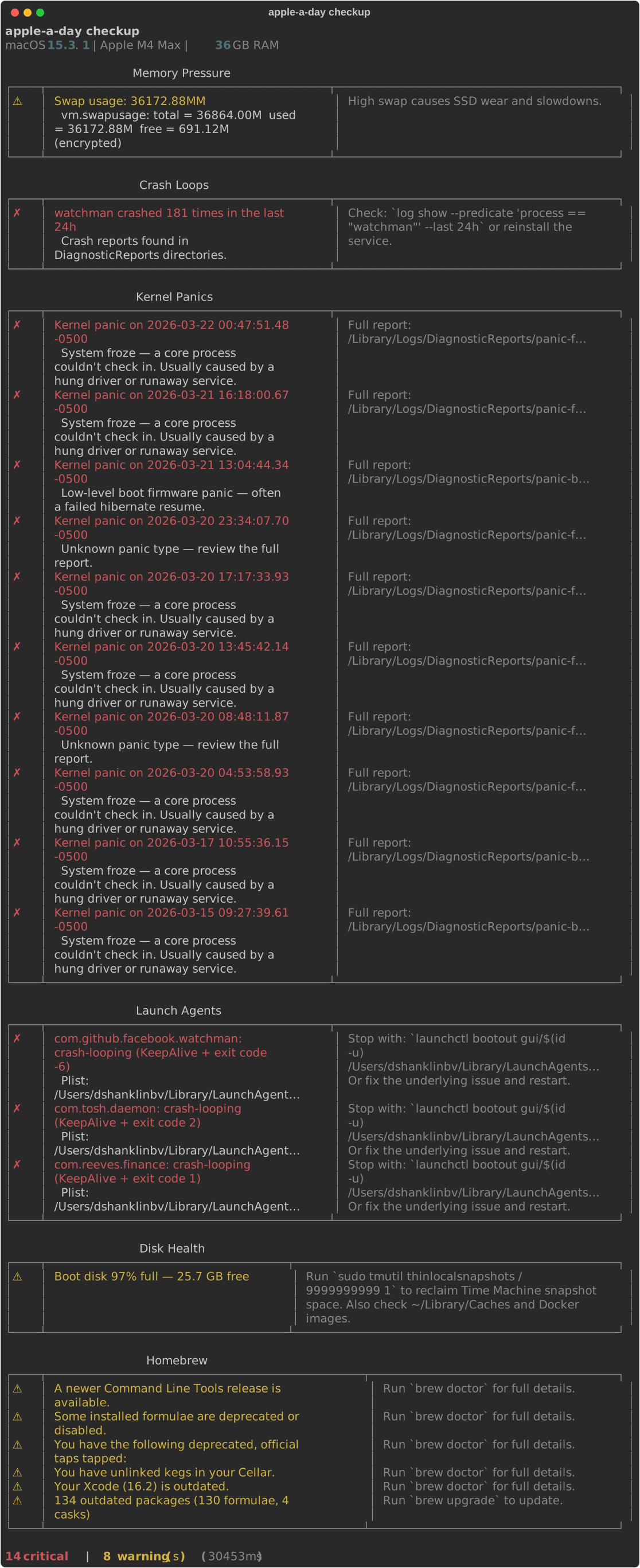
What it checks
| Module | What It Finds |
|---|---|
| Crash Loops | Services dying repeatedly via DiagnosticReports |
| Kernel Panics | Panic logs decoded into human-readable causes |
| Dylib Health | Broken dynamic library links after brew upgrades |
| Memory Pressure | RAM pressure level and swap usage |
| Disk Health | APFS state, free space, Time Machine snapshot bloat |
| Launch Agents | Crash-looping, rogue, or forgotten launchd services |
| Homebrew | Outdated packages, doctor warnings, broken links |
| Security | SIP, Gatekeeper, FileVault, XProtect freshness |
| Network | Wi-Fi signal quality, speed test, responsiveness |
Every finding includes a severity, a plain-english explanation, and a fix command.
For AI Agents
from apple_a_day.runner import run_all_checks

report = run_all_checks()
for r in report.results:
    for f in r.findings:
        if f.severity.value == "critical":
            print(f.summary, "→", f.fix)
Or via CLI:
# Get structured JSON for agent parsing
aad checkup --json --min-severity warning --fields severity,summary,fix

# Discover capabilities at runtime
aad schema
See SKILL.md for the full agent-discoverable capability definition.
Install
pip install apple-a-day
Or install from source:
git clone https://github.com/eidos-agi/apple-a-day.git
cd apple-a-day
pip install -e .
Usage
Run all checks:
aad checkup
JSON output (for scripts or piping):
aad checkup --json
Why "apple-a-day"?
"Eat an apple on going to bed, and you'll keep the doctor from earning his bread."
— Welsh proverb, Pembrokeshire, 1866
Prevention over treatment. Don't wait until your Mac is crashing — run the check daily and you won't need the doctor at all. The tool runs silently every morning, scoring your Mac's health across 7 dimensions. By the time you ask "why is my Mac slow?", the log already has the answer.
Origin story
This tool was born from a real incident: a broken Homebrew dependency (libboost_system.dylib) caused Facebook's watchman to crash-loop 611 times in a single day via a KeepAlive launchd plist. The crash loop likely triggered 9 kernel panics in 7 days through watchdog timeouts. It took 20 minutes of manual forensics to figure out what happened.
apple-a-day would have caught it in seconds.
Design principles
- Mac-native — uses
otool,diskutil,launchctl,powermetrics, and other macOS-specific tools directly. No cross-platform abstraction. - Plain english — doesn't just report "exit code -6". Explains it means SIGABRT from a missing dylib and tells you to
brew reinstall. - Always actionable — every finding includes a fix or next step.
- Read-only by default —
aad checkupnever modifies your system. Futureaad fixwill require explicit opt-in.
Roadmap
- MCP server — let Claude Code sessions query Mac health as a tool
-
aad fix— opt-in remediation with confirmation for each fix - Thermal & power monitoring for Apple Silicon
- Network diagnostics (networkQuality, Wi-Fi signal)
- Security checks (SIP, Gatekeeper, XProtect, FileVault)
- SSD health via smartctl
- PyPI release
Contributing
See CONTRIBUTING.md for guidelines.
We welcome:
- New check modules for macOS-specific health issues
- Better plain-english explanations for existing findings
- Bug reports from real Mac issues you've encountered
- Suggestions for native macOS tools we should wrap
Requirements
- macOS 13+ (Ventura or later)
- Python 3.11+
- Some checks benefit from Homebrew being installed
License
MIT — see LICENSE.
Built by Eidos AGI. An apple a day keeps the doctor away.
1 maintainer

Metadata
1 maintainer
Release files for apple-a-day 0.3.1
For a detailed explanation of source distributions (sdists) and built distributions (wheels), please see the package formats documentation.
Source distribution (sdist)
| File | Size | Uploaded | |
|---|---|---|---|
| apple_a_day-0.3.1.tar.gz | 617.4 kB | Details |
Built distribution (wheel)
| File | Interpreter | ABI | Platform | Reset |
|---|---|---|---|---|
| apple_a_day-0.3.1-py3-none-any.whl | Python 3 | none | any | Details |
Total release size: 718.5 kB
Release files / apple_a_day-0.3.1.tar.gz
| Download URL | apple_a_day-0.3.1.tar.gz |
|---|---|
| Size | 617.4 kB |
| Tags | Source |
|
SHA-256 checksum How to use checksums |
9a8fd8d076e363ed41657fe20466bf4b35ed531e8fd708cccdaa1b7512dcd411
|
|
BLAKE2b-256 checksum How to use checksums |
d93d6fc3803fb5ab75fd112dd05e136de77f56e017e7a3f7d91abe84dc0b1178
|
| Upload date | |
|
Uploaded using Trusted Publishing? What is trusted publishing? |
No |
| Uploaded via |
twine/6.2.0 CPython/3.12.7
|
Release files / apple_a_day-0.3.1-py3-none-any.whl
| Download URL | apple_a_day-0.3.1-py3-none-any.whl |
|---|---|
| Size | 101.1 kB |
| Tags | Python 3 |
|
SHA-256 checksum How to use checksums |
063816fc2ee8020ddfad0322b32c9ab80c2dde52e0f53d736e39a7be7dd88e32
|
|
BLAKE2b-256 checksum How to use checksums |
83c10c4af2db8e2c2852ed51272ccc2304f3dc34b7d62436a6c5c360fcf7bd0b
|
| Upload date | |
|
Uploaded using Trusted Publishing? What is trusted publishing? |
No |
| Uploaded via |
twine/6.2.0 CPython/3.12.7
|














