
Agent-native Mac health toolkit — keeps the doctor away. Zero dependencies.

Project description
apple-a-day





Agent-native Mac health toolkit — keeps the doctor away.
Zero dependencies. 9 checks. Plain english. Built for AI agents, friendly to humans.
pip install apple-a-day
aad checkup
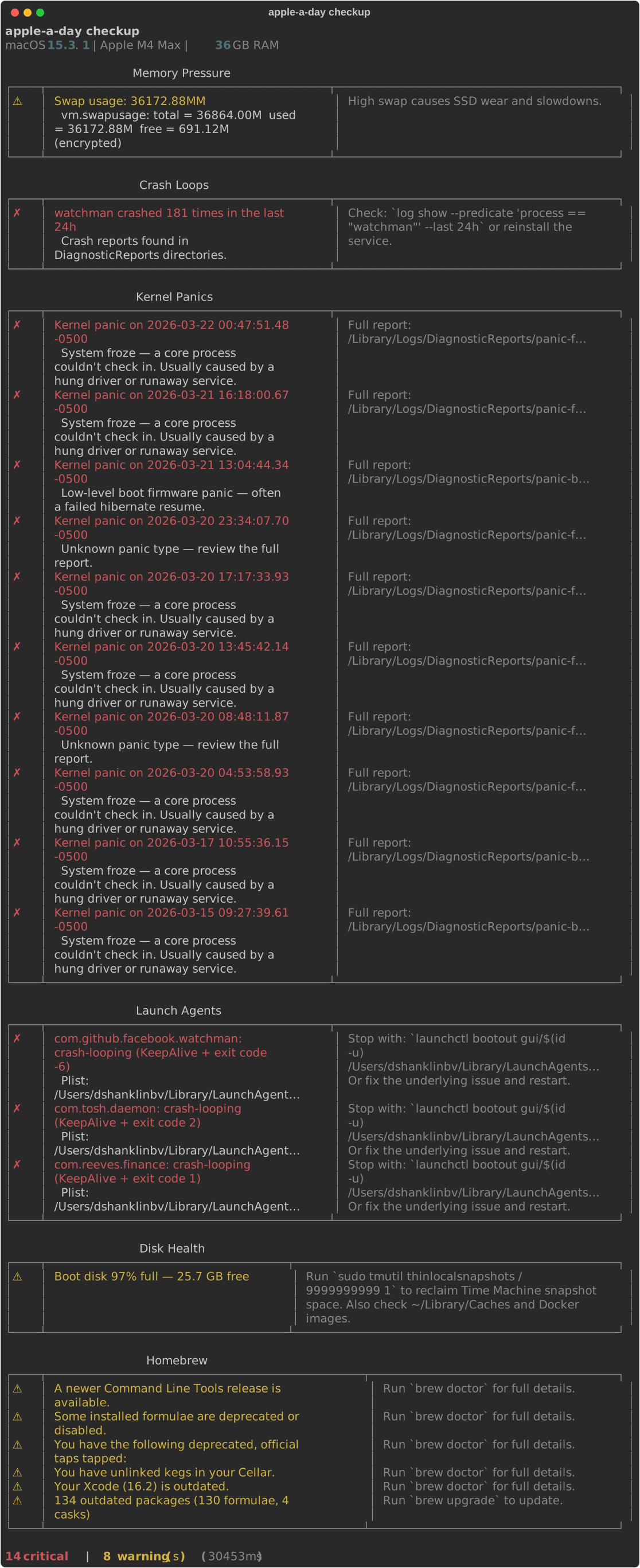
What it checks
| Module | What It Finds |
|---|---|
| Crash Loops | Services dying repeatedly via DiagnosticReports |
| Kernel Panics | Panic logs decoded into human-readable causes |
| Dylib Health | Broken dynamic library links after brew upgrades |
| Memory Pressure | RAM pressure level and swap usage |
| Disk Health | APFS state, free space, Time Machine snapshot bloat |
| Launch Agents | Crash-looping, rogue, or forgotten launchd services |
| Homebrew | Outdated packages, doctor warnings, broken links |
| Security | SIP, Gatekeeper, FileVault, XProtect freshness |
| Network | Wi-Fi signal quality, speed test, responsiveness |
Every finding includes a severity, a plain-english explanation, and a fix command.
For AI Agents
from apple_a_day.runner import run_all_checks

report = run_all_checks()
for r in report.results:
    for f in r.findings:
        if f.severity.value == "critical":
            print(f.summary, "→", f.fix)
Or via CLI:
# Get structured JSON for agent parsing
aad checkup --json --min-severity warning --fields severity,summary,fix

# Discover capabilities at runtime
aad schema
See SKILL.md for the full agent-discoverable capability definition.
Install
pip install apple-a-day
Or install from source:
git clone https://github.com/eidos-agi/apple-a-day.git
cd apple-a-day
pip install -e .
Usage
Run all checks:
aad checkup
JSON output (for scripts or piping):
aad checkup --json
Why "apple-a-day"?
"Eat an apple on going to bed, and you'll keep the doctor from earning his bread."
— Welsh proverb, Pembrokeshire, 1866
Prevention over treatment. Don't wait until your Mac is crashing — run the check daily and you won't need the doctor at all. The tool runs silently every morning, scoring your Mac's health across 7 dimensions. By the time you ask "why is my Mac slow?", the log already has the answer.
Origin story
This tool was born from a real incident: a broken Homebrew dependency (libboost_system.dylib) caused Facebook's watchman to crash-loop 611 times in a single day via a KeepAlive launchd plist. The crash loop likely triggered 9 kernel panics in 7 days through watchdog timeouts. It took 20 minutes of manual forensics to figure out what happened.
apple-a-day would have caught it in seconds.
Design principles
- Mac-native — uses
otool,diskutil,launchctl,powermetrics, and other macOS-specific tools directly. No cross-platform abstraction. - Plain english — doesn't just report "exit code -6". Explains it means SIGABRT from a missing dylib and tells you to
brew reinstall. - Always actionable — every finding includes a fix or next step.
- Read-only by default —
aad checkupnever modifies your system. Futureaad fixwill require explicit opt-in.
Roadmap
- MCP server — let Claude Code sessions query Mac health as a tool
-
aad fix— opt-in remediation with confirmation for each fix - Thermal & power monitoring for Apple Silicon
- Network diagnostics (networkQuality, Wi-Fi signal)
- Security checks (SIP, Gatekeeper, XProtect, FileVault)
- SSD health via smartctl
- PyPI release
Contributing
See CONTRIBUTING.md for guidelines.
We welcome:
- New check modules for macOS-specific health issues
- Better plain-english explanations for existing findings
- Bug reports from real Mac issues you've encountered
- Suggestions for native macOS tools we should wrap
Requirements
- macOS 13+ (Ventura or later)
- Python 3.11+
- Some checks benefit from Homebrew being installed
License
MIT — see LICENSE.
Built by Eidos AGI. An apple a day keeps the doctor away.
Release history Release notifications | RSS feed


Download files
Download the file for your platform. If you're not sure which to choose, learn more about installing packages.
Source Distribution
Built Distribution
Filter files by name, interpreter, ABI, and platform.
If you're not sure about the file name format, learn more about wheel file names.
Copy a direct link to the current filters
File details
Details for the file apple_a_day-0.3.0.tar.gz.
File metadata
- Download URL: apple_a_day-0.3.0.tar.gz
- Upload date:
- Size: 309.4 kB
- Tags: Source
- Uploaded using Trusted Publishing? No
- Uploaded via: twine/6.2.0 CPython/3.12.7
File hashes
| Algorithm | Hash digest | |
|---|---|---|
| SHA256 |
9a47c99ad9173852ed23f2a0290db93f3b2de2de3c11bc2d6fd5fb03b694768c
|
|
| MD5 |
3c9002b4b19d6f0c1d9aad0a29a2921f
|
|
| BLAKE2b-256 |
7f936049ca66d8715b18d6acc9063a5c5c541df2945e7102054db5f12317330a
|
File details
Details for the file apple_a_day-0.3.0-py3-none-any.whl.
File metadata
- Download URL: apple_a_day-0.3.0-py3-none-any.whl
- Upload date:
- Size: 89.4 kB
- Tags: Python 3
- Uploaded using Trusted Publishing? No
- Uploaded via: twine/6.2.0 CPython/3.12.7
File hashes
| Algorithm | Hash digest | |
|---|---|---|
| SHA256 |
b3b40aba6474e5f29f44fdb73b3f12c20829452cff191f3c3d2e53c982330000
|
|
| MD5 |
5bfc00305dff49268c790a98df452047
|
|
| BLAKE2b-256 |
7c1859bf794327ab1d59107da206bbbd78be042178fd1756a96fc500e89e1aac
|






