
Convert Apple Dictionary HTML `<span>`s into semantic, readable HTML. Removes the dependency on CSS styles by converting span class names into appropriate semantic HTML tags and structural markup.
Verified details
These details have been verified by PyPIProject links
GitHub Statistics
Maintainers

Project description
appledict2semantic
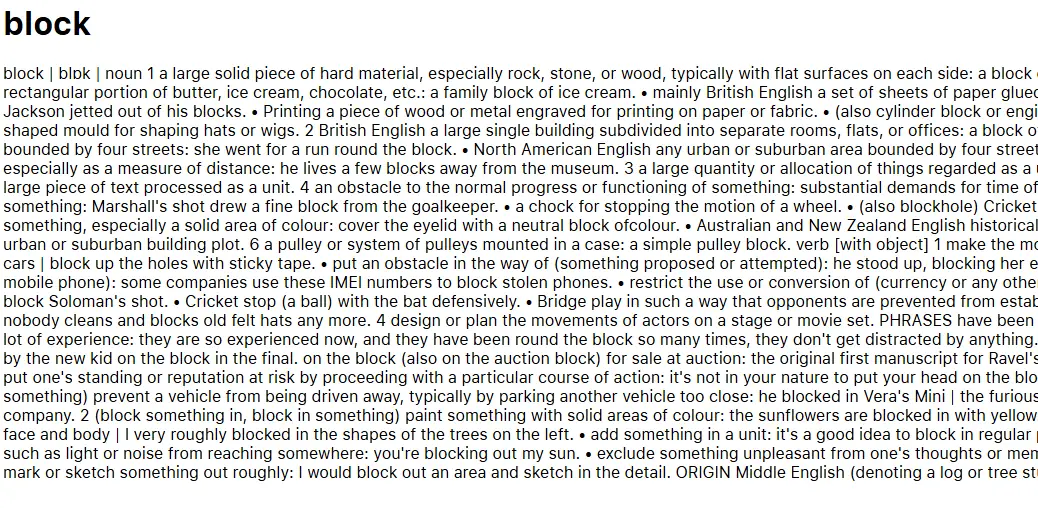
appledict2semantic is a Python tool to convert Apple Dictionary HTML files into clean, semantic HTML. It removes the dependency on the custom CSS by mapping span class names to appropriate semantic HTML tags and structural markup, making the output more readable and portable.
Screenshots
Before conversion:
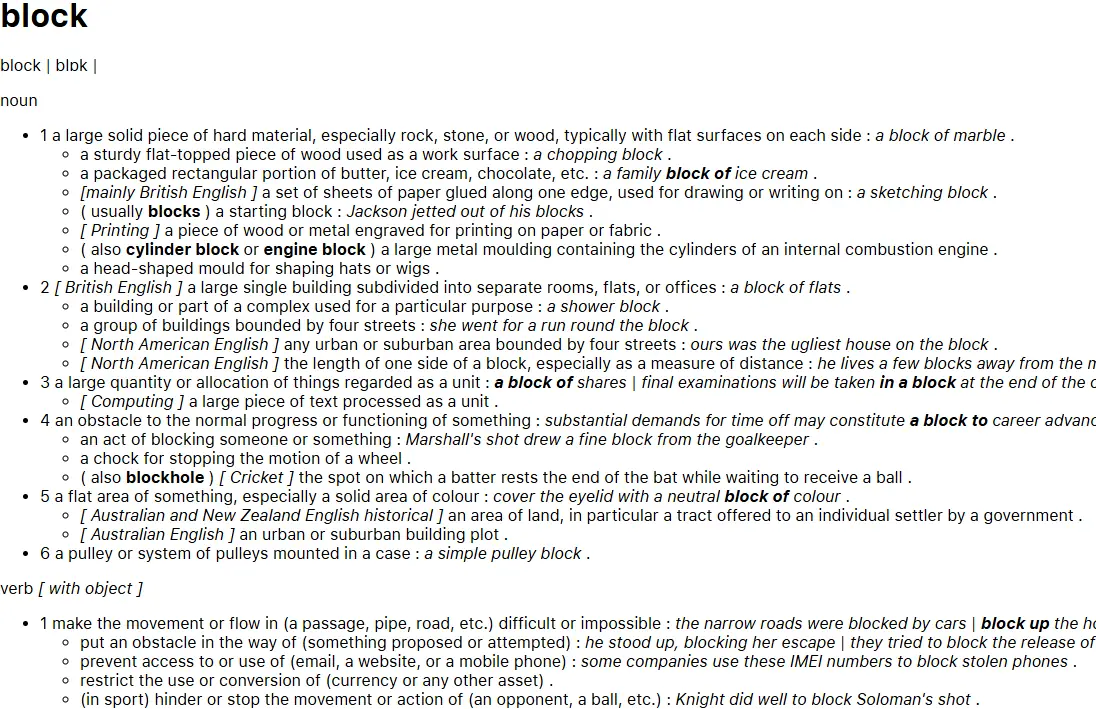
After conversion:
Features
- Span-to-semantic conversion: Converts Apple Dictionary’s
<span class="...">elements into semantic HTML tags like<strong>,<em>,<u>, and more. - Structural transformation: Transforms sense and subsense blocks into nested lists
<ul>,<li>for better readability. - Block conversion: Converts etymology, phrase (verb), derivatives, and usage note blocks into more meaningful HTML structures. This paves way for further processing, e.g. to convert to Markdown.
- Cleanup: Removes unnecessary or empty tags, and replaces bullet spans with proper list items.
- Batch processing: Supports processing single files or entire folders, with optional in-place replacement.
Installation
Make sure that you have Python 3.10 or higher installed.
Then install the package from PyPI:
pip install appledict2semantic
Obtaining and extracting Apple Dictionary HTML files
How to obtain
To obtain the Apple Dictionary data, first you need to have a macOS.
Then, open the Dictionary app, select Dictionary > Settings. Choose the sources you want to download.
The dictionary files are stored in /System/Library/AssetsV2/com_apple_MobileAsset_DictionaryServices_dictionaryOSX.
How to extract
Install pyglossary:
pip install pyglossary
Then use pyglossary to point to the Body.data file in the .dictionary folder, and convert to AppleDict Source. This will produce an XML file.
From there, use this script to extract the XML file to HTML files.
For more information about the Apple Dictionary binary format, see here.
Usage
-
Converts a single Apple Dictionary HTML file to semantic HTML:
appledict2semantic --single input.html output.html
-
Processes all .html files in
input_folder, saving results tooutput_folder:appledict2semantic --multiple input_folder output_folder
-
Processes all .html files in
input_folder, replacing the original files:appledict2semantic --multiple input_folder --replace
You will need to confirm the action.
License
This project is licensed under the MIT License. See the LICENSE file for details.
Project details
Verified details
These details have been verified by PyPIProject links
GitHub Statistics
Maintainers
Release history Release notifications | RSS feed


Download files
Download the file for your platform. If you're not sure which to choose, learn more about installing packages.
Source Distribution
Built Distribution
Filter files by name, interpreter, ABI, and platform.
If you're not sure about the file name format, learn more about wheel file names.
Copy a direct link to the current filters
File details
Details for the file appledict2semantic-1.2.1.tar.gz.
File metadata
- Download URL: appledict2semantic-1.2.1.tar.gz
- Upload date:
- Size: 327.0 kB
- Tags: Source
- Uploaded using Trusted Publishing? Yes
- Uploaded via: twine/6.1.0 CPython/3.12.9
File hashes
| Algorithm | Hash digest | |
|---|---|---|
| SHA256 |
6f73641da213899002e9447e936c7b39bd5c81d49aa4c2d4e87b64a2a6a4f065
|
|
| MD5 |
66530b9c56270348af0bd89100d063bd
|
|
| BLAKE2b-256 |
a4b214af3818801695e09850b043b23f9a2e20630d7a8c94c0dd18d7efec4f90
|
Provenance
The following attestation bundles were made for appledict2semantic-1.2.1.tar.gz:
Publisher:
build.yaml on yell0wsuit/appledict2semantic
-
Statement:
-
Statement type:
https://in-toto.io/Statement/v1 -
Predicate type:
https://docs.pypi.org/attestations/publish/v1 -
Subject name:
appledict2semantic-1.2.1.tar.gz -
Subject digest:
6f73641da213899002e9447e936c7b39bd5c81d49aa4c2d4e87b64a2a6a4f065 - Sigstore transparency entry: 266654068
- Sigstore integration time:
-
Permalink:
yell0wsuit/appledict2semantic@0cbb90a679c2d30f3f6775c400dcd1bb411a4c53 -
Branch / Tag:
refs/heads/main - Owner: https://github.com/yell0wsuit
-
Access:
public
-
Token Issuer:
https://token.actions.githubusercontent.com -
Runner Environment:
github-hosted -
Publication workflow:
build.yaml@0cbb90a679c2d30f3f6775c400dcd1bb411a4c53 -
Trigger Event:
push
-
Statement type:
File details
Details for the file appledict2semantic-1.2.1-py3-none-any.whl.
File metadata
- Download URL: appledict2semantic-1.2.1-py3-none-any.whl
- Upload date:
- Size: 17.9 kB
- Tags: Python 3
- Uploaded using Trusted Publishing? Yes
- Uploaded via: twine/6.1.0 CPython/3.12.9
File hashes
| Algorithm | Hash digest | |
|---|---|---|
| SHA256 |
04d36b826f03f101e3454c5fa66803bebbb2f62600668f0bb1bf197ccf062815
|
|
| MD5 |
2bd0ecb72ade426f04cbbebc00d93c91
|
|
| BLAKE2b-256 |
cd9a0cad813d8cdbdb4879f456d5b9e9b303ef4ff66cb4544f3c7144db1b50f1
|
Provenance
The following attestation bundles were made for appledict2semantic-1.2.1-py3-none-any.whl:
Publisher:
build.yaml on yell0wsuit/appledict2semantic
-
Statement:
-
Statement type:
https://in-toto.io/Statement/v1 -
Predicate type:
https://docs.pypi.org/attestations/publish/v1 -
Subject name:
appledict2semantic-1.2.1-py3-none-any.whl -
Subject digest:
04d36b826f03f101e3454c5fa66803bebbb2f62600668f0bb1bf197ccf062815 - Sigstore transparency entry: 266654088
- Sigstore integration time:
-
Permalink:
yell0wsuit/appledict2semantic@0cbb90a679c2d30f3f6775c400dcd1bb411a4c53 -
Branch / Tag:
refs/heads/main - Owner: https://github.com/yell0wsuit
-
Access:
public
-
Token Issuer:
https://token.actions.githubusercontent.com -
Runner Environment:
github-hosted -
Publication workflow:
build.yaml@0cbb90a679c2d30f3f6775c400dcd1bb411a4c53 -
Trigger Event:
push
-
Statement type:






