
Client SDK for App Mesh

Project description














Advanced Application Management Platform
App Mesh is a secure platform for executing and managing user-defined process behaviors as managed services, providing control and integration via CLI and RESTful APIs.
App Mesh = systemd + scheduler + remote exec + API
1. Application Management
Manages user-defined processes in a way similar to systemd services or Docker-managed processes, while providing more advanced capabilities for control, security, and integration.
# List registered applications
$ appc ls
ID  NAME    OWNER  STATUS    HEALTH  PID  USER  MEMORY    %CPU  RETURN  AGE  DURATION  STARTS  COMMAND
1   pyexec  mesh   disabled  -       -    -     -         -     -       37s  -         0       "python3 ../../bin/py_exec.py"
2   ping    mesh   enabled   OK      747  root  5.9 MiB   0     -       37s  37s       1       "ping cloudflare.com"
3   pytask  mesh   enabled   OK      748  root  29.7 MiB  0     -       37s  37s       1       "python3 ../../bin/py_task.py"
# Add app
$ appc add -a myapp -c "ping www.baidu.com"
# View app
$ appc ls -a myapp -o
PING www.baidu.com (183.2.172.17) 56(84) bytes of data.
64 bytes from 183.2.172.17 (183.2.172.17): icmp_seq=1 ttl=52 time=34.9 ms
64 bytes from 183.2.172.17 (183.2.172.17): icmp_seq=2 ttl=52 time=35.1 ms
64 bytes from 183.2.172.17 (183.2.172.17): icmp_seq=3 ttl=52 time=35.3 ms
# appc -h for more usage
Supports not only long-running services, but also scheduled and policy-driven executions, with remote control and execution status tracking.
2. Sending Tasks to a Running Application
Interact with a running application by sending tasks or data to it and receiving responses through the SDK.
from appmesh import AppMeshClient
client = AppMeshClient()
client.login("USER-NAME", "USER-PWD")

result_from_server = "0"
for i in range(10):
    task_data = f"print({result_from_server} + {i}, end='')"
    result_from_server = client.run_task(app_name="pytask", data=task_data)
    print(result_from_server)
🚀 Features
| Feature | Description |
|---|---|
| App Management | 🧩 App CURD with Full Remote Control – including cgroup, OS user, environment variables, Docker, stdin, and stdout – along with comprehensive monitoring (start counts, exit codes, error messages, health checks). 🧩 Fine-Grained Behavior Control & Scheduling – supports long- and short-running tasks, periodic jobs, cron schedules, custom timings, and robust error handling. 🧩 Multi-Tenancy – built-in user ownership model and access controls. 🧩 Unified Access Interface – interact via CLI, REST, SDK or WebGUI. |
| Computing | 🚀 High-performance in-memory computing ▶️ Remote execution |
| Security | 🔐 Authentication: OAuth, 2FA, YAML-based storage (local or Consul for clustering) 🔐 Authorization: JWT, RBAC, multi-tenant isolation 🔐 Protection: SSL/TLS for TCP/HTTP/WebSocket, CSRF tokens, HMAC with PSK for non-token verification |
| Cloud Native | 🌩️ Prometheus Exporter (built-in) 🌩️ Grafana SimpleJson datasource 🌩️ Grafana Loki 🌩️ Dockerfile 🧱 Consul micro-service cluster management |
| Extra Features | Collect host/app resource usage Remote shell command execution File upload/download API Hot-update support systemctl reload appmesh Bash completion Request Forwarding 🌐Web GUI |
| Ecosystem | LLM: Model Context Protocol (MCP) AI: Claude Code Plugin IoT: MQTT |
| Platform support | Linux, macOS, Windows (X86, ARM) |
| SDK | C++, Rust, Python, Golang, JavaScript, Java, Swagger OpenAPI Specification |
📦 Install
Refer to the Installation doc, this covers:
- Docker Compose setup
- Native installation
- Cluster initialization
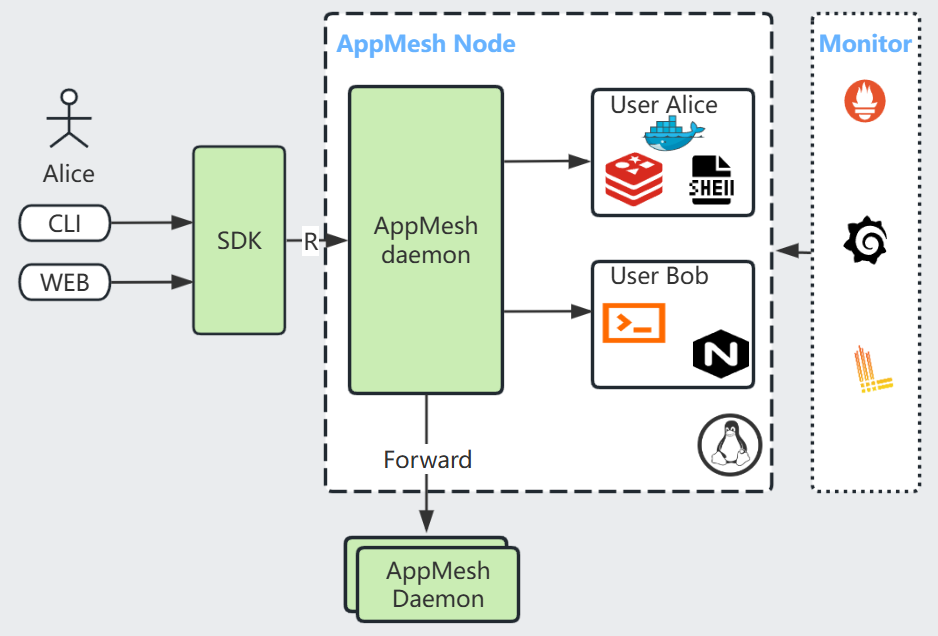
📚 Documentation
🆚 Comparison
Standalone mode
| Feature | App Mesh | Supervisor | crontab |
|---|---|---|---|
| Accuracy | Seconds | Seconds | Minutes |
| Language | C++17 | Python | C |
| Web GUI | √ | √ | |
| Command lines | √ | √ | √ |
| SDK | √ | ||
| Cron schedule expression | √ | √ | |
| Manage docker app | √ | ||
| Session login | √ | ||
| Manage stdout/stderr | √ | √ | |
| Health check | √ | ||
| Authentication | √ | √ | |
| Multi-tenant | √ | √ |
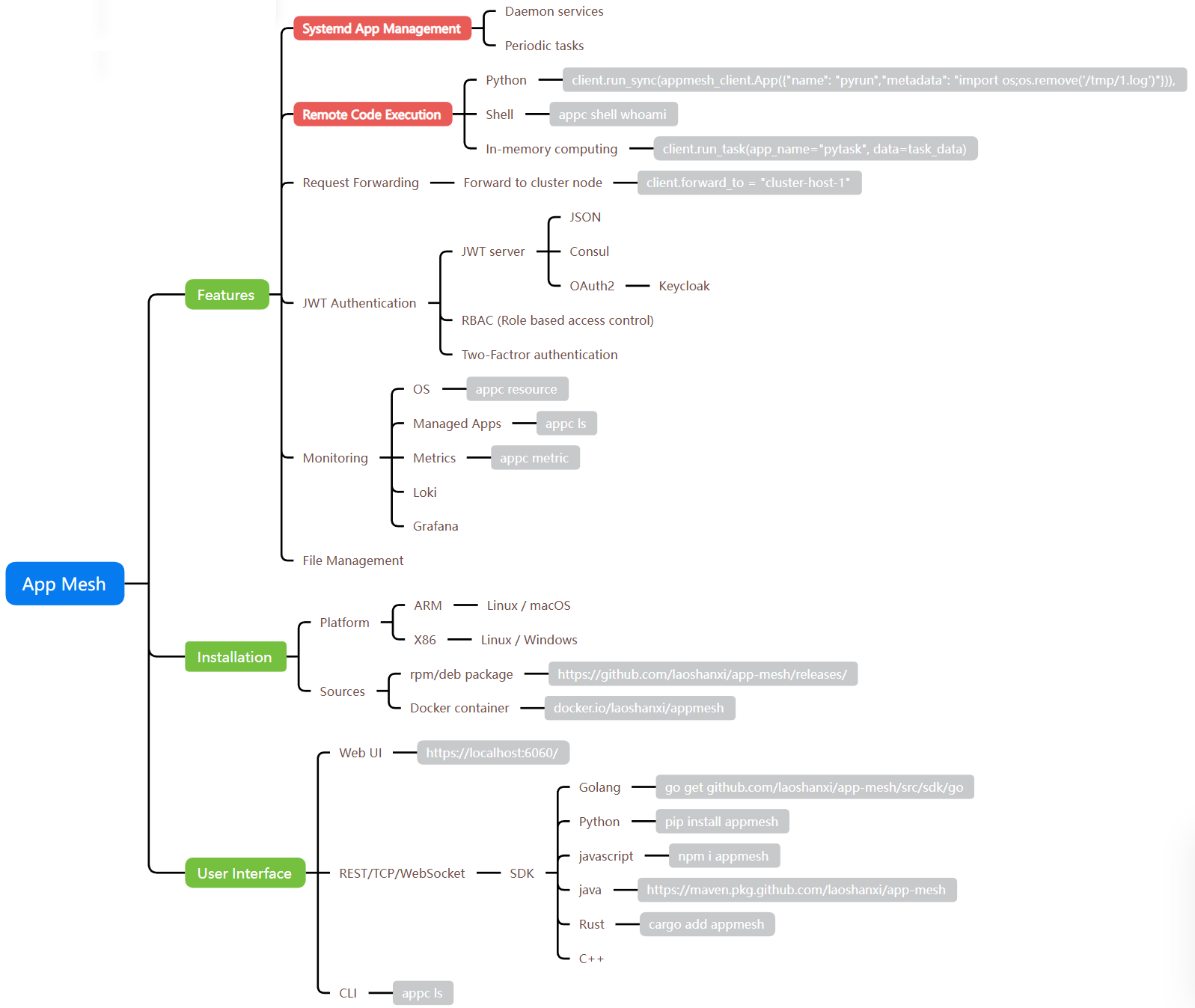
Mind diagram
💡 Success
- In-memory remote task execute
- Build a powerful monitor system with Grafana/Prometheus/Loki
- Customize application start behavior
- Open service broker support local PV for Kubernetes
- Promote native application to microservice application
- Secure REST file server
- Standalone JWT server
- Kubernetes run non-container applications
- Remote execute
- Python parallel run
- Secure consul cluster
- JWT service with REST and UI
🔗 Library dependency
Release history Release notifications | RSS feed


Download files
Download the file for your platform. If you're not sure which to choose, learn more about installing packages.
Source Distributions
Built Distribution
Filter files by name, interpreter, ABI, and platform.
If you're not sure about the file name format, learn more about wheel file names.
Copy a direct link to the current filters
File details
Details for the file appmesh-2.1.18-py3-none-any.whl.
File metadata
- Download URL: appmesh-2.1.18-py3-none-any.whl
- Upload date:
- Size: 47.6 kB
- Tags: Python 3
- Uploaded using Trusted Publishing? No
- Uploaded via: twine/6.1.0 CPython/3.13.13
File hashes
| Algorithm | Hash digest | |
|---|---|---|
| SHA256 |
341c567cca17e717003bfe1033bfe001dfcb745bea50400b6509f545a831185c
|
|
| MD5 |
5c12b8081cbcf8cadf3b0c476281b8dc
|
|
| BLAKE2b-256 |
dc00a8bcd170a58f9f1b724d438da17d9bde81894f97e1cbdb8db1b52f8ee462
|






