
AppRC: Application Runtime Config


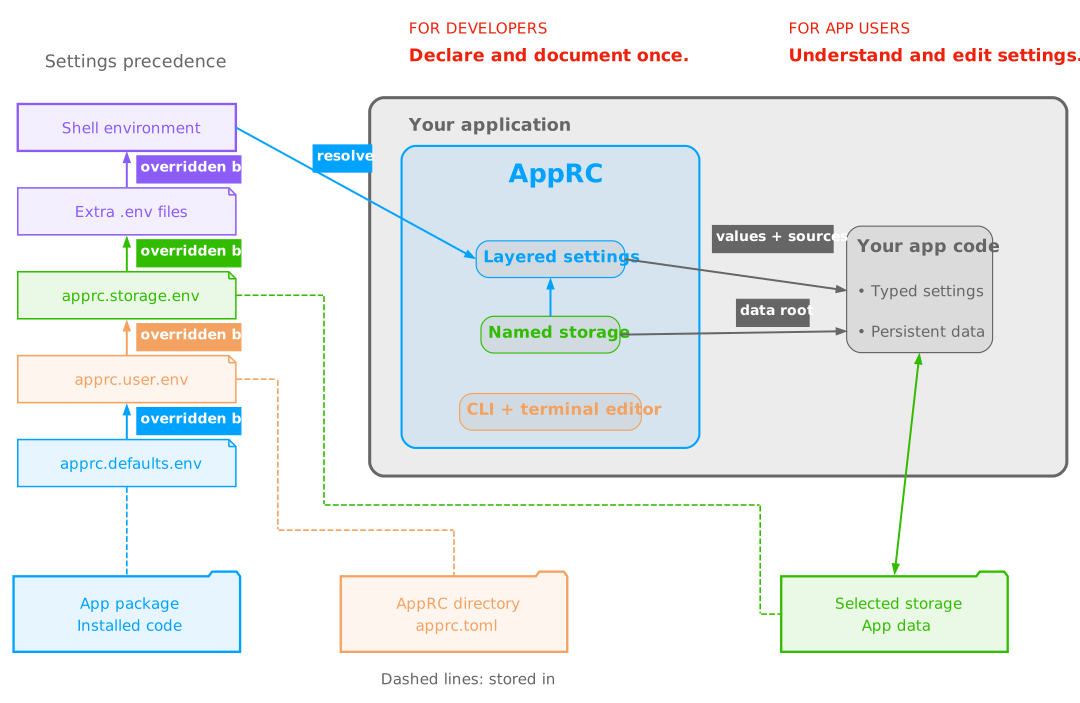
AppRC gives Python applications typed settings and tools for configuring them. Define each setting's type, default, and explanation once. Use the same application declaration to load values, show where they came from, and let users edit saved overrides.
Applications can also register named data directories outside their source checkout. Each directory can have its own settings. A config CLI and terminal editor provide setup, inspection, editing, and storage management.
 |
|---|
| Fig. 1 - Graphical Abstract: AppRC resolves typed settings from layered sources, connects selected storage to its settings and data directory, and shares one declaration across application code and configuration tools. |
- Install
- Load settings
- Save user settings
- Add named storage
- Add terminal commands
- Add a Gradio settings page
- Examples and documentation
Install
Python 3.12 or newer is required.
| Command | Includes |
|---|---|
python -m pip install "apprc>=0.29.0,<0.30" |
Configuration, Typer commands, prompts, and the Textual editor. |
python -m pip install "apprc-core>=0.29.0,<0.30" |
Configuration and noninteractive management without terminal dependencies. |
python -m pip install "apprc-gui>=0.29.0,<0.30" |
Configuration and a Gradio settings editor. |
apprc-core and apprc use import apprc; apprc-gui provides
from apprc_gui import ConfigEditor. The terminal and GUI distributions each
install the exact matching apprc-core version.
Warning
When upgrading from the previous single-distribution package, use a fresh
environment or uninstall the old apprc first. Follow the
migration instructions
for the changed Python API and package ownership.
Load settings
Create one AppRC for the application and register
its config sections.
This complete example needs no files:
import apprc as rc

MyRC = rc.AppRC(app_id="demo")

@MyRC.config("client", prefix="DEMO_")
class ClientSettings(rc.Config):
    timeout: int = rc.field(
        "DEMO_TIMEOUT",
        default=30,
        title="Request timeout",
        explanation_short="Seconds to wait for an API response.",
    )

resolved = MyRC.resolve(environment={"DEMO_TIMEOUT": "10"})
settings = resolved.build(ClientSettings)
assert settings.timeout == 10
assert settings.provenance_of("timeout").origin == "shell_export_variable"
resolve() reads the chosen inputs and returns a
ResolvedConfig. build() converts those
inputs into the Python values used by ClientSettings. Pass settings to your
application functions. Omit environment to use the actual process environment.
Add dotenv files or
packaged defaults
when values should come from files. AppRC applies a defined
source precedence, and
provenance records the source of each field.
Reading configuration creates no files and does not change os.environ.
An importable client
can resolve these layers when constructed, so its caller only imports the client.
The complete client example
shows the package and its configuration commands.
Save user settings
Add user_dotenv=rc.UserDotenv() to the AppRC declaration when users need saved
preferences. The user dotenv
is apprc.user.env in the AppRC directory, separate from the installed code.
Its default location for app_id="demo" is ~/.local/share/demo;
DEMO_APPRC_DIR relocates it.
ConfigManager, obtained from MyRC.manage(),
initializes files and applies reviewed edits. The
saved-preference guide
is a complete runnable program. The
user preferences example
provides the same operations through a CLI.
Add named storage
Add storage=rc.Storage() when the application writes persistent data.
A storage is a registered directory with its own
apprc.storage.env. The application obtains the selected root and writes its
data there. Users can keep data outside the source checkout, switch between
named directories, and move or archive them.
The data-directory guide
writes a report to selected storage. The
combined example shows how storage
settings override user preferences. UserDotenv() and Storage() are independent;
enable either or both.
Add terminal commands
The config CLI adds config setup, config doctor,
config set, config edit, and storage commands to a Typer application.
Set setup_next_step on AppRC to print
app-supplied next-step text after successful config setup. The
Typer guide
shows the entire application and command sequence.
Applications can separately opt in to the
application-data CLI with
rc.cli.mount_appdata_cli(app, MyRC). It adds appdata paths for the cleanup
inventory and appdata clean --dry-run to preview removal of AppRC-managed
files and internal storage data. Cleanup is explicit; external storage payloads
and unrelated files are retained. Follow the
cleanup guide
for the mount, runtime-independent policy, and confirmation behavior.
The config editor displays configuration
layers together, explains each setting, and edits user or storage overrides.
The same config fields
also drive the desktop settings view.
Set restart_required=True on a field
whose saved value takes effect only after the application restarts. The
Textual and Gradio editors mark that field and repeat the restart instruction
after saving; AppRC never restarts the application automatically.
Add a Gradio settings page
Embed apprc_gui.ConfigEditor in an application-owned Gradio Blocks. Pass it
MyRC.manage() so the page can set up declared files, show where effective
values came from, and save user or storage overrides. It opens before required
settings are complete, which makes it suitable for first-run setup. The
Gradio settings guide
shows the connection, and the secret companion explanation
explains where saved secret=True fields go.
AppRC does not create installers. The Windows installer guide shows how an application can package its own launcher and dependencies in one Setup.exe.
Examples and documentation
Start with Documentation for the learning order and component names.
| Document | Purpose |
|---|---|
| Explanations | Understand the components and their connections. |
| How-to user guides | Complete one task using an independent example. |
| References | Look up exact APIs, files, commands, and behavior. |
| Examples | Choose and run a complete application setup. |
| Development | Change, verify, build, and release AppRC. |
1 maintainer

Metadata
1 maintainer
Release files for apprc-core 0.29.0
For a detailed explanation of source distributions (sdists) and built distributions (wheels), please see the package formats documentation.
Source distribution (sdist)
| File | Size | Uploaded | Provenance | Actions |
|---|---|---|---|---|
| apprc_core-0.29.0.tar.gz | 436.3 kB | Without provenance | Details for apprc_core-0.29.0.tar.gz |
Built distribution (wheel)
| File | Interpreter | ABI | Platform | Actions Reset |
|---|---|---|---|---|
| apprc_core-0.29.0-py3-none-any.whl | Python 3 | none | any | Details for apprc_core-0.29.0-py3-none-any.whl |
Total release size: 699.2 kB
Release files / apprc_core-0.29.0.tar.gz
| Download URL | apprc_core-0.29.0.tar.gz |
|---|---|
| Size | 436.3 kB |
| Tags | Source |
|
SHA-256 checksum How to use checksums |
b6f4beb3f73ab1b74667e4e5b25813503a3c96b728aa63d704652cb76322dcd9
|
|
BLAKE2b-256 checksum How to use checksums |
9e0a79aacfca10897f54a2043037be388acded04ed2cac4d246ddc7090682826
|
| Upload date | |
|
Uploaded using Trusted Publishing? What is trusted publishing? |
Yes |
| Uploaded via |
uv/0.13.5 {"installer":{"name":"uv","version":"0.13.5","subcommand":["publish"]},"python":null,"implementation":{"name":null,"version":null},"distro":{"name":"Ubuntu","version":"24.04","id":"noble","libc":null},"system":{"name":null,"release":null},"cpu":null,"openssl_version":null,"setuptools_version":null,"rustc_version":null,"ci":true}
|
Release files / apprc_core-0.29.0-py3-none-any.whl
| Download URL | apprc_core-0.29.0-py3-none-any.whl |
|---|---|
| Size | 262.9 kB |
| Tags | Python 3 |
|
SHA-256 checksum How to use checksums |
20bf951be22aa6d793e1cad3e43c3ee53dc3de7783f186e00fc3e59d6999fb48
|
|
BLAKE2b-256 checksum How to use checksums |
67400f9710ae89bf095b37cff0a8e351f2c8cf179d5a50f3cc8d73d5de60f180
|
| Upload date | |
|
Uploaded using Trusted Publishing? What is trusted publishing? |
Yes |
| Uploaded via |
uv/0.13.5 {"installer":{"name":"uv","version":"0.13.5","subcommand":["publish"]},"python":null,"implementation":{"name":null,"version":null},"distro":{"name":"Ubuntu","version":"24.04","id":"noble","libc":null},"system":{"name":null,"release":null},"cpu":null,"openssl_version":null,"setuptools_version":null,"rustc_version":null,"ci":true}
|
Security for apprc-core 0.29.0
Provenance
Provenance describes where a file came from. On PyPI, provenance is shared via attestations, which provide a verifiable record of the build or publishing details. View details, limitations and caveats.
No provenance found
None of the files in this release were uploaded with provenance metadata.
A note on package security
PyPI is a repository for distributing packages, not a service for auditing them. While third-party security researchers and our staff do their best to detect and remove malicious packages, PyPI cannot guarantee the quality, security or suitability of any given package.
To learn more about protecting yourself from malicious actors, visit our package security documentation.














