
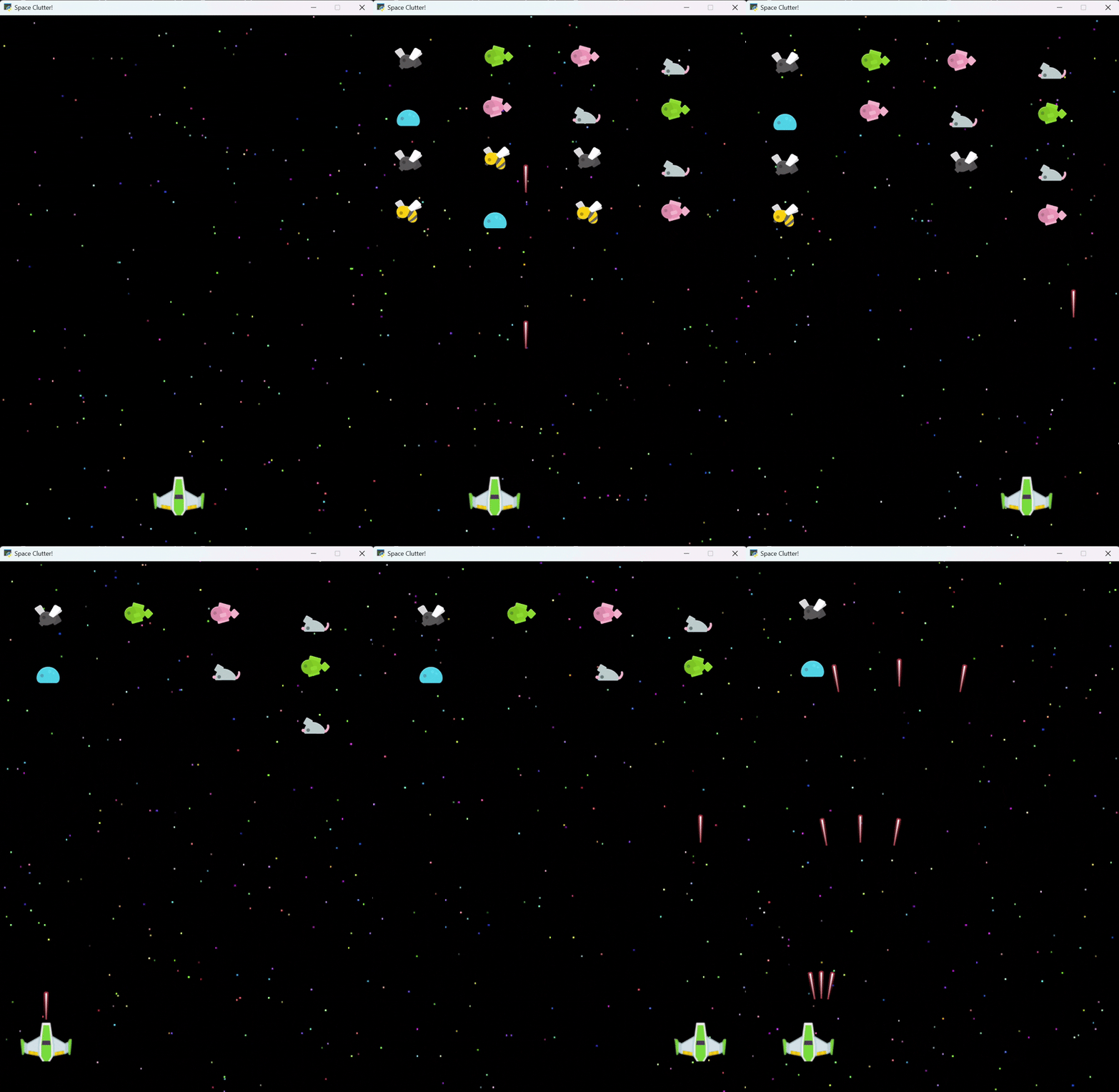
Space Clutter! - A game prototype demonstrating grid formations, wave patterns, and MoveUntil actions |
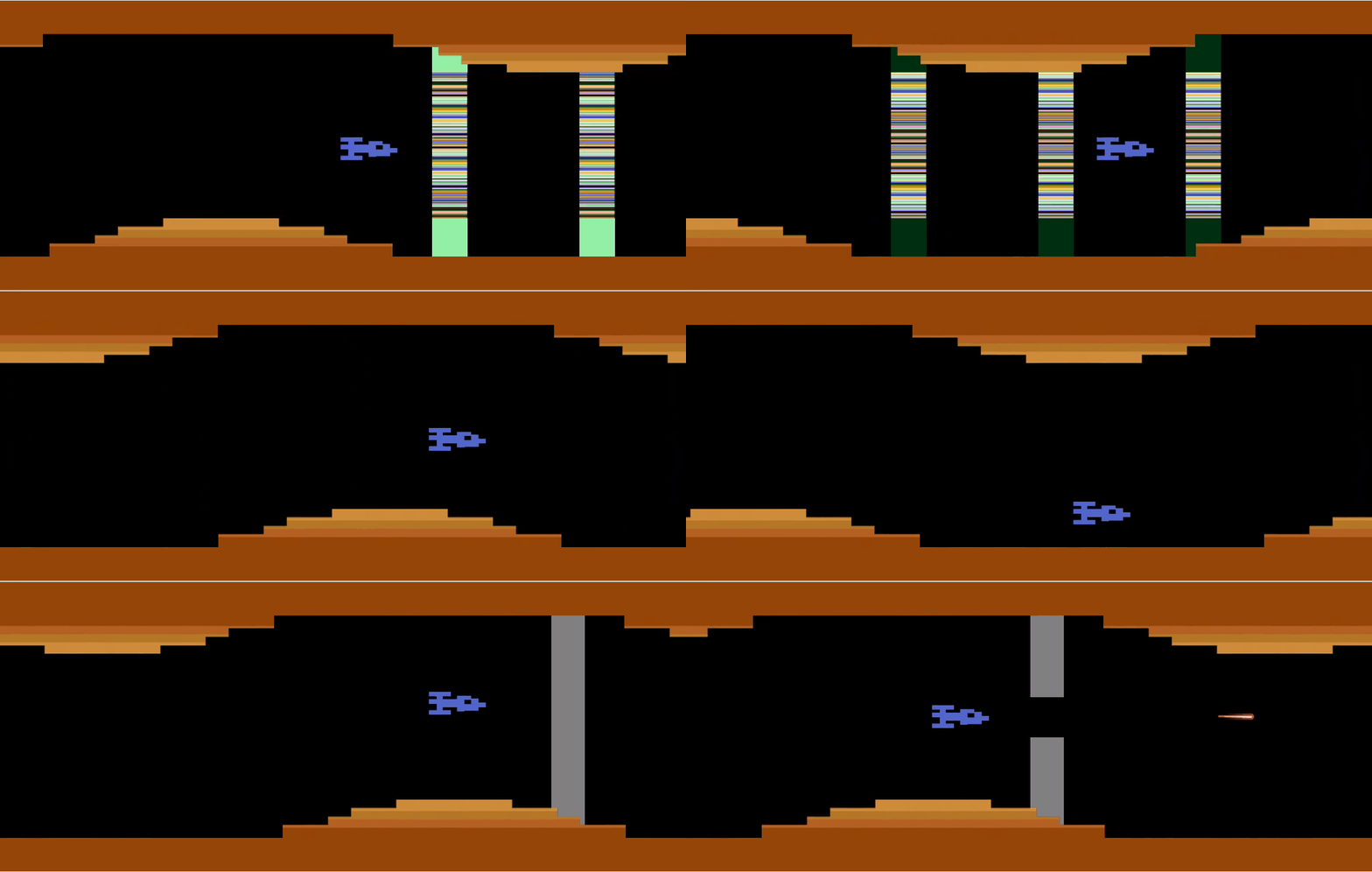
A full game under development, using Actions 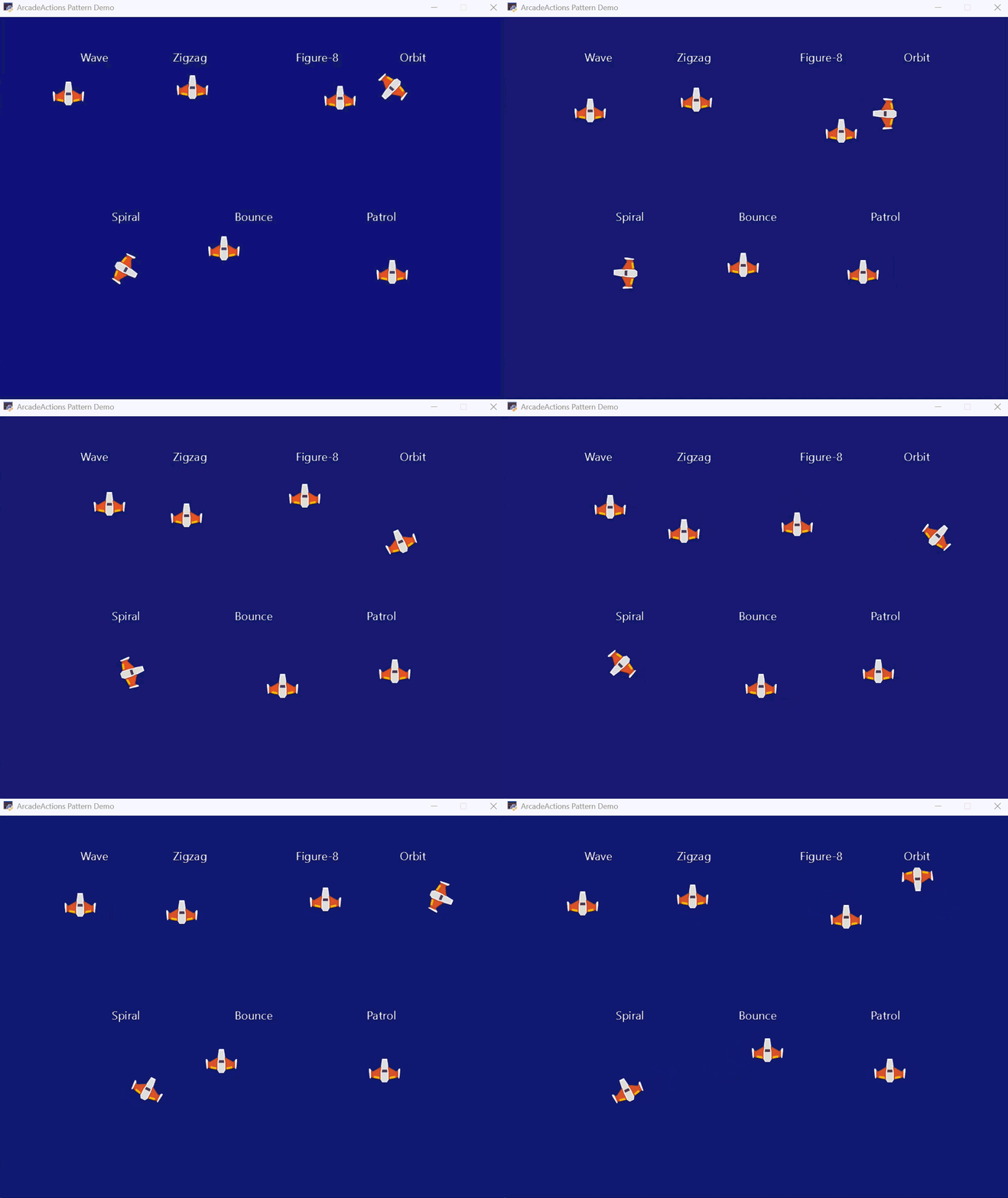
Pattern Demo - Showcasing various movement patterns and formation arrangements |
ArcadeActions extension library for Arcade 3.x


🚀 Quick Appeal
So much of building an arcade game is a cluttered way of saying "animate this sprite until something happens", like colliding with another sprite, reaching a boundary, or an event response. Most of us manage this complexity in the game loop, using low-level movement of game objects and complex chains of if-statements. But what if you could write a concise command like "keep moving this sprite, wrap it the other side of the window if it hits a boundary, and raise an event when it collides with another sprite"?
import arcade
from actions import MoveUntil, Action

class AsteroidDemoView(arcade.View):
    def __init__(self):
        super().__init__()
        # Minimal, explicit setup
        self.player = arcade.Sprite(":resources:/images/space_shooter/playerShip1_green.png")
        self.player.center_x, self.player.center_y = 400, 100

        self.asteroids = arcade.SpriteList()
        # Position asteroids in a simple pattern with different velocities
        positions = [(200, 450), (400, 400), (600, 450)]
        velocities = [(3, -2), (-2, -3), (4, -1)]

        for (x, y), (vx, vy) in zip(positions, velocities):
            rock = arcade.Sprite(":resources:/images/space_shooter/meteorGrey_big1.png")
            rock.center_x, rock.center_y = x, y
            self.asteroids.append(rock)

            # Each asteroid moves independently with its own velocity
            MoveUntil(
                velocity=(vx, vy),
                condition=self.player_asteroid_collision,
                on_stop=self.on_player_collision,
                bounds=(-64, -64, 864, 664),
                boundary_behavior="wrap",
            ).apply(rock)

    def player_asteroid_collision(self):
        """Return data when player hits any asteroid; None to keep moving."""
        hits = arcade.check_for_collision_with_list(self.player, self.asteroids)
        return {"hits": hits} if hits else None

    def on_player_collision(self, data):
        """React to collision."""
        print(f"Game over! {len(data['hits'])} asteroid(s) hit the player.")
        # ... reset player / end round / etc. ...

    def on_update(self, dt):
        Action.update_all(dt)
        self.player.update()
        self.asteroids.update()

    def on_draw(self):
        self.clear()
        self.player.draw()
        self.asteroids.draw()
This example shows how animation actions can be logically separated from collision responses, making your code simple and appealing. If writing high-level game code appeals to you ... it's why you chose Python in the first place ... read on!
📚 Documentation Overview
Essential Reading
- API Usage Guide - START HERE - Complete guide to using the framework
- Testing Guide - Testing patterns and best practices
- PRD - Project requirements and architecture decisions
🚀 Getting Started
🛠️ Installation
For Library Users:
# Basic installation for most games; adjust the commands below depending on your Python package manager.
pip install arcade-actions

# With optional state machine support (platformers/character action games)
pip install arcade-actions[statemachine]

# With state machine diagram generation
pip install arcade-actions[statemachine_diagrams]
For Contributors:
# Clone the repository
git clone https://github.com/bcorfman/arcade_actions.git
cd arcade_actions

# Install for development (includes all optional dependencies and dev tools)
make devinstall

# Run tests
make test

# Run linter
make lint

# Format code
make format
Quick Start by Game Type
Simple Arcade Games (no physics):
- Read the API Usage Guide to understand the framework
- Study working demos to see Actions in practice
- Start with simple helper functions (
move_until,rotate_until) - Build up to sequences for complex behaviors
Platformers / Physics Games:
- Install with state machine support:
uv add arcade-actions[statemachine](see Installation section above) - Start with
examples/pymunk_demo_platformer.py- reference implementation - Study the patterns:
- InputState with @dataclass
- DUMB View / SMART State Machine architecture
- Centralized physics in state machine
cycle_textures_untilfor animations
- Follow the architecture guide (see Decision Matrix below)
📖 Documentation Structure
docs/
├── README.md                # This file - overview and quick start
├── api_usage_guide.md       # Complete API usage patterns (START HERE)
├── testing_guide.md         # Testing patterns and fixtures
└── prd.md                   # Requirements and architecture
🔧 Core Components
✅ Implementation
Base Action System (actions/base.py)
- Action - Core action class with global management
- Global management - Automatic action tracking and updates
Configuration (actions/config.py)
- Configurable debug logging: Fine-grained, level-based diagnostics with per-Action filtering for focused output
- Debug levels: Level 0 (off), Level 1 (summary counts), Level 2 (lifecycle events), Level 3+ (verbose per-frame details)
- Action filtering: Observe specific action classes or all actions for targeted debugging
- Environment variables:
ARCADEACTIONS_DEBUG=2,ARCADEACTIONS_DEBUG_ALL=1,ARCADEACTIONS_DEBUG_INCLUDE=MoveUntil,CallbackUntil - Programmatic API:
set_debug_options(level=2, include=["MoveUntil"])orobserve_actions(MoveUntil, CallbackUntil)in your app startup
Instant Action System (actions/instant.py)
- MoveBy - Relative Sprite or SpriteList positioning
- MoveTo - Absolute positioning
Conditional Actions (actions/conditional.py)
- MoveUntil - Velocity-based movement until condition met (optional PyMunk physics integration)
- FollowPathUntil - Follow Bezier curve paths with optional automatic sprite rotation (optional PyMunk physics steering with
use_physics=True) - RotateUntil - Angular velocity rotation (optional PyMunk physics integration)
- ScaleUntil - Scale velocity changes
- FadeUntil - Alpha velocity changes
- CycleTexturesUntil - Cycle through a list of textures at a specific frame rate with simulation time duration support
- BlinkUntil - Toggle sprite visibility with optional enter/exit callbacks for collision management
- CallbackUntil - Execute callback functions at specified intervals or every frame until condition is met
- DelayUntil - Wait for condition to be met
- TweenUntil - Direct property animation from start to end value
- GlowUntil - Render full-screen Shadertoy effects with camera offset support
- EmitParticlesUntil - Manage per-sprite particle emitters with anchor and rotation following
Composite Actions (actions/composite.py)
- Sequential actions - Run actions one after another (use
sequence()) - Parallel actions - Run actions in parallel (use
parallel()) - Repeat actions - Repeat an action indefinitely (use
repeat())
Boundary Handling (actions/conditional.py)
- MoveUntil with bounds - Built-in boundary detection with bounce/wrap behaviors
Formation Management (actions/formation.py)
- Formation functions - Grid, line, circle, diamond, V-formation, triangle, hexagonal grid, arc, concentric rings, cross, and arrow positioning
- Zero-allocation support: pass
sprites=to arrange existing sprites without allocating - Contract: exactly one of
spritesor creation inputs (countorsprite_factory) is required - Grid rule: when
spritesis provided,len(sprites)must equalrows * cols - See
examples/formation_demo.pyfor a quick start
- Zero-allocation support: pass
Movement Patterns (actions/pattern.py)
- Movement pattern functions - Zigzag, wave, spiral, figure-8, orbit, bounce, and patrol patterns
- Condition helpers - Time-based and sprite count conditions for conditional actions
- See
examples/pattern_demo.pyfor a quick start
State Machine Integration
ArcadeActions integrates seamlessly with the external python-statemachine library for complex state-driven game logic.
Complete Example: See examples/pymunk_demo_platformer.py for the reimagined Arcade 3.x implementation showing:
- InputState with @dataclass
- State machine with guard conditions and named events
- Physics force application centralized in state machine
- CycleTexturesUntil for walk/climb animations
- Zero state flags - state machine as single source of truth
Additional Reference: The AmazonWarriors and Laser Gates projects demonstrate more complete and advanced patterns.
♻️ Zero-Allocation Gameplay (experimental)
ArcadeActions now provides an optional zero-allocation workflow to eliminate per-wave sprite creation.
- Use the new
SpritePool(inactions.pools) to pre-allocate sprites once at boot:
from actions.pools import SpritePool
from actions import arrange_grid
import arcade

def make_block():
    return arcade.Sprite(":resources:images/items/star.png", scale=0.8)

pool = SpritePool(make_block, max_size=300)
blocks = pool.acquire(150)                                    # borrow invisible sprites
arrange_grid(rows=30, cols=5, sprites=blocks, start_x=0, start_y=0)  # position only
pool.assign(blocks)                                           # return to pool (hidden & neutral)
- During gameplay, acquire → arrange → release without allocating:
shield = pool.acquire(width * 30)
arrange_grid(rows=30, cols=width, sprites=shield, start_x=WINDOW+50, start_y=TUNNEL_H)
# ... gameplay ...
pool.release(shield)
SpritePool API:
acquire(n) -> list[Sprite]— borrow invisible, un-positioned spritesrelease(iterable[Sprite])— return sprites to the pool (hidden, detached, reset)assign(iterable[Sprite])— load externally-created sprites into the pool once
Arrange functions contract:
- Provide exactly one of
spritesor creation inputs (count/sprite_factory) - When using
spriteswitharrange_grid,len(sprites) == rows * colsis required
Easing Effects (actions/easing.py)
- Ease wrapper - Apply smooth acceleration/deceleration curves to any conditional action
- Multiple easing functions - Built-in ease_in, ease_out, ease_in_out support
- Custom easing - Create specialized easing curves and nested easing effects
Optional Physics Integration (actions/physics_adapter.py)
- PyMunk Physics Support - Optional integration with
arcade.PymunkPhysicsEnginefor physics-driven movement - Zero API Changes - Existing code works unchanged; physics is opt-in via
Action.update_all(dt, physics_engine=engine) - Automatic Kinematic Sync - NEW: Kinematic bodies automatically synced (eliminates manual
set_velocity()loops) - Automatic Routing -
MoveUntilandRotateUntilautomatically use physics when engine is provided - Physics-Based Path Following -
FollowPathUntilwithuse_physics=Trueuses steering impulses for natural physics interaction - Fallback Behavior - Actions work normally without a physics engine (direct sprite attribute manipulation)
- Complete Example - See
examples/pymunk_demo_platformer.pyfor state machine + physics + actions integration - See the API Usage Guide for detailed examples
📋 Decision Matrix: When to Use What
Basic Actions & Composition
| Scenario | Use | Example |
|---|---|---|
| Simple sprite actions | Helper functions | move_until(sprite, ..., tag="move") |
| Sprite group actions | Helper functions on SpriteList | move_until(enemies, ..., tag="formation") |
| Complex sequences | Direct classes + sequence() |
sequence(DelayUntil(...), MoveUntil(...)) |
| Parallel behaviors | Direct classes + parallel() |
parallel(MoveUntil(...), RotateUntil(...)) |
| Formation positioning | Formation functions | arrange_grid(enemies, rows=3, cols=5) |
| Curved path movement | follow_path_until helper |
follow_path_until(sprite, points, ...) |
| Visibility blinking | blink_until helper |
blink_until(sprite, seconds_until_change=0.25, ...) |
| Periodic callbacks | callback_until helper |
callback_until(sprite, callback=fn, condition=cond, seconds_between_calls=0.1) |
| Shader/particle effects | callback_until for temporal control |
callback_until(sprite, lambda: emitter.update(), condition=cond) |
| Boundary detection | move_until with bounds |
move_until(sprite, bounds=b, boundary_behavior="bounce") |
| Smooth acceleration | ease() helper |
ease(sprite, action, duration=2.0) |
| Property animation | tween_until helper |
tween_until(sprite, 0, 100, "center_x", ...) |
State Machine Integration
| Scenario | Use | Example/Reference |
|---|---|---|
| Character animation states | python-statemachine + cycle_textures_until |
See examples/pymunk_demo_platformer.py |
| Input handling | @dataclass InputState |
Simple fields + computed properties |
| Physics + animation + input | State machine with guards + centralized forces | State machine calls physics.apply_force() |
| Walk/climb animations | cycle_textures_until in enter callbacks |
Start in on_enter_walk, stop in on_exit_walk |
| Jump physics | Physics in state enter callback | on_enter_jump calls apply_impulse |
| Complex platformer mechanics | State machine + physics callbacks | pymunk_moved triggers state transitions |
Physics Integration
| Scenario | Use | Pattern |
|---|---|---|
| Kinematic moving platforms | move_until + bounce + physics |
Automatic kinematic sync (no manual loop) |
| Player with physics forces | State machine + apply_physics_forces() |
Centralize in state machine method |
| Dynamic sprites | PyMunk with gravity | Use PyMunk directly (masses, collisions) |
| Physics path following | FollowPathUntil with use_physics=True |
Steering impulses for natural movement |
Architecture Decision Guide
| Your Game Type | Recommended Stack | Rationale |
|---|---|---|
| Simple arcade (Asteroids, Space Invaders) | ArcadeActions alone | sequence(), move_until, formations |
| Complex arcade | python-statemachine + ArcadeActions | See full game projects above |
| Complex arcade with physics | python-statemachine + ArcadeActions + PyMunk | See pymunk_demo_platformer.py |
| Cutscenes/tutorials | sequence() + parallel() |
Complex multi-step choreography |
View Architecture Pattern
| Component | Responsibility | Complexity |
|---|---|---|
| DUMB View (Window) | Route input, call state machine events | Simple: 2-3 lines per handler |
| SMART State Machine | Guards, transitions, physics forces, animations | Complex: all game logic |
| @dataclass InputState | Hold input data, computed properties | Simple: fields + properties |
| PlayerSprite | Hold textures, forward to state machine | Medium: setup + callbacks |
1 maintainer

Metadata
1 maintainer
Release files for arcade-actions 0.10.7
For a detailed explanation of source distributions (sdists) and built distributions (wheels), please see the package formats documentation.
Source distribution (sdist)
| File | Size | Uploaded | |
|---|---|---|---|
| arcade_actions-0.10.7.tar.gz | 471.4 kB | Details |
Built distribution (wheel)
| File | Interpreter | ABI | Platform | Reset |
|---|---|---|---|---|
| arcade_actions-0.10.7-py3-none-any.whl | Python 3 | none | any | Details |
Total release size: 545.4 kB
Release files / arcade_actions-0.10.7.tar.gz
| Download URL | arcade_actions-0.10.7.tar.gz |
|---|---|
| Size | 471.4 kB |
| Tags | Source |
|
SHA-256 checksum How to use checksums |
23ed46fc60c4ea47cc2b1e5daffbacd3411a68659eb24a952693ded9128505ce
|
|
BLAKE2b-256 checksum How to use checksums |
c2b10b8a20d9fa8ec4d1578b2fe58b1c5a609ae566ecf11b70dec07933ce1e07
|
| Upload date | |
|
Uploaded using Trusted Publishing? What is trusted publishing? |
Yes |
| Uploaded via |
uv/0.9.7
|
Release files / arcade_actions-0.10.7-py3-none-any.whl
| Download URL | arcade_actions-0.10.7-py3-none-any.whl |
|---|---|
| Size | 74.0 kB |
| Tags | Python 3 |
|
SHA-256 checksum How to use checksums |
445dbc41c3968a7d4f492a8d194b4e2186e08f3710e8a39e71f77557bebd7111
|
|
BLAKE2b-256 checksum How to use checksums |
17920f35fadc25360db327b0a5dc8593d392454c6dea779cbb41196dff529925
|
| Upload date | |
|
Uploaded using Trusted Publishing? What is trusted publishing? |
Yes |
| Uploaded via |
uv/0.9.7
|














