
Extension library for Arcade 3.x, providing a high-level way to animate sprites with conditional actions.
Verified details
These details have been verified by PyPIProject links
GitHub Statistics
Maintainers

Project description
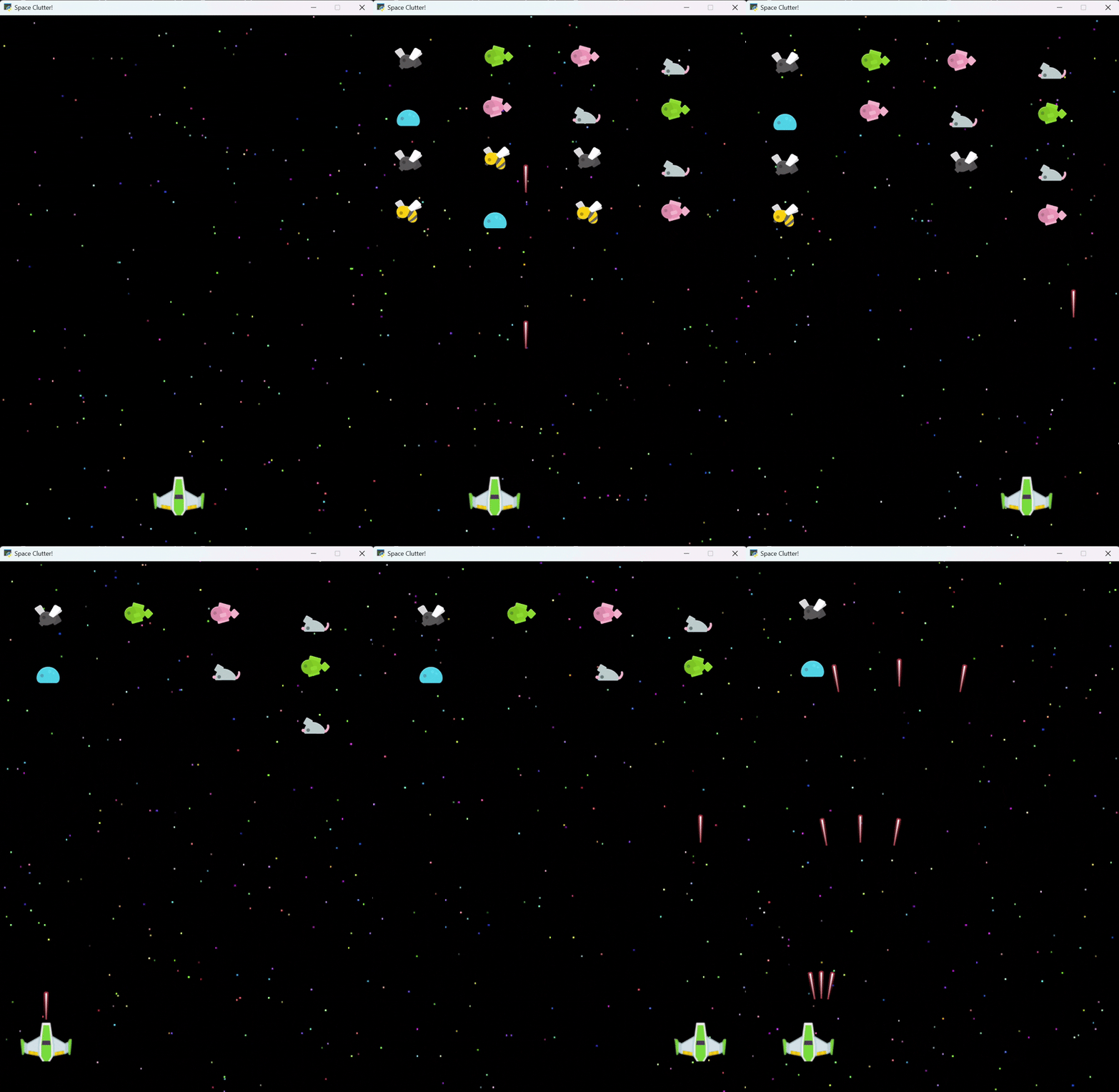
Space Clutter! - A game prototype demonstrating grid formations, wave patterns, and MoveUntil actions |
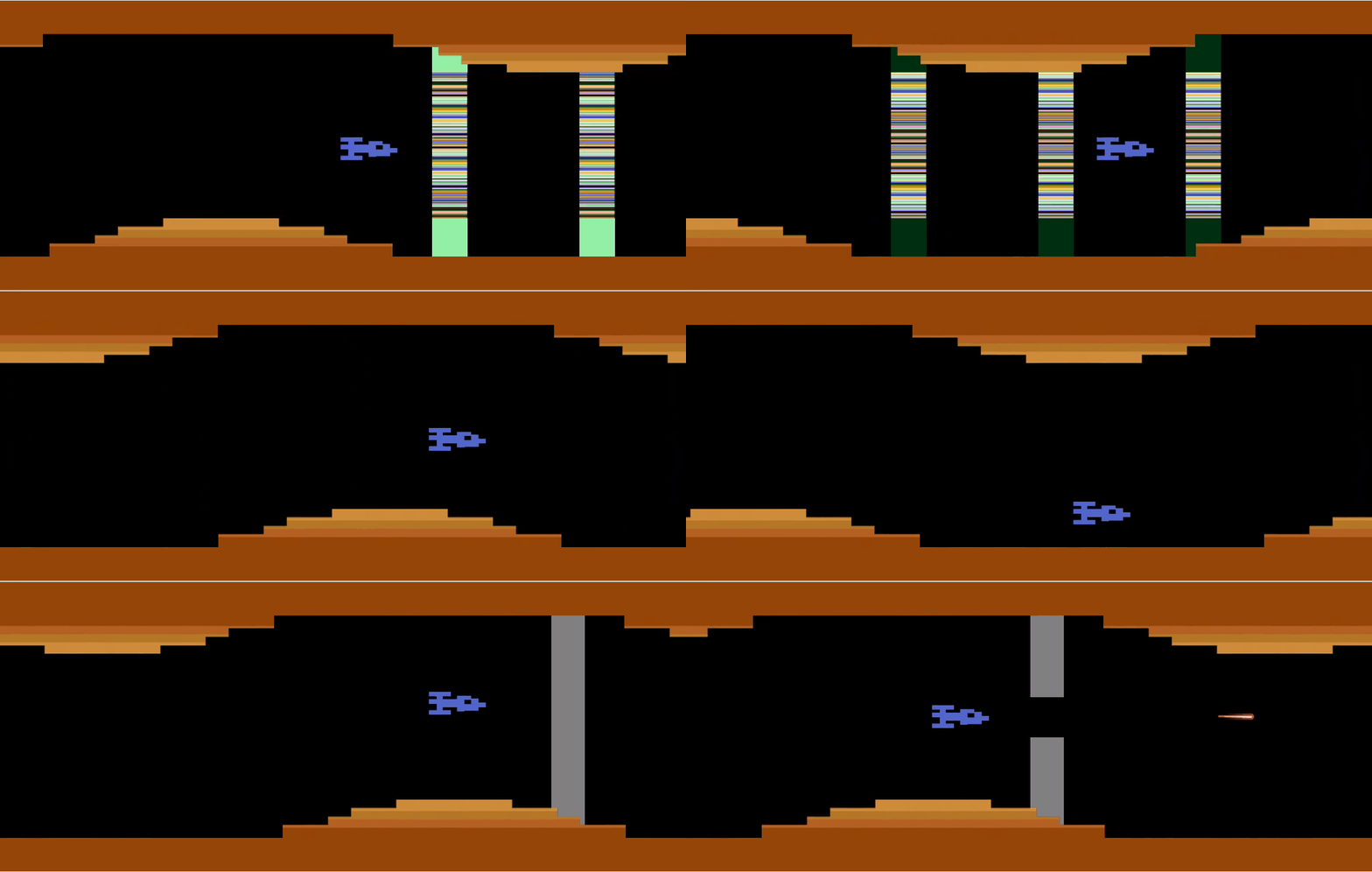
A full game under development, using Actions 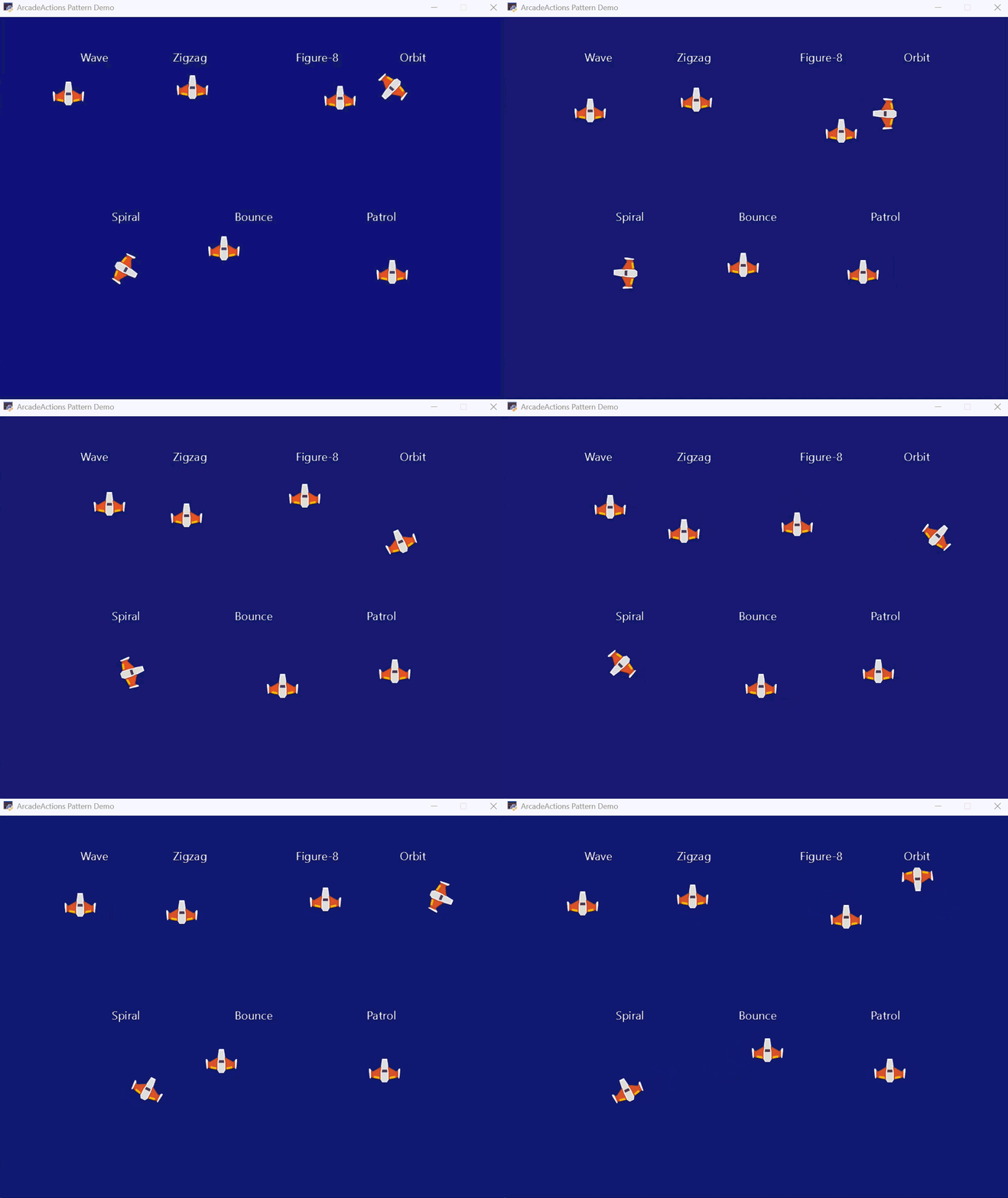
Pattern Demo - Showcasing various movement patterns and formation arrangements |
ArcadeActions extension library for Arcade 3.x


🚀 Quick Appeal
So much of building an arcade game is a cluttered way of saying "animate this sprite until something happens", like colliding with another sprite, reaching a boundary, or an event response. Most of us manage this complexity in the game loop, using low-level movement of game objects and complex chains of if-statements. But what if you could write a concise command like "keep moving this sprite, wrap it the other side of the window if it hits a boundary, and raise an event when it collides with another sprite"?
import arcade
from actions import MoveUntil, Action

class AsteroidDemoView(arcade.View):
    def __init__(self):
        super().__init__()
        # Minimal, explicit setup
        self.player = arcade.Sprite(":resources:/images/space_shooter/playerShip1_green.png")
        self.player.center_x, self.player.center_y = 400, 100

        self.asteroids = arcade.SpriteList()
        # Position asteroids in a simple pattern with different velocities
        positions = [(200, 450), (400, 400), (600, 450)]
        velocities = [(3, -2), (-2, -3), (4, -1)]

        for (x, y), (vx, vy) in zip(positions, velocities):
            rock = arcade.Sprite(":resources:/images/space_shooter/meteorGrey_big1.png")
            rock.center_x, rock.center_y = x, y
            self.asteroids.append(rock)

            # Each asteroid moves independently with its own velocity
            MoveUntil(
                velocity=(vx, vy),
                condition=self.player_asteroid_collision,
                on_stop=self.on_player_collision,
                bounds=(-64, -64, 864, 664),
                boundary_behavior="wrap",
            ).apply(rock)

    def player_asteroid_collision(self):
        """Return data when player hits any asteroid; None to keep moving."""
        hits = arcade.check_for_collision_with_list(self.player, self.asteroids)
        return {"hits": hits} if hits else None

    def on_player_collision(self, data):
        """React to collision."""
        print(f"Game over! {len(data['hits'])} asteroid(s) hit the player.")
        # ... reset player / end round / etc. ...

    def on_update(self, dt):
        Action.update_all(dt)
        self.player.update()
        self.asteroids.update()

    def on_draw(self):
        self.clear()
        self.player.draw()
        self.asteroids.draw()
This example shows how animation actions can be logically separated from collision responses, making your code simple and appealing. If writing high-level game code appeals to you ... it's why you chose Python in the first place ... read on!
📚 Documentation Overview
Essential Reading
- API Usage Guide - START HERE - Complete guide to using the framework
- Testing Guide - Testing patterns and best practices
- PRD - Project requirements and architecture decisions
🚀 Getting Started
🛠️ Installation
For Library Users:
# Basic installation for most games; adjust the commands below depending on your Python package manager.
pip install arcade-actions

# With optional state machine support (platformers/character action games)
pip install arcade-actions[statemachine]

# With state machine diagram generation
pip install arcade-actions[statemachine_diagrams]
For Contributors:
# Clone the repository
git clone https://github.com/bcorfman/arcade_actions.git
cd arcade_actions

# Install for development (includes all optional dependencies and dev tools)
make devinstall

# Run tests
make test

# Run linter
make lint

# Format code
make format
Quick Start by Game Type
Simple Arcade Games (no physics):
- Read the API Usage Guide to understand the framework
- Study working demos to see Actions in practice
- Start with simple helper functions (
move_until,rotate_until) - Build up to sequences for complex behaviors
Platformers / Physics Games:
- Install with state machine support:
uv add arcade-actions[statemachine](see Installation section above) - Start with
examples/pymunk_demo_platformer.py- reference implementation - Study the patterns:
- InputState with @dataclass
- DUMB View / SMART State Machine architecture
- Centralized physics in state machine
cycle_textures_untilfor animations
- Follow the architecture guide (see Decision Matrix below)
📖 Documentation Structure
docs/
├── README.md                # This file - overview and quick start
├── api_usage_guide.md       # Complete API usage patterns (START HERE)
├── testing_guide.md         # Testing patterns and fixtures
└── prd.md                   # Requirements and architecture
🔧 Core Components
✅ Implementation
Base Action System (actions/base.py)
- Action - Core action class with global management
- Global management - Automatic action tracking and updates
Configuration (actions/config.py)
- Configurable debug logging: Fine-grained, level-based diagnostics with per-Action filtering for focused output
- Debug levels: Level 0 (off), Level 1 (summary counts), Level 2 (lifecycle events), Level 3+ (verbose per-frame details)
- Action filtering: Observe specific action classes or all actions for targeted debugging
- Environment variables:
ARCADEACTIONS_DEBUG=2,ARCADEACTIONS_DEBUG_ALL=1,ARCADEACTIONS_DEBUG_INCLUDE=MoveUntil,CallbackUntil - Programmatic API:
set_debug_options(level=2, include=["MoveUntil"])orobserve_actions(MoveUntil, CallbackUntil)in your app startup
Instant Action System (actions/instant.py)
- MoveBy - Relative Sprite or SpriteList positioning
- MoveTo - Absolute positioning
Conditional Actions (actions/conditional.py)
- MoveUntil - Velocity-based movement until condition met (optional PyMunk physics integration)
- FollowPathUntil - Follow Bezier curve paths with optional automatic sprite rotation (optional PyMunk physics steering with
use_physics=True) - RotateUntil - Angular velocity rotation (optional PyMunk physics integration)
- ScaleUntil - Scale velocity changes
- FadeUntil - Alpha velocity changes
- CycleTexturesUntil - Cycle through a list of textures at a specific frame rate with simulation time duration support
- BlinkUntil - Toggle sprite visibility with optional enter/exit callbacks for collision management
- CallbackUntil - Execute callback functions at specified intervals or every frame until condition is met
- DelayUntil - Wait for condition to be met
- TweenUntil - Direct property animation from start to end value
- GlowUntil - Render full-screen Shadertoy effects with camera offset support
- EmitParticlesUntil - Manage per-sprite particle emitters with anchor and rotation following
Composite Actions (actions/composite.py)
- Sequential actions - Run actions one after another (use
sequence()) - Parallel actions - Run actions in parallel (use
parallel()) - Repeat actions - Repeat an action indefinitely (use
repeat())
Boundary Handling (actions/conditional.py)
- MoveUntil with bounds - Built-in boundary detection with bounce/wrap behaviors
Formation Management (actions/formation.py)
- Formation functions - Grid, line, circle, diamond, V-formation, triangle, hexagonal grid, arc, concentric rings, cross, and arrow positioning
- Zero-allocation support: pass
sprites=to arrange existing sprites without allocating - Contract: exactly one of
spritesor creation inputs (countorsprite_factory) is required - Grid rule: when
spritesis provided,len(sprites)must equalrows * cols - See
examples/formation_demo.pyfor a quick start
- Zero-allocation support: pass
Movement Patterns (actions/pattern.py)
- Movement pattern functions - Zigzag, wave, spiral, figure-8, orbit, bounce, and patrol patterns
- Condition helpers - Time-based and sprite count conditions for conditional actions
- See
examples/pattern_demo.pyfor a quick start
State Machine Integration
ArcadeActions integrates seamlessly with the external python-statemachine library for complex state-driven game logic.
Complete Example: See examples/pymunk_demo_platformer.py for the reimagined Arcade 3.x implementation showing:
- InputState with @dataclass
- State machine with guard conditions and named events
- Physics force application centralized in state machine
- CycleTexturesUntil for walk/climb animations
- Zero state flags - state machine as single source of truth
Additional Reference: The AmazonWarriors and Laser Gates projects demonstrate more complete and advanced patterns.
♻️ Zero-Allocation Gameplay (experimental)
ArcadeActions now provides an optional zero-allocation workflow to eliminate per-wave sprite creation.
- Use the new
SpritePool(inactions.pools) to pre-allocate sprites once at boot:
from actions.pools import SpritePool
from actions import arrange_grid
import arcade

def make_block():
    return arcade.Sprite(":resources:images/items/star.png", scale=0.8)

pool = SpritePool(make_block, max_size=300)
blocks = pool.acquire(150)                                    # borrow invisible sprites
arrange_grid(rows=30, cols=5, sprites=blocks, start_x=0, start_y=0)  # position only
pool.assign(blocks)                                           # return to pool (hidden & neutral)
- During gameplay, acquire → arrange → release without allocating:
shield = pool.acquire(width * 30)
arrange_grid(rows=30, cols=width, sprites=shield, start_x=WINDOW+50, start_y=TUNNEL_H)
# ... gameplay ...
pool.release(shield)
SpritePool API:
acquire(n) -> list[Sprite]— borrow invisible, un-positioned spritesrelease(iterable[Sprite])— return sprites to the pool (hidden, detached, reset)assign(iterable[Sprite])— load externally-created sprites into the pool once
Arrange functions contract:
- Provide exactly one of
spritesor creation inputs (count/sprite_factory) - When using
spriteswitharrange_grid,len(sprites) == rows * colsis required
Easing Effects (actions/easing.py)
- Ease wrapper - Apply smooth acceleration/deceleration curves to any conditional action
- Multiple easing functions - Built-in ease_in, ease_out, ease_in_out support
- Custom easing - Create specialized easing curves and nested easing effects
Optional Physics Integration (actions/physics_adapter.py)
- PyMunk Physics Support - Optional integration with
arcade.PymunkPhysicsEnginefor physics-driven movement - Zero API Changes - Existing code works unchanged; physics is opt-in via
Action.update_all(dt, physics_engine=engine) - Automatic Kinematic Sync - NEW: Kinematic bodies automatically synced (eliminates manual
set_velocity()loops) - Automatic Routing -
MoveUntilandRotateUntilautomatically use physics when engine is provided - Physics-Based Path Following -
FollowPathUntilwithuse_physics=Trueuses steering impulses for natural physics interaction - Fallback Behavior - Actions work normally without a physics engine (direct sprite attribute manipulation)
- Complete Example - See
examples/pymunk_demo_platformer.pyfor state machine + physics + actions integration - See the API Usage Guide for detailed examples
📋 Decision Matrix: When to Use What
Basic Actions & Composition
| Scenario | Use | Example |
|---|---|---|
| Simple sprite actions | Helper functions | move_until(sprite, ..., tag="move") |
| Sprite group actions | Helper functions on SpriteList | move_until(enemies, ..., tag="formation") |
| Complex sequences | Direct classes + sequence() |
sequence(DelayUntil(...), MoveUntil(...)) |
| Parallel behaviors | Direct classes + parallel() |
parallel(MoveUntil(...), RotateUntil(...)) |
| Formation positioning | Formation functions | arrange_grid(enemies, rows=3, cols=5) |
| Curved path movement | follow_path_until helper |
follow_path_until(sprite, points, ...) |
| Visibility blinking | blink_until helper |
blink_until(sprite, seconds_until_change=0.25, ...) |
| Periodic callbacks | callback_until helper |
callback_until(sprite, callback=fn, condition=cond, seconds_between_calls=0.1) |
| Shader/particle effects | callback_until for temporal control |
callback_until(sprite, lambda: emitter.update(), condition=cond) |
| Boundary detection | move_until with bounds |
move_until(sprite, bounds=b, boundary_behavior="bounce") |
| Smooth acceleration | ease() helper |
ease(sprite, action, duration=2.0) |
| Property animation | tween_until helper |
tween_until(sprite, 0, 100, "center_x", ...) |
State Machine Integration
| Scenario | Use | Example/Reference |
|---|---|---|
| Character animation states | python-statemachine + cycle_textures_until |
See examples/pymunk_demo_platformer.py |
| Input handling | @dataclass InputState |
Simple fields + computed properties |
| Physics + animation + input | State machine with guards + centralized forces | State machine calls physics.apply_force() |
| Walk/climb animations | cycle_textures_until in enter callbacks |
Start in on_enter_walk, stop in on_exit_walk |
| Jump physics | Physics in state enter callback | on_enter_jump calls apply_impulse |
| Complex platformer mechanics | State machine + physics callbacks | pymunk_moved triggers state transitions |
Physics Integration
| Scenario | Use | Pattern |
|---|---|---|
| Kinematic moving platforms | move_until + bounce + physics |
Automatic kinematic sync (no manual loop) |
| Player with physics forces | State machine + apply_physics_forces() |
Centralize in state machine method |
| Dynamic sprites | PyMunk with gravity | Use PyMunk directly (masses, collisions) |
| Physics path following | FollowPathUntil with use_physics=True |
Steering impulses for natural movement |
Architecture Decision Guide
| Your Game Type | Recommended Stack | Rationale |
|---|---|---|
| Simple arcade (Asteroids, Space Invaders) | ArcadeActions alone | sequence(), move_until, formations |
| Complex arcade | python-statemachine + ArcadeActions | See full game projects above |
| Complex arcade with physics | python-statemachine + ArcadeActions + PyMunk | See pymunk_demo_platformer.py |
| Cutscenes/tutorials | sequence() + parallel() |
Complex multi-step choreography |
View Architecture Pattern
| Component | Responsibility | Complexity |
|---|---|---|
| DUMB View (Window) | Route input, call state machine events | Simple: 2-3 lines per handler |
| SMART State Machine | Guards, transitions, physics forces, animations | Complex: all game logic |
| @dataclass InputState | Hold input data, computed properties | Simple: fields + properties |
| PlayerSprite | Hold textures, forward to state machine | Medium: setup + callbacks |
Project details
Verified details
These details have been verified by PyPIProject links
GitHub Statistics
Maintainers
Release history Release notifications | RSS feed


Download files
Download the file for your platform. If you're not sure which to choose, learn more about installing packages.
Source Distribution
Built Distribution
Filter files by name, interpreter, ABI, and platform.
If you're not sure about the file name format, learn more about wheel file names.
Copy a direct link to the current filters
File details
Details for the file arcade_actions-0.10.4.tar.gz.
File metadata
- Download URL: arcade_actions-0.10.4.tar.gz
- Upload date:
- Size: 471.0 kB
- Tags: Source
- Uploaded using Trusted Publishing? Yes
- Uploaded via: uv/0.9.7
File hashes
| Algorithm | Hash digest | |
|---|---|---|
| SHA256 |
1d20fa07a4a9cf8f97b97f1c5b3a435adc3ac972db2e4b74a465b09b19260790
|
|
| MD5 |
41ddf2e7e2869bdf6f26fcb0f4dd8637
|
|
| BLAKE2b-256 |
d78c8fc5ba97a0bbcc3d8332cbcac7bfe5675266406547196fa4bbb13f90ee0c
|
File details
Details for the file arcade_actions-0.10.4-py3-none-any.whl.
File metadata
- Download URL: arcade_actions-0.10.4-py3-none-any.whl
- Upload date:
- Size: 73.5 kB
- Tags: Python 3
- Uploaded using Trusted Publishing? Yes
- Uploaded via: uv/0.9.7
File hashes
| Algorithm | Hash digest | |
|---|---|---|
| SHA256 |
44092be696dfdafb8bd6dfe65df19b4cdf5c5df99f4e1b678d9cfc05c261d474
|
|
| MD5 |
9f71cb82dc0a9eb8051fb46c734683dc
|
|
| BLAKE2b-256 |
49ee07934bc64a62bcd69e83939d4cee3de33d4c8119ac8e4a34f8dfcfc3bfdd
|






