








Arepy is a lightweight ECS game engine for Python focused on making game code simple to read, easy to extend, and pleasant to iterate on.
It gives you a small but practical set of engine services out of the box: worlds, typed resource injection, 2D and 3D rendering through Raylib, built-in timers and animation helpers, and optional Dear ImGui integration for tools and debug UI.
Features
- ECS architecture built for gameplay code
- Typed resource injection for engine services and your own state objects
- Raylib-backed 2D and 3D rendering
- World-local
TimersandAnimatorservices - Optional Dear ImGui integration for tools, debug panels, and quick editors
- Extensible Windows and web game builder with encrypted asset packs
- Query filters with
With[...]andWithout[...] - Fluent entity builder API
Installation
From PyPI
pip install arepy
If you also want Dear ImGui support:
pip install "arepy[imgui]"
The optional video streaming example uses PyAV:
pip install "arepy[video]"
Local setup with uv
git clone https://github.com/Scr44gr/arepy.git
cd arepy
uv sync --extra docs
Source installs from this repository use maturin, so pip install . builds the bundled native extension automatically. If no wheel is available, make sure Rust is installed.
If you also want the optional ImGui extra:
uv sync --extra docs --extra imgui --extra video
Quick Start
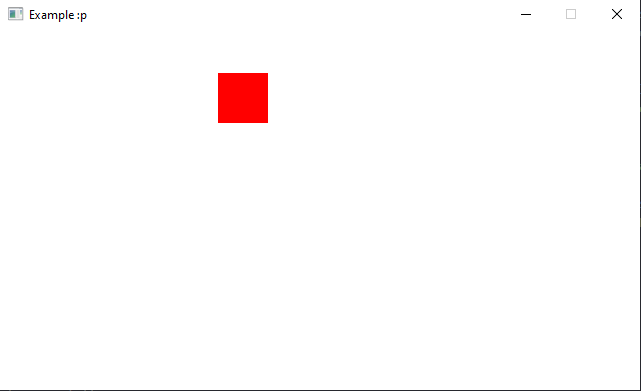
This example creates a small world with one moving square. The drawing
rectangle is allocated once and reused, so the render loop does not create a
new Rect for every entity on every frame. For a complete playable example
with textures and input, see
examples/getting_started.py.
from arepy import ArepyEngine, Color, Rect, Renderer2D, SystemPipeline, Time
from arepy.bundle.components import RigidBody2D, Transform
from arepy.ecs import Entity, Query, With
from arepy.math import Vec2

WHITE = Color(255, 255, 255, 255)
RED = Color(255, 0, 0, 255)
SQUARE = Rect(0, 0, 32, 32)


def movement_system(
    query: Query[Entity, With[Transform, RigidBody2D]],
    time: Time,
) -> None:
    dt = time.delta_seconds
    for transform, rigid_body in query.iter_components(Transform, RigidBody2D):
        transform.position.x += rigid_body.velocity.x * dt
        transform.position.y += rigid_body.velocity.y * dt


def render_system(
    query: Query[Entity, With[Transform]],
    renderer: Renderer2D,
) -> None:
    renderer.start_frame()
    renderer.clear(color=WHITE)

    for transform, in query.iter_components(Transform):
        SQUARE.x = transform.position.x
        SQUARE.y = transform.position.y
        renderer.draw_rectangle(SQUARE, RED)

    renderer.end_frame()


def main() -> None:
    engine = ArepyEngine(title="Arepy Quickstart", width=960, height=540)
    world = engine.create_world("main")

    world.create_entity().with_component(
        Transform(position=Vec2(40, 40))
    ).with_component(
        RigidBody2D(velocity=Vec2(90, 60))
    ).build()

    world.add_system(SystemPipeline.UPDATE, movement_system)
    world.add_system(SystemPipeline.RENDER, render_system)
    engine.set_current_world("main")
    engine.run()


if __name__ == "__main__":
    main()
Optional ImGui
If you install the imgui extra, Arepy exposes the real imgui module directly.
Use ImGui code inside SystemPipeline.RENDER_UI and let the engine handle the frame lifecycle.
from arepy import Display, SystemPipeline, imgui


def debug_ui(display: Display) -> None:
    is_open, _ = imgui.begin("Debug")
    if is_open:
        imgui.text("Hello from Arepy")
        if imgui.button("Rename window"):
            display.set_window_title("Debug")
    imgui.end()


world.add_system(SystemPipeline.RENDER_UI, debug_ui)
You do not need a wrapper class.
You do not need to call imgui.new_frame() yourself.
You do not need to call imgui.render() yourself.
See docs/guide/imgui.md and examples/imgui_minimal.py for the full workflow.
Exporting games
Install the builder extra and export a configured game to Windows or web:
pip install "arepy[builder]"
arepy --export windows web --config examples/bunnymark.build.toml
See docs/guide/builder.md for configuration, asset protection, update manifests, and current web backend coverage.
Core Concepts
Entities
An Entity is a lightweight handle that identifies an object in a world.
world.create_entity() returns an EntityBuilder; add the initial components
to that builder and call build() to receive the Entity handle:
player_builder = world.create_entity()
player = (
    player_builder
    .with_component(Transform(position=Vec2(100, 100)))
    .with_component(PlayerController())
    .build()
)

empty_entity = world.create_entity().build()
Components
Pure data containers attached to entities:
from arepy.ecs import Component

class Health(Component):
    def __init__(self, value: int = 100):
        super().__init__()
        self.value = value
        self.max_value = value

class Weapon(Component):
    def __init__(self, damage: int = 10, range: float = 100.0):
        super().__init__()
        self.damage = damage
        self.range = range
Systems
Systems are plain functions. Their parameters describe what they need.
def damage_system(query: Query[Entity, With[Health, Weapon]]):
    for entity, health, weapon in query.iter_entities_components(Health, Weapon):
        if health.value <= 0:
            entity.kill()
Queries
Queries filter entities by component shape:
Query[Entity, With[Transform, Velocity]]
Query[Entity, Without[Dead]]
Query[Entity, tuple[With[Transform, Velocity], Without[Frozen]]]
Use iter_components(...) when you only need the component data:
def movement_system(
    query: Query[Entity, tuple[With[Transform, Velocity], Without[Frozen]]],
    time: Time,
) -> None:
    for transform, velocity in query.iter_components(Transform, Velocity):
        transform.position.x += velocity.x * time.delta_seconds
        transform.position.y += velocity.y * time.delta_seconds
Resources
Arepy can inject shared services like Renderer2D, Display, Time, Input, AssetStore, and your own resource objects directly into systems.
def hud_system(renderer: Renderer2D, time: Time) -> None:
    ...
That keeps function signatures explicit and avoids manual service lookup in most code.
Texture Atlas Batch Rendering
If you want sprite rendering to go through the atlas path, first pack the loaded textures once:
asset_store.load_texture(renderer, "bunny", "./assets/bunny.png")
texture_atlas = asset_store.build_texture_atlas(renderer)
Then build a batch layout from your Sprite list and submit it with the destination, origin, and rotation views you want to feed into DrawTexturePro:
import numpy as np

position = batch.vec2(Transform, "position")
origin = batch.vec2(Transform, "origin")
rotation = batch.scalar(
    Transform,
    "rotation",
    dtype=np.float64,
    bind=True,
)
sprites = batch.components(Sprite)
layout = texture_atlas.get_batch_layout(sprites)
renderer.draw_texture_batch(
    texture_atlas,
    layout,
    position.x,
    position.y,
    layout.default_dest_width,
    layout.default_dest_height,
    origin.x,
    origin.y,
    rotation,
    WHITE,
)
layout.default_dest_width and layout.default_dest_height are cached with the layout, so you do not need to rebuild those arrays every frame unless you want custom destination sizes.
draw_texture_batch(...) requires at least one atlas page and the bundled native extension. Installs from PyPI include it, and pip install . builds it automatically from source. There is no Python fallback path.
Learn More
- docs/getting-started/installation.md
- docs/guide/engine-lifecycle.md
- docs/guide/engine-services.md
- docs/guide/resources.md
- docs/guide/imgui.md
- docs/guide/bundle.md
- examples/imgui_minimal.py
- examples/bunnymark.py
- examples/cubemark_3d.py
Testing
uv run pytest -q
To run the focused engine tests:
uv run pytest tests/test_engine_worlds.py tests/test_animator.py -q
Contributing
See CONTRIBUTING.md for the contributor workflow.
Requirements
- CPython 3.11, 3.12, 3.13, or 3.14
- Raylib 5.5.0+
- Bitarray 3.8.1
License
This project is licensed under the MIT License. See LICENSE.
Acknowledgments
1 maintainer

Metadata
1 maintainer
Release files for arepy 0.6.0
For a detailed explanation of source distributions (sdists) and built distributions (wheels), please see the package formats documentation.
Source distribution (sdist)
| File | Size | Uploaded | |
|---|---|---|---|
| arepy-0.6.0.tar.gz | 98.4 kB | Details |
Built distributions (wheels)
| File | Reset | |||
|---|---|---|---|---|
| arepy-0.6.0-cp311-abi3-win_amd64.whl | CPython 3.11 | abi3 | Windows x86-64 | Details |
| arepy-0.6.0-cp311-abi3-manylinux_2_17_x86_64.manylinux2014_x86_64.whl | CPython 3.11 | abi3 | Linux glibc 2.17+ x86-64 | Details |
| arepy-0.6.0-cp311-abi3-manylinux_2_17_aarch64.manylinux2014_aarch64.whl | CPython 3.11 | abi3 | Linux glibc 2.17+ ARM64 | Details |
| arepy-0.6.0-cp311-abi3-macosx_10_12_x86_64.macosx_11_0_arm64.macosx_10_12_universal2.whl | CPython 3.11 | abi3 | macOS 11.0+ ARM64, macOS 10.12+ universal2 (ARM64, x86-64), macOS 10.12+ x86-64 | Details |
Total release size: 1.5 MB
Release files / arepy-0.6.0.tar.gz
| Download URL | arepy-0.6.0.tar.gz |
|---|---|
| Size | 98.4 kB |
| Tags | Source |
|
SHA-256 checksum How to use checksums |
5cb5f12cfd5d3a15688466455d7db3dd7162c93f84400f8bb19de259d266a366
|
|
BLAKE2b-256 checksum How to use checksums |
3f1c54edef797fe3eedf7b32c276f4f64ec07da718052c20ff70078a3f2b062d
|
| Upload date | |
|
Uploaded using Trusted Publishing? What is trusted publishing? |
Yes |
| Uploaded via |
twine/6.1.0 CPython/3.13.12
|
Provenance
Provenance describes where a file came from. On PyPI, provenance is shared via attestations, which provide a verifiable record of the build or publishing details. View details, limitations and caveats.


PyPI Publish Attestation
PyPI verified that this artifact, at this checksum, originated from the publisher listed below.
Signed by GitHub Actions, verified by PyPI on Jul 14, 2026.
Transparency logRelease files / arepy-0.6.0-cp311-abi3-win_amd64.whl
| Download URL | arepy-0.6.0-cp311-abi3-win_amd64.whl |
|---|---|
| Size | 247.4 kB |
| Tags | CPython 3.11 Windows x86-64 abi3 |
|
SHA-256 checksum How to use checksums |
ec846fd224350ad4fb215e9f658be68200bbf1f89e5ab124310d00125bca8739
|
|
BLAKE2b-256 checksum How to use checksums |
d8855cfaf15fb564f78f79e896d0fb75849dae70138d365e05a35531b5fc27f1
|
| Upload date | |
|
Uploaded using Trusted Publishing? What is trusted publishing? |
Yes |
| Uploaded via |
twine/6.1.0 CPython/3.13.12
|
Provenance
Provenance describes where a file came from. On PyPI, provenance is shared via attestations, which provide a verifiable record of the build or publishing details. View details, limitations and caveats.
PyPI Publish Attestation
PyPI verified that this artifact, at this checksum, originated from the publisher listed below.
Signed by GitHub Actions, verified by PyPI on Jul 14, 2026.
Transparency logRelease files / arepy-0.6.0-cp311-abi3-manylinux_2_17_x86_64.manylinux2014_x86_64.whl
| Download URL | arepy-0.6.0-cp311-abi3-manylinux_2_17_x86_64.manylinux2014_x86_64.whl |
|---|---|
| Size | 339.0 kB |
| Tags | CPython 3.11 Linux glibc 2.17+ x86-64 abi3 |
|
SHA-256 checksum How to use checksums |
2b2abe3b9562e2ec24c5fc7ec732e47b75a716c69eb1985f528039c0bd29f683
|
|
BLAKE2b-256 checksum How to use checksums |
66df3129e696430532a7fe1ceef4e50894e2d2616ecb259fd503405026d6d041
|
| Upload date | |
|
Uploaded using Trusted Publishing? What is trusted publishing? |
Yes |
| Uploaded via |
twine/6.1.0 CPython/3.13.12
|
Provenance
Provenance describes where a file came from. On PyPI, provenance is shared via attestations, which provide a verifiable record of the build or publishing details. View details, limitations and caveats.
PyPI Publish Attestation
PyPI verified that this artifact, at this checksum, originated from the publisher listed below.
Signed by GitHub Actions, verified by PyPI on Jul 14, 2026.
Transparency logRelease files / arepy-0.6.0-cp311-abi3-manylinux_2_17_aarch64.manylinux2014_aarch64.whl
| Download URL | arepy-0.6.0-cp311-abi3-manylinux_2_17_aarch64.manylinux2014_aarch64.whl |
|---|---|
| Size | 331.5 kB |
| Tags | CPython 3.11 Linux glibc 2.17+ ARM64 abi3 |
|
SHA-256 checksum How to use checksums |
c80c945c8beef3fdf343e486b1d31863fe1bad4902e436c67959db3e550d48c0
|
|
BLAKE2b-256 checksum How to use checksums |
96474ffd9cd2eb14cc7b82ebef0704672dba20ebe482bb1408af2f48a37177b7
|
| Upload date | |
|
Uploaded using Trusted Publishing? What is trusted publishing? |
Yes |
| Uploaded via |
twine/6.1.0 CPython/3.13.12
|
Provenance
Provenance describes where a file came from. On PyPI, provenance is shared via attestations, which provide a verifiable record of the build or publishing details. View details, limitations and caveats.
PyPI Publish Attestation
PyPI verified that this artifact, at this checksum, originated from the publisher listed below.
Signed by GitHub Actions, verified by PyPI on Jul 14, 2026.
Transparency logRelease files / arepy-0.6.0-cp311-abi3-macosx_10_12_x86_64.macosx_11_0_arm64.macosx_10_12_universal2.whl
| Download URL | arepy-0.6.0-cp311-abi3-macosx_10_12_x86_64.macosx_11_0_arm64.macosx_10_12_universal2.whl |
|---|---|
| Size | 517.7 kB |
| Tags | CPython 3.11 abi3 macOS 10.12+ universal2 (ARM64, x86-64) macOS 10.12+ x86-64 macOS 11.0+ ARM64 |
|
SHA-256 checksum How to use checksums |
2fc9b29c519e4f47c913c4f3c4877cd0200f3a90115375577cce9d32d2feb454
|
|
BLAKE2b-256 checksum How to use checksums |
5b5994e7632f7a4766290f455a3a55b05cf0384c06db4a85f8f070cb60ce2012
|
| Upload date | |
|
Uploaded using Trusted Publishing? What is trusted publishing? |
Yes |
| Uploaded via |
twine/6.1.0 CPython/3.13.12
|
Provenance
Provenance describes where a file came from. On PyPI, provenance is shared via attestations, which provide a verifiable record of the build or publishing details. View details, limitations and caveats.
PyPI Publish Attestation
PyPI verified that this artifact, at this checksum, originated from the publisher listed below.
Signed by GitHub Actions, verified by PyPI on Jul 14, 2026.
Transparency log













