
An ECS python game engine with Raylib

Project description








Arepy is a lightweight ECS game engine for Python focused on making game code simple to read, easy to extend, and pleasant to iterate on.
It gives you a small but practical set of engine services out of the box: worlds, typed resource injection, 2D and 3D rendering through Raylib, built-in timers and animation helpers, and optional Dear ImGui integration for tools and debug UI.
Features
- ECS architecture built for gameplay code
- Typed resource injection for engine services and your own state objects
- Raylib-backed 2D and 3D rendering
- World-local
TimersandAnimatorservices - Optional Dear ImGui integration for tools, debug panels, and quick editors
- Query filters with
With[...]andWithout[...] - Fluent entity builder API
Installation
From PyPI
pip install arepy
If you also want Dear ImGui support:
pip install "arepy[imgui]"
Local setup with uv
git clone https://github.com/Scr44gr/arepy.git
cd arepy
uv sync --extra docs
If you also want the optional ImGui extra:
uv sync --extra docs --extra imgui
Quick Start
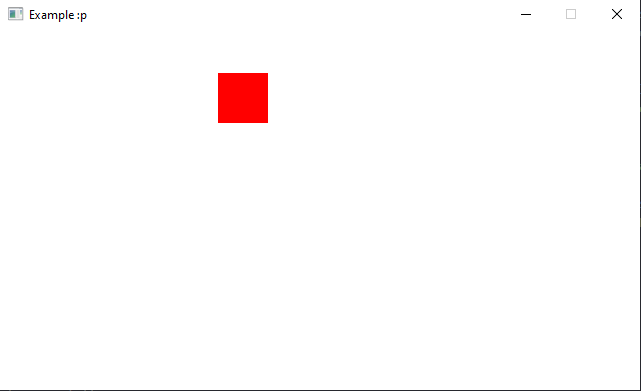
This example creates a small world with one moving square.
from arepy import ArepyEngine, Color, Rect, Renderer2D, SystemPipeline, Time
from arepy.bundle.components import RigidBody2D, Transform
from arepy.ecs import Entity, Query, With
from arepy.math import Vec2

WHITE = Color(255, 255, 255, 255)
RED = Color(255, 0, 0, 255)


def movement_system(
    query: Query[Entity, With[Transform, RigidBody2D]],
    time: Time,
) -> None:
    for transform, rigid_body in query.iter_components(Transform, RigidBody2D):
        transform.position.x += rigid_body.velocity.x * time.delta_seconds
        transform.position.y += rigid_body.velocity.y * time.delta_seconds


def render_system(
    query: Query[Entity, With[Transform]],
    renderer: Renderer2D,
) -> None:
    renderer.start_frame()
    renderer.clear(color=WHITE)

    for transform, in query.iter_components(Transform):
        renderer.draw_rectangle(
            Rect(transform.position.x, transform.position.y, 32, 32),
            RED,
        )

    renderer.end_frame()


def main() -> None:
    engine = ArepyEngine(title="Arepy Quickstart", width=960, height=540)
    world = engine.create_world("main")

    world.create_entity().with_component(
        Transform(position=Vec2(40, 40))
    ).with_component(
        RigidBody2D(velocity=Vec2(90, 60))
    ).build()

    world.add_system(SystemPipeline.UPDATE, movement_system)
    world.add_system(SystemPipeline.RENDER, render_system)
    engine.set_current_world("main")
    engine.run()


if __name__ == "__main__":
    main()
Optional ImGui
If you install the imgui extra, Arepy exposes the real imgui module directly.
Use ImGui code inside SystemPipeline.RENDER_UI and let the engine handle the frame lifecycle.
from arepy import Display, SystemPipeline, imgui


def debug_ui(display: Display) -> None:
    is_open, _ = imgui.begin("Debug")
    if is_open:
        imgui.text("Hello from Arepy")
        if imgui.button("Rename window"):
            display.set_window_title("Debug")
    imgui.end()


world.add_system(SystemPipeline.RENDER_UI, debug_ui)
You do not need a wrapper class.
You do not need to call imgui.new_frame() yourself.
You do not need to call imgui.render() yourself.
See docs/guide/imgui.md and examples/imgui_minimal.py for the full workflow.
Core Concepts
Entities
Lightweight identifiers that represent objects in the game world:
entity = world.create_entity()

player = (world.create_entity()
          .with_component(Transform(position=Vec2(100, 100)))
          .with_component(PlayerController())
          .build())

empty_entity = world.create_entity().build()
Components
Pure data containers attached to entities:
from arepy.ecs import Component

class Health(Component):
    def __init__(self, value: int = 100):
        super().__init__()
        self.value = value
        self.max_value = value

class Weapon(Component):
    def __init__(self, damage: int = 10, range: float = 100.0):
        super().__init__()
        self.damage = damage
        self.range = range
Systems
Systems are plain functions. Their parameters describe what they need.
def damage_system(query: Query[Entity, With[Health, Weapon]]):
    for entity, health, weapon in query.iter_entities_components(Health, Weapon):
        if health.value <= 0:
            entity.kill()
Queries
Queries filter entities by component shape:
Query[Entity, With[Transform, Velocity]]
Query[Entity, Without[Dead]]
Query[Entity, tuple[With[Transform, Velocity], Without[Frozen]]]
Use iter_components(...) when you only need the component data:
def movement_system(
    query: Query[Entity, tuple[With[Transform, Velocity], Without[Frozen]]],
    time: Time,
) -> None:
    for transform, velocity in query.iter_components(Transform, Velocity):
        transform.position.x += velocity.x * time.delta_seconds
        transform.position.y += velocity.y * time.delta_seconds
Resources
Arepy can inject shared services like Renderer2D, Display, Time, Input, AssetStore, and your own resource objects directly into systems.
def hud_system(renderer: Renderer2D, time: Time) -> None:
    ...
That keeps function signatures explicit and avoids manual service lookup in most code.
Learn More
- docs/getting-started/installation.md
- docs/guide/engine-lifecycle.md
- docs/guide/engine-services.md
- docs/guide/resources.md
- docs/guide/imgui.md
- docs/guide/bundle.md
- examples/imgui_minimal.py
- examples/bunnymark.py
- examples/cubemark_3d.py
Testing
uv run pytest -q
To run the focused engine tests:
uv run pytest tests/test_engine_worlds.py tests/test_animator.py -q
Contributing
See CONTRIBUTING.md for the contributor workflow.
Requirements
- Python 3.11+
- Raylib 5.5.0+
- Bitarray 3.8.1
License
This project is licensed under the MIT License. See LICENSE.
Acknowledgments
Release history Release notifications | RSS feed


Download files
Download the file for your platform. If you're not sure which to choose, learn more about installing packages.
Source Distribution
Built Distribution
Filter files by name, interpreter, ABI, and platform.
If you're not sure about the file name format, learn more about wheel file names.
Copy a direct link to the current filters
File details
Details for the file arepy-0.5.5.tar.gz.
File metadata
- Download URL: arepy-0.5.5.tar.gz
- Upload date:
- Size: 84.6 kB
- Tags: Source
- Uploaded using Trusted Publishing? Yes
- Uploaded via: twine/6.1.0 CPython/3.13.12
File hashes
| Algorithm | Hash digest | |
|---|---|---|
| SHA256 |
eabe3df8c6607dd6bc629ee3e159efb52d80484dbedddd8f3cd6c7e1d3058ae3
|
|
| MD5 |
0384698494fe53dcaed55bf21b6d53b0
|
|
| BLAKE2b-256 |
291d254f6b6f77ff2fc55779102fc46f470499cf774da75dcbeed183c35c8592
|
Provenance
The following attestation bundles were made for arepy-0.5.5.tar.gz:
Publisher:
python-publish.yml on Scr44gr/arepy
-
Statement:
-
Statement type:
https://in-toto.io/Statement/v1 -
Predicate type:
https://docs.pypi.org/attestations/publish/v1 -
Subject name:
arepy-0.5.5.tar.gz -
Subject digest:
eabe3df8c6607dd6bc629ee3e159efb52d80484dbedddd8f3cd6c7e1d3058ae3 - Sigstore transparency entry: 1402716787
- Sigstore integration time:
-
Permalink:
Scr44gr/arepy@94c8c1578dc6639d8795d9b42241547185914df0 -
Branch / Tag:
refs/tags/v0.5.5 - Owner: https://github.com/Scr44gr
-
Access:
public
-
Token Issuer:
https://token.actions.githubusercontent.com -
Runner Environment:
github-hosted -
Publication workflow:
python-publish.yml@94c8c1578dc6639d8795d9b42241547185914df0 -
Trigger Event:
release
-
Statement type:
File details
Details for the file arepy-0.5.5-py3-none-any.whl.
File metadata
- Download URL: arepy-0.5.5-py3-none-any.whl
- Upload date:
- Size: 79.5 kB
- Tags: Python 3
- Uploaded using Trusted Publishing? Yes
- Uploaded via: twine/6.1.0 CPython/3.13.12
File hashes
| Algorithm | Hash digest | |
|---|---|---|
| SHA256 |
7c539abbfd92d95001cd221b34fa305a502dc7cccd7a1e5b8c5d5863e09b4e99
|
|
| MD5 |
1836807901da9c1418a61a70db7a47fd
|
|
| BLAKE2b-256 |
4ed4202e1ed858a328eb8ffb8f9e92ce5abe1e8a0e8240480ce3610749f8dd39
|
Provenance
The following attestation bundles were made for arepy-0.5.5-py3-none-any.whl:
Publisher:
python-publish.yml on Scr44gr/arepy
-
Statement:
-
Statement type:
https://in-toto.io/Statement/v1 -
Predicate type:
https://docs.pypi.org/attestations/publish/v1 -
Subject name:
arepy-0.5.5-py3-none-any.whl -
Subject digest:
7c539abbfd92d95001cd221b34fa305a502dc7cccd7a1e5b8c5d5863e09b4e99 - Sigstore transparency entry: 1402716906
- Sigstore integration time:
-
Permalink:
Scr44gr/arepy@94c8c1578dc6639d8795d9b42241547185914df0 -
Branch / Tag:
refs/tags/v0.5.5 - Owner: https://github.com/Scr44gr
-
Access:
public
-
Token Issuer:
https://token.actions.githubusercontent.com -
Runner Environment:
github-hosted -
Publication workflow:
python-publish.yml@94c8c1578dc6639d8795d9b42241547185914df0 -
Trigger Event:
release
-
Statement type:






