
Automatic PII masking for OpenAI and Anthropic SDKs

Project description
Armos
The privacy boundary between regulated workflows and LLM APIs.
Sensitive-data teams want LLM automation — but can't casually send names, IDs, tax records, or health data to external models. Armos is the local detection and reversible token layer that makes it safe.
Built for developers. Drop-in for OpenAI and Anthropic. One line to integrate.


The problem
Healthtech, fintech, legal, and HR teams are sitting on a specific blocker: they want LLM automation, but they can't casually send names, IDs, tax data, health records, or legal documents into external models.
Every LLM API call sends raw text to a third-party server. If that text contains PII — names, Aadhaar, PAN, SSN, emails, credit cards — that data leaves your infrastructure. Most teams know this is a risk. Few have time to build a proper privacy layer before shipping.
Armos is that layer, pre-built — local detection, reversible tokens, no data sent anywhere during masking.
How it works
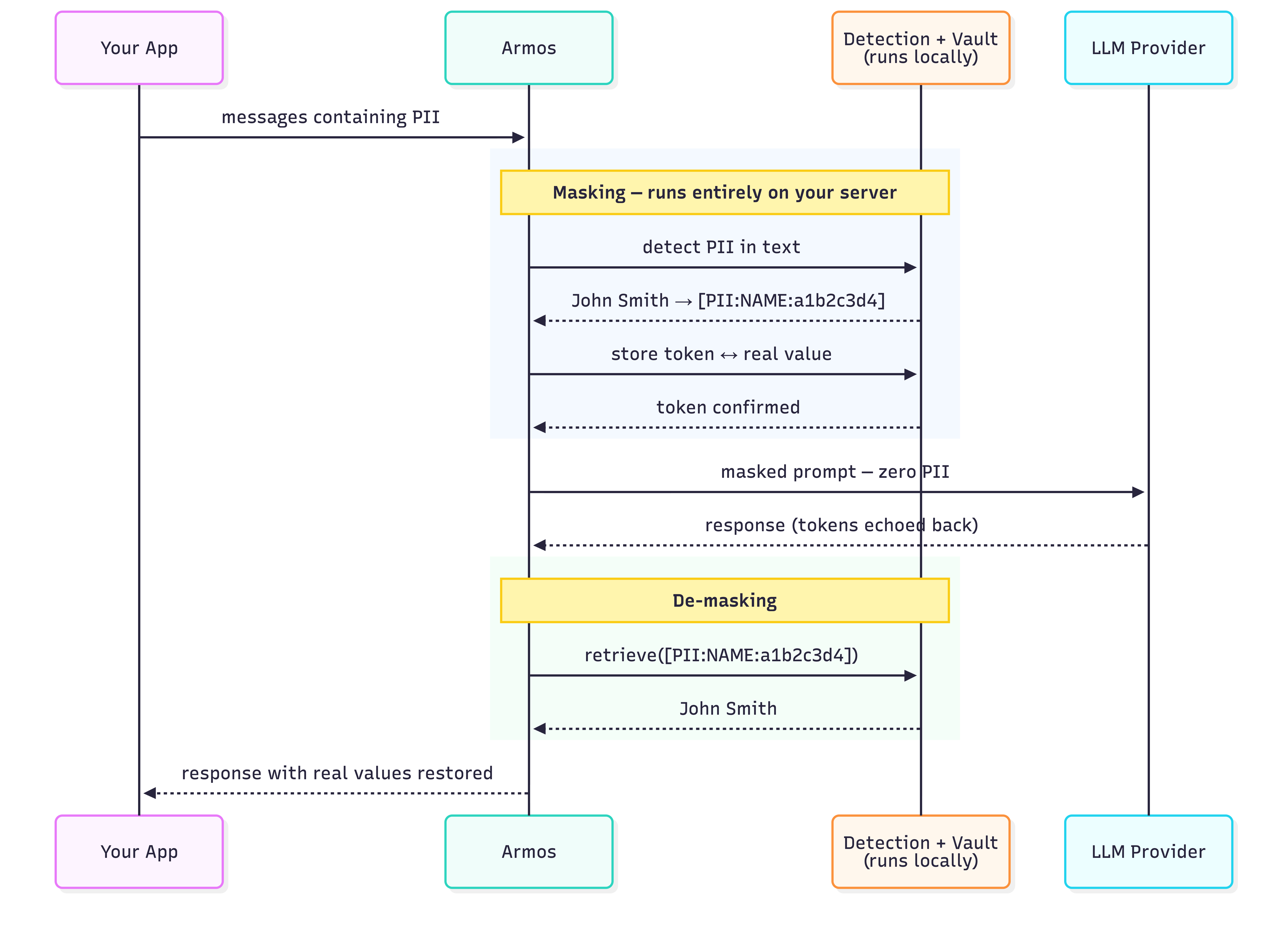
Detection runs entirely on your machine. Presidio + spaCy analyse the text locally. No data is sent to any Armos server — there is no Armos server. The vault (token ↔ real value map) lives in your process memory, or optionally in your own Redis instance.
Why Armos over alternatives?
vs. building your own: A custom masking layer takes weeks to build correctly and months to handle edge cases. Armos is a pip install.
vs. LLM Guard: LLM Guard focuses on prompt injection and toxicity — not PII masking. Different problem.
vs. Presidio directly: Presidio detects PII but doesn't handle tokenization, vault management, or SDK integration. Armos wraps all of that.
Indian PII first-class: Aadhaar and PAN detection built in. No competitor handles Indian identifiers reliably.
Quickstart
Install
pip install armos
For Redis-backed persistence across requests:
pip install armos[redis]
Note: On first use, Armos automatically downloads
armos-ner-en— our custom-trained NER model (~450 MB). This happens once and is cached at~/.cache/armos/models/for all future uses.
OpenAI
# Before
from openai import OpenAI
client = OpenAI()

# After — one import added, one word changed
from openai import OpenAI
from armos import ArmosOpenAI

client = ArmosOpenAI(OpenAI())

# Everything else is identical
response = client.chat.completions.create(
    model="gpt-4o",
    messages=[{
        "role": "user",
        "content": "Summarise the case for patient John Smith, Aadhaar 2345 6789 0123"
    }]
)

# Real values are restored in the response automatically
print(response.choices[0].message.content)
Anthropic
from anthropic import Anthropic
from armos import ArmosAnthropic

client = ArmosAnthropic(Anthropic())

message = client.messages.create(
    model="claude-sonnet-4-6",
    max_tokens=1024,
    messages=[{
        "role": "user",
        "content": "Patient John Smith, DOB 12/04/1982, PAN ABCDE1234F"
    }]
)

print(message.content[0].text)  # real values restored
OpenAI Responses API
response = client.responses.create(
    model="gpt-4o",
    input="Patient John Smith, Aadhaar 2345 6789 0123 — summarise in one line."
)
print(response.output[0].content[0].text)  # real values restored
Embeddings
# PII is masked before the text is sent for embedding
result = client.embeddings.create(
    model="text-embedding-3-small",
    input="John Smith's email is john@hospital.com"
)
# Works with list input too
result = client.embeddings.create(
    model="text-embedding-3-small",
    input=["john@hospital.com", "no pii here"]
)
With Redis (persistent vault across requests)
# Token mappings survive across processes and requests
client = ArmosOpenAI(OpenAI(), store="redis", redis_url="redis://localhost:6379")
client = ArmosAnthropic(Anthropic(), store="redis", redis_url="redis://localhost:6379")

# Custom TTL (default: 24 hours)
client = ArmosOpenAI(OpenAI(), store="redis", redis_url="redis://localhost:6379", vault_ttl=3600)
Async (OpenAI / Anthropic)
from openai import AsyncOpenAI
from armos import ArmosAsyncOpenAI

client = ArmosAsyncOpenAI(AsyncOpenAI())

response = await client.chat.completions.create(
    model="gpt-4o",
    messages=[{"role": "user", "content": "Patient Priya Sharma, Aadhaar 2345 6789 0123"}]
)
Same pattern for Anthropic:
from anthropic import AsyncAnthropic
from armos import ArmosAsyncAnthropic

client = ArmosAsyncAnthropic(AsyncAnthropic())

response = await client.messages.create(
    model="claude-sonnet-4-6",
    max_tokens=100,
    messages=[{"role": "user", "content": "Employee Rahul Mehta, PAN ABCDE1234F"}]
)
Standalone (any LLM or framework)
from armos import Armos

guard = Armos()

result = guard.mask("Patient John Smith, Aadhaar 2345 6789 0123, email john@hospital.com")
print(result.text)
# → "Patient [PII:NAME:a1b2c3d4], Aadhaar [PII:AADHAAR:b2c3d4e5], email [PII:EMAIL:e5f6g7h8]"

print(result.has_pii)  # True

restored = guard.demask(result.text)
print(restored)
# → "Patient John Smith, Aadhaar 2345 6789 0123, email john@hospital.com"
Async variants are also available on the standalone guard:
result = await guard.amask("Patient John Smith, Aadhaar 2345 6789 0123")
restored = await guard.ademask(result.text)
What gets detected
| Entity | Token | Example |
|---|---|---|
| Person name | [PII:NAME:…] |
John Smith |
| Email address | [PII:EMAIL:…] |
john@hospital.com |
| Phone number | [PII:PHONE:…] |
+91 98765 43210 |
| Aadhaar number | [PII:AADHAAR:…] |
2345 6789 0123 |
| PAN card | [PII:PAN:…] |
ABCDE1234F |
| SSN | [PII:SSN:…] |
371-53-1234 |
| IBAN | [PII:IBAN:…] |
GB29NWBK60161331926819 |
| Credit / debit card | [PII:CARD:…] |
4111 1111 1111 1111 |
| IP address | [PII:IP:…] |
192.168.1.100 |
| API keys & secrets | [PII:APIKEY:…] |
sk-abc123… / AKIA… / ghp_… |
| Physical address | [PII:ADDRESS:…] |
123 Oak Ave, Chicago, IL 60601 / Flat 4B, Koramangala, Bangalore |
Token design
Tokens are deterministic and normalisation-aware:
"john smith"  →  [PII:NAME:a1b2c3d4]  ← stored: "john smith"
"John Smith"  →  [PII:NAME:a1b2c3d4]  ← same token, vault unchanged
"JOHN SMITH"  →  [PII:NAME:a1b2c3d4]  ← same token, vault unchanged
All casing variants of the same name map to one token. The LLM sees one consistent entity across a conversation — not three different people. De-masking restores the first-seen value.
Vault options
| Option | Default | Use when |
|---|---|---|
| In-memory | Armos() |
Single request or single process |
| Redis | Armos(store="redis", redis_url="redis://…") |
Multi-turn conversations, multiple workers, or across requests |
In-memory vault is zero configuration and the default. Redis vault persists token mappings so a token created in request 1 can be de-masked in request 5.
Token overhead
Masking replaces PII values with tokens like [PII:NAME:a1b2c3d4]. These are longer than the original values, adding a small number of tokens to each request. Measured with GPT-4 tokenization (cl100k_base):
| Entity type | Example | Original tokens | Masked tokens | Overhead |
|---|---|---|---|---|
| NAME | John Smith | 2 | 10 | +8 |
| john@example.com | 3 | 13 | +10 | |
| AADHAAR | 2345 6789 0123 | 8 | 13 | +5 |
| PAN | ABCDE1234F | 4 | 11 | +7 |
| PHONE | +91 98765 43210 | 8 | 12 | +4 |
| IP | 192.168.1.100 | 7 | 11 | +4 |
| Average | 6 | 11 | +5 |
In practice: a message with 4 PII entities adds ~20 tokens to the request, plus a one-time 13-token system hint injected when PII is detected. For a typical 200-token prompt this is a ~15% increase — negligible against LLM pricing at scale.
Performance
Detection and masking run entirely in-process with no network calls. Benchmarked on Apple M-series (50 runs, median / p95):
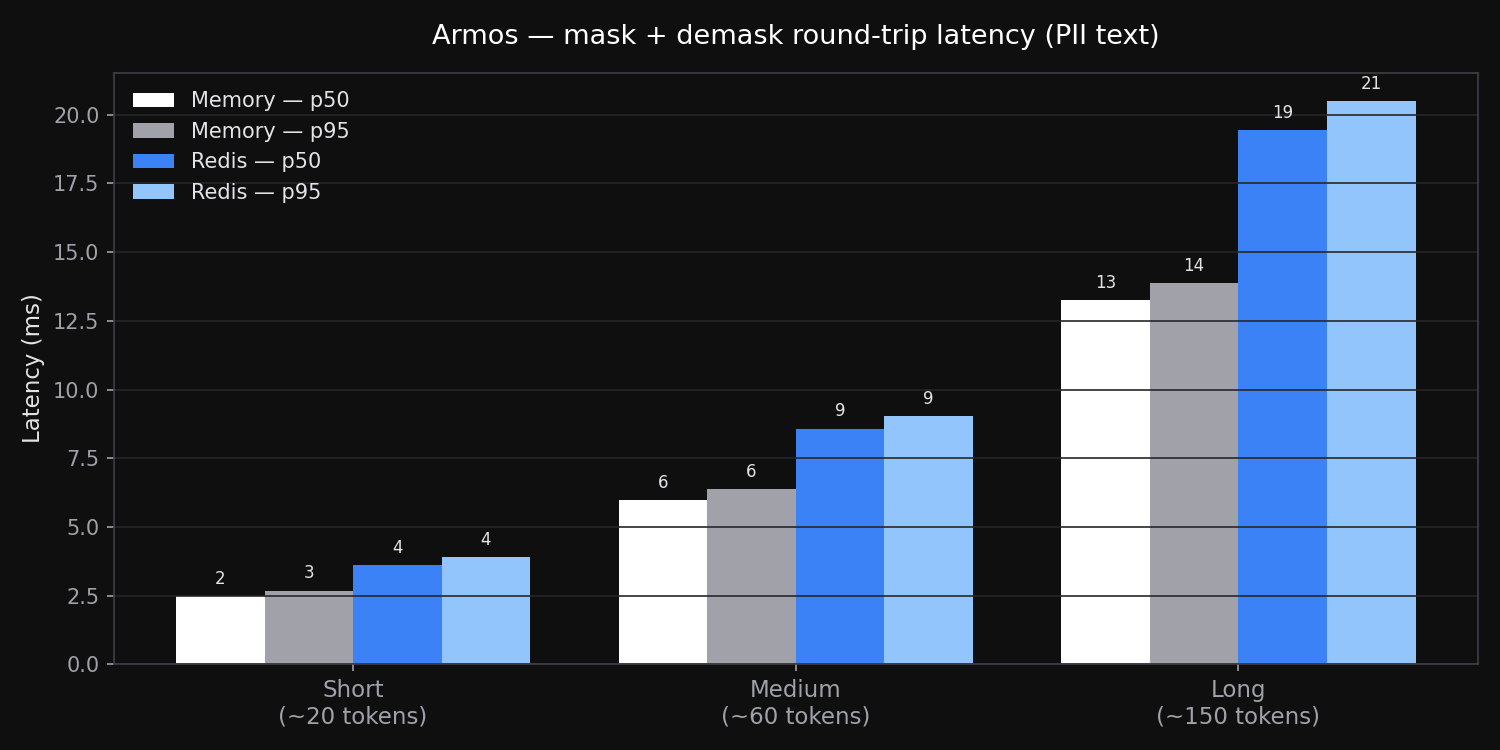
| Text size | Memory — p50 | Memory — p95 | Redis — p50 | Redis — p95 |
|---|---|---|---|---|
| Short (~20 tokens) | 2.5 ms | 2.7 ms | 3.6 ms | 3.9 ms |
| Medium (~60 tokens) | 6.0 ms | 6.4 ms | 8.6 ms | 9.0 ms |
| Long (~150 tokens) | 13.3 ms | 13.9 ms | 19.4 ms | 20.5 ms |
Redis overhead is the localhost round-trip cost (~1–2 ms per vault operation). Both are negligible relative to LLM response times (typically 500 ms–5 s).
Detection accuracy
Tested across 10,000 random samples per entity type, each embedded in a realistic sentence context. Name and address detection uses armos-ner-en — a custom-trained NER model built specifically for Indian and Western PII, not a generic off-the-shelf model.
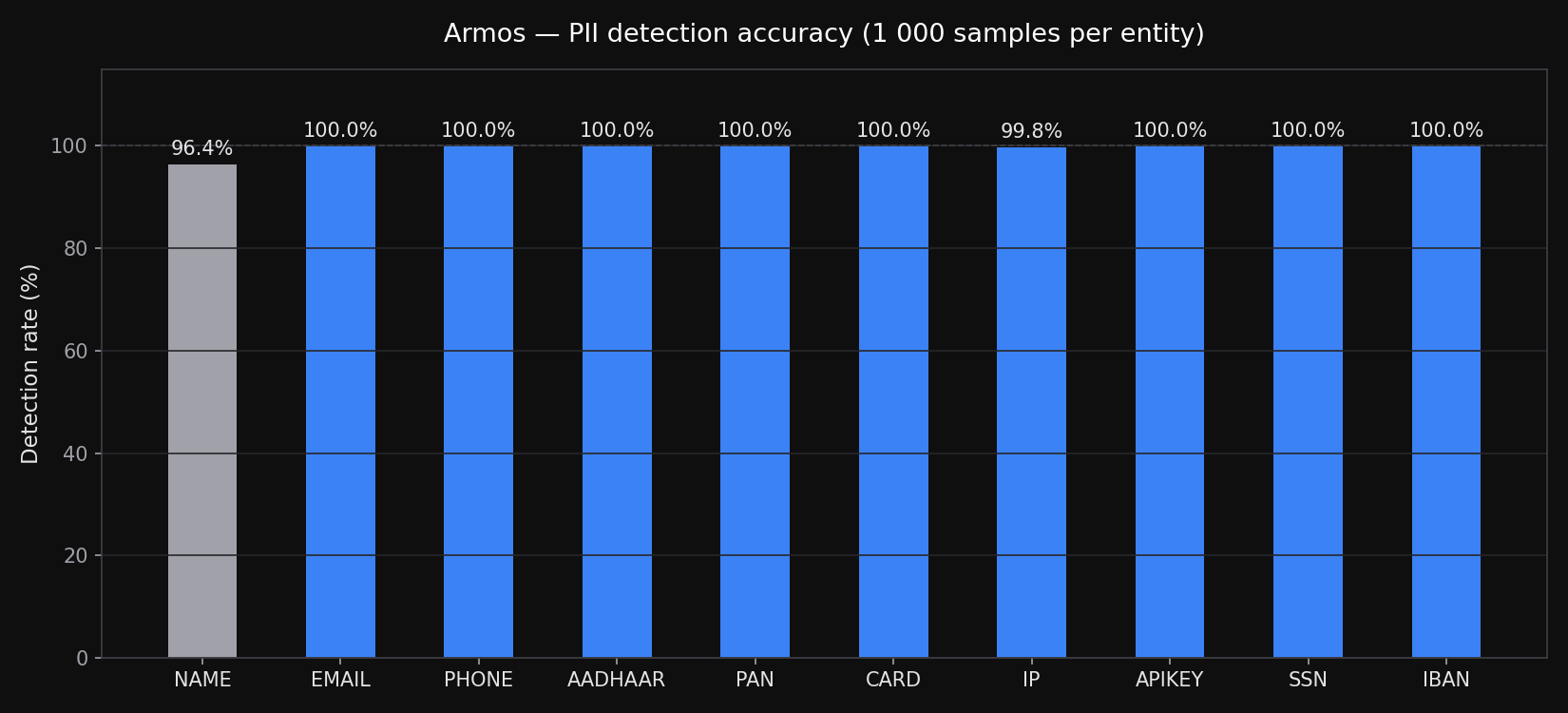
| Entity | Method | Samples | Detected | Rate |
|---|---|---|---|---|
| Person name (Indian) | armos-ner-en | 10,000 | 9,920 | 99.2% |
| Person name (Western) | armos-ner-en | 10,000 | 9,970 | 99.7% |
| Physical address (Indian) | armos-ner-en | 10,000 | 10,000 | 100% |
| Physical address (US/UK) | armos-ner-en | 10,000 | 10,000 | 100% |
| Email address | Regex | 10,000 | 10,000 | 100% |
| Phone number | Regex | 10,000 | 10,000 | 100% |
| Aadhaar | Regex | 10,000 | 10,000 | 100% |
| PAN | Regex | 10,000 | 10,000 | 100% |
| SSN | Regex | 10,000 | 10,000 | 100% |
| IBAN | Regex + checksum | 10,000 | 10,000 | 100% |
| Credit / debit card | Regex + Luhn | 10,000 | 10,000 | 100% |
| IP address | Regex | 10,000 | 9,980 | 99.8% |
| API keys | Regex | 10,000 | 10,000 | 100% |
vs. en_core_web_lg baseline: armos-ner-en improves Indian name detection by +9.1% and adds ADDRESS detection from 0% to 100% — a capability the baseline model has none of.
Address detection covers full US/UK addresses, street-only, P.O. Box, and Indian formats (flat, house, plot, named locality) across 8 sub-categories. False positive rate across all entity types: 0%.
Failure modes — what Armos catches and what it doesn't
Armos is designed to be transparent about its boundaries. Use this to decide whether a given use case is a fit.
Reliably caught (99%+)
| Case | Example |
|---|---|
| Full name in sentence context | Patient Priya Sharma was admitted... |
| Indian address with flat/locality/PIN | Flat 4B, Koramangala, Bangalore 560095 |
| US/UK address with street and postcode | 123 Oak Ave, Chicago, IL 60601 |
| All structured identifiers | Aadhaar, PAN, SSN, IBAN, card, email, phone, IP, API key |
Intentionally not caught (out of scope today)
| Case | Why |
|---|---|
| Passport numbers, voter ID, driving licence | Not yet supported — on the roadmap |
| Names in non-Latin scripts | प्रिया शर्मा — English model only |
| Dates of birth | Ambiguous — 12/04/1982 could be a date, not PII in all contexts |
| Company / organisation names | ORG detection not enabled |
| Custom internal identifiers | Employee IDs, account codes — use custom model for these |
Known gaps (miss rate < 1%)
| Case | Notes |
|---|---|
| Single-word names without context | "Contact Priya" — too ambiguous, skipped intentionally |
| Very long or uncommon South Indian names | e.g. Venkataraman Subramaniam — trained on these but rarely missed |
| Heavily abbreviated addresses | B-42, MG Rd with no city or PIN — incomplete format |
| Names embedded in long lists | CC: Ananya, Vikram, Neha, Rahul — sometimes boundary detection slips |
| Partial / truncated numbers | 4111 1111... — regex requires complete format |
If your data looks like a specific case here, open an issue or reach out — we train on real-world gaps.
Known limitations
- Token length —
[PII:NAME:a1b2c3d4]is 18 chars vsJohn(4 chars). Near context-window limits this may push content over. Rare in practice. - Casing: first-seen wins — De-masking always restores the first-seen casing of an entity. Use consistent casing in your prompts for exact restoration.
- Streaming not supported —
stream=Truepasses through without masking. (planned)
Contributing
Armos is open source and MIT licensed. Issues and pull requests welcome.
git clone https://github.com/armos-ai/armos-python
cd armos-python
pip install -e ".[dev,all]"
python -m spacy download en_core_web_lg
pytest tests/ -v
License
MIT
Release history Release notifications | RSS feed


Download files
Download the file for your platform. If you're not sure which to choose, learn more about installing packages.
Source Distribution
Built Distribution
Filter files by name, interpreter, ABI, and platform.
If you're not sure about the file name format, learn more about wheel file names.
Copy a direct link to the current filters
File details
Details for the file armos-2.0.1.tar.gz.
File metadata
- Download URL: armos-2.0.1.tar.gz
- Upload date:
- Size: 680.5 kB
- Tags: Source
- Uploaded using Trusted Publishing? No
- Uploaded via: twine/6.2.0 CPython/3.12.6
File hashes
| Algorithm | Hash digest | |
|---|---|---|
| SHA256 |
affd91d2e2d19ddc9f67514786c6ee42a1369c30a9a14489a0dd6ffdec714051
|
|
| MD5 |
8d236e879a60116f97ebe24e1110cdec
|
|
| BLAKE2b-256 |
4da464cddd9405feab693a2a18d4c118678b9775efba5c8018c604b0ff083d24
|
File details
Details for the file armos-2.0.1-py3-none-any.whl.
File metadata
- Download URL: armos-2.0.1-py3-none-any.whl
- Upload date:
- Size: 31.9 kB
- Tags: Python 3
- Uploaded using Trusted Publishing? No
- Uploaded via: twine/6.2.0 CPython/3.12.6
File hashes
| Algorithm | Hash digest | |
|---|---|---|
| SHA256 |
80a2b193b9cd534486f2b832e795abf306de9be731b1f6e9f1488a60cbd29313
|
|
| MD5 |
b451a342f5d97ec2557640638b3bc4fd
|
|
| BLAKE2b-256 |
fac6187f7f7fffe428a090be2d2c0ada6e2ac513f58ca44e391a1d3272ef562e
|






