
Secure API gateway for AI-generated artifact apps — external proxy, internal API forwarding, and user-isolated database access with JWT-scoped auth tokens.

Project description
artifact-gateway




Secure API gateway for AI-generated artifact apps — external HTTPS proxy, internal API forwarding, and user-isolated database access with JWT-scoped auth tokens.
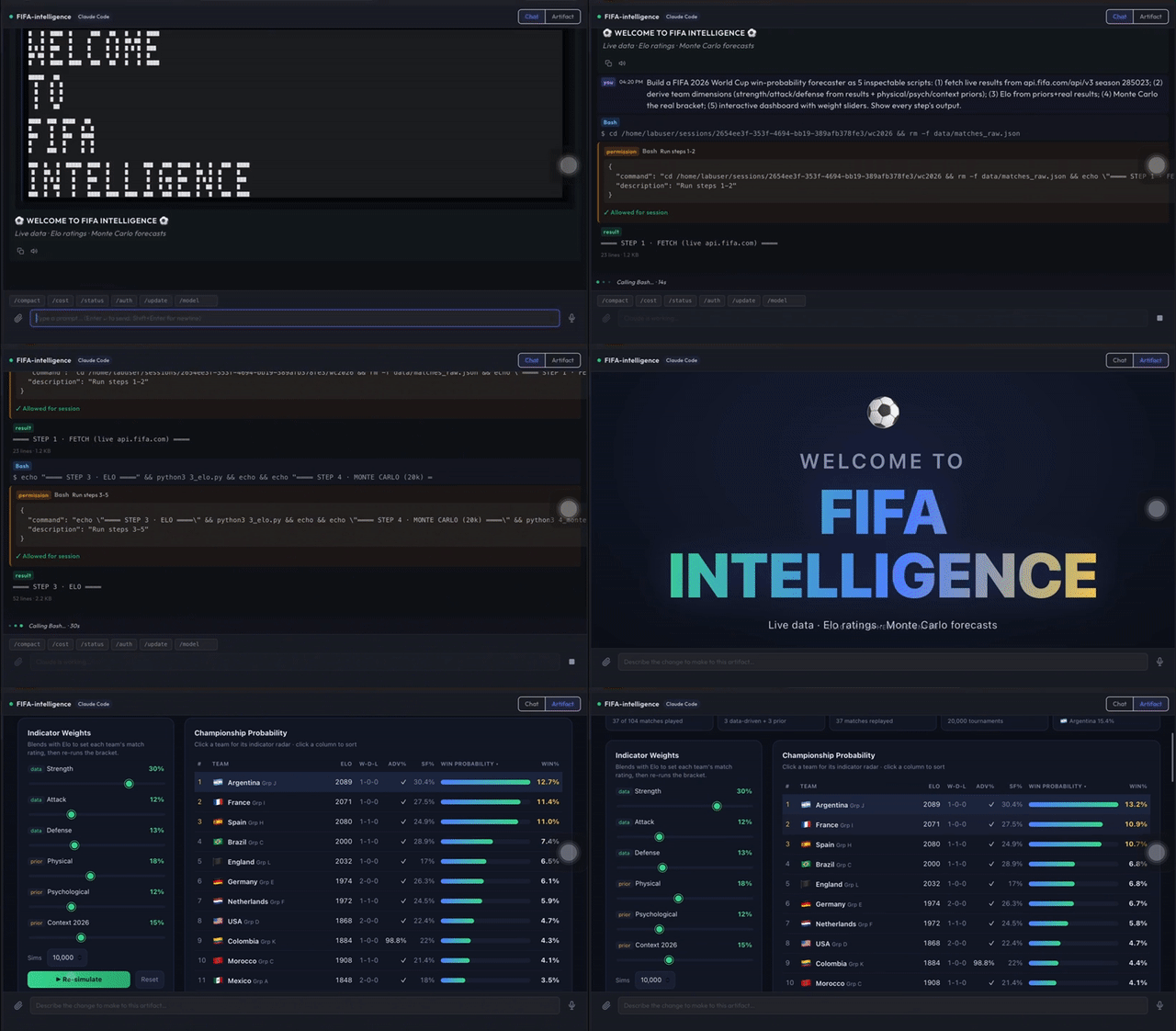
Above: an AI-generated artifact (a live FIFA forecast dashboard) calls external APIs and isolated data through artifact-gateway — no secrets in the page, no raw network access.
What it is
AI agents (Claude Code, Codex, Gemini CLI) can produce interactive web apps — artifacts — that need to call external APIs, read internal data, and persist state. These apps run inside iframes and cannot authenticate directly.
artifact-gateway provides:
- App tokens — short-lived JWTs scoped to a user+context, derived from the user's RBAC role.
- External proxy — forward calls from artifact apps to any external HTTPS API without exposing the user's credentials.
- Internal proxy — forward calls to internal OhWise APIs with allowlist enforcement; the user's JWT is forwarded so RBAC is handled by the target service.
- DuckDB handler — per-user and per-session isolated DuckDB files on the local filesystem.
- MongoDB handler — per-user and per-session isolated MongoDB collections via Motor.
Browser client SDK: the matching client that artifact apps load in the iframe lives in
sdk/js/and is published to npm asartifact-sdk(npm i artifact-sdk, or via CDN). This Python package is the server half; the JS SDK is the client half.
Installation
Base install (token + proxy only, no database drivers):
pip install artifact-gateway
With DuckDB support:
pip install "artifact-gateway[duckdb]"
With MongoDB (Motor) support:
pip install "artifact-gateway[mongo]"
Full install:
pip install "artifact-gateway[all]"
Quick start
1. Issue an app token
from artifact_gateway import issue_app_token, scope_from_role

token = issue_app_token(
    secret_key="your-service-secret-key",
    user_id="user-abc123",
    account_id="account-xyz789",
    context="lab_session:sess-001",
    scope=scope_from_role("member"),  # derives scopes from RBAC role
    ttl=14400,  # 4 hours (default)
)
2. Validate a token on incoming requests
from artifact_gateway import validate_app_token

try:
    claims = validate_app_token(secret_key="your-service-secret-key", token=token)
    user_id = claims["user_id"]
    scope = claims["scope"]
except ValueError as exc:
    # expired or tampered token
    raise
3. Proxy an external API call
from artifact_gateway import ExternalProxy

proxy = ExternalProxy()

result = await proxy.call(
    scope=claims["scope"],
    method="GET",
    url="https://api.example.com/v1/data",
    headers={"X-Api-Key": "..."},
)
# result = {"status": 200, "headers": {...}, "body": {...}}
4. Proxy an internal OhWise API call
from artifact_gateway import InternalProxy

proxy = InternalProxy(base_url="http://localhost:8000")

result = await proxy.call(
    scope=claims["scope"],
    user_jwt="<user's original OhWise JWT>",
    path="/api/agent",
    method="GET",
)
# result = {"status": 200, "body": {...}}
5. DuckDB — user-isolated database
from artifact_gateway.db.duckdb import DuckDBHandler

handler = DuckDBHandler(workspace="/var/ohwise/workspaces")

# Create and populate a table.
await handler.exec("user", user_id, "analytics", "CREATE TABLE events (ts TEXT, val INT)")
await handler.exec("user", user_id, "analytics", "INSERT INTO events VALUES (?, ?)", params=["2026-01-01", 42])

# Query it.
result = await handler.query("user", user_id, "analytics", "SELECT * FROM events")
# {"columns": ["ts", "val"], "rows": [["2026-01-01", 42]], "rowcount": 1}
Session-scoped database (isolated to one Lab session):
await handler.exec("session", user_id, "scratch", "CREATE TABLE t (n INT)", session_id="sess-001")
6. MongoDB — user-isolated collections
import motor.motor_asyncio
from artifact_gateway.db.mongo import MongoHandler

client = motor.motor_asyncio.AsyncIOMotorClient("mongodb://localhost:27017")
db = client["ohwise"]
handler = MongoHandler(db=db)

# Find documents.
docs = await handler.find("user", user_id, "notes", filter={"status": "active"})

# Upsert.
await handler.upsert("user", user_id, "notes",
    filter={"key": "my-note"},
    update={"$set": {"content": "updated content"}},
)

# Delete.
await handler.delete("user", user_id, "notes", filter={"archived": True})
7. Credential vault — reference secrets by name
Artifact apps should never embed plaintext API keys. Store the secret encrypted, then have the app reference it by name; the gateway resolves and injects it on the outbound request.
from artifact_gateway import CredentialVault, apply_credential, PLACEMENT_BEARER

vault = CredentialVault(master_key="your-encryption-key")

# At save time (store ciphertext in your DB):
ciphertext = vault.encrypt("sk-live-abc123")

# At request time, resolve and inject:
secret = vault.decrypt(ciphertext)
headers, query = apply_credential(secret=secret, placement=PLACEMENT_BEARER)
# headers = {"Authorization": "Bearer sk-live-abc123"}
placement can be "bearer", "header" (with name="X-Api-Key"), or "query" (with name="api_key").
8. Files — user/session-isolated read & write
from artifact_gateway import FilesHandler

files = FilesHandler(root="/var/ohwise/workspaces")

await files.write("user", user_id, "exports/report.csv", "a,b\n1,2\n")
out = await files.read("user", user_id, "exports/report.csv")
await files.list("user", user_id, "exports")
await files.delete("user", user_id, "exports/report.csv")
Paths are confined to the user's (or session's) directory; traversal outside it raises ValueError.
9. Streaming external proxy
proxy = ExternalProxy()
async for chunk in proxy.stream(
    scope=claims["scope"], method="POST",
    url="https://api.anthropic.com/v1/messages",
    headers={"x-api-key": "..."}, body={...},
):
    relay_to_client(chunk)  # e.g. as SSE
10. Refresh a token
from artifact_gateway import refresh_app_token

fresh = refresh_app_token(secret_key, old_token)  # same claims, new exp
Concepts
App token
A short-lived JWT (HS256) signed with the service's SECRET_KEY. Claims include user_id, account_id, context (e.g. lab_session:<id>), and a scope list derived from the user's RBAC role.
The token is injected into artifact app iframes via postMessage by the parent frame. It is stored in memory only — never in localStorage or cookies.
Scope claims
| Scope | Meaning |
|---|---|
external:* |
Call any external HTTPS API |
internal:read |
Read from internal OhWise APIs (GET) |
internal:write |
Mutate internal OhWise APIs (POST/PUT/DELETE) |
db:user:read |
Read from user-scoped databases |
db:user:rw |
Read and write user-scoped databases |
db:session:read |
Read from session-scoped databases |
db:session:rw |
Read and write session-scoped databases |
db:shared:read |
Read from shared databases (admin+ only) |
Role → scope mapping
| Role | External | Internal write | DB user rw | DB shared read |
|---|---|---|---|---|
| viewer | No | No | No | No |
| member | Yes | Yes | Yes | No |
| admin | Yes | Yes | Yes | Yes |
| system_admin | Yes | Yes | Yes | Yes |
| platform_owner | Yes | Yes | Yes | Yes |
Data isolation
- DuckDB: each user's files live under
{workspace}/{user_id}/db/. Session-scoped files live under{workspace}/{user_id}/sessions/{session_id}/db/. The proxy never allows path traversal beyond the user's directory. - MongoDB: collection names are prefixed automatically —
app_user_{user_id}_{collection}orapp_session_{session_id}_{collection}. User code never sees the real collection name.
Integrating with FastAPI
Wire the proxy handlers into a FastAPI router alongside token validation middleware:
from fastapi import APIRouter, Depends, HTTPException, Header
from artifact_gateway import (
    validate_app_token,
    ExternalProxy,
    InternalProxy,
    ExternalCallRequest,
    InternalCallRequest,
)

SECRET_KEY = "your-secret-key"
router = APIRouter(prefix="/api/lab/app")
external_proxy = ExternalProxy()
internal_proxy = InternalProxy(base_url="http://ohwise-backend:8000")


async def get_claims(authorization: str = Header(...)) -> dict:
    token = authorization.removeprefix("Bearer ")
    try:
        return validate_app_token(SECRET_KEY, token)
    except ValueError as exc:
        raise HTTPException(status_code=401, detail=str(exc))


@router.post("/external")
async def proxy_external(req: ExternalCallRequest, claims: dict = Depends(get_claims)):
    try:
        return await external_proxy.call(
            scope=claims["scope"],
            method=req.method,
            url=req.url,
            headers=req.headers,
            body=req.body,
        )
    except PermissionError as exc:
        raise HTTPException(status_code=403, detail=str(exc))


@router.post("/internal")
async def proxy_internal(req: InternalCallRequest, claims: dict = Depends(get_claims)):
    try:
        return await internal_proxy.call(
            scope=claims["scope"],
            user_jwt=claims["_user_jwt"],  # store at token issuance
            path=req.path,
            method=req.method,
            body=req.body,
            query=req.query,
        )
    except PermissionError as exc:
        raise HTTPException(status_code=403, detail=str(exc))
Contributing
- Fork the repository.
- Create a feature branch.
- Run tests:
pip install -e ".[dev]" && pytest. - Submit a pull request.
License
Apache 2.0 — see LICENSE.


Download files
Download the file for your platform. If you're not sure which to choose, learn more about installing packages.
Source Distribution
Built Distribution
Filter files by name, interpreter, ABI, and platform.
If you're not sure about the file name format, learn more about wheel file names.
Copy a direct link to the current filters
File details
Details for the file artifact_gateway-0.3.1.tar.gz.
File metadata
- Download URL: artifact_gateway-0.3.1.tar.gz
- Upload date:
- Size: 3.8 MB
- Tags: Source
- Uploaded using Trusted Publishing? No
- Uploaded via: twine/6.2.0 CPython/3.14.0
File hashes
| Algorithm | Hash digest | |
|---|---|---|
| SHA256 |
dc06b6c0e383c875c906dd4aec9cd43801d1fabe4f4a4a0cfae35049062c3e0c
|
|
| MD5 |
88be5a137553bdd3b435310d8d63d4de
|
|
| BLAKE2b-256 |
1981e08460d456df5cc52bf1cae7889a8ffb5cf21da67e8ffc897b3f4ad4c004
|
File details
Details for the file artifact_gateway-0.3.1-py3-none-any.whl.
File metadata
- Download URL: artifact_gateway-0.3.1-py3-none-any.whl
- Upload date:
- Size: 30.6 kB
- Tags: Python 3
- Uploaded using Trusted Publishing? No
- Uploaded via: twine/6.2.0 CPython/3.14.0
File hashes
| Algorithm | Hash digest | |
|---|---|---|
| SHA256 |
45e7ef5060589a8986993db6f89133032bccad5f15258f4bdeb2a75dfd1697e6
|
|
| MD5 |
2b372dc9fe9acf0709a377375936c464
|
|
| BLAKE2b-256 |
a2d0d8d0aa400a341ec392b6383f40ebe89573727eccb9d9bd02a6cc479388f8
|






