
Manage AI artifacts across multiple configurations, tools, & repositories

Project description
Artifactr
A cross-platform CLI tool for managing AI project artifacts. Maintain a personal library of skills, agents, and commands in centralized "vaults" and import them into any git repository for use with AI coding assistants.
Installation • Quickstart • Usage • Vault Structure
Why? 🤔
AI coding agents accumulate configs — skills, agents, commands — and they're usually project-local. Starting a new repo often means rebuilding your environment from scratch.
I develop mostly in cloud VMs via ssh and tmux for security purposes. I got tired of rebuilding my setup every time and desperately wanted a terminal-centric solution. Lo-and-behold: Artifactr
It takes inspiration from local-first note-taking applications like Obsidian and Logseq. No external connections are made. Your vaults contain YOUR files.
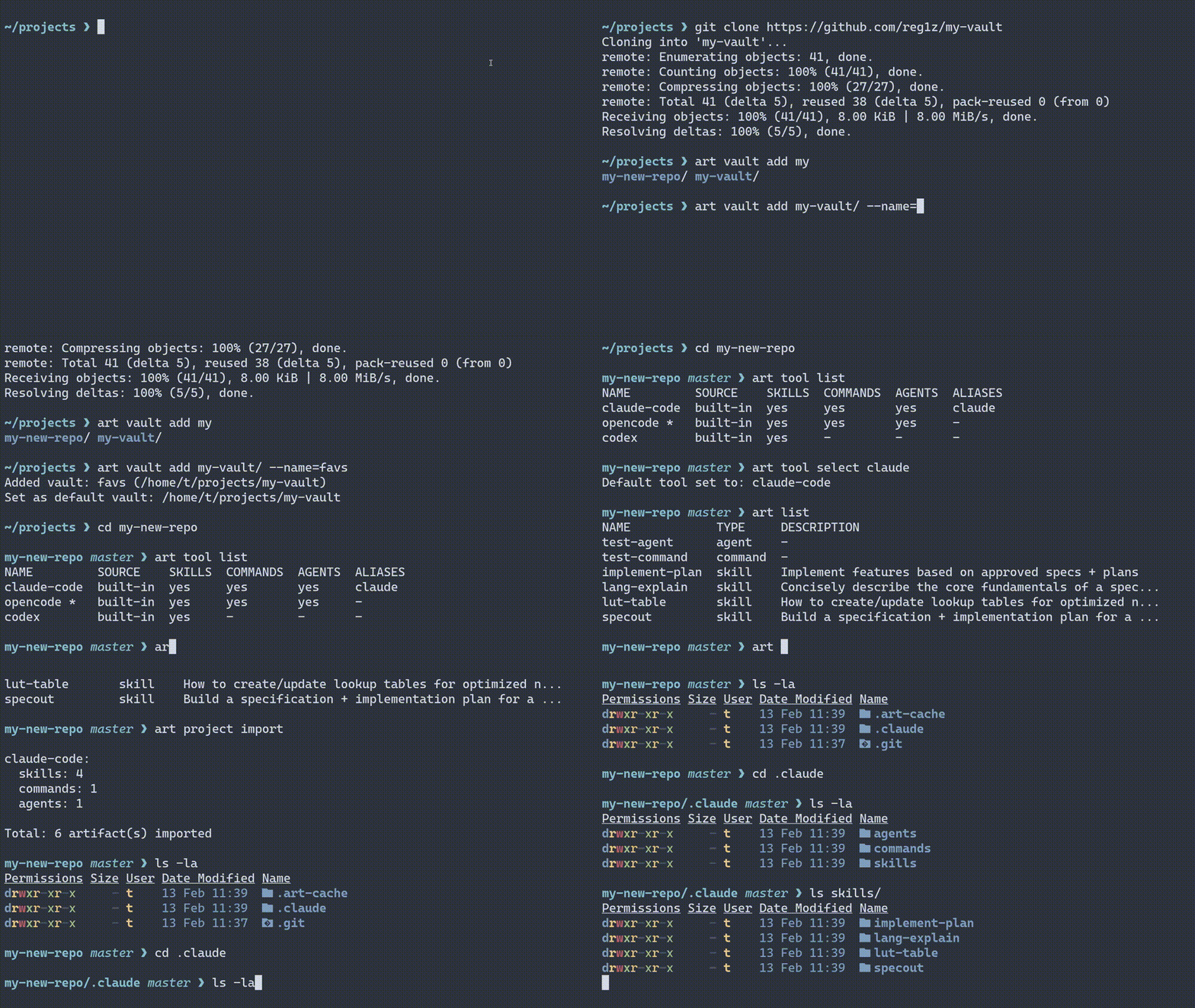
Features
- Tool-agnostic storage: Store artifacts once, import to multiple AI tools
- Cross-platform: Works on Linux, macOS, and Windows
- Multiple vaults: Organize artifacts into separate collections with auto-naming (
llm-vault-N) - Vault initialization: Create new vaults from scratch with
art vault init - Artifact creation: Create skills, commands, and agents from the CLI with
art create - Artifact editing: Open artifacts in your terminal editor with
art edit - Selective import: Import specific artifacts by name with
--artifacts - Artifact discovery: Scan any project for existing artifacts with
art spelunk - Artifact collection: Store discovered artifacts back into a vault with
art store - Import tracking:
.art-cache/importedrecords what was imported and from where - Supported tools: Claude Code, OpenCode, Codex (extensible — add custom tools with
art tool add) - Automatic git exclusion: Adds imported artifacts to
.git/info/excludeto protect against accidental commits of project-specific skills & prompts
Installation
Requires Python 3.10+
It's easiest to globally install artifactr via pipx:
pipx install artifactr
Otherwise, you can install via pip (though it's recommended to use a non-system venv):
pip install artifactr
Quickstart
art vault add ~/my-vault
art store ~/repos/existing-project
art proj import ~/repos/new-project
Usage
Managing Vaults
# Initialize a new vault (creates directory with skills/, agents/, commands/ scaffolding)
art vault init ~/my-vault

# Initialize with a name and set as default
art vault init ~/my-vault --name=favorites --set-default

# Add an existing directory as a vault (auto-named as llm-vault-1, llm-vault-2, etc.)
art vault add ~/my-vault

# Add a vault with an explicit name
art vault add ~/my-vault --name=favorites

# Add and set as default in one step
art vault add ~/my-vault --name=favorites --set-default

# Name or rename an existing vault
art vault name ~/my-vault favorites

# List all vaults
art vault list

# List all vaults with full artifact hierarchy
art vault list --all

# Set default vault (by name or path)
art vault select favorites

# Remove a vault (by name or path)
art vault rm favorites
Vaults added without --name are automatically assigned names using the llm-vault-N pattern. Vault names can be used in place of full directory paths in any command that accepts a vault identifier, including --vault on art import.
Managing Tools
# List supported tools — shows artifact support, source, and aliases
art tool list

# Set default tool (defaults to opencode)
art tool select claude-code

# Aliases work anywhere a tool name is accepted
art tool select claude  # resolves to claude-code

# Show details for a specific tool
art tool show codex

# Add a custom tool (e.g., Cursor IDE)
art tool add cursor --skills .cursor/skills --commands .cursor/commands \
  --global-skills '$HOME/.cursor/skills' --alias cur

# Add a tool scoped to a specific vault
art tool add my-tool --skills .my-tool/skills --vault=team-vault

# Remove a custom tool
art tool rm cursor
Listing Vault Contents
# List all artifacts in the default vault
art list

# List from a specific vault
art list --vault=favorites

# Filter by type
art list -S              # skills only
art list -S -C           # skills and commands
art list -S foo,bar      # only skills named foo and bar
Removing Vault Artifacts
# Remove an artifact from the default vault
art rm my-skill

# Use type prefix for disambiguation
art rm skills/my-skill

# Remove without confirmation
art rm my-skill -f
Importing Artifacts (Project)
# Import into current directory (cwd default)
art proj import

# Import into a specific project
art proj import ~/repos/my-project

# Import from a specific vault
art proj import --vault=favorites

# Import for specific tools
art proj import --tools=claude-code,opencode

# Import only skills
art proj import -S

# Symlink instead of copying
art proj import --link

# Import only specific artifacts by name
art proj import --artifacts=helping-hand,code-review

# Don't add artifacts to .git/info/exclude
art proj import --no-exclude
Managing Project Artifacts
# List imported artifacts in current project
art proj list

# Remove specific imported artifacts
art proj rm my-skill

# Wipe all imported artifacts
art proj wipe

# Filter by type or tool
art proj list -S --tools=claude-code
art proj wipe -S -f
Importing Artifacts (Global Config)
# Import into global config directories
art conf import

# Import from a specific vault
art conf import --vault=favorites

# Import only skills for claude-code
art conf import --tools=claude-code -S
Managing Global Config Artifacts
# List globally imported artifacts
art conf list

# Remove globally imported artifacts
art conf rm my-skill

# Wipe all globally imported artifacts
art conf wipe -f
Imported artifacts are tracked in .art-cache/imported (project) and ~/.config/artifactr/.art-cache-global/imported (global), recording which vault and tool each artifact came from.
Creating Artifacts
Create skills, commands, and agents directly from the CLI:
# Create a skill (directory-based, with SKILL.md)
art create skill my-skill -d "A helpful skill" -c "Instructions here"

# Create a command (flat .md file, filename is the name)
art create command deploy-prod -d "Run production deployment"

# Create an agent (flat .md file, name in frontmatter)
art create agent code-reviewer -d "Reviews code changes"

# Add extra frontmatter fields
art create agent my-agent -d "desc" -D model=sonnet -D version=1.0

# Create in a specific vault
art create skill my-skill -d "desc" --vault=favorites

# Create in the current project instead of a vault
art create command my-cmd -d "desc" --here
art create skill my-skill -d "desc" --here --tools=claude-code,opencode
All artifact types require --description / -d. Skills are created as directories with a SKILL.md file; commands and agents are created as flat .md files.
Editing Artifacts
Open an artifact in your terminal editor:
# Edit a skill in the default vault
art edit skill my-skill

# Edit a command or agent
art edit command deploy-prod
art edit agent code-reviewer

# Edit in a specific vault
art edit skill my-skill --vault=favorites

# Edit a project-local artifact
art edit skill my-skill --here
The editor is resolved from $VISUAL, then $EDITOR, then the first available of nano, nvim, vim, vi.
Discovering Artifacts
Scan directories, vaults, or global configs for existing artifacts:
# Discover artifacts in a project
art spelunk ~/repos/my-project

# Spelunk global config (default when no target)
art spelunk

# Explicit global flag
art spelunk -g

# Filter by tool or type
art spelunk ~/repos/my-project --tools=claude-code
art spelunk -S
Example output:
NAME                              TYPE      TOOL      DESCRIPTION
helping-hand (imported: favs)     skill     claude    A helpful assistant
utility-tool                      skill     claude    -
reviewer                          agent     claude    Reviews code changes
deploy                            command   opencode  -
The (imported: ...) marker appears when an artifact was previously imported via art import, showing which vault it came from.
Storing Artifacts
Collect artifacts from a project directory and store them into a vault:
# Store artifacts into default vault
art store ~/repos/my-project

# Store into a specific vault
art store ~/repos/my-project --vault=favorites
You'll be presented with a numbered list of discovered artifacts and can select which ones to store using individual numbers (1), ranges (1-3), comma-separated (1,3,5), combinations (1,3-5), or all.
Vault Structure
vault/
├── vault.yaml          # Optional: portable vault name and tool definitions
├── skills/
│   └── skill-name/
│       ├── SKILL.md
│       └── (supporting files...)
├── agents/
│   └── agent-name.md
└── commands/
    └── command-name.md
The optional vault.yaml file stores a portable vault name and vault-scoped tool definitions. When present, its name takes precedence over the name stored in the global config. Tool definitions in vault.yaml travel with the vault when shared.
Artifacts are copied (or symlinked with --link) to tool-specific directories in the target repo (e.g., .claude/skills/, .opencode/agents/) and automatically excluded from git tracking.
Release history Release notifications | RSS feed


Download files
Download the file for your platform. If you're not sure which to choose, learn more about installing packages.
Source Distribution
Built Distribution
Filter files by name, interpreter, ABI, and platform.
If you're not sure about the file name format, learn more about wheel file names.
Copy a direct link to the current filters
File details
Details for the file artifactr-0.0.9.tar.gz.
File metadata
- Download URL: artifactr-0.0.9.tar.gz
- Upload date:
- Size: 57.9 kB
- Tags: Source
- Uploaded using Trusted Publishing? No
- Uploaded via: twine/6.2.0 CPython/3.14.2
File hashes
| Algorithm | Hash digest | |
|---|---|---|
| SHA256 |
59e323d5404e4312c74c4507a70e9a558740a1542684c185d5a4da568195fb75
|
|
| MD5 |
8ff0ae98d629735486d8ee2bf4c66964
|
|
| BLAKE2b-256 |
bf0a102d8d38d669adcfcbb33588e8ebb96f1eb5aa7034e0df8a08fe3e454287
|
File details
Details for the file artifactr-0.0.9-py3-none-any.whl.
File metadata
- Download URL: artifactr-0.0.9-py3-none-any.whl
- Upload date:
- Size: 39.1 kB
- Tags: Python 3
- Uploaded using Trusted Publishing? No
- Uploaded via: twine/6.2.0 CPython/3.14.2
File hashes
| Algorithm | Hash digest | |
|---|---|---|
| SHA256 |
c0507673da2a97f385218377773bdd140b3f9bd690454bb5f9977ca522b752e9
|
|
| MD5 |
80ff62d62807be25290faec80ba9933c
|
|
| BLAKE2b-256 |
013882aca9859b4eaa7b5c3fba5df245d42d5d6eaa52e63373670695bffd7bc6
|






