
artixinstall
An interactive, menu-driven TUI installer for Artix Linux — the systemd-free Arch-based distribution. Inspired by archinstall, built specifically for Artix with full support for all four init systems and comprehensive hardware detection.
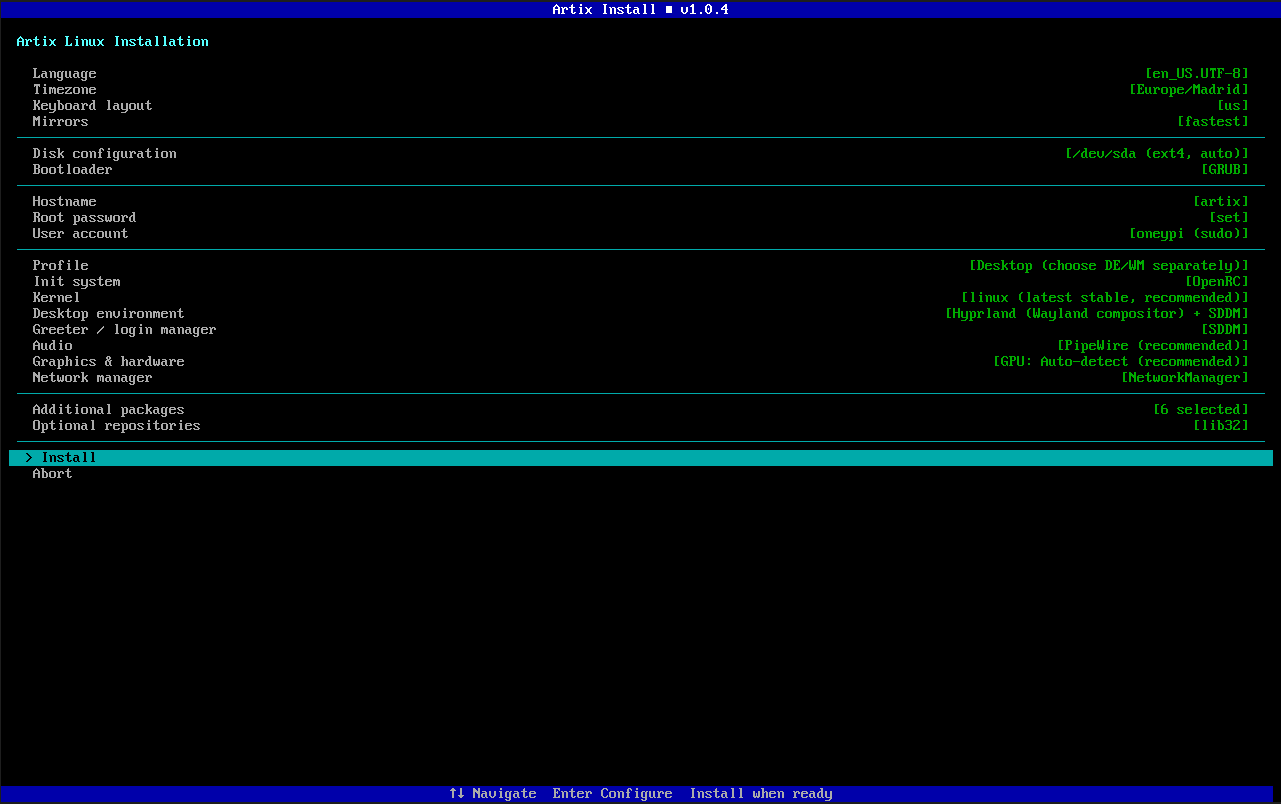
Features
Core
- No external dependencies — built entirely with Python's standard library (
curses) - Four init systems — full support for OpenRC, runit, s6, and dinit
- Guided flow — pre-filled defaults, clear value indicators, and archinstall-style organization
- Comprehensive logging — all commands and output logged to
/tmp/artixinstall.log
Disk & Boot
- Automatic partitioning — wipes and partitions entire disk (EFI/BIOS aware)
- Manual partitioning — drops into
cfdiskfor advanced users - LUKS encryption — full-disk encryption with automatic mkinitcpio hook setup
- Filesystem selection — ext4, btrfs, xfs, or f2fs
- Configurable swap — 4 GB, 8 GB, or none
- GRUB & systemd-boot — both supported with LUKS and microcode awareness
Desktop Environments (18 options)
| Category | Options |
|---|---|
| Full DEs | GNOME, KDE Plasma, XFCE, Cinnamon, MATE, Budgie, LXQt, Deepin, Enlightenment |
| Tiling WMs | Hyprland, Sway, i3, bspwm, dwm, Qtile, awesome, River |
| Stacking WMs | Openbox |
Hardware Detection
- GPU auto-detection — Intel, AMD, NVIDIA (proprietary/open/nouveau), VMware/VirtualBox
- WiFi detection — automatic chipset detection via lspci and rfkill
- Bluetooth detection — USB and PCI adapter scanning
- Laptop detection — battery/chassis/touchpad heuristics for TLP and ACPI
- CPU microcode — auto-selects Intel or AMD microcode package
- Printing support — optional CUPS installation
System Configuration
- 4 kernels — linux, linux-lts, linux-zen, linux-hardened
- Audio servers — PipeWire (recommended) or PulseAudio
- Installation profiles — Minimal, Desktop, Server, Development
- Network managers — NetworkManager, dhcpcd, wpa_supplicant, or none
Package Management
- Categorized package browser — 40+ packages across 8 categories
(browsers, multimedia, office, dev tools, system tools, networking, fonts, gaming) - Custom package entry — type any package name to add it
- Optional repositories — lib32 and universe toggles
Safety
- Destructive operations require explicit "yes" — not just Enter
- Retry/Abort/Skip on failures — never leaves you stranded
- Passwords never logged — automatic masking in all log output
- Input validation — injection-safe username/hostname/locale handling
Requirements
- Python 3.10+ (included on the Artix live ISO)
- Must be run as root on a live Artix Linux ISO
- A storage device to install to
- Active internet connection for package downloads
Usage
Boot into a live Artix Linux ISO, connect to the internet, then:
- Ethernet should usually work automatically via DHCP.
- If you are using Wi-Fi, connect before starting the installer.
artixinstallis meant to be run on the Artix live ISO, not on Windows.- Artix documentation links: https://wiki.artixlinux.org/Main/Installation https://wiki.artixlinux.org/Main/InstallationOnZFS
pacman -Sy python python-pipx expat --overwrite '*'
pipx install artixinstall
pipx ensurepath
exec $SHELL
artixinstall
If you prefer running from source instead of PyPI:
pacman -Sy git python --overwrite '*'
git clone https://github.com/1ypi/artixinstall.git
cd artixinstall
python -m artixinstall
Notes
- This project is currently maintained by one person, and I have not tested every possible combination yet.
- If you try it, please test it and send feedback if something breaks or feels rough. It would be genuinely appreciated.
- NVIDIA systems are supported, but NVIDIA plus Wayland compositors such as Hyprland can still need manual post-install tuning depending on driver choice and GPU generation.
- The installer now adds basic NVIDIA-specific Hyprland environment variables automatically when Hyprland and an NVIDIA driver are selected together.
Supported Init Systems
| Init System | Base Packages | Service Enable Method |
|---|---|---|
| OpenRC | base base-devel openrc elogind-openrc |
rc-update add <service> default |
| runit | base base-devel runit elogind-runit |
ln -s /etc/runit/sv/<svc> /etc/runit/runsvdir/default/ |
| s6 | base base-devel s6-base elogind-s6 |
s6-rc-bundle-update add default <service> |
| dinit | base base-devel dinit elogind-dinit |
dinitctl enable <service> |
Project Structure
artixinstall/
├── __main__.py               # Entry point & main menu orchestration
├── tui/
│   ├── menu.py               # Reusable curses menu component
│   ├── screen.py             # Screen/window management, colors
│   └── prompts.py            # Text input, password, yes/no prompts
├── installer/
│   ├── disk.py               # Partition, format, mount, LUKS encryption
│   ├── base.py               # basestrap, fstab generation, mirrorlist
│   ├── init.py               # Init system selection & service mapping
│   ├── locale.py             # Locale, timezone, keyboard layout
│   ├── network.py            # Hostname, network manager setup
│   ├── users.py              # Root password, user creation, sudo
│   ├── bootloader.py         # GRUB / systemd-boot (LUKS-aware)
│   ├── desktop.py            # 18 DE/WM options with package lists
│   ├── hardware.py           # GPU, WiFi, Bluetooth, laptop detection
│   └── packages.py           # Kernel, audio, profiles, package browser
├── data/
│   ├── services.json         # Service-to-init mapping (13 services × 4 inits)
│   ├── mirrors.txt           # Default Artix mirror list
│   └── locales.txt           # 30 common locales
├── utils/
│   ├── shell.py              # Safe subprocess wrapper
│   ├── log.py                # File-based logging with password masking
│   └── validate.py           # Input validation & sanitization
├── pyproject.toml
├── README.md
└── LICENSE
How It Works
- Configure — Navigate the grouped main menu and set each option
- Review — Select "Install" to see a full summary of your choices
- Install — Confirm to begin the automated installation:
- Partitions and formats the disk (with optional LUKS)
- Installs base system + all selected packages via
basestrap - Configures locale, timezone, hostname, users
- Sets up encryption hooks (if LUKS enabled)
- Installs bootloader with microcode and encryption support
- Enables all init-specific services
- Configures hardware drivers and power management
- Reboot — Unmount and reboot into your new Artix system
Contributing
Contributions are welcome! Some areas where help is appreciated:
- Testing on different hardware configurations and init systems
- Adding more DEs/WMs — the desktop module is designed to be extended easily
- LVM support — adding LVM partition layouts
- Btrfs subvolumes — automatic subvolume creation for snapshots
- Translations — locale and TUI text internationalization
- Accessibility — screen reader support
Development
# Zero dependencies — just Python 3.10+ and curses
# Test individual modules:
python -c "from artixinstall.installer.init import load_services; print(load_services())"
python -c "from artixinstall.installer.hardware import detect_gpu; print(detect_gpu())"
python -c "from artixinstall.installer.desktop import DESKTOP_ENVIRONMENTS; print(list(DESKTOP_ENVIRONMENTS.keys()))"

# Run on a live ISO:
sudo python -m artixinstall
Troubleshooting
| Problem | Solution |
|---|---|
| "must be run as root" | Use sudo python -m artixinstall |
| Terminal too small | Resize to at least 60×20 |
| basestrap fails | Check internet connection and mirror availability |
| LUKS passphrase prompt at boot | Enter the passphrase you set during installation |
| No WiFi after install | Verify NetworkManager is enabled for your init system |
| Black screen after install | Try a different GPU driver option |
All commands are logged to /tmp/artixinstall.log.
License
GPL-3.0 — see LICENSE for details.
1 maintainer

Metadata
1 maintainer
Release files for artixinstall 1.1.0
For a detailed explanation of source distributions (sdists) and built distributions (wheels), please see the package formats documentation.
Source distribution (sdist)
| File | Size | Uploaded | Provenance | |
|---|---|---|---|---|
| artixinstall-1.1.0.tar.gz | 80.7 kB | Without provenance | Details |
Built distribution (wheel)
| File | Interpreter | ABI | Platform | Reset |
|---|---|---|---|---|
| artixinstall-1.1.0-py3-none-any.whl | Python 3 | none | any | Details |
Total release size: 168.5 kB
Release files / artixinstall-1.1.0.tar.gz
| Download URL | artixinstall-1.1.0.tar.gz |
|---|---|
| Size | 80.7 kB |
| Tags | Source |
|
SHA-256 checksum How to use checksums |
f7decd2647bfe1350e48e61b724035ae3f622ea3d2c1dba4b3a5c07fff919567
|
|
BLAKE2b-256 checksum How to use checksums |
6b91320b81cfd4a9dd3ee1dcebb36374d091029a27ada512e5e9f2991bba3402
|
| Upload date | |
|
Uploaded using Trusted Publishing? What is trusted publishing? |
No |
| Uploaded via |
twine/6.2.0 CPython/3.11.9
|
Release files / artixinstall-1.1.0-py3-none-any.whl
| Download URL | artixinstall-1.1.0-py3-none-any.whl |
|---|---|
| Size | 87.8 kB |
| Tags | Python 3 |
|
SHA-256 checksum How to use checksums |
c9f454ce04a2829e2f6ea3e4e3eef67a41f6226b4050018df2c53cbc5dfd0101
|
|
BLAKE2b-256 checksum How to use checksums |
153ecf665ba3e3b959d8a2766c4b4b0423a85f07f06c4e305fcd084d1862cb45
|
| Upload date | |
|
Uploaded using Trusted Publishing? What is trusted publishing? |
No |
| Uploaded via |
twine/6.2.0 CPython/3.11.9
|
Security for artixinstall 1.1.0
Provenance
Provenance describes where a file came from. On PyPI, provenance is shared via attestations, which provide a verifiable record of the build or publishing details. View details, limitations and caveats.
No provenance found
None of the files in this release were uploaded with provenance metadata.
A note on package security
PyPI is a repository for distributing packages, not a service for auditing them. While third-party security researchers and our staff do their best to detect and remove malicious packages, PyPI cannot guarantee the quality, security or suitability of any given package.














