
An interactive TUI installer for Artix Linux with support for OpenRC, runit, s6, and dinit

Project description
artixinstall
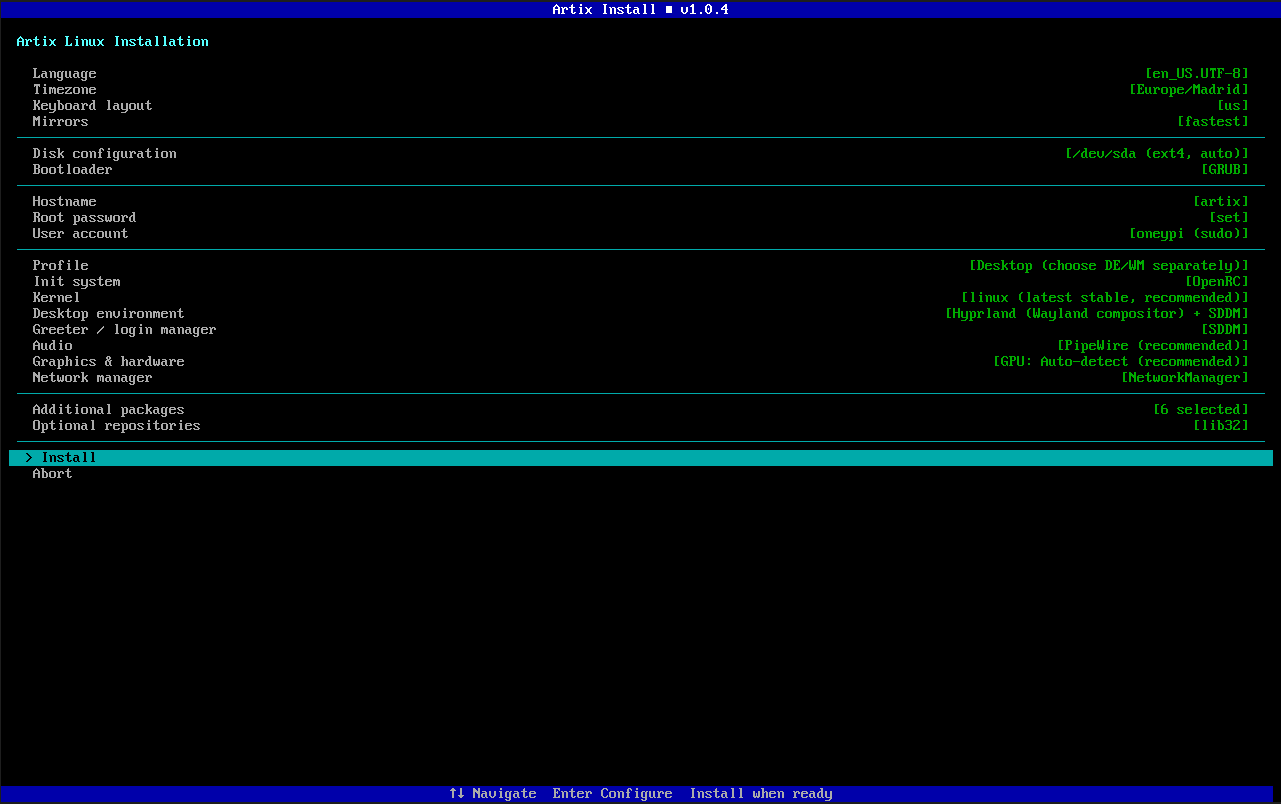
An interactive, menu-driven TUI installer for Artix Linux — the systemd-free Arch-based distribution. Inspired by archinstall, built specifically for Artix with full support for all four init systems and comprehensive hardware detection.
Features
Core
- No external dependencies — built entirely with Python's standard library (
curses) - Four init systems — full support for OpenRC, runit, s6, and dinit
- Guided flow — pre-filled defaults, clear value indicators, and archinstall-style organization
- Comprehensive logging — all commands and output logged to
/tmp/artixinstall.log
Disk & Boot
- Automatic partitioning — wipes and partitions entire disk (EFI/BIOS aware)
- Manual partitioning — drops into
cfdiskfor advanced users - LUKS encryption — full-disk encryption with automatic mkinitcpio hook setup
- Filesystem selection — ext4, btrfs, xfs, or f2fs
- Configurable swap — 4 GB, 8 GB, or none
- GRUB & systemd-boot — both supported with LUKS and microcode awareness
Desktop Environments (18 options)
| Category | Options |
|---|---|
| Full DEs | GNOME, KDE Plasma, XFCE, Cinnamon, MATE, Budgie, LXQt, Deepin, Enlightenment |
| Tiling WMs | Hyprland, Sway, i3, bspwm, dwm, Qtile, awesome, River |
| Stacking WMs | Openbox |
Hardware Detection
- GPU auto-detection — Intel, AMD, NVIDIA (proprietary/open/nouveau), VMware/VirtualBox
- WiFi detection — automatic chipset detection via lspci and rfkill
- Bluetooth detection — USB and PCI adapter scanning
- Laptop detection — battery/chassis/touchpad heuristics for TLP and ACPI
- CPU microcode — auto-selects Intel or AMD microcode package
- Printing support — optional CUPS installation
System Configuration
- 4 kernels — linux, linux-lts, linux-zen, linux-hardened
- Audio servers — PipeWire (recommended) or PulseAudio
- Installation profiles — Minimal, Desktop, Server, Development
- Network managers — NetworkManager, dhcpcd, wpa_supplicant, or none
Package Management
- Categorized package browser — 40+ packages across 8 categories
(browsers, multimedia, office, dev tools, system tools, networking, fonts, gaming) - Custom package entry — type any package name to add it
- Optional repositories — lib32 and universe toggles
Safety
- Destructive operations require explicit "yes" — not just Enter
- Retry/Abort/Skip on failures — never leaves you stranded
- Passwords never logged — automatic masking in all log output
- Input validation — injection-safe username/hostname/locale handling
Requirements
- Python 3.10+ (included on the Artix live ISO)
- Must be run as root on a live Artix Linux ISO
- A storage device to install to
- Active internet connection for package downloads
Usage
Boot into a live Artix Linux ISO, connect to the internet, then:
- Ethernet should usually work automatically via DHCP.
- If you are using Wi-Fi, connect before starting the installer.
artixinstallis meant to be run on the Artix live ISO, not on Windows.- Artix documentation links: https://wiki.artixlinux.org/Main/Installation https://wiki.artixlinux.org/Main/InstallationOnZFS
pacman -Sy python python-pipx expat --overwrite '*'
pipx install artixinstall
pipx ensurepath
exec $SHELL
artixinstall
If you prefer running from source instead of PyPI:
pacman -Sy git python --overwrite '*'
git clone https://github.com/1ypi/artixinstall.git
cd artixinstall
python -m artixinstall
Notes
- This project is currently maintained by one person, and I have not tested every possible combination yet.
- If you try it, please test it and send feedback if something breaks or feels rough. It would be genuinely appreciated.
- NVIDIA systems are supported, but NVIDIA plus Wayland compositors such as Hyprland can still need manual post-install tuning depending on driver choice and GPU generation.
- The installer now adds basic NVIDIA-specific Hyprland environment variables automatically when Hyprland and an NVIDIA driver are selected together.
Supported Init Systems
| Init System | Base Packages | Service Enable Method |
|---|---|---|
| OpenRC | base base-devel openrc elogind-openrc |
rc-update add <service> default |
| runit | base base-devel runit elogind-runit |
ln -s /etc/runit/sv/<svc> /etc/runit/runsvdir/default/ |
| s6 | base base-devel s6-base elogind-s6 |
s6-rc-bundle-update add default <service> |
| dinit | base base-devel dinit elogind-dinit |
dinitctl enable <service> |
Project Structure
artixinstall/
├── __main__.py               # Entry point & main menu orchestration
├── tui/
│   ├── menu.py               # Reusable curses menu component
│   ├── screen.py             # Screen/window management, colors
│   └── prompts.py            # Text input, password, yes/no prompts
├── installer/
│   ├── disk.py               # Partition, format, mount, LUKS encryption
│   ├── base.py               # basestrap, fstab generation, mirrorlist
│   ├── init.py               # Init system selection & service mapping
│   ├── locale.py             # Locale, timezone, keyboard layout
│   ├── network.py            # Hostname, network manager setup
│   ├── users.py              # Root password, user creation, sudo
│   ├── bootloader.py         # GRUB / systemd-boot (LUKS-aware)
│   ├── desktop.py            # 18 DE/WM options with package lists
│   ├── hardware.py           # GPU, WiFi, Bluetooth, laptop detection
│   └── packages.py           # Kernel, audio, profiles, package browser
├── data/
│   ├── services.json         # Service-to-init mapping (13 services × 4 inits)
│   ├── mirrors.txt           # Default Artix mirror list
│   └── locales.txt           # 30 common locales
├── utils/
│   ├── shell.py              # Safe subprocess wrapper
│   ├── log.py                # File-based logging with password masking
│   └── validate.py           # Input validation & sanitization
├── pyproject.toml
├── README.md
└── LICENSE
How It Works
- Configure — Navigate the grouped main menu and set each option
- Review — Select "Install" to see a full summary of your choices
- Install — Confirm to begin the automated installation:
- Partitions and formats the disk (with optional LUKS)
- Installs base system + all selected packages via
basestrap - Configures locale, timezone, hostname, users
- Sets up encryption hooks (if LUKS enabled)
- Installs bootloader with microcode and encryption support
- Enables all init-specific services
- Configures hardware drivers and power management
- Reboot — Unmount and reboot into your new Artix system
Contributing
Contributions are welcome! Some areas where help is appreciated:
- Testing on different hardware configurations and init systems
- Adding more DEs/WMs — the desktop module is designed to be extended easily
- LVM support — adding LVM partition layouts
- Btrfs subvolumes — automatic subvolume creation for snapshots
- Translations — locale and TUI text internationalization
- Accessibility — screen reader support
Development
# Zero dependencies — just Python 3.10+ and curses
# Test individual modules:
python -c "from artixinstall.installer.init import load_services; print(load_services())"
python -c "from artixinstall.installer.hardware import detect_gpu; print(detect_gpu())"
python -c "from artixinstall.installer.desktop import DESKTOP_ENVIRONMENTS; print(list(DESKTOP_ENVIRONMENTS.keys()))"

# Run on a live ISO:
sudo python -m artixinstall
Troubleshooting
| Problem | Solution |
|---|---|
| "must be run as root" | Use sudo python -m artixinstall |
| Terminal too small | Resize to at least 60×20 |
| basestrap fails | Check internet connection and mirror availability |
| LUKS passphrase prompt at boot | Enter the passphrase you set during installation |
| No WiFi after install | Verify NetworkManager is enabled for your init system |
| Black screen after install | Try a different GPU driver option |
All commands are logged to /tmp/artixinstall.log.
License
GPL-3.0 — see LICENSE for details.
Release history Release notifications | RSS feed


Download files
Download the file for your platform. If you're not sure which to choose, learn more about installing packages.
Source Distribution
Built Distribution
Filter files by name, interpreter, ABI, and platform.
If you're not sure about the file name format, learn more about wheel file names.
Copy a direct link to the current filters
File details
Details for the file artixinstall-1.0.5.tar.gz.
File metadata
- Download URL: artixinstall-1.0.5.tar.gz
- Upload date:
- Size: 72.8 kB
- Tags: Source
- Uploaded using Trusted Publishing? No
- Uploaded via: twine/6.2.0 CPython/3.11.9
File hashes
| Algorithm | Hash digest | |
|---|---|---|
| SHA256 |
b428cd9f549dfc76f5d5c672e9ea36b1e16981cef059642e5b186a44ebb1ed32
|
|
| MD5 |
5b7ab61db69f4174ed32879f769b49e7
|
|
| BLAKE2b-256 |
a308139524c61a95c20832b132f8d9c733494a2611f14393d97411003bc10f0b
|
File details
Details for the file artixinstall-1.0.5-py3-none-any.whl.
File metadata
- Download URL: artixinstall-1.0.5-py3-none-any.whl
- Upload date:
- Size: 79.2 kB
- Tags: Python 3
- Uploaded using Trusted Publishing? No
- Uploaded via: twine/6.2.0 CPython/3.11.9
File hashes
| Algorithm | Hash digest | |
|---|---|---|
| SHA256 |
b5e0d52d62d532d9df4b46a69121a0acd48376be851c7e7bec948b21bf6b5410
|
|
| MD5 |
926795a5b828129fea614290b299672f
|
|
| BLAKE2b-256 |
aafc3311b390cc158139a87bf2c5df5d3080f0788556327b58207a689ba92b9c
|






