
A Claude Code clone built with Agno agents

Project description
aru
An intelligent coding assistant for the terminal, powered by LLMs and Agno agents.
📖 Full documentation: https://estevaofon.github.io/aru/
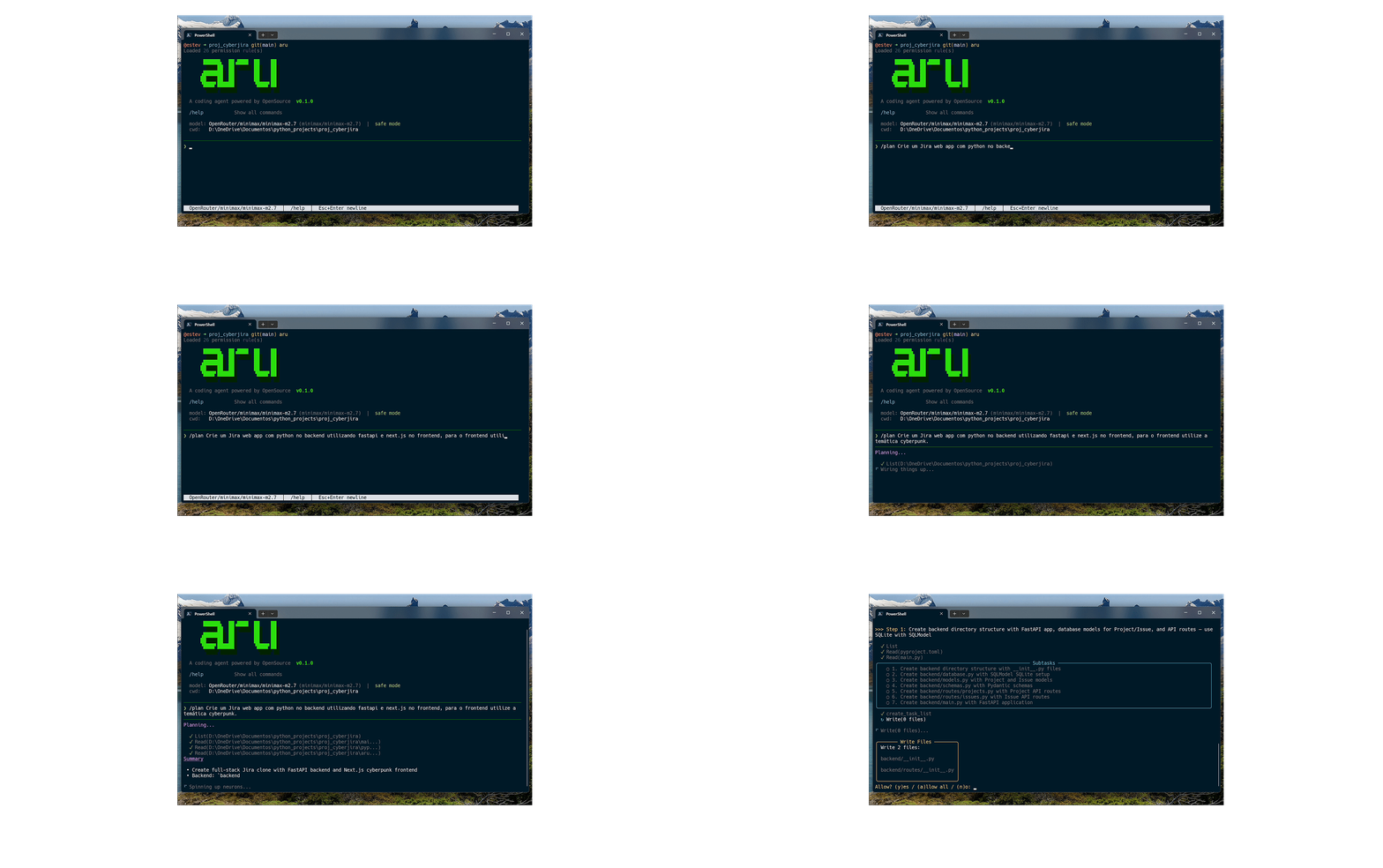
Highlights
- Catalog-Driven Multi-Agent Architecture —
build,plan,executor, andexplorer(subagent) specs resolved from a single source of truth (aru/agents/catalog.py) - Autonomous Plan Mode — Agents self-trigger planning via
enter_plan_mode(task); plan steps are persisted in the session and surfaced each turn as aPLAN ACTIVEreminder - Structured Subtask Tracking —
create_task_list/update_task/update_plan_stepforce the executor to plan, execute, and mark subtasks as it goes - Interactive CLI — Streaming responses, multi-line paste, session management
- Image Support — Attach images via
@mentions for multimodal analysis (Claude, GPT-4o, Gemini) - 17 Integrated Tools — File I/O (single + batched), code search, shell, web, delegation, plan/task tracking
- Multi-Provider — Anthropic, OpenAI, Ollama, Groq, OpenRouter, DeepSeek, and others via custom configuration
- Custom Commands, Skills, and Agents — Extend aru via the
.agents/directory - Custom Tools — Add your own Python tools with a simple
@tooldecorator - Plugin System — OpenCode-compatible hooks for tool lifecycle, chat, permissions, and more
- MCP Support — Integration with Model Context Protocol servers
Quick Start
1. Install
pip install aru-code
Requirements: Python 3.11+
2. Configure the API Key
Aru uses Claude Sonnet 4.6 from Anthropic as the default model. You need an Anthropic API key to get started.
Set your API key as an environment variable or create a .env file in your project directory:
ANTHROPIC_API_KEY=sk-ant-your-key-here
Using another provider? See the Models and Providers section to configure OpenAI, Ollama, Groq, etc.
3. Run
aru
That's it — aru is available globally after install.
Usage
Commands
| Command | Description |
|---|---|
| Natural language | Just type — aru handles the rest |
/plan <task> |
Creates a detailed implementation plan |
/model [provider/model] |
Switch models and providers |
/mcp |
List available MCP servers and tools |
/commands |
List custom commands |
/skills |
List available skills |
/agents |
List custom agents |
/sessions |
List recent sessions |
/help |
Show all commands |
! <command> |
Execute shell commands |
/quit or /exit |
Exit aru |
CLI Options
aru                                    # Start new session
aru --resume <id>                      # Resume session
aru --resume last                      # Resume last session
aru --list                             # List sessions
aru --dangerously-skip-permissions     # Skip permission prompts
Examples
aru> /plan create a REST API with FastAPI to manage users

aru> refactor the authentication module to use JWT tokens

aru> ! pytest tests/ -v

aru> /model ollama/codellama
Image Support
Attach images to your messages using the same @ mention syntax used for files. Aru detects image files by extension and sends them to the LLM as visual content for multimodal analysis.
Supported formats: .png, .jpg, .jpeg, .gif, .webp, .bmp
aru> describe @screenshot.png
aru> compare @before.png and @after.png
aru> review @code.py and explain the diagram in @architecture.png
aru> analyze @D:/full/path/to/image.jpg
Images are sent natively to the model via the provider's multimodal API — no base64 text is injected into the conversation. Works with any multimodal model (Claude Opus/Sonnet, GPT-4o, Gemini, etc.). The autocomplete shows an [image] label for image files.
Note: Images require a multimodal model. Local models via Ollama may not support image input. Maximum file size: 20MB.
Configuration
Models and Providers
By default, aru uses Claude Sonnet 4.6 (Anthropic). You can switch to any supported provider during a session with /model:
| Provider | Command | API Key (.env) |
Extra Installation |
|---|---|---|---|
| Anthropic | /model anthropic/claude-sonnet-4-6 |
ANTHROPIC_API_KEY |
— (included) |
| Ollama | /model ollama/llama3.1 |
— (local) | pip install "aru-code[ollama]" |
| OpenAI | /model openai/gpt-4o |
OPENAI_API_KEY |
pip install "aru-code[openai]" |
| Groq | /model groq/llama-3.3-70b-versatile |
GROQ_API_KEY |
pip install "aru-code[groq]" |
| OpenRouter | /model openrouter/deepseek/deepseek-chat-v3-0324 |
OPENROUTER_API_KEY |
pip install "aru-code[openai]" |
| MiniMax | /model openrouter/minimax/minimax-m2.7 |
OPENROUTER_API_KEY |
pip install "aru-code[openai]" |
To install all providers at once:
pip install "aru-code[all-providers]"
Ollama (local models)
To run models locally without an API key, install Ollama, start the server, and use any installed model:
ollama serve                    # Start the Ollama server
ollama pull codellama           # Download a model
aru                             # Start aru
# Inside aru:
/model ollama/codellama
Configuring the default model
You can set the default provider/model in aru.json so you don't need to switch manually every session:
{
  "default_model": "openrouter/minimax/minimax-m2.7",
  "model_aliases": {
    "minimax": "openrouter/minimax/minimax-m2.5",
    "minimax-m2.7": "openrouter/minimax/minimax-m2.7",
    "deepseek-v3": "openrouter/deepseek/deepseek-chat-v3-0324",
    "sonnet-4-6": "anthropic/claude-sonnet-4-6",
    "opus-4-6": "anthropic/claude-opus-4-6"
  }
}
The default_model field sets the main model. The model_aliases are shortcuts that can be used with /model <alias>.
Custom providers
You can configure custom providers with specific token limits:
{
  "providers": {
    "deepseek": {
      "models": {
        "deepseek-chat-v3-0324": { "max_tokens": 16384 }
      }
    },
    "openrouter": {
      "models": {
        "minimax/minimax-m2.5": { "max_tokens": 65536 },
        "minimax/minimax-m2.7": { "max_tokens": 131072 }
      }
    }
  }
}
Permissions (aru.json)
Aru uses a granular permission system where each tool action resolves to one of three outcomes:
allow— executes without askingask— prompts for confirmation (once / always / no)deny— blocks the action silently
Configure permissions per tool category with glob patterns:
{
  "permission": {
    "*": "ask",
    "read": "allow",
    "glob": "allow",
    "grep": "allow",
    "list": "allow",
    "edit": {
      "*": "allow",
      "*.env": "deny"
    },
    "write": {
      "*": "allow",
      "*.env": "deny"
    },
    "bash": {
      "*": "ask",
      "git *": "allow",
      "npm *": "allow",
      "pytest *": "allow",
      "rm -rf *": "deny"
    },
    "web_search": "allow",
    "web_fetch": "allow",
    "delegate_task": "allow"
  }
}
Available categories
| Category | Matched against | Default |
|---|---|---|
read |
file path | allow |
edit |
file path | ask |
write |
file path | ask |
bash |
command string | safe prefixes = allow, rest = ask |
glob |
— | allow |
grep |
— | allow |
list |
— | allow |
web_search |
— | allow |
web_fetch |
URL | allow |
delegate_task |
— | allow |
Rule precedence
Rules use last-match-wins ordering. Place catch-all "*" first, then specific patterns:
{
  "edit": {
    "*": "allow",
    "*.env": "deny",
    "*.env.example": "allow"
  }
}
Shorthands
"permission": "allow"
Allows everything (equivalent to --dangerously-skip-permissions).
"permission": { "read": "allow", "edit": "ask" }
String value applies to all patterns in that category.
Defaults
Without any aru.json config, aru applies safe defaults:
- Read-only tools (
read,glob,grep,list) →allow - Mutating tools (
edit,write) →ask - Bash → ~40 safe command prefixes auto-allowed (
ls,git status,grep, etc.), rest →ask - Sensitive files (
*.env,*.env.*) →denyfor read/edit/write (except*.env.example)
Config file locations
Aru loads configuration from two levels, with project settings overriding global ones:
| Level | Path | Purpose |
|---|---|---|
| Global (user) | ~/.aru/config.json |
Defaults that apply to all projects (model, aliases, permissions, providers) |
| Project | aru.json or .aru/config.json |
Project-specific overrides |
Global config is loaded first, then the project config is deep-merged on top — scalar values and lists are replaced, nested objects (like permission, providers, model_aliases) are merged recursively. This means you can set your preferred model and aliases globally and only override what's different per project.
Example ~/.aru/config.json:
{
  "default_model": "anthropic/claude-sonnet-4-6",
  "model_aliases": {
    "sonnet": "anthropic/claude-sonnet-4-6",
    "opus": "anthropic/claude-opus-4-6"
  },
  "permission": {
    "read": "allow",
    "glob": "allow",
    "grep": "allow"
  }
}
Then a project aru.json only needs project-specific settings:
{
  "default_model": "ollama/codellama",
  "permission": {
    "bash": { "pytest *": "allow" }
  }
}
The result: default_model becomes ollama/codellama, model_aliases come from global, and permission merges both levels (read, glob, grep from global + bash from project).
A full
aru.jsonconfig reference here:aru.json
AGENTS.md
Place an AGENTS.md file in your project root with custom instructions that will be appended to all agent system prompts.
Instructions (Rules)
You can load additional instructions from local files, glob patterns, or remote URLs via the instructions field in aru.json:
{
  "instructions": [
    "CONTRIBUTING.md",
    "docs/coding-standards.md",
    "packages/*/AGENTS.md",
    "https://raw.githubusercontent.com/my-org/shared-rules/main/style.md"
  ]
}
Each entry is resolved as follows:
| Format | Example | Behavior |
|---|---|---|
| Local file | "CONTRIBUTING.md" |
Reads the file relative to the project root |
| Glob pattern | "docs/**/*.md" |
Expands the pattern, respects .gitignore |
| Remote URL | "https://example.com/rules.md" |
Fetches via HTTP (5s timeout, cached per session) |
All resolved content is combined and appended to the agent's system prompt alongside AGENTS.md. Individual files are capped at 10KB, and the total combined size is capped at 50KB to prevent context bloat. Missing files and failed URL fetches are skipped with a warning.
.agents/ Directory
.agents/
├── agents/         # Custom agents with their own model, tools, and prompt
│   └── reviewer.md # Usage: /reviewer <args>
├── commands/       # Custom slash commands (filename = command name)
│   └── deploy.md   # Usage: /deploy <args>
└── skills/         # Custom skills/personas
    └── review/
        └── SKILL.md
Command files support frontmatter with description, agent, and model fields, plus OpenCode-style argument placeholders: $ARGUMENTS (full string), $1/$2 (positional), and $ARGUMENTS[N] (0-indexed).
Custom Agents
Custom agents are Markdown files with YAML frontmatter stored in .agents/agents/. Each agent runs with its own system prompt, model, and tool set — unlike commands and skills, which reuse the General Agent.
---
name: Code Reviewer
description: Review code for quality, bugs, and best practices
model: anthropic/claude-sonnet-4-5
tools: read_file, grep_search, glob_search
max_turns: 15
mode: primary
---

You are an expert code reviewer. Analyze code for bugs, security,
performance, and readability. Do NOT modify files.
Frontmatter fields
| Field | Required | Description |
|---|---|---|
name |
Yes | Display name of the agent |
description |
Yes | When to use this agent (shown in /agents and tab completion) |
model |
No | Provider/model reference (e.g., anthropic/claude-sonnet-4-5). Defaults to session model |
tools |
No | Comma-separated tool names (allowlist) or JSON object for granular control (e.g., {"bash": false}). Defaults to all general tools |
max_turns |
No | Max tool calls before the agent stops. Default: 20 |
mode |
No | primary (invocable via /name) or subagent (only via delegate_task). Default: primary |
permission |
No | Permission overrides (same format as aru.json permission section). Replaces global rules for specified categories while the agent runs |
Invocation
There are three ways to invoke a custom agent:
| Method | Syntax | When to use |
|---|---|---|
| Slash command | /reviewer src/auth.py |
Directly invoke a primary agent by name |
| @mention | @reviewer check this function |
Mention an agent anywhere in your message |
| delegate_task | Automatic (subagents only) | Subagent names and descriptions are injected into the delegate_task tool description, so the LLM sees them and can call delegate_task(task="...", agent="name") on its own when it judges the task fits |
aru> /reviewer src/auth.py           # slash command (primary agents)
aru> @reviewer check the auth module  # @mention (primary or subagent)
aru> /agents                          # list all custom agents
Note: Slash commands (
/name) are only available forprimaryagents — subagents are blocked with a warning.@mentionworks for any agent regardless of mode. Subagents can be invoked in two ways: automatically by the LLM viadelegate_task, or manually by the user via@name.
Discovery paths
Agents are discovered from multiple locations (later overrides earlier):
~/.agents/agents/— global (available in all projects)~/.claude/agents/— global (Claude Code compatible path).agents/agents/— project-local.claude/agents/— project-local
Agent-level permissions
Agents can override global permission rules. Overrides replace the entire category — unspecified categories inherit from global config.
---
name: Code Reviewer
description: Read-only code reviewer
permission:
  edit: deny
  write: deny
  bash:
    git diff *: allow
    grep *: allow
---
You can also set agent permissions in aru.json (overrides frontmatter):
{
  "agent": {
    "reviewer": {
      "permission": { "edit": "deny", "write": "deny" }
    }
  }
}
Each agent gets its own isolated "always" memory — approvals during an agent's run don't carry over to the global scope.
Subagent mode
Agents with mode: subagent can be referenced by the LLM via delegate_task(task, agent="name") but are not directly invocable from the CLI.
Custom Tools
You can extend aru with your own Python tools. Drop a .py file in .aru/tools/ (project) or ~/.aru/tools/ (global) — aru auto-discovers and registers every function found.
# .aru/tools/deploy.py
from aru.plugins import tool

@tool(description="Deploy the current branch to an environment")
def deploy(environment: str = "staging") -> str:
    """Runs the deploy script and returns the output."""
    import subprocess
    result = subprocess.run(
        ["./scripts/deploy.sh", environment],
        capture_output=True, text=True,
    )
    return result.stdout or result.stderr
The LLM sees each tool as a first-class function — name, description, and typed parameters are inferred from the signature.
Rules
- Decorator is optional. A bare
def fn(...) -> strwith a docstring works too. Use@tool(...)when you want a custom description or to override a built-in. - Parameters are read from type hints; defaults become optional params.
- Return type should be
str(or something stringifiable) — the result is sent back to the LLM as tool output. - Override built-ins with
@tool(override=True)if you want to replace, say,bashwith your own implementation. - Discovery paths (later roots override earlier ones):
~/.aru/tools/.aru/tools/~/.agents/tools/.agents/tools/
Both sync and async def functions are supported.
Plugins
For more control than custom tools — e.g. intercepting tool calls, mutating chat messages, injecting env vars into shell commands, or blocking permissions — use the plugin system. Plugins are Python files that return a Hooks object, mirroring OpenCode's hook pattern.
# .aru/plugins/audit.py
from aru.plugins import Hooks, PluginInput

async def plugin(ctx: PluginInput, options: dict | None = None) -> Hooks:
    hooks = Hooks()

    @hooks.on("tool.execute.before")
    async def before_tool(event):
        print(f"[audit] running {event.tool_name} with {event.args}")

    @hooks.on("tool.execute.after")
    async def after_tool(event):
        print(f"[audit] {event.tool_name} → ok")

    @hooks.on("shell.env")
    async def inject_env(event):
        event.env["DEPLOY_TOKEN"] = "••••"

    # You can also register tools directly from a plugin:
    def greet(name: str) -> str:
        """Say hello."""
        return f"hello, {name}"
    hooks.tools["greet"] = greet

    return hooks
Save the file as .aru/plugins/<name>.py and aru will load it automatically at startup.
Available hooks
| Hook | When it fires | Typical use |
|---|---|---|
config |
After config is loaded | Read/adjust config |
tool.execute.before |
Before any tool runs | Audit, block, mutate args |
tool.execute.after |
After any tool runs | Log, post-process results |
tool.definition |
When tool list is resolved | Modify tool descriptions/params |
chat.message |
Before a user message is sent to the LLM | Rewrite the message |
chat.params |
Before the LLM call | Adjust temperature, max_tokens |
chat.system.transform |
Before the LLM call | Modify the system prompt |
chat.messages.transform |
Before the LLM call | Modify the full message history |
command.execute.before |
Before a slash command runs | Block or rewrite commands |
permission.ask |
Before a permission prompt | Auto-allow/deny |
shell.env |
Before bash runs |
Inject env vars |
session.compact |
Before context compaction | React to compaction |
event |
Any published event | Generic subscription |
Handlers can be sync or async. They run sequentially so each can mutate the event before the next handler sees it. Raise PermissionError to block an action.
Loading plugins
Plugins come from three sources:
-
Auto-discovery —
.aru/plugins/*.py,.agents/plugins/*.py, and the same paths under~/ -
Config — explicit list in
aru.json:{ "plugins": [ "my-package-plugin", ["./.aru/plugins/audit.py", { "verbose": true }] ] }
The second form passes options to the plugin as the
optionsargument. -
Entry points — installed packages can register via the
aru.pluginsentry point group
Every plugin file must export a plugin(ctx, options) function (sync or async) that returns a Hooks instance.
MCP Support (Model Context Protocol)
Aru can load tools from MCP servers. Configure in .aru/mcp_config.json:
{
  "mcpServers": {
    "filesystem": {
      "command": "npx",
      "args": ["-y", "@modelcontextprotocol/server-filesystem", "/allowed/path"]
    }
  }
}
Agents
Built-in agents are declared as specs in aru/agents/catalog.py and instantiated on demand by agent_factory.create_agent_from_spec. A single construction path resolves the model, tool list, prompt role, and plugin hooks for all native agents.
| Agent | Mode | Role | Tools |
|---|---|---|---|
build (General) |
primary | Conversational coding assistant. Self-triggers enter_plan_mode for 3+ file changes |
Full tool set including delegate_task |
plan (Planner) |
primary | Read-only analysis → ## Summary + ## Steps markdown plan |
Read/search only (read_file, read_files, glob_search, grep_search, list_directory) |
executor |
primary | Step-by-step execution of a stored plan with mandatory task list tracking | Full tool set |
explorer |
subagent | Fast, read-only codebase research. Invoked only via delegate_task(task, agent_name="explorer") |
Read/search + read-only bash + rank_files |
Scope reviewer:
aru/agents/planner.pyalso exposesreview_plan(request, plan), a one-shot, no-tool reviewer that runs on the small model to trim scope creep from generated plans. Enabled viaplan_reviewer: trueinaru.json.
Plan mode flow
The plan agent runs in two ways:
- Manual: the user types
/plan <task>— the planner produces a plan, the reviewer optionally trims it, and the result is stored in the session. - Autonomous: the
buildagent callsenter_plan_mode(task)when it detects a multi-file task. This invokes the planner, stores the plan, and returns a summary.
Once a plan is stored, every following turn prepends a <system-reminder> listing all plan steps with their status icons. The build/executor agent works through them in order, calling update_plan_step(index, "completed") after each. Within a step, it calls create_task_list([...]) to break the step into 1–10 concrete subtasks, then update_task(i, "completed") as they finish.
Tools
File Operations
read_file— Reads files with line range support and binary detectionread_files— Reads multiple files in parallel (batched)write_file— Writes content to files, creating directories as neededwrite_files— Writes multiple files in one calledit_file— Find-and-replace edits on filesedit_files— Batched find-and-replace across multiple files
Search & Discovery
glob_search— Find files by pattern (respects .gitignore)grep_search— Content search with regex and file filteringlist_directory— Directory listing with gitignore filteringrank_files— Multi-factor file relevance ranking (explorer subagent only)
Shell & Web
bash— Executes shell commands with permission gatesweb_search— Web search via DuckDuckGoweb_fetch— Fetches URLs and converts HTML to readable text
Planning & Delegation
enter_plan_mode— Generate a structured plan via the planner agent and store it in the sessionupdate_plan_step— Mark a macro plan step asin_progress/completed/failed/skippedcreate_task_list— Declare 1–10 subtasks for the current step (mandatory first executor call)update_task— Mark a subtask asin_progress/completed/faileddelegate_task— Spawn an autonomous subagent (defaults toexplorer) for parallel research or execution
Architecture
aru-code/
├── aru/
│   ├── cli.py              # Main REPL loop, argument parsing, and entry point
│   ├── agent_factory.py    # Single factory — builds Agno Agents from catalog specs
│   ├── commands.py         # Slash commands, help display, shell execution
│   ├── completers.py       # Input completions, paste detection, @file mentions
│   ├── context.py          # Token optimization (pruning, truncation, compaction)
│   ├── display.py          # Terminal display (logo, status bar, streaming output)
│   ├── runner.py           # Agent execution, streaming, PLAN ACTIVE reminder injection
│   ├── session.py          # Session state, persistence, plan steps tracking
│   ├── runtime.py          # Request context (TaskStore, session, display handles)
│   ├── config.py           # Configuration loader (AGENTS.md, .agents/)
│   ├── providers.py        # Multi-provider LLM abstraction
│   ├── permissions.py      # Granular permission system (allow/ask/deny)
│   ├── agents/
│   │   ├── base.py         # Shared prompt templates + build_instructions(role)
│   │   ├── catalog.py      # AgentSpec registry — build / plan / executor / explorer
│   │   └── planner.py      # review_plan() — small-model scope reviewer
│   └── tools/
│       ├── codebase.py     # Core tool implementations + GENERAL/EXECUTOR/PLANNER/EXPLORER sets
│       ├── plan_mode.py    # enter_plan_mode tool (agent-invokable planner entry)
│       ├── tasklist.py     # create_task_list / update_task / update_plan_step
│       ├── ast_tools.py    # Tree-sitter code analysis
│       ├── ranker.py       # File relevance ranking
│       ├── mcp_client.py   # MCP client
│       └── gitignore.py    # Gitignore-aware filtering
├── aru.json                # Permissions and model configuration
├── .env                    # API keys (not committed)
├── .aru/                   # Local data (sessions)
└── pyproject.toml
Built With
- Agno — Agent framework with tool orchestration
- Anthropic Claude — Sonnet 4.6, Opus 4.6, Haiku 4.5
- tree-sitter — AST-based code analysis
- Rich — Terminal UI
- prompt-toolkit — Advanced input handling
Development
# Clone and install in editable mode with dev dependencies
git clone https://github.com/estevaofon/aru.git
cd aru
pip install -e ".[dev]"

# Run tests
pytest

# Run tests with coverage
pytest --cov=aru --cov-report=term-missing
Built with Claude and Agno
Release history Release notifications | RSS feed


Download files
Download the file for your platform. If you're not sure which to choose, learn more about installing packages.
Source Distribution
Built Distribution
Filter files by name, interpreter, ABI, and platform.
If you're not sure about the file name format, learn more about wheel file names.
Copy a direct link to the current filters
File details
Details for the file aru_code-0.26.1.tar.gz.
File metadata
- Download URL: aru_code-0.26.1.tar.gz
- Upload date:
- Size: 213.1 kB
- Tags: Source
- Uploaded using Trusted Publishing? No
- Uploaded via: uv/0.7.8
File hashes
| Algorithm | Hash digest | |
|---|---|---|
| SHA256 |
aa8c0246483ed1e07e05df3c057b825c6d0110ab32965a059c7e121023c48a85
|
|
| MD5 |
ddc0724fef29ff0c003aa7367f2872cb
|
|
| BLAKE2b-256 |
d21ef81377a47b157aae68fab92d47270b429ee1f8a8db3a823ff577ab9f168b
|
File details
Details for the file aru_code-0.26.1-py3-none-any.whl.
File metadata
- Download URL: aru_code-0.26.1-py3-none-any.whl
- Upload date:
- Size: 148.6 kB
- Tags: Python 3
- Uploaded using Trusted Publishing? No
- Uploaded via: uv/0.7.8
File hashes
| Algorithm | Hash digest | |
|---|---|---|
| SHA256 |
339ecdf6178b8cee7562a1ed291d5709c89be4853391ee0c0f84df0f221b590a
|
|
| MD5 |
9ddd0d2a9def328432e639c392857f4a
|
|
| BLAKE2b-256 |
41585492089c69806d30e2ca2a4eb0dd5ad20e3edd4e335cf25a5bba54681e21
|






