
Terminal dashboard for Litter Robot (LR3/LR4/LR5) via the Whisker cloud API

Project description
Asher CLI
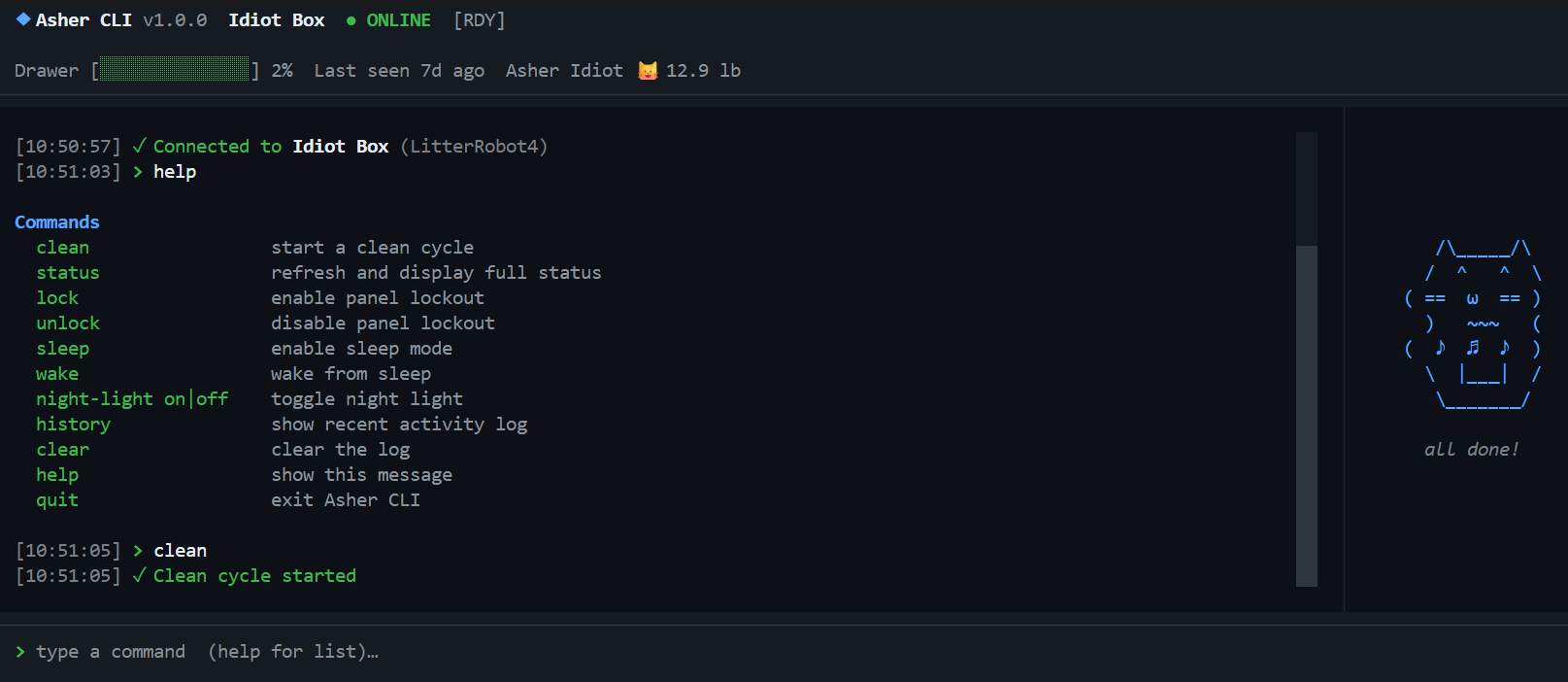
A Claude Code-style terminal dashboard for monitoring and controlling Litter Robot via the Whisker cloud API.
Features
- Live status bar — unit name, online/offline, drawer fill level, last activity, cat weight
- Human-readable robot status — translates raw API states into plain English (
Ready,Cleaning,Cat Detected,Drawer Full, etc.) - Scrollable activity log with timestamps
- Commands:
clean,status,lock,unlock,sleep,wake,night-light,history,help,quit - Slash commands for app management:
/login,/logout,/exit - Cat animation panel that reacts to robot state
- Command history (↑/↓ arrows)
- Auto-refreshes every 30 seconds
Install
pip install asher-cli
asher
Or run from source:
git clone https://github.com/karanshukla/asher-cli
cd asher-cli
pip install -e .
asher
Dev setup
uv sync --dev
git config core.hooksPath .githooks   # run lint + tests before every push
uv run poe check   # ruff + mypy + pytest (same as CI)
uv run poe fix     # auto-fix ruff issues
uv run poe test    # tests only
uv run poe types   # mypy only
Credentials
On first run, type /login at the command prompt. Your credentials are saved to the OS keyring (Windows Credential Manager / macOS Keychain / Linux Secret Service) and reused automatically on subsequent runs.
To sign out: /logout
.env fallback (for CI or existing users):
LITTER_ROBOT_USER=your@email.com
LITTER_ROBOT_PASSWORD=yourpassword
Commands
Robot commands
| Command | Description |
|---|---|
clean |
Start a clean cycle |
status |
Refresh and show what matters — online state, drawer level, last activity |
info |
Full dump of all robot properties (serial, firmware, all settings) |
lock / unlock |
Toggle panel lockout |
sleep / wake |
Toggle sleep mode |
night-light on|off |
Toggle night light |
history |
Show last 25 activity events |
clear |
Clear the log |
help |
Show command list |
quit |
Exit |
Slash commands
| Command | Description |
|---|---|
/login |
Sign in or switch accounts |
/logout |
Sign out and clear saved credentials |
/exit |
Exit Asher CLI |
Keyboard shortcuts: Ctrl+L clears the log, Ctrl+C quits.
Releasing
# bump version, commit, and tag in one step
uv run bump-my-version bump patch    # 0.0.1 → 0.0.2
uv run bump-my-version bump minor    # 0.0.2 → 0.1.0
uv run bump-my-version bump major    # 0.1.0 → 1.0.0

# then push the release branch to trigger PyPI publish
git checkout -b release/0.0.2
git push origin release/0.0.2
Testing
uv run pytest
CI runs on Python 3.10 / 3.11 / 3.12 across Ubuntu, Windows, and macOS on every push.
Notes
- Uses the unofficial pylitterbot library — supports LR3, LR4, LR5, and other Whisker robots
- The Whisker API is reverse-engineered and may change without notice
- Auth errors and network failures are shown in the UI with friendly messages
Release history Release notifications | RSS feed


Download files
Download the file for your platform. If you're not sure which to choose, learn more about installing packages.
Source Distribution
Built Distribution
Filter files by name, interpreter, ABI, and platform.
If you're not sure about the file name format, learn more about wheel file names.
Copy a direct link to the current filters
File details
Details for the file asher_cli-0.0.1.tar.gz.
File metadata
- Download URL: asher_cli-0.0.1.tar.gz
- Upload date:
- Size: 194.2 kB
- Tags: Source
- Uploaded using Trusted Publishing? Yes
- Uploaded via: twine/6.1.0 CPython/3.13.12
File hashes
| Algorithm | Hash digest | |
|---|---|---|
| SHA256 |
2dc85d405f5107333d6de8b75193e1484ce8106a9bd13d79072331b97e6a7bb0
|
|
| MD5 |
df2b2ffecf3de0e2ed4949aa3aa6fd32
|
|
| BLAKE2b-256 |
8053b58db2b3f73b0df08765127da513bc16cab1d4071094f423d3ac899568a4
|
Provenance
The following attestation bundles were made for asher_cli-0.0.1.tar.gz:
Publisher:
release.yml on karanshukla/asher-cli
-
Statement:
-
Statement type:
https://in-toto.io/Statement/v1 -
Predicate type:
https://docs.pypi.org/attestations/publish/v1 -
Subject name:
asher_cli-0.0.1.tar.gz -
Subject digest:
2dc85d405f5107333d6de8b75193e1484ce8106a9bd13d79072331b97e6a7bb0 - Sigstore transparency entry: 1820455662
- Sigstore integration time:
-
Permalink:
karanshukla/asher-cli@8c5fa4c60bd2cbf56c48ab97c1b30bec1f2ea377 -
Branch / Tag:
refs/heads/release/0.0.1 - Owner: https://github.com/karanshukla
-
Access:
public
-
Token Issuer:
https://token.actions.githubusercontent.com -
Runner Environment:
github-hosted -
Publication workflow:
release.yml@8c5fa4c60bd2cbf56c48ab97c1b30bec1f2ea377 -
Trigger Event:
push
-
Statement type:
File details
Details for the file asher_cli-0.0.1-py3-none-any.whl.
File metadata
- Download URL: asher_cli-0.0.1-py3-none-any.whl
- Upload date:
- Size: 17.9 kB
- Tags: Python 3
- Uploaded using Trusted Publishing? Yes
- Uploaded via: twine/6.1.0 CPython/3.13.12
File hashes
| Algorithm | Hash digest | |
|---|---|---|
| SHA256 |
0097a17d8348b280547ec224fb653321d3b64483ddd2634532c45b6c73ddc7db
|
|
| MD5 |
12aafb624d144f736a450045c04e167d
|
|
| BLAKE2b-256 |
5bf9f9787b30b639f5b417d74cb2be806520590bcbb3fa93a67345e765ec3f8e
|
Provenance
The following attestation bundles were made for asher_cli-0.0.1-py3-none-any.whl:
Publisher:
release.yml on karanshukla/asher-cli
-
Statement:
-
Statement type:
https://in-toto.io/Statement/v1 -
Predicate type:
https://docs.pypi.org/attestations/publish/v1 -
Subject name:
asher_cli-0.0.1-py3-none-any.whl -
Subject digest:
0097a17d8348b280547ec224fb653321d3b64483ddd2634532c45b6c73ddc7db - Sigstore transparency entry: 1820455698
- Sigstore integration time:
-
Permalink:
karanshukla/asher-cli@8c5fa4c60bd2cbf56c48ab97c1b30bec1f2ea377 -
Branch / Tag:
refs/heads/release/0.0.1 - Owner: https://github.com/karanshukla
-
Access:
public
-
Token Issuer:
https://token.actions.githubusercontent.com -
Runner Environment:
github-hosted -
Publication workflow:
release.yml@8c5fa4c60bd2cbf56c48ab97c1b30bec1f2ea377 -
Trigger Event:
push
-
Statement type:






