
Asher CLI





A Claude Code-style terminal dashboard for monitoring and controlling Litter Robot via the Whisker cloud API.
Features
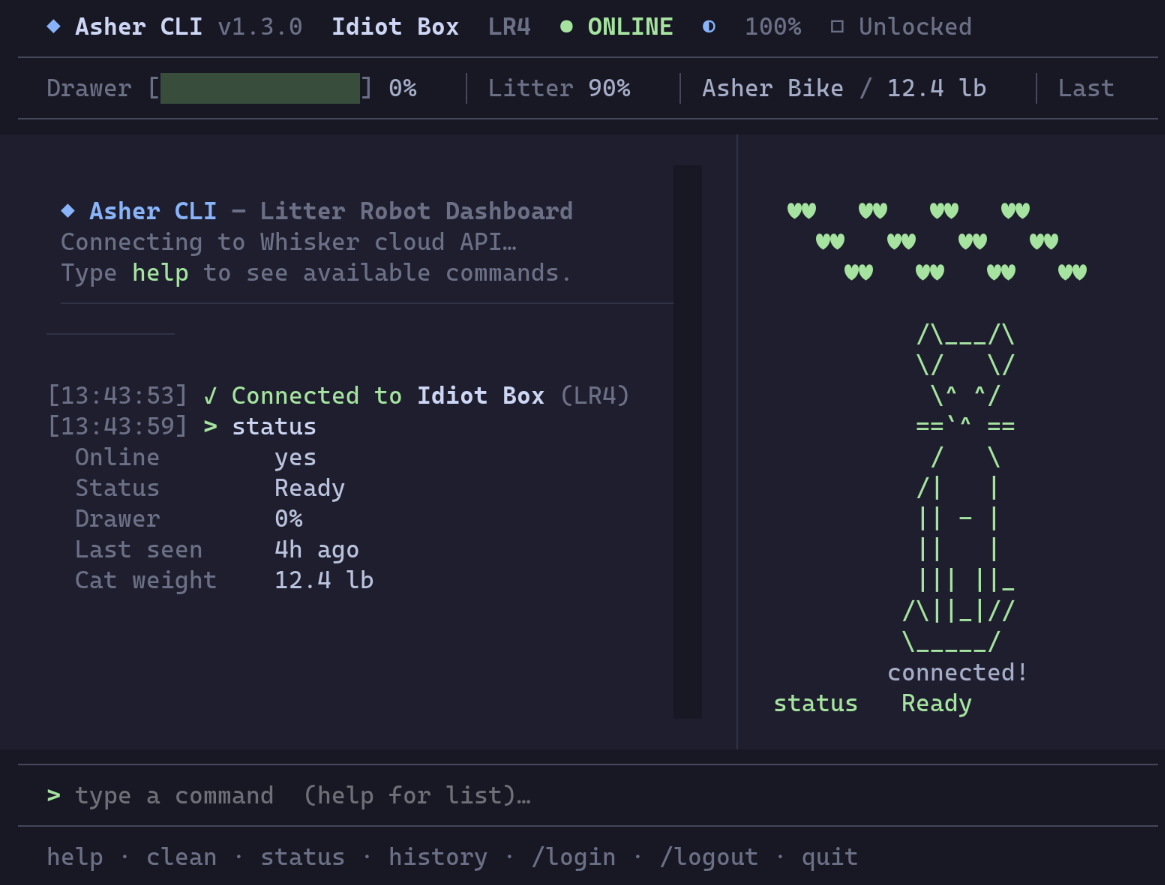
- Live status bar — unit name, online/offline, drawer fill level, last activity, cat weight
- Human-readable robot status — translates raw API states into plain English (
Ready,Cleaning,Cat Detected,Drawer Full, etc.) - Real-time cycling indicator with elapsed time (
⟳ Cycling M:SS) - Fault & safety monitoring — model-scoped in-panel alerts for cat detected, pinch, motor/position/gas faults (LR5: bonnet/laser/drawer); press
dto dismiss - Cat panel with mode label + status badges (status chip, lock, night light, sleep, wait time) under the art
- Scrollable activity-history pager —
history [count|all] [--type <kind>]opens a full-screen, paginated view (arrow keys,Page Up/Page Down,Home/End);ccopies the whole history to the clipboard;q/Esc/Enterto close - Commands:
clean,status,info,lock,unlock,sleep,wake,night-light on|off|auto|color <hex>,night-light-brightness,panel-brightness <low|medium|high>(LR4/LR5),wait-time,power on|off,rename,insight,sleep-schedule [set|disable], plus LR5 extras (privacy,volume,camera-audio,drawer-reset),history [count|all] [--type <kind>],export [days|month],help,quit - Slash commands for app management:
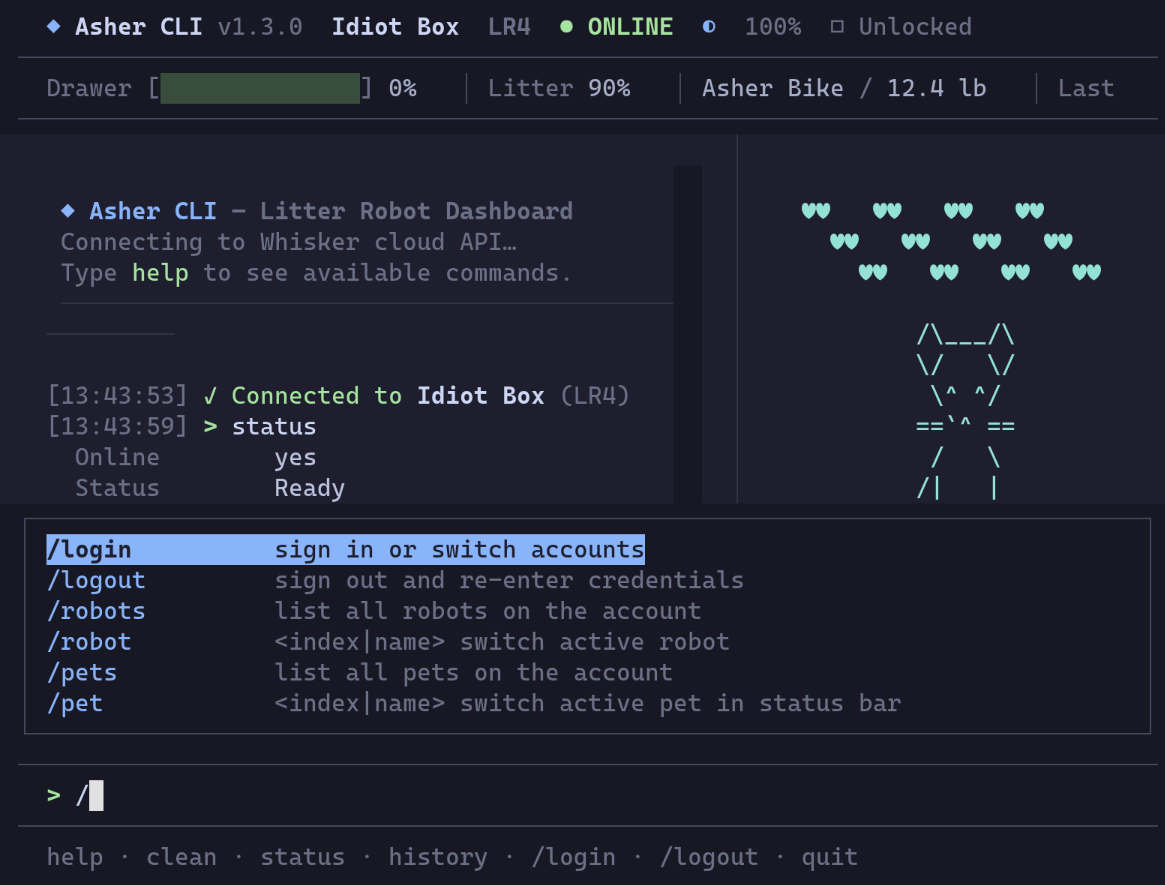
/login,/logout,/robots,/robot <index|name>,/pets,/pet <index|name>,/cat on|off|colour <hex>,/refresh [seconds|off],/config,/notify on|off|sound on|off|test,/watch start|stop|status|enable|disable,/version,/mcp on|off|status,/exit - Slash-command tab completion — type
/and a Claude Code-style overlay lists matching commands;↑/↓to move,TaborEnterto accept,Escto dismiss - Inline ghost-text completion for bare commands — type a prefix (
cle) and the rest (an) appears greyed;Tabor→to accept →clean - Headless mode — every robot command also runs without the TUI (
asher status,asher clean,asher night-light auto,asher export 7), with--jsonoutput and documented exit codes for cron / Task Scheduler / SSH - Background watcher —
asher watch startdetaches a notifier process that keeps toasting faults, a filling drawer, and offline/online changes after you close the terminal;asher watch enablestarts it at login (launchd / systemd / registry); optional system-tray icon shows live status with Open Asher / Notifications / Quit - Update notices — checks PyPI once a day and tells you when a newer release exists, with the right upgrade command for how you installed it. It never installs anything itself
- Catppuccin Mocha throughout — one palette in
asher/theme.pydrives the TUI stylesheet and every Rich style - Cat animation panel that reacts to robot state
- Command history (↑/↓ arrows)
- Real-time updates via WebSocket; 5-minute poll fallback
Install
With pipx (recommended)
pipx install asher-cli
asher
pipx installs the CLI into an isolated environment and puts asher on your PATH automatically. Install pipx with pip install pipx if you don't have it.
With pip
pip install asher-cli
asher
With uv
uv tool install asher-cli
asher
Run from source
git clone https://github.com/karanshukla/asher-cli
cd asher-cli
uv sync
uv run asher
Credentials
On first run, type /login at the command prompt. Your credentials are saved to the OS keyring (Windows Credential Manager / macOS Keychain / Linux Secret Service) and reused automatically on subsequent runs.
To sign out: /logout
The keyring is the only place an installed copy reads credentials from. Working from a clone, you can use .env instead by opting into dev mode (see Development).
Commands
Robot commands
| Command | Description |
|---|---|
clean |
Start a clean cycle |
status |
Refresh and show what matters — online state, drawer level, last activity |
info |
Full dump of all robot properties (serial, firmware, all settings) |
lock / unlock |
Toggle panel lockout |
sleep / wake |
Toggle sleep mode |
night-light on|off|auto |
Set night light mode |
night-light color <hex> |
Set the LR5 night light colour (#RRGGBB, or the 3-digit shorthand) |
night-light-brightness <level> |
Set brightness (LR5: 0-100; LR4: 25/50/100) |
panel-brightness <low|medium|high> |
Set control-panel brightness (LR4/LR5 only; shows current if omitted) |
wait-time <minutes> |
Set clean-cycle wait time (shows valid values / current if omitted) |
power on|off |
Hard-power the unit on or off |
rename <new name> |
Rename the unit in the Whisker cloud |
insight [days|month] |
Show cycle-usage statistics (default: 30 days) |
sleep-schedule |
Show the per-day sleep schedule |
sleep-schedule set <day|all> <HH:MM> <HH:MM> |
Set the sleep → wake window (LR3: one window for every day, wake time fixed; LR4: read-only, use the Whisker app) |
sleep-schedule disable |
Turn every scheduled sleep window off |
privacy on|off |
Toggle LR5 privacy mode |
volume <0-100> |
Set LR5 sound volume |
camera-audio on|off |
Toggle LR5 camera audio |
drawer-reset |
Reset the LR5 waste drawer level indicator |
history [count|all] [--type <kind>] |
Show recent activity in a scrollable pager (default: 50 events); --type cat|clean|litter|offline|… filters on the LR5 |
export [days|month] |
Export activity history to CSV in ~/Downloads (default: 30 days) |
clear |
Clear the log |
help |
Show command list |
quit |
Exit |
Slash commands
| Command | Description |
|---|---|
/login |
Sign in or switch accounts |
/logout |
Sign out and clear saved credentials |
/robots |
List all robots on the account |
/robot <index|name> |
Switch active robot (selection persists to keyring) |
/pets |
List all pets on the account |
/pet <index|name> |
Switch which pet's name/weight shows in the status bar |
/cat on|off |
Show or hide the cat animation panel |
/cat colour <hex> |
Change the cat art colour (e.g. /cat colour #ff79c6); color also accepted; /cat reset to revert |
/refresh [seconds|off] |
Change the auto-poll interval or disable it (/refresh 60, /refresh off) |
/config |
Show current runtime settings (robot, refresh rate, cat panel, active pet, notifications, watcher) |
/notify on|off|sound on|off|test |
Toggle desktop toast notifications for fault events (cat detected, pinch, motor fault, drawer full); test fires a sample toast |
/watch start|stop|status |
Start, stop, or check the background watcher that keeps notifications running after you close the dashboard |
/watch enable|disable |
Register (or remove) the watcher as a login item so it starts automatically |
/version |
Show version info (asher-cli, Python, pylitterbot, textual) |
/mcp on|off|status |
Toggle the Litter-Robot MCP server entry in Claude Desktop |
/exit |
Exit Asher CLI |
Keyboard shortcuts: Ctrl+L clears the log, Ctrl+C quits. While typing a / slash command, ↑/↓ move through completions, Tab or Enter accepts, Esc dismisses. While typing a bare command, a greyed ghost suggestion appears — Tab or → accepts it.
Headless commands (cron / Task Scheduler / SSH)
Every robot action the dashboard offers is also a subcommand that runs without launching the TUI — asher with no arguments still opens the interactive dashboard.
asher status                             at-a-glance state
asher info                               model, serial, firmware, settings
asher clean                              start a clean cycle
asher night-light auto                   set night light mode
asher wait-time 7                        set the clean-cycle wait time
asher history 20                         recent activity, newest first
asher history 20 --type cat              only cat visits (LR5)
asher sleep-schedule set all 22:00 07:00 sleep 22:00 → 07:00 every day
asher insight 7                          cycle-usage statistics
asher export 7 --output ~/hist.csv       activity history to CSV
asher --help lists every command; asher <command> --help shows its arguments. The full set: status, info, robots, pets, history, insight, sleep-schedule, clean, lock, unlock, sleep, wake, night-light, night-light-brightness, panel-brightness, wait-time, power, rename, privacy, volume, camera-audio, drawer-reset, export.
Two flags apply to all of them:
--robot <index|name>— an index or a partial, case-insensitive name (defaults to your saved preferred robot, else the first)--json— machine-readable output instead of aligned text, for piping intojq
asher status --json | jq -r '.drawer'
asher history 50 --json | jq '[.events[] | select(.event | startswith("Cat"))] | length'
Credentials use the same keyring → .env priority as the TUI, but with no interactive login prompt — a scheduled task can't type a password, so sign in once with /login first.
Exit codes for scripting:
| Code | Meaning |
|---|---|
0 |
command succeeded |
1 |
no credentials found (keyring or .env) |
2 |
connection or API failure |
3 |
failed to write the CSV (permissions, disk full) |
4 |
--robot matched no robot on the account |
5 |
bad argument, or the robot/cloud rejected the command |
# crontab — nightly export at 03:00
0 3 * * * /usr/bin/env asher export 7 --output /home/me/litter-history.csv >> /var/log/asher-export.log 2>&1

# alert when the drawer passes 85%
0 * * * * [ "$(asher status --json | jq -r '.drawer' | tr -d %)" -gt 85 ] && notify-send "Litter drawer full"
# Windows Task Scheduler action
asher.exe export 7 --output C:\Users\me\litter-history.csv
Update notices
asher update            # is there a newer release?
asher update --json
Asher checks PyPI's JSON API once a day (and on /version) and tells you when a newer release is published, along with the right command for however you installed it — pipx upgrade, uv tool upgrade, or pip install -U. Exit code is 0 when current, 10 when an update exists, so a script can branch on it.
It never installs anything. That's deliberate, not an omission:
- The process can't reliably tell how it was installed, so a self-upgrade would be guessing at the command that owns its own files.
- Replacing files under a live interpreter can load a mix of old and new modules, and the background watcher is exactly the long-lived process that would be running while its own code got swapped.
- Most importantly, auto-installing turns one compromised release into code running everywhere with nobody choosing the moment. Checking is safe; applying should be your call.
The check is read-only over HTTPS, fetches no code, and update_check: false in ~/.asher-cli/config.json turns it off entirely.
asher --export [days] remains as a deprecated alias for asher export [days], so existing cron entries keep working.
Background notifications (asher watch)
The dashboard only notifies while it's on screen — close the terminal and the toasts stop. asher watch runs the same fault monitoring as a detached process, so notifications keep arriving with no terminal open at all.
asher watch start        # detach a watcher; the terminal is free to close
asher watch status       # is one running? plus the last few log lines
asher watch stop         # shut it down
asher watch enable       # also start it at every login
asher watch disable      # stop starting it at login
asher watch run          # same thing in the foreground, for debugging
You can also drive it from inside the dashboard with /watch start|stop|status — handy right before you quit. While a watcher is running the dashboard suppresses its own toasts, so you never get an alert twice.
It notifies on:
- faults appearing and clearing — cat detected, pinch, motor/position/gas faults, drawer full (same model-scoped detection as the dashboard's fault banner)
- the waste drawer crossing 85% — an early warning before the robot stops on its own (tune with
watch_drawer_threshold) - the robot going offline or coming back
Notifications respect your /notify settings, and re-read them on every alert — toggling notifications in the dashboard reaches a watcher that's already running. Faults already showing when the watcher starts are announced immediately; connectivity is only reported when it changes, so startup never claims a robot "came back" that was never away.
The watcher is built to be left alone: it reconnects with backoff through Wi-Fi drops, laptop sleeps, expired tokens, and a cloud that's still unreachable at login. Only genuinely missing credentials stop it — sign in with /login once first. Its log lives at ~/.asher-cli/watch.log (~ is your home directory; %USERPROFILE% on Windows).
System-tray icon (optional):
pip install "asher-cli[tray]"
asher watch start then shows a tray icon: a cat silhouette toned to your desktop panel, badged green healthy / red faulted / grey offline, with the full status in its tooltip. The menu offers Open Asher (also the left-click action, opens the dashboard in a new terminal), a Notifications toggle, and Quit. It carries no robot actions on purpose: a misclick next to the clock shouldn't be able to start a cycle. No extras, no desktop session, or no AppIndicator host all fall back to a headless watcher rather than failing. Pass --no-tray (or set watch_tray: false) to skip the icon.
On Linux the extra pulls in PyGObject, which builds from source and needs your distro's GObject-introspection and Cairo dev packages (gobject-introspection-devel + cairo-gobject-devel on Fedora, libgirepository1.0-dev + libcairo2-dev on Debian/Ubuntu).
Start at login:
asher watch enable      # register a login item, and start watching now
asher watch disable     # remove it
enable uses whatever already runs things at login on your machine, so there's no extra background service to trust:
| Platform | Login item | Where |
|---|---|---|
| macOS | launchd user agent | ~/Library/LaunchAgents/com.asher-cli.watcher.plist |
| Linux | systemd user unit | ~/.config/systemd/user/asher-watch.service |
| Windows | registry Run value | HKCU\...\CurrentVersion\Run\AsherWatch |
All three are per-user and need no administrator rights, and disable removes exactly what enable created. A crashed watcher is restarted; one you stopped with asher watch stop stays stopped. asher watch status shows whether autostart is registered. If your system has no user-level systemd (some minimal distros, WSL), enable says so and points you at putting asher watch start in your shell profile instead.
Configuration
Runtime settings persist across restarts in ~/.asher-cli/config.json, so you don't have to re-apply /refresh 60, /cat colour #ff79c6, or /pet 1 every launch. The file is auto-created on first change and holds these non-secret UI preferences:
| Setting | Slash command | Default |
|---|---|---|
poll_interval_seconds |
/refresh <seconds|off> |
300 |
cat_panel_visible |
/cat on|off |
true |
cat_panel_color |
/cat colour <hex>|reset |
null (default palette) |
active_pet_index |
/pet <index|name> |
0 |
notifications |
/notify on|off |
true |
notification_sound |
/notify sound on|off |
false |
watch_tray |
(file only) | true — set false to make asher watch always run without a tray icon |
watch_drawer_threshold |
(file only) | 85 — drawer % that triggers an early background warning |
update_check |
(file only) | true — set false to stop the daily PyPI version check |
Credentials and the preferred-robot serial stay in the OS keyring; .env vars stay as env vars. You generally don't need to edit the file by hand — just use the slash commands — but it's plain JSON and safe to inspect or delete (deleting it restores defaults).
Releasing
# 1. file the pending commits under the version you're about to cut, refine the
#    prose if a squashed commit needs unpacking, then commit it
uv run poe changelog-release X.Y.Z
git add CHANGELOG.md
git commit -m "docs(changelog): cut vX.Y.Z"

# 2. bump version, commit, and tag in one step, then push with tags
uv run bump-my-version bump patch    # 0.2.0 → 0.2.1
uv run bump-my-version bump minor    # 0.2.0 → 0.3.0
uv run bump-my-version bump major    # 0.2.0 → 1.0.0

git push && git push --tags

# 3. push the release branch to trigger PyPI publish (OIDC) + GitHub Release
#    (release notes = the `## [X.Y.Z]` section of CHANGELOG.md, verbatim)
git checkout -b release/X.Y.Z
git push origin release/X.Y.Z
CHANGELOG.md is generated by git-cliff from
conventional commits — see cliff.toml. Commit messages must use
feat:/fix:/docs:/etc. prefixes (optionally scoped, e.g. feat(robot):)
to appear in the changelog.
Use poe changelog-release X.Y.Z — not plain poe changelog — when cutting a
release. Both regenerate the whole file, but only the former files the pending
commits under ## [X.Y.Z] instead of ## [Unreleased], and the release
workflow extracts exactly that section for the GitHub Release body. It fails
loudly if the section is missing, so the notes can never come out stale.
Because the workflow reads the committed file rather than re-deriving from commits, any hand-refinement you make to a section survives into the release notes — but re-running either task afterwards regenerates from commits and discards it. Refine last, right before committing.
Troubleshooting
asher not found after pip install asher-cli
Python's Scripts folder isn't on your PATH. Use pipx instead — it handles this automatically:
pip install pipx
pipx install asher-cli
asher
If you're in a virtualenv, deactivate it first:
deactivate
pip install pipx
pipx install asher-cli
pipx: command not found
Run it as a module instead:
python -m pip install pipx
python -m pipx install asher-cli
Dev Setup
1. Clone and install
git clone https://github.com/karanshukla/asher-cli
cd asher-cli
uv sync                                        # installs all deps including the dev group
git config core.hooksPath .githooks            # lint + type checks run before every push
2. Configure environment (optional)
Copy .env.example to .env and fill in your credentials:
cp .env.example .env
ASHER_CLI_DEV_MODE=true    # shows version as "dev", and opts the two variables below in
LITTER_ROBOT_USER=your@email.com
LITTER_ROBOT_PASSWORD=yourpassword
ASHER_CLI_DEV_MODE is what makes the credentials below readable at all — outside dev mode the app takes credentials only from the OS keyring.
3. Run with hot reload
CSS hot reload — Textual's devtools watch inline CSS strings and .tcss files and reload them in-place without restarting:
uv run poe dev
# equivalent to: textual run --dev asher/__main__.py
Python auto-restart — true in-process reload isn't possible with Textual's event loop, but watchfiles will kill and relaunch the app whenever a .py file changes in asher/:
uv run poe watch
# equivalent to: watchfiles --filter python 'python -m asher' asher
You can combine both — run poe watch for Python changes and it will naturally pick up CSS changes too on restart.
4. Run tests
uv run poe test                  # run all tests
uv run pytest tests/ --cov=asher # with coverage report
5. Lint, format, type-check
uv run poe fix     # auto-fix ruff issues
uv run poe lint    # check only (no fixes)
uv run poe fmt     # check formatting
uv run poe types   # mypy
uv run poe check   # run all of the above + tests (same as CI)
6. Security scan
uv run poe security # bandit, same config the Bandit workflow uses
Scan settings live in [tool.bandit] in pyproject.toml, so local runs and the
Bandit workflow report identical findings. Results from main and pull requests
are published to the repository's Security → Code scanning tab.
CI runs on Python 3.10 / 3.11 / 3.12 across Ubuntu, Windows, and macOS on every push.
Changelog
The full, maintained release history lives in CHANGELOG.md, auto-generated from conventional commits by git-cliff.
Notes
- Uses the unofficial pylitterbot library — supports LR3, LR4, LR5, and other Whisker robots
- The Whisker API is reverse-engineered and may change without notice
- Auth errors and network failures are shown in the UI with friendly messages
1 maintainer

Release files for asher-cli 1.4.0
For a detailed explanation of source distributions (sdists) and built distributions (wheels), please see the package formats documentation.
Source distribution (sdist)
| File | Size | Uploaded | |
|---|---|---|---|
| asher_cli-1.4.0.tar.gz | 482.5 kB | Details |
Built distribution (wheel)
| File | Interpreter | ABI | Platform | Reset |
|---|---|---|---|---|
| asher_cli-1.4.0-py3-none-any.whl | Python 3 | none | any | Details |
Total release size:594.1 kB
Release files / asher_cli-1.4.0.tar.gz
| Download URL | asher_cli-1.4.0.tar.gz |
|---|---|
| Size | 482.5 kB |
| Tags | Source |
|
SHA-256 checksum How to use checksums |
c098636b3323fe0382e80b21445be5422bc885c407686608eb0977164aa8d70e
|
|
BLAKE2b-256 checksum How to use checksums |
75e3c1517869635c18d32fba814f5161ce75779c99035fa30e1419c9fa72e28f
|
| Upload date | |
|
Uploaded using Trusted Publishing? What is trusted publishing? |
Yes |
| Uploaded via |
twine/7.0.0 CPython/3.13.14
|
Provenance
Provenance describes where a file came from. On PyPI, provenance is shared via attestations, which provide a verifiable record of the build or publishing details. View details, limitations and caveats.


PyPI Publish Attestation
PyPI verified that this artifact, at this checksum, originated from the publisher listed below.
Signed by GitHub Actions, verified by PyPI on Sep 13, 2026.
Transparency logRelease files / asher_cli-1.4.0-py3-none-any.whl
| Download URL | asher_cli-1.4.0-py3-none-any.whl |
|---|---|
| Size | 111.6 kB |
| Tags | Python 3 |
|
SHA-256 checksum How to use checksums |
33286440e273aec86c302ad26eff51b92fa01a3f79b7ecc89a80daac6712ffd0
|
|
BLAKE2b-256 checksum How to use checksums |
e2d997c1c2384b0e9e914e0e30029251e0afbb864787f77e1bd5060e6049cd36
|
| Upload date | |
|
Uploaded using Trusted Publishing? What is trusted publishing? |
Yes |
| Uploaded via |
twine/7.0.0 CPython/3.13.14
|
Provenance
Provenance describes where a file came from. On PyPI, provenance is shared via attestations, which provide a verifiable record of the build or publishing details. View details, limitations and caveats.
PyPI Publish Attestation
PyPI verified that this artifact, at this checksum, originated from the publisher listed below.
Signed by GitHub Actions, verified by PyPI on Sep 13, 2026.
Transparency log













