
Asher CLI





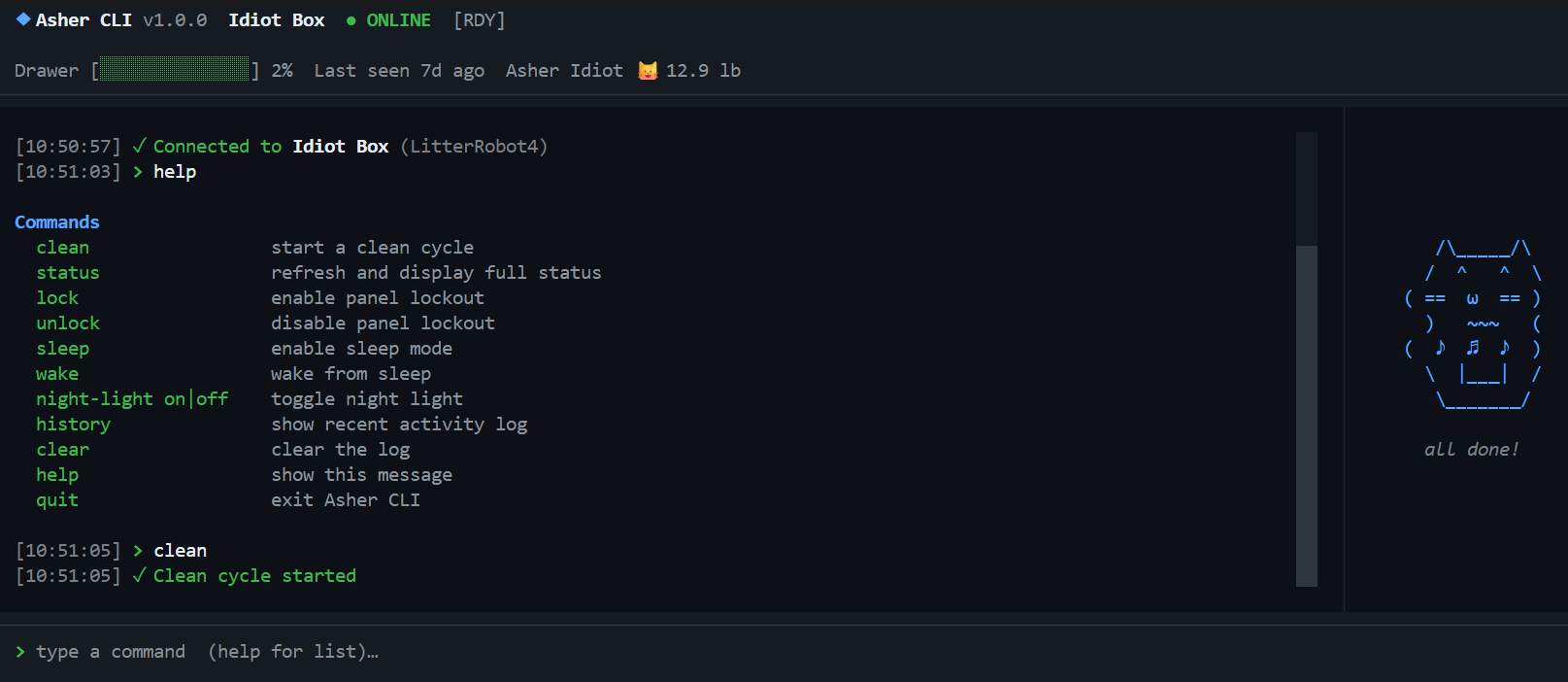
A Claude Code-style terminal dashboard for monitoring and controlling Litter Robot via the Whisker cloud API.
Features
- Live status bar — unit name, online/offline, drawer fill level, last activity, cat weight
- Human-readable robot status — translates raw API states into plain English (
Ready,Cleaning,Cat Detected,Drawer Full, etc.) - Real-time cycling indicator with elapsed time (
⟳ Cycling M:SS) - Fault & safety monitoring — model-scoped in-panel alerts for cat detected, pinch, motor/position/gas faults (LR5: bonnet/laser/drawer); press
dto dismiss - Cat panel with mode label + status badges (status chip, lock, night light, sleep, wait time) under the art
- Scrollable activity-history pager —
history [count|all]opens a full-screen, paginated view (arrow keys,Page Up/Page Down,Home/End);ccopies the whole history to the clipboard;q/Esc/Enterto close - Commands:
clean,status,info,lock,unlock,sleep,wake,night-light on|off|auto,night-light-brightness,panel-brightness <low|medium|high>(LR4/LR5),wait-time,power on|off,rename,insight,sleep-schedule, plus LR5 extras (privacy,volume,camera-audio,drawer-reset),history [count|all],export [days|month],help,quit - Slash commands for app management:
/login,/logout,/robots,/robot <index|name>,/pets,/pet <index|name>,/cat on|off|colour <hex>,/refresh [seconds|off],/config,/notify on|off|sound on|off|test,/version,/mcp on|off|status,/exit - Slash-command tab completion — type
/and a Claude Code-style overlay lists matching commands;↑/↓to move,TaborEnterto accept,Escto dismiss - Inline ghost-text completion for bare commands — type a prefix (
cle) and the rest (an) appears greyed;Tabor→to accept →clean - Headless export —
asher --export 7writes activity history to CSV from cron / Task Scheduler / SSH without launching the TUI - Cat animation panel that reacts to robot state
- Command history (↑/↓ arrows)
- Real-time updates via WebSocket; 5-minute poll fallback
Install
With pipx (recommended)
pipx install asher-cli
asher
pipx installs the CLI into an isolated environment and puts asher on your PATH automatically. Install pipx with pip install pipx if you don't have it.
With pip
pip install asher-cli
asher
With uv
uv tool install asher-cli
asher
Run from source
git clone https://github.com/karanshukla/asher-cli
cd asher-cli
uv sync
uv run asher
Credentials
On first run, type /login at the command prompt. Your credentials are saved to the OS keyring (Windows Credential Manager / macOS Keychain / Linux Secret Service) and reused automatically on subsequent runs.
To sign out: /logout
.env fallback (for CI or existing users):
LITTER_ROBOT_USER=your@email.com
LITTER_ROBOT_PASSWORD=yourpassword
Commands
Robot commands
| Command | Description |
|---|---|
clean |
Start a clean cycle |
status |
Refresh and show what matters — online state, drawer level, last activity |
info |
Full dump of all robot properties (serial, firmware, all settings) |
lock / unlock |
Toggle panel lockout |
sleep / wake |
Toggle sleep mode |
night-light on|off|auto |
Set night light mode |
night-light-brightness <level> |
Set brightness (LR5: 0-100; LR4: 25/50/100) |
panel-brightness <low|medium|high> |
Set control-panel brightness (LR4/LR5 only; shows current if omitted) |
wait-time <minutes> |
Set clean-cycle wait time (shows valid values / current if omitted) |
power on|off |
Hard-power the unit on or off |
rename <new name> |
Rename the unit in the Whisker cloud |
insight [days|month] |
Show cycle-usage statistics (default: 30 days) |
sleep-schedule |
Show the per-day sleep schedule (read-only) |
privacy on|off |
Toggle LR5 privacy mode |
volume <0-100> |
Set LR5 sound volume |
camera-audio on|off |
Toggle LR5 camera audio |
drawer-reset |
Reset the LR5 waste drawer level indicator |
history [count|all] |
Show recent activity in a scrollable pager (default: 50 events) |
export [days|month] |
Export activity history to CSV in ~/Downloads (default: 30 days) |
clear |
Clear the log |
help |
Show command list |
quit |
Exit |
Slash commands
| Command | Description |
|---|---|
/login |
Sign in or switch accounts |
/logout |
Sign out and clear saved credentials |
/robots |
List all robots on the account |
/robot <index|name> |
Switch active robot (selection persists to keyring) |
/pets |
List all pets on the account |
/pet <index|name> |
Switch which pet's name/weight shows in the status bar |
/cat on|off |
Show or hide the cat animation panel |
/cat colour <hex> |
Change the cat art colour (e.g. /cat colour #ff79c6); color also accepted; /cat reset to revert |
/refresh [seconds|off] |
Change the auto-poll interval or disable it (/refresh 60, /refresh off) |
/config |
Show current runtime settings (robot, refresh rate, cat panel, active pet, notifications) |
/notify on|off|sound on|off|test |
Toggle desktop toast notifications for fault events (cat detected, pinch, motor fault, drawer full); test fires a sample toast |
/version |
Show version info (asher-cli, Python, pylitterbot, textual) |
/mcp on|off|status |
Toggle the Litter-Robot MCP server entry in Claude Desktop |
/exit |
Exit Asher CLI |
Keyboard shortcuts: Ctrl+L clears the log, Ctrl+C quits. While typing a / slash command, ↑/↓ move through completions, Tab or Enter accepts, Esc dismisses. While typing a bare command, a greyed ghost suggestion appears — Tab or → accepts it.
Headless export (cron / Task Scheduler / SSH)
--export writes the same CSV as the export command without launching the TUI — so you can script activity-history exports from cron, Windows Task Scheduler, or a server over SSH. No flags launches the interactive dashboard as before.
asher --export 7                         export last 7 days to ~/Downloads
asher --export 7 --output ~/hist.csv     explicit output path
asher --export month --robot "Asher 2"   30 days (Whisker ceiling) for a specific robot
--robot accepts an index or a partial, case-insensitive name (defaults to your saved preferred robot, else the first). Credentials use the same keyring → .env priority as the TUI, but with no interactive login prompt — a scheduled task can't type a password, so sign in once with /login first.
Exit codes for scripting:
| Code | Meaning |
|---|---|
0 |
export succeeded |
1 |
no credentials found (keyring or .env) |
2 |
connection or API failure |
3 |
failed to write the CSV (permissions, disk full) |
4 |
--robot matched no robot on the account |
# crontab — nightly export at 03:00
0 3 * * * /usr/bin/env asher --export 7 --output /home/me/litter-history.csv >> /var/log/asher-export.log 2>&1
# Windows Task Scheduler action
asher.exe --export 7 --output C:\Users\me\litter-history.csv
Configuration
Runtime settings persist across restarts in ~/.asher-cli/config.json, so you don't have to re-apply /refresh 60, /cat colour #ff79c6, or /pet 1 every launch. The file is auto-created on first change and holds six non-secret UI preferences:
| Setting | Slash command | Default |
|---|---|---|
poll_interval_seconds |
/refresh <seconds|off> |
300 |
cat_panel_visible |
/cat on|off |
true |
cat_panel_color |
/cat colour <hex>|reset |
null (default palette) |
active_pet_index |
/pet <index|name> |
0 |
notifications |
/notify on|off |
true |
notification_sound |
/notify sound on|off |
false |
Credentials and the preferred-robot serial stay in the OS keyring; .env vars stay as env vars. You generally don't need to edit the file by hand — just use the slash commands — but it's plain JSON and safe to inspect or delete (deleting it restores defaults).
Releasing
# 1. regenerate CHANGELOG.md from conventional commits (idempotent), then commit it
uv run poe changelog
git add CHANGELOG.md
git commit -m "docs(changelog): update for next release"

# 2. bump version, commit, and tag in one step, then push with tags
uv run bump-my-version bump patch    # 0.2.0 → 0.2.1
uv run bump-my-version bump minor    # 0.2.0 → 0.3.0
uv run bump-my-version bump major    # 0.2.0 → 1.0.0

git push && git push --tags

# 3. push the release branch to trigger PyPI publish (OIDC) + GitHub Release
#    (release notes auto-generated by git-cliff from the same cliff.toml)
git checkout -b release/X.Y.Z
git push origin release/X.Y.Z
CHANGELOG.md is generated by git-cliff from
conventional commits — see cliff.toml. Commit messages must use
feat:/fix:/docs:/etc. prefixes (optionally scoped, e.g. feat(robot):)
to appear in the changelog.
Troubleshooting
asher not found after pip install asher-cli
Python's Scripts folder isn't on your PATH. Use pipx instead — it handles this automatically:
pip install pipx
pipx install asher-cli
asher
If you're in a virtualenv, deactivate it first:
deactivate
pip install pipx
pipx install asher-cli
pipx: command not found
Run it as a module instead:
python -m pip install pipx
python -m pipx install asher-cli
Dev Setup
1. Clone and install
git clone https://github.com/karanshukla/asher-cli
cd asher-cli
uv sync                                        # installs all deps including the dev group
git config core.hooksPath .githooks            # lint + type checks run before every push
2. Configure environment (optional)
Copy .env.example to .env and fill in your credentials:
cp .env.example .env
LITTER_ROBOT_USER=your@email.com
LITTER_ROBOT_PASSWORD=yourpassword
ASHER_CLI_DEV_MODE=true    # sets version to "dev" instead of the installed package version
3. Run with hot reload
CSS hot reload — Textual's devtools watch inline CSS strings and .tcss files and reload them in-place without restarting:
uv run poe dev
# equivalent to: textual run --dev asher/__main__.py
Python auto-restart — true in-process reload isn't possible with Textual's event loop, but watchfiles will kill and relaunch the app whenever a .py file changes in asher/:
uv run poe watch
# equivalent to: watchfiles --filter python 'python -m asher' asher
You can combine both — run poe watch for Python changes and it will naturally pick up CSS changes too on restart.
4. Run tests
uv run poe test                  # run all tests
uv run pytest tests/ --cov=asher # with coverage report
5. Lint, format, type-check
uv run poe fix     # auto-fix ruff issues
uv run poe lint    # check only (no fixes)
uv run poe fmt     # check formatting
uv run poe types   # mypy
uv run poe check   # run all of the above + tests (same as CI)
6. Security scan
uv run poe security # bandit, same config the Bandit workflow uses
Scan settings live in [tool.bandit] in pyproject.toml, so local runs and the
Bandit workflow report identical findings. Results from main and pull requests
are published to the repository's Security → Code scanning tab.
CI runs on Python 3.10 / 3.11 / 3.12 across Ubuntu, Windows, and macOS on every push.
Changelog
The full, maintained release history lives in CHANGELOG.md, auto-generated from conventional commits by git-cliff.
Notes
- Uses the unofficial pylitterbot library — supports LR3, LR4, LR5, and other Whisker robots
- The Whisker API is reverse-engineered and may change without notice
- Auth errors and network failures are shown in the UI with friendly messages
1 maintainer

Release files for asher-cli 1.0.2
For a detailed explanation of source distributions (sdists) and built distributions (wheels), please see the package formats documentation.
Source distribution (sdist)
| File | Size | Uploaded | |
|---|---|---|---|
| asher_cli-1.0.2.tar.gz | 365.0 kB | Details |
Built distribution (wheel)
| File | Interpreter | ABI | Platform | Reset |
|---|---|---|---|---|
| asher_cli-1.0.2-py3-none-any.whl | Python 3 | none | any | Details |
Total release size:428.1 kB
Release files / asher_cli-1.0.2.tar.gz
| Download URL | asher_cli-1.0.2.tar.gz |
|---|---|
| Size | 365.0 kB |
| Tags | Source |
|
SHA-256 checksum How to use checksums |
b26144074f979e88cd1ff7b84f2fc9208c69303ee3f0af2f66146c8161fc3229
|
|
BLAKE2b-256 checksum How to use checksums |
cdd77078a09e41b937346dd6f80e309f36bb9b2eb8ee044fa35ecde353d356a1
|
| Upload date | |
|
Uploaded using Trusted Publishing? What is trusted publishing? |
Yes |
| Uploaded via |
twine/6.1.0 CPython/3.13.14
|
Provenance
Provenance describes where a file came from. On PyPI, provenance is shared via attestations, which provide a verifiable record of the build or publishing details. View details, limitations and caveats.


PyPI Publish Attestation
PyPI verified that this artifact, at this checksum, originated from the publisher listed below.
Signed by GitHub Actions, verified by PyPI on Aug 5, 2026.
Transparency logRelease files / asher_cli-1.0.2-py3-none-any.whl
| Download URL | asher_cli-1.0.2-py3-none-any.whl |
|---|---|
| Size | 63.1 kB |
| Tags | Python 3 |
|
SHA-256 checksum How to use checksums |
337f41fadf9fde5f5f80e118cec0788b29200baeb79b17dc3b38d629d5b24590
|
|
BLAKE2b-256 checksum How to use checksums |
b1e75b5baf848679c66f78722ebf57393469cc55d86bda69d0da64657832ff9a
|
| Upload date | |
|
Uploaded using Trusted Publishing? What is trusted publishing? |
Yes |
| Uploaded via |
twine/6.1.0 CPython/3.13.14
|
Provenance
Provenance describes where a file came from. On PyPI, provenance is shared via attestations, which provide a verifiable record of the build or publishing details. View details, limitations and caveats.
PyPI Publish Attestation
PyPI verified that this artifact, at this checksum, originated from the publisher listed below.
Signed by GitHub Actions, verified by PyPI on Aug 5, 2026.
Transparency log













