
Terminal dashboard for Litter Robot (LR3/LR4/LR5) via the Whisker cloud API

Project description
Asher CLI





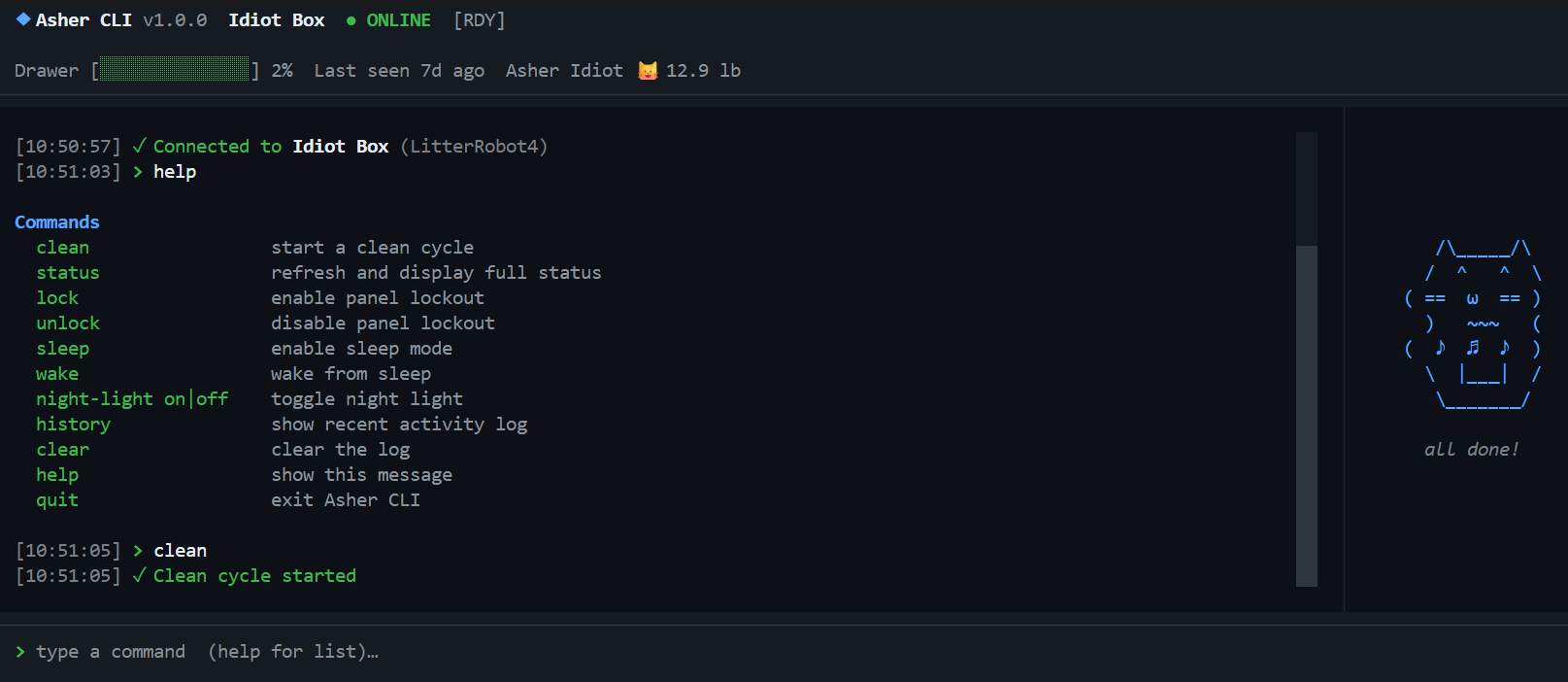
A Claude Code-style terminal dashboard for monitoring and controlling Litter Robot via the Whisker cloud API.
Features
- Live status bar — unit name, online/offline, drawer fill level, last activity, cat weight
- Human-readable robot status — translates raw API states into plain English (
Ready,Cleaning,Cat Detected,Drawer Full, etc.) - Real-time cycling indicator with elapsed time (
⟳ Cycling M:SS) - Fault & safety monitoring — model-scoped in-panel alerts for cat detected, pinch, motor/position/gas faults (LR5: bonnet/laser/drawer); press
dto dismiss - Cat panel with mode label + status badges (status chip, lock, night light, sleep, wait time) under the art
- Scrollable activity-history pager —
history [count|all]opens a full-screen, paginated view (arrow keys,Page Up/Page Down,Home/End);q/Esc/Enterto close - Commands:
clean,status,info,lock,unlock,sleep,wake,night-light on|off|auto,night-light-brightness,wait-time,power on|off,rename,insight,sleep-schedule, plus LR5 extras (privacy,volume,camera-audio,drawer-reset),history [count|all],export [days|month],help,quit - Slash commands for app management:
/login,/logout,/robots,/robot <index|name>,/pets,/pet <index|name>,/cat on|off|color <hex>,/refresh [seconds|off],/config,/version,/mcp on|off|status,/exit - Slash-command tab completion — type
/and a Claude Code-style overlay lists matching commands;↑/↓to move,TaborEnterto accept,Escto dismiss - Inline ghost-text completion for bare commands — type a prefix (
cle) and the rest (an) appears greyed;Tabor→to accept →clean - Headless export —
asher --export 7writes activity history to CSV from cron / Task Scheduler / SSH without launching the TUI - Cat animation panel that reacts to robot state
- Command history (↑/↓ arrows)
- Real-time updates via WebSocket; 5-minute poll fallback
Install
With pipx (recommended)
pipx install asher-cli
asher
pipx installs the CLI into an isolated environment and puts asher on your PATH automatically. Install pipx with pip install pipx if you don't have it.
With pip
pip install asher-cli
asher
With uv
uv tool install asher-cli
asher
Run from source
git clone https://github.com/karanshukla/asher-cli
cd asher-cli
uv sync
uv run asher
Credentials
On first run, type /login at the command prompt. Your credentials are saved to the OS keyring (Windows Credential Manager / macOS Keychain / Linux Secret Service) and reused automatically on subsequent runs.
To sign out: /logout
.env fallback (for CI or existing users):
LITTER_ROBOT_USER=your@email.com
LITTER_ROBOT_PASSWORD=yourpassword
Commands
Robot commands
| Command | Description |
|---|---|
clean |
Start a clean cycle |
status |
Refresh and show what matters — online state, drawer level, last activity |
info |
Full dump of all robot properties (serial, firmware, all settings) |
lock / unlock |
Toggle panel lockout |
sleep / wake |
Toggle sleep mode |
night-light on|off|auto |
Set night light mode |
night-light-brightness <level> |
Set brightness (LR5: 0-100; LR4: 25/50/100) |
wait-time <minutes> |
Set clean-cycle wait time (shows valid values / current if omitted) |
power on|off |
Hard-power the unit on or off |
rename <new name> |
Rename the unit in the Whisker cloud |
insight [days|month] |
Show cycle-usage statistics (default: 30 days) |
sleep-schedule |
Show the per-day sleep schedule (read-only) |
privacy on|off |
Toggle LR5 privacy mode |
volume <0-100> |
Set LR5 sound volume |
camera-audio on|off |
Toggle LR5 camera audio |
drawer-reset |
Reset the LR5 waste drawer level indicator |
history [count|all] |
Show recent activity in a scrollable pager (default: 50 events) |
export [days|month] |
Export activity history to CSV in ~/Downloads (default: 30 days) |
clear |
Clear the log |
help |
Show command list |
quit |
Exit |
Slash commands
| Command | Description |
|---|---|
/login |
Sign in or switch accounts |
/logout |
Sign out and clear saved credentials |
/robots |
List all robots on the account |
/robot <index|name> |
Switch active robot (selection persists to keyring) |
/pets |
List all pets on the account |
/pet <index|name> |
Switch which pet's name/weight shows in the status bar |
/cat on|off |
Show or hide the cat animation panel |
/cat color <hex> |
Change the cat art colour (e.g. /cat color #ff79c6); /cat reset to revert |
/refresh [seconds|off] |
Change the auto-poll interval or disable it (/refresh 60, /refresh off) |
/config |
Show current runtime settings (robot, refresh rate, cat panel, active pet) |
/version |
Show version info (asher-cli, Python, pylitterbot, textual) |
/mcp on|off|status |
Toggle the Litter-Robot MCP server entry in Claude Desktop |
/exit |
Exit Asher CLI |
Keyboard shortcuts: Ctrl+L clears the log, Ctrl+C quits. While typing a / slash command, ↑/↓ move through completions, Tab or Enter accepts, Esc dismisses. While typing a bare command, a greyed ghost suggestion appears — Tab or → accepts it.
Headless export (cron / Task Scheduler / SSH)
--export writes the same CSV as the export command without launching the TUI — so you can script activity-history exports from cron, Windows Task Scheduler, or a server over SSH. No flags launches the interactive dashboard as before.
asher --export 7                         export last 7 days to ~/Downloads
asher --export 7 --output ~/hist.csv     explicit output path
asher --export month --robot "Asher 2"   30 days (Whisker ceiling) for a specific robot
--robot accepts an index or a partial, case-insensitive name (defaults to your saved preferred robot, else the first). Credentials use the same keyring → .env priority as the TUI, but with no interactive login prompt — a scheduled task can't type a password, so sign in once with /login first.
Exit codes for scripting:
| Code | Meaning |
|---|---|
0 |
export succeeded |
1 |
no credentials found (keyring or .env) |
2 |
connection or API failure |
3 |
failed to write the CSV (permissions, disk full) |
4 |
--robot matched no robot on the account |
# crontab — nightly export at 03:00
0 3 * * * /usr/bin/env asher --export 7 --output /home/me/litter-history.csv >> /var/log/asher-export.log 2>&1
# Windows Task Scheduler action
asher.exe --export 7 --output C:\Users\me\litter-history.csv
Releasing
# bump version, commit, and tag in one step, then push with tags
uv run bump-my-version bump patch    # 0.0.1 → 0.0.2
uv run bump-my-version bump minor    # 0.0.2 → 0.1.0
uv run bump-my-version bump major    # 0.1.0 → 1.0.0

git push && git push --tags

# then push the release branch to trigger PyPI publish with the new semver
git checkout -b release/0.0.2
git push origin release/0.0.2
Troubleshooting
asher not found after pip install asher-cli
Python's Scripts folder isn't on your PATH. Use pipx instead — it handles this automatically:
pip install pipx
pipx install asher-cli
asher
If you're in a virtualenv, deactivate it first:
deactivate
pip install pipx
pipx install asher-cli
pipx: command not found
Run it as a module instead:
python -m pip install pipx
python -m pipx install asher-cli
Dev Setup
1. Clone and install
git clone https://github.com/karanshukla/asher-cli
cd asher-cli
uv sync                                        # installs all deps including the dev group
git config core.hooksPath .githooks            # lint + type checks run before every push
2. Configure environment (optional)
Copy .env.example to .env and fill in your credentials:
cp .env.example .env
LITTER_ROBOT_USER=your@email.com
LITTER_ROBOT_PASSWORD=yourpassword
ASHER_CLI_DEV_MODE=true    # sets version to "dev" instead of the installed package version
3. Run with hot reload
CSS hot reload — Textual's devtools watch inline CSS strings and .tcss files and reload them in-place without restarting:
uv run poe dev
# equivalent to: textual run --dev asher/__main__.py
Python auto-restart — true in-process reload isn't possible with Textual's event loop, but watchfiles will kill and relaunch the app whenever a .py file changes in asher/:
uv run poe watch
# equivalent to: watchfiles --filter python 'python -m asher' asher
You can combine both — run poe watch for Python changes and it will naturally pick up CSS changes too on restart.
4. Run tests
uv run poe test                  # run all tests
uv run pytest tests/ --cov=asher # with coverage report
5. Lint, format, type-check
uv run poe fix     # auto-fix ruff issues
uv run poe lint    # check only (no fixes)
uv run poe fmt     # check formatting
uv run poe types   # mypy
uv run poe check   # run all of the above + tests (same as CI)
CI runs on Python 3.10 / 3.11 / 3.12 across Ubuntu, Windows, and macOS on every push.
Changelog
Unreleased
v0.2.0 — 2026-07-27
- Headless export —
asher --export 7writes activity history to CSV without launching the TUI, for cron / Task Scheduler / SSH.--outputand--robot <index|name>flags select the destination and robot; documented exit codes for scripting. - Activity-history pager —
historynow opens a full-screen, scrollable view instead of dumping into the main log. Page through long histories with the arrow keys /Page Up/Page Down/Home/End;q,Esc, orEntercloses it. Accepts an optional event count (history 100) orall(default: 50).
v0.1.1
- Token persistence — the OAuth session token is now saved to the keyring, so re-logins are skipped on subsequent launches.
/version— new slash command showing asher-cli, Python, pylitterbot, and textual versions.- Sleep-schedule viewer — new
sleep-schedulecommand renders the per-day schedule (read-only). - Cat panel badges — mode label plus status chips (status, lock, night light, sleep, wait time) under the cat art.
- Fault & safety monitoring — model-scoped, enum-aware detection with an in-panel banner; press
dto dismiss. - Cycling indicator — real-time elapsed timer (
⟳ Cycling M:SS).
v0.1.0
- Readable status & history — robot status and activity events now render as plain English instead of raw enum values.
- Missing robot commands — added
wait-time,power on|off,rename,insight, and splitstatus(summary) frominfo(full property dump). - LR5 extras —
privacy,volume,camera-audio, anddrawer-resetwired up via the robot adapter (gracefully refused on LR3/LR4). - MCP bridge — keyring-backed
pylitterbot[mcp]launcher with Claude Desktop config management (/mcp on|off|status).
Full history: see the commit log.
Notes
- Uses the unofficial pylitterbot library — supports LR3, LR4, LR5, and other Whisker robots
- The Whisker API is reverse-engineered and may change without notice
- Auth errors and network failures are shown in the UI with friendly messages
Release history Release notifications | RSS feed


Download files
Download the file for your platform. If you're not sure which to choose, learn more about installing packages.
Source Distribution
Built Distribution
Filter files by name, interpreter, ABI, and platform.
If you're not sure about the file name format, learn more about wheel file names.
Copy a direct link to the current filters
File details
Details for the file asher_cli-0.2.0.tar.gz.
File metadata
- Download URL: asher_cli-0.2.0.tar.gz
- Upload date:
- Size: 346.3 kB
- Tags: Source
- Uploaded using Trusted Publishing? Yes
- Uploaded via: twine/6.1.0 CPython/3.13.14
File hashes
| Algorithm | Hash digest | |
|---|---|---|
| SHA256 |
bb5baf6f9fb3d14d6b9ed93c8ee544f7b8fc7b832998258e68ff7a11eccbfb16
|
|
| MD5 |
ecdc187bbf54b17331ff460414cfa7e2
|
|
| BLAKE2b-256 |
89fc1685f23b4152f4e9696b7e28364fa1bf6390106c96c9bb44279b09c65594
|
Provenance
The following attestation bundles were made for asher_cli-0.2.0.tar.gz:
Publisher:
release.yml on karanshukla/asher-cli
-
Statement:
-
Statement type:
https://in-toto.io/Statement/v1 -
Predicate type:
https://docs.pypi.org/attestations/publish/v1 -
Subject name:
asher_cli-0.2.0.tar.gz -
Subject digest:
bb5baf6f9fb3d14d6b9ed93c8ee544f7b8fc7b832998258e68ff7a11eccbfb16 - Sigstore transparency entry: 2258218170
- Sigstore integration time:
-
Permalink:
karanshukla/asher-cli@0495b6e30a8f44c8b7fbafe70c918dcbdf7aad14 -
Branch / Tag:
refs/heads/release/0.2.0 - Owner: https://github.com/karanshukla
-
Access:
public
-
Token Issuer:
https://token.actions.githubusercontent.com -
Runner Environment:
github-hosted -
Publication workflow:
release.yml@0495b6e30a8f44c8b7fbafe70c918dcbdf7aad14 -
Trigger Event:
push
-
Statement type:
File details
Details for the file asher_cli-0.2.0-py3-none-any.whl.
File metadata
- Download URL: asher_cli-0.2.0-py3-none-any.whl
- Upload date:
- Size: 57.5 kB
- Tags: Python 3
- Uploaded using Trusted Publishing? Yes
- Uploaded via: twine/6.1.0 CPython/3.13.14
File hashes
| Algorithm | Hash digest | |
|---|---|---|
| SHA256 |
2d6dad71fdca24582e737601f6268e86a078569d173c1099ee84dcaba82a3d6d
|
|
| MD5 |
dc3c01182b76ec5cb6647acaae4ec0dd
|
|
| BLAKE2b-256 |
3dbb3aa3737a153330f44c66c46f60f38b33fa09ca1b510554c01823e56cbd3e
|
Provenance
The following attestation bundles were made for asher_cli-0.2.0-py3-none-any.whl:
Publisher:
release.yml on karanshukla/asher-cli
-
Statement:
-
Statement type:
https://in-toto.io/Statement/v1 -
Predicate type:
https://docs.pypi.org/attestations/publish/v1 -
Subject name:
asher_cli-0.2.0-py3-none-any.whl -
Subject digest:
2d6dad71fdca24582e737601f6268e86a078569d173c1099ee84dcaba82a3d6d - Sigstore transparency entry: 2258218334
- Sigstore integration time:
-
Permalink:
karanshukla/asher-cli@0495b6e30a8f44c8b7fbafe70c918dcbdf7aad14 -
Branch / Tag:
refs/heads/release/0.2.0 - Owner: https://github.com/karanshukla
-
Access:
public
-
Token Issuer:
https://token.actions.githubusercontent.com -
Runner Environment:
github-hosted -
Publication workflow:
release.yml@0495b6e30a8f44c8b7fbafe70c918dcbdf7aad14 -
Trigger Event:
push
-
Statement type:






