
Affordable Databricks Workflows in Apache Airflow
Project description
⚠️ Discontinuation of project
In August 2024, Astronomer donated the features available in this provider to the Apache Airflow repository. The features available in this repository are available in
apache-airflow-providers-databricks>= 6.8.0. This repository is no longer actively maintained by Astronomer, and the code is kept here for historical purposes only. You can still contribute, submit bug fixes, and improvements in this project's new home, under the terms of its license. Please note that this deprecated version of the provider may not work with the latest dependencies or platforms, and it could contain security vulnerabilities. Astronomer cannot offer guarantees or warranties for its use. Thanks for being part of the open-source journey and helping keep great ideas alive!
For the operators and sensors that are deprecated in this repository, migrating to the official Apache Airflow Databricks Provider is as simple as changing the import path in your DAG code as per the below examples.
| Previous import path used (Deprecated now) | Suggested import path to use |
|---|---|
from astro_databricks.operators.notebook import DatabricksNotebookOperator |
from airflow.providers.databricks.operators.databricks import DatabricksNotebookOperator |
from astro_databricks.operators.workflow import DatabricksWorkflowTaskGroup |
from airflow.providers.databricks.operators.databricks_workflow import DatabricksWorkflowTaskGroup |
from astro_databricks.operators.common import DatabricksTaskOperator |
from airflow.providers.databricks.operators.databricks import DatabricksTaskOperator |
from astro_databricks.plugins.plugin import AstroDatabricksPlugin |
from airflow.providers.airflow.providers.databricks.plugins.databricks_workflow import DatabricksWorkflowPlugin |
Archives
Databricks Workflows in Airflow
The Astro Databricks Provider is an Apache Airflow provider to write Databricks Workflows using Airflow as the authoring interface. Running your Databricks notebooks as Databricks Workflows can result in a 75% cost reduction ($0.40/DBU for all-purpose compute, $0.07/DBU for Jobs compute).
While this is maintained by Astronomer, it's available to anyone using Airflow - you don't need to be an Astronomer customer to use it.
There are a few advantages to defining your Databricks Workflows in Airflow:
| via Databricks | via Airflow | |
|---|---|---|
| Authoring interface | Web-based via Databricks UI | Code via Airflow DAG |
| Workflow compute pricing | ✅ | ✅ |
| Notebook code in source control | ✅ | ✅ |
| Workflow structure in source control | ✅ | ✅ |
| Retry from beginning | ✅ | ✅ |
| Retry single task | ✅ | ✅ |
| Task groups within Workflows | ✅ | |
| Trigger workflows from other DAGs | ✅ | |
| Workflow-level parameters | ✅ |
Example
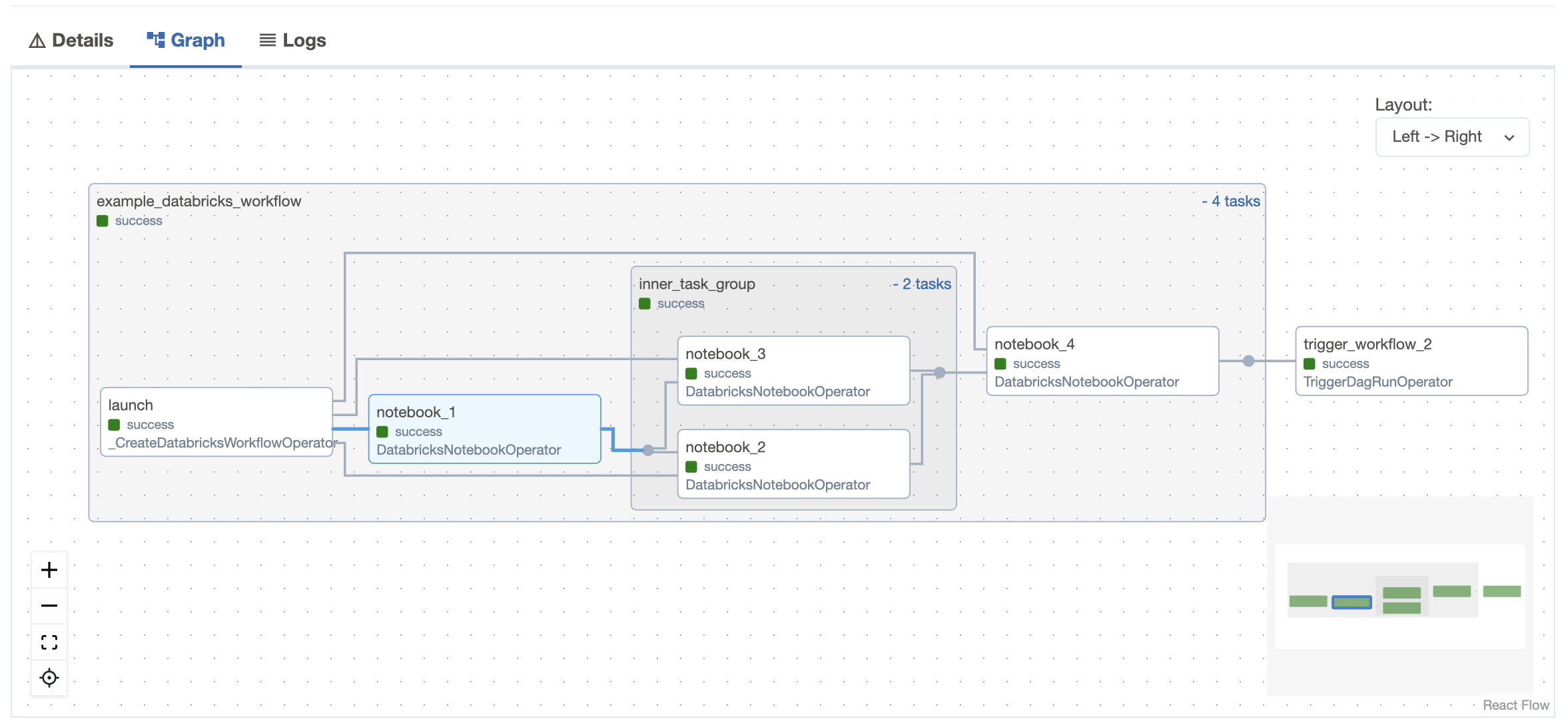
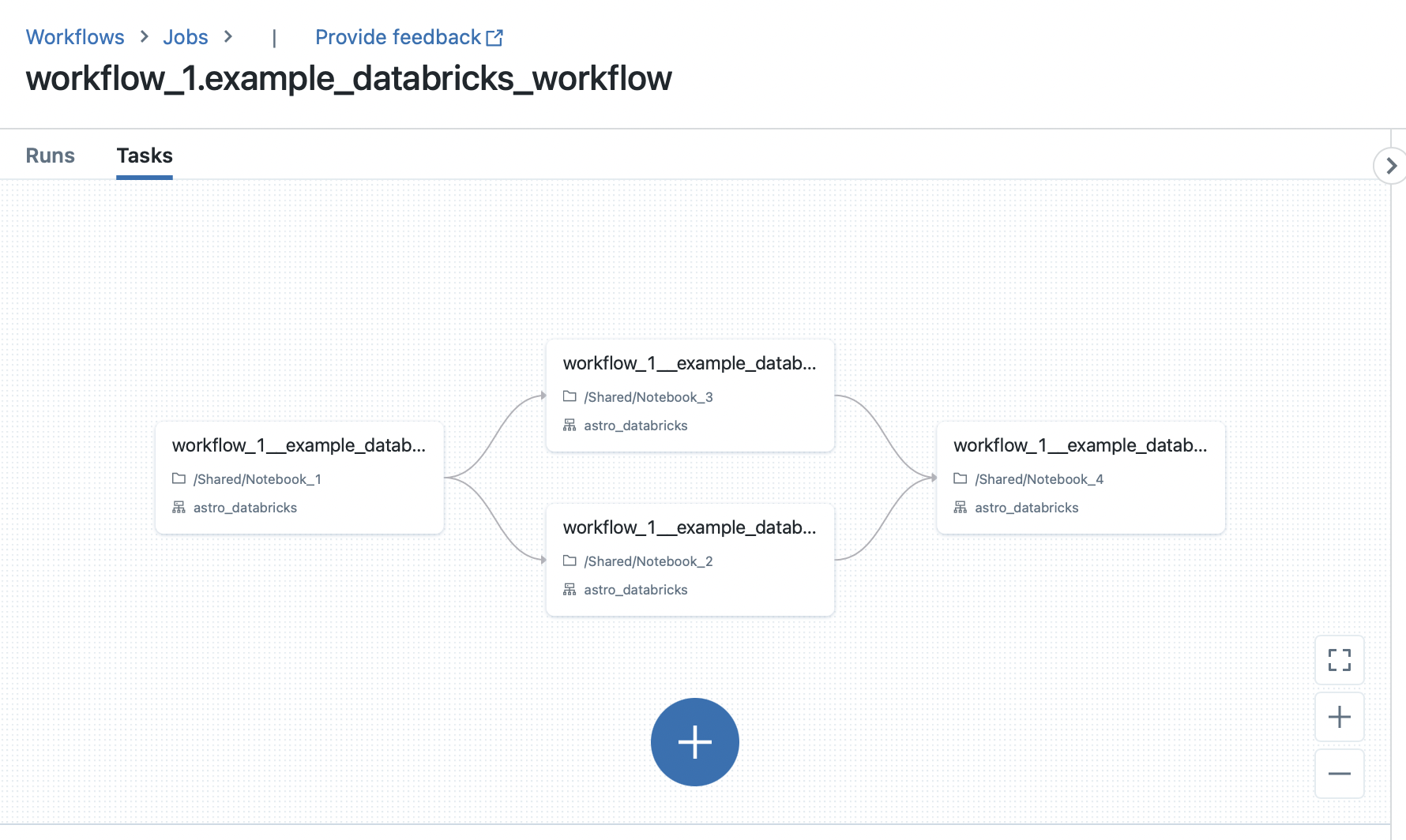
The following Airflow DAG illustrates how to use the DatabricksTaskGroup and DatabricksNotebookOperator to define a Databricks Workflow in Airflow:
from pendulum import datetime

from airflow.decorators import dag, task_group
from airflow.operators.trigger_dagrun import TriggerDagRunOperator
from astro_databricks import DatabricksNotebookOperator, DatabricksWorkflowTaskGroup

# define your cluster spec - can have from 1 to many clusters
job_cluster_spec = [
   {
      "job_cluster_key": "astro_databricks",
      "new_cluster": {
         "cluster_name": "",
         # ...
      },
   }
]

@dag(start_date=datetime(2023, 1, 1), schedule_interval="@daily", catchup=False)
def databricks_workflow_example():
   # the task group is a context manager that will create a Databricks Workflow
   with DatabricksWorkflowTaskGroup(
      group_id="example_databricks_workflow",
      databricks_conn_id="databricks_default",
      job_clusters=job_cluster_spec,
      # you can specify common fields here that get shared to all notebooks
      notebook_packages=[
         { "pypi": { "package": "pandas" } },
      ],
      # notebook_params supports templating
      notebook_params={
         "start_time": "{{ ds }}",
      }
   ) as workflow:
      notebook_1 = DatabricksNotebookOperator(
         task_id="notebook_1",
         databricks_conn_id="databricks_default",
         notebook_path="/Shared/notebook_1",
         source="WORKSPACE",
         # job_cluster_key corresponds to the job_cluster_key in the job_cluster_spec
         job_cluster_key="astro_databricks",
         # you can add to packages & params at the task level
         notebook_packages=[
            { "pypi": { "package": "scikit-learn" } },
         ],
         notebook_params={
            "end_time": "{{ macros.ds_add(ds, 1) }}",
         }
      )

      # you can embed task groups for easier dependency management
      @task_group(group_id="inner_task_group")
      def inner_task_group():
         notebook_2 = DatabricksNotebookOperator(
            task_id="notebook_2",
            databricks_conn_id="databricks_default",
            notebook_path="/Shared/notebook_2",
            source="WORKSPACE",
            job_cluster_key="astro_databricks",
         )

         notebook_3 = DatabricksNotebookOperator(
            task_id="notebook_3",
            databricks_conn_id="databricks_default",
            notebook_path="/Shared/notebook_3",
            source="WORKSPACE",
            job_cluster_key="astro_databricks",
         )

      notebook_4 = DatabricksNotebookOperator(
         task_id="notebook_4",
         databricks_conn_id="databricks_default",
         notebook_path="/Shared/notebook_4",
         source="WORKSPACE",
         job_cluster_key="astro_databricks",
      )

      notebook_1 >> inner_task_group() >> notebook_4

   trigger_workflow_2 = TriggerDagRunOperator(
      task_id="trigger_workflow_2",
      trigger_dag_id="workflow_2",
      execution_date="{{ next_execution_date }}",
   )

   workflow >> trigger_workflow_2

databricks_workflow_example_dag = databricks_workflow_example()
Airflow UI
Databricks UI
Quickstart
Check out the following quickstart guides:
Documentation
The documentation is a work in progress--we aim to follow the Diátaxis system:
Changelog
Astro Databricks follows semantic versioning for releases. Read changelog to understand more about the changes introduced to each version.
Contribution guidelines
All contributions, bug reports, bug fixes, documentation improvements, enhancements, and ideas are welcome.
Read the Contribution Guidelines for a detailed overview on how to contribute.
Contributors and maintainers should abide by the Contributor Code of Conduct.
License
Project details
Release history Release notifications | RSS feed


Download files
Download the file for your platform. If you're not sure which to choose, learn more about installing packages.
Source Distribution
Built Distribution
Filter files by name, interpreter, ABI, and platform.
If you're not sure about the file name format, learn more about wheel file names.
Copy a direct link to the current filters
File details
Details for the file astro_provider_databricks-0.3.2.tar.gz.
File metadata
- Download URL: astro_provider_databricks-0.3.2.tar.gz
- Upload date:
- Size: 2.2 MB
- Tags: Source
- Uploaded using Trusted Publishing? No
- Uploaded via: python-httpx/0.28.1
File hashes
| Algorithm | Hash digest | |
|---|---|---|
| SHA256 |
db1d19d992dde2f5a4e83a3e720cbe712789e89fe0e5d6941395d2ab5bc7bc1f
|
|
| MD5 |
cf10bf2750f517b004ab2718bb722d37
|
|
| BLAKE2b-256 |
ae70cb0b48d01d3afe27de6dfee5dd1057d5ca56699ac670df33496096dda3c8
|
File details
Details for the file astro_provider_databricks-0.3.2-py3-none-any.whl.
File metadata
- Download URL: astro_provider_databricks-0.3.2-py3-none-any.whl
- Upload date:
- Size: 11.7 kB
- Tags: Python 3
- Uploaded using Trusted Publishing? No
- Uploaded via: python-httpx/0.28.1
File hashes
| Algorithm | Hash digest | |
|---|---|---|
| SHA256 |
33585a3fa4d4031f80a446c1e4486171e3c86084e37f7acc246dced1b6fb202c
|
|
| MD5 |
7875dbf3f2646b9dc858f2580d2221ab
|
|
| BLAKE2b-256 |
07d06594a6772ffbd0f8059e1f3829fad46d3191a94ec01575583f4e97818192
|






