
Lumi
Lumi is a terminal app for exploring ATLAS conditions databases. It browses global tags, tags, IOVs and payloads on CREST, COOLR and file-system backends, diffs them across backends, and copies tags between databases, with an embedded Python shell alongside. It is built on CHAI and Textual.
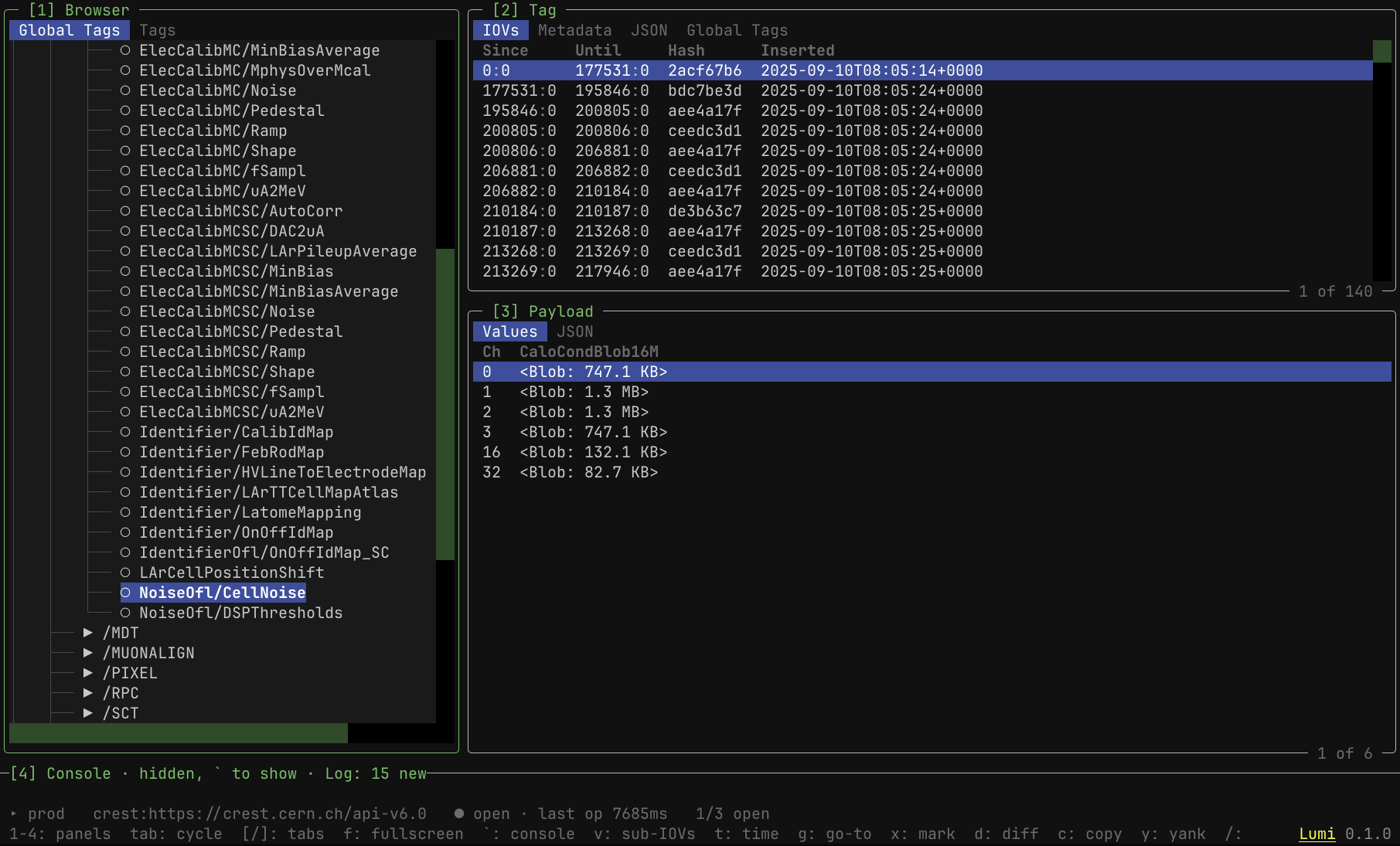
Highlights
- Several connections open at once, each a root of the browser tree with its own coloured chip. The source of every operation is wherever the cursor sits.
- Payload views that adapt to the container type: single-IOV, multi-IOV (with a sub-IOV viewer and delta highlighting), vector and raw.
- Diffs between any two IOVs or tags, on the same connection or across backends: two tags compare IOV by IOV, any pair opens its payload diff, and either saves as a text and JSON report.
- A copy workbench that previews every IOV's status on the destination before anything is written, then runs the copy in the background while you keep browsing. It follows
crest copy: a since-only resume (forced when COOLR is involved), a since/until range, tag only, multi-IOV and raw tags, hash-preserving copies within one connection, and a content check that tells a re-serialized payload from a changed one. - Tag Search, a tab beside the global tags tree: search tag names across connections by name or regex, including tags no global tag maps yet. The Tag panel always says which tag it shows and where it was opened from.
- Read-only connections: COOLR and production CREST are never written to.
- A Python console with the current database as
db. - A source bar showing the current connection, its typical request time, and the CHAI operation in flight.
- A per-session log file to attach to bug reports.
Installation
Lumi is published on PyPI as atlas-lumi and needs Python 3.12 or newer. It depends on atlas-chai, CHAI's Python bindings, which PyPI provides for Linux x86_64 only.
pipx installs Lumi into its own environment and puts lumi on your PATH. Where the default python3 is older than 3.12 (lxplus: 3.9), the flags point pipx at a python3.12, or let it download one:
pipx install --python 3.12 --fetch-missing-python atlas-lumi
uv tool install --python 3.12 atlas-lumi does the same with uv. On lxplus, a shared venv in the atlcond account already has Lumi. See Use existing venv.
To also import chai in your own scripts, pip install atlas-lumi into a virtual environment instead: the same environment then runs lumi and imports chai. Lumi's Python console runs in the environment Lumi is installed in, so a package you want there (say numpy) goes into that environment, with pip install or pipx inject atlas-lumi.
Other platforms
On any platform other than Linux x86_64, pip stops with "no matching distribution" for atlas-chai. Build an atlas-chai wheel locally first (Build a Wheel Locally) and install it into your environment. Installing Lumi then finds it already satisfied.
Quick start
lumi
On first run Lumi creates ~/.config/lumi/config.toml with a default cern connection to the CREST production server and connects to it, so you can start browsing straight away. Press ? for every key. The row at the bottom shows the keys that work where you are.
Configuration
Connections, the theme and the console's auto-imports live in ~/.config/lumi/config.toml. The connection manager and the settings popup edit it from inside Lumi and apply changes at once. Editing it by hand works too:
[connections.prod]
uri = "crest:https://crest.cern.ch/api-v6.0"
default = true

[connections.local]
uri = "crest_fs:/tmp/crest_data"
color = "sage"  # chip colour: a palette name or "#RRGGBB"

[connections.cool]
uri = "coolr:https://coolr-host:8080/coolrapi?db=CONDBR2&schema=COOLOFL_TILE"

[read_only]  # Connections copies never write to: by URI scheme, or by host
schemes = ["coolr"]
hosts = ["crest.cern.ch", "atlas-crest-mgr.cern.ch"]

[ui]
theme = "tokyo-night"

[shell]
auto_import = ["import numpy as np"]
Every URI starts with a CHAI scheme (crest:, crest_fs:, coolr:), and the schemes on offer are the CHAI plugins installed. Authentication is handled by each CHAI plugin. For CREST, see CREST Server Authentication. The settings popup lists every [ui] and [shell] option. The [read_only] lists above are the defaults; a connection's own read_only = true or false overrides them, except that COOLR is always read-only.
Session log
Each run writes a log file under ~/.local/state/lumi/logs/ (or $XDG_STATE_HOME/lumi/logs/): versions, connections, every Log tab entry, copy progress and the traceback of any unexpected error. Credentials are masked and payload contents are not logged. lumi --log-path prints where it is. Attach it when reporting a problem.
Troubleshooting
Quitting waits for a request in flight. Lumi never interrupts a CHAI call midway, since a write could be left half sent, so quitting during a slow request waits for that one call. CrestApi sets no network timeout, so an unresponsive server holds the terminal until the request fails.
Copying text over SSH. Lumi sends copied text over OSC 52, which reaches your local clipboard in terminals that support it. To select text with the mouse in a table, the tree or the console, hold the terminal's selection modifier while dragging (Option in iTerm2, Shift in most others).
Development
Clone the repository and install Lumi in editable mode with the development tools. On macOS, install a locally built atlas-chai wheel into the venv first (see Other platforms).
git clone https://gitlab.cern.ch/crest-db/lumi.git
cd lumi
python3.12 -m venv venv
venv/bin/pip install -e ".[dev]"
The test suite does not need CHAI: tests stub the chai module, and CI runs them without atlas-chai installed.
venv/bin/pytest --cov=lumi --cov-report=term-missing
venv/bin/ruff check src/ tests/
venv/bin/mypy src/
Releasing
- Run
./scripts/release.sh X.Y.Z. It bumps__version__insrc/lumi/__init__.py, the only place the version is set, and refuses a version that is not newer or is already tagged. It does not commit, tag or push. - Commit the bump on a
release/X.Y.Zbranch and merge it tomaster. - Tag the merge commit
X.Y.Z(novprefix, as in CHAI) and push the tag. - The tag pipeline checks the tag against
__version__, uploads to TestPyPI and smoke-tests the install from there. If it passes, run the manualpublish_pypijob.
A version cannot be uploaded twice to either index. If anything is wrong after the TestPyPI upload, fix it and release the next patch version.
License
Apache-2.0
1 maintainer

Metadata
1 maintainer
Release files for atlas-lumi 0.2.0
For a detailed explanation of source distributions (sdists) and built distributions (wheels), please see the package formats documentation.
Source distribution (sdist)
| File | Size | Uploaded | Provenance | Actions |
|---|---|---|---|---|
| atlas_lumi-0.2.0.tar.gz | 177.9 kB | Without provenance | Details for atlas_lumi-0.2.0.tar.gz |
Built distribution (wheel)
| File | Interpreter | ABI | Platform | Actions Reset |
|---|---|---|---|---|
| atlas_lumi-0.2.0-py3-none-any.whl | Python 3 | none | any | Details for atlas_lumi-0.2.0-py3-none-any.whl |
Total release size: 384.2 kB
Release files / atlas_lumi-0.2.0.tar.gz
| Download URL | atlas_lumi-0.2.0.tar.gz |
|---|---|
| Size | 177.9 kB |
| Tags | Source |
|
SHA-256 checksum How to use checksums |
a1f91ea1056bd10bf08433b2db3426c9ad6522b47062c84037bfd36c58907554
|
|
BLAKE2b-256 checksum How to use checksums |
1ee93105e61da50837659840897464de147f6800d2067c97d7b4bd0cc983c7c7
|
| Upload date | |
|
Uploaded using Trusted Publishing? What is trusted publishing? |
No |
| Uploaded via |
twine/7.0.0 CPython/3.12.16
|
Release files / atlas_lumi-0.2.0-py3-none-any.whl
| Download URL | atlas_lumi-0.2.0-py3-none-any.whl |
|---|---|
| Size | 206.3 kB |
| Tags | Python 3 |
|
SHA-256 checksum How to use checksums |
9e3e09a3239c375057902b54cf940fccbcb907c4d1188f0484d6035df687aeba
|
|
BLAKE2b-256 checksum How to use checksums |
afaa90b8b11b7fedb4cf452f65ccf73053b34aa357566eaba8801ae5f5fe3e13
|
| Upload date | |
|
Uploaded using Trusted Publishing? What is trusted publishing? |
No |
| Uploaded via |
twine/7.0.0 CPython/3.12.16
|
Security for atlas-lumi 0.2.0
Provenance
Provenance describes where a file came from. On PyPI, provenance is shared via attestations, which provide a verifiable record of the build or publishing details. View details, limitations and caveats.
No provenance found
None of the files in this release were uploaded with provenance metadata.
A note on package security
PyPI is a repository for distributing packages, not a service for auditing them. While third-party security researchers and our staff do their best to detect and remove malicious packages, PyPI cannot guarantee the quality, security or suitability of any given package.
To learn more about protecting yourself from malicious actors, visit our package security documentation.














