
AtlasTrack



Register histological brain sections to a reference atlas, and map probe trajectories into atlas coordinates.
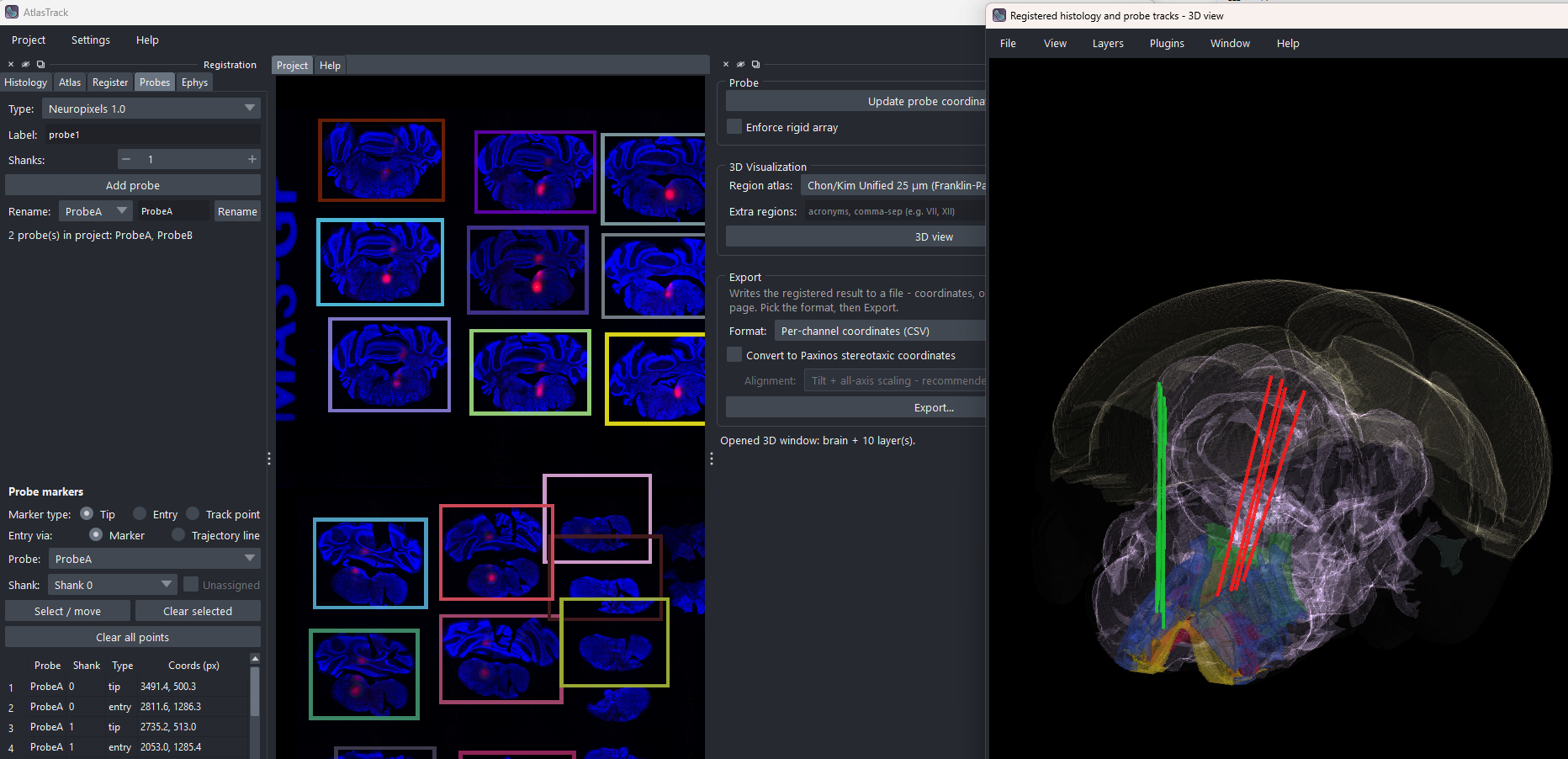
This is a desktop app for wet-lab neuroscientists: load histology slide images, place each section in the atlas, register the series automatically, click your probe tracks, and export coordinates or figures.
What it does
Given one or more slide images and a little guidance:
- Finds the sections in each slide and merges several slides into one image with shared coordinates.
- Places each section at its front-to-back atlas level - by hand in a side-by-side matcher, or automatically with DeepSlice.
- Registers every section to the atlas, bending the atlas to follow your tissue (see How a section is fitted below). Damaged sections can be corrected by hand, by moving the whole atlas outline or by dragging points.
- Maps probe tracks you click into atlas coordinates, per shank and per channel; optionally refined from recorded LFP depth features.
- Exports electrode coordinates as CSV (CCF µm or Paxinos stereotaxic mm), an interactive
3-D HTML page, a HERBS
.pkl, or your section series with atlas outlines.
How a section is fitted
DeepSlice alone places each section with a linear fit: an atlas plane, tilted, shifted and scaled, but not bent. On real tissue that is rarely enough. AtlasTrack uses DeepSlice only to choose the plane, then fits the atlas to the tissue:
- Plane. DeepSlice sees one tight crop per section, with your flips applied, numbered in your section order. It uses those numbers to keep the series in front-to-back order and to share one tilt across it. Any AP you set by hand (or by even spacing) is an anchor: that section's plane slides along AP to exactly your value, keeping DeepSlice's tilt. Sections without an anchor shift by interpolating their neighbouring anchors' corrections, so one anchor corrects the offset of the whole series and two or more also its spacing. APs that DeepSlice wrote itself are predictions, not anchors.
- Scale and shift. The outline of the atlas slice is moved and scaled onto the outline of the tissue: same centre, same size, no rotation.
- Warp. elastix, a registration program, bends the atlas onto the section: it moves a grid of control points until the light and dark patterns of the two images agree. It compares tissue pixels only - fluorescent labels are left out - and a penalty on bending keeps the warp smooth.
- Edge snap. The atlas brain's outline is pulled onto the tissue border, with the interior held still. Pushes too large to be a fit (torn or missing tissue) are skipped, and a warp that would fold is rejected.
- Check. If the result overlaps the tissue clearly worse than the plain plane, the plane is kept instead, for you to fit by hand.
Box and landmark corrections are applied on top. Re-registering a section clears them, since they corrected the fit it replaces.
Atlases come from BrainGlobe: Allen CCFv3, CCFv3-BBP Augmented, Chon/Kim Unified (Franklin-Paxinos names), and any other BrainGlobe id. All cover the same volume, so regions can be re-named from a different atlas without re-registering.
TUTORIAL.md walks through one slide start to finish.
MANUAL.md is the reference document.
Both are also available in the app under Help.
Install
From PyPI:
uv pip install "atlastrack[all]"    # recommended  (pip install also works)
atlastrack gui
The base install (atlastrack) is deliberately light. [all] adds three extras,
each installable on its own:
| Extra | Adds | Cost |
|---|---|---|
elastix |
The regularized registration engine - recommended | ~150 MB (ITK) |
deepslice |
Automatic front-to-back placement | ~1.65 GB (TensorFlow) |
ephys |
The Ephys tab (Open Ephys / SpikeGLX / Intan) | SpikeInterface |
From source, for development:
git clone https://github.com/vncntprvst/AtlasTrack
cd AtlasTrack
uv pip install -e ".[all,dev]"
Put the package name in quotes and leave no spaces inside the brackets -
zshand PowerShell otherwise read[...]as a file pattern, and a space splits it in two.
Commands
atlastrack gui        # the app
atlastrack version
atlastrack gl-info    # check the graphics setup if the window will not open
atlastrack split | register | export      # the same steps, without the window
atlastrack import SOURCE                  # convert a slicereg or QuickNII/VisuAlign registration
atlastrack match PROJECT.json REF.json    # register sections from the same sections in REF
The window
The centre holds Project (your slide and the atlas overlay) and Help. On the left, the workflow in order: Histology → Atlas → Register → Probes → Ephys. On the right, 3D & Export. Menus: Project, Settings, Help.
Wheel zooms; Ctrl+wheel and Shift+wheel pan.
Layout
src/atlastrack/   io/ atlas/ sectioning/ landmarks/ registration/ probes/ viz/ gui/
tests/            pytest suite
The core packages run without a display and have their own tests; only gui/
and viz/napari3d.py import napari/Qt, which lint-imports checks. Coordinates are CCF
(AP, ML, DV) in µm throughout. A project is one Pydantic model serialized to
<slide>.atlastrack.json, with each section's registration saved in a file
alongside it.
Testing
uv pip install -e ".[all,dev]"
pytest -q          # GUI tests need a display
lint-imports       # checks the core packages never import the GUI
1 maintainer

Metadata
1 maintainer
Release files for atlastrack 0.10.34
For a detailed explanation of source distributions (sdists) and built distributions (wheels), please see the package formats documentation.
Source distribution (sdist)
| File | Size | Uploaded | Provenance | Actions |
|---|---|---|---|---|
| atlastrack-0.10.34.tar.gz | 2.0 MB | With provenance | Details for atlastrack-0.10.34.tar.gz |
Built distribution (wheel)
| File | Interpreter | ABI | Platform | Actions Reset |
|---|---|---|---|---|
| atlastrack-0.10.34-py3-none-any.whl | Python 3 | none | any | Details for atlastrack-0.10.34-py3-none-any.whl |
Total release size: 2.6 MB
Release files / atlastrack-0.10.34.tar.gz
| Download URL | atlastrack-0.10.34.tar.gz |
|---|---|
| Size | 2.0 MB |
| Tags | Source |
|
SHA-256 checksum How to use checksums |
2edc7bb24d0c23904a9e3ee0556dbd7eb36825076576aaf083b67e4a075d0813
|
|
BLAKE2b-256 checksum How to use checksums |
dccd965a838229d4932eaedb0ce7968e295ca7e9d9c6c5d8b2d8bd433dc77322
|
| Upload date | |
|
Uploaded using Trusted Publishing? What is trusted publishing? |
Yes |
| Uploaded via |
twine/7.0.0 CPython/3.13.14
|
Provenance
Provenance describes where a file came from. On PyPI, provenance is shared via attestations, which provide a verifiable record of the build or publishing details. View details, limitations and caveats.


PyPI Publish Attestation
PyPI verified that this artifact, at this checksum, originated from the publisher listed below.
Signed by GitHub Actions, verified by PyPI on Oct 17, 2026.
Transparency logRelease files / atlastrack-0.10.34-py3-none-any.whl
| Download URL | atlastrack-0.10.34-py3-none-any.whl |
|---|---|
| Size | 557.4 kB |
| Tags | Python 3 |
|
SHA-256 checksum How to use checksums |
3173b07b62e73317567f98020396264c6e989ee7ba4d9738bfea7d43effceaf1
|
|
BLAKE2b-256 checksum How to use checksums |
34965b9d32890bb669b3754634cf44b7057d50faeda1cf3dfc143a05b37ceb6d
|
| Upload date | |
|
Uploaded using Trusted Publishing? What is trusted publishing? |
Yes |
| Uploaded via |
twine/7.0.0 CPython/3.13.14
|
Provenance
Provenance describes where a file came from. On PyPI, provenance is shared via attestations, which provide a verifiable record of the build or publishing details. View details, limitations and caveats.
PyPI Publish Attestation
PyPI verified that this artifact, at this checksum, originated from the publisher listed below.
Signed by GitHub Actions, verified by PyPI on Oct 17, 2026.
Transparency logSecurity for atlastrack 0.10.34
Provenance
Provenance describes where a file came from. On PyPI, provenance is shared via attestations, which provide a verifiable record of the build or publishing details. View details, limitations and caveats.
Full provenance
All 2 files in this release have been uploaded with provenance metadata.
Attestation for atlastrack-0.10.34.tar.gz
PyPI Publish Attestation
PyPI verified that this artifact, at this checksum, originated from the publisher listed below.
Signed by GitHub Actions, verified by PyPI on Oct 17, 2026.
Transparency logA note on package security
PyPI is a repository for distributing packages, not a service for auditing them. While third-party security researchers and our staff do their best to detect and remove malicious packages, PyPI cannot guarantee the quality, security or suitability of any given package.
To learn more about protecting yourself from malicious actors, visit our package security documentation.














