
A 3D monte carlo simulation of Atmospheric Radiative Transfer

Project description
AtmoRad
A vectorized Monte Carlo simulation of atmospheric radiative transfer.


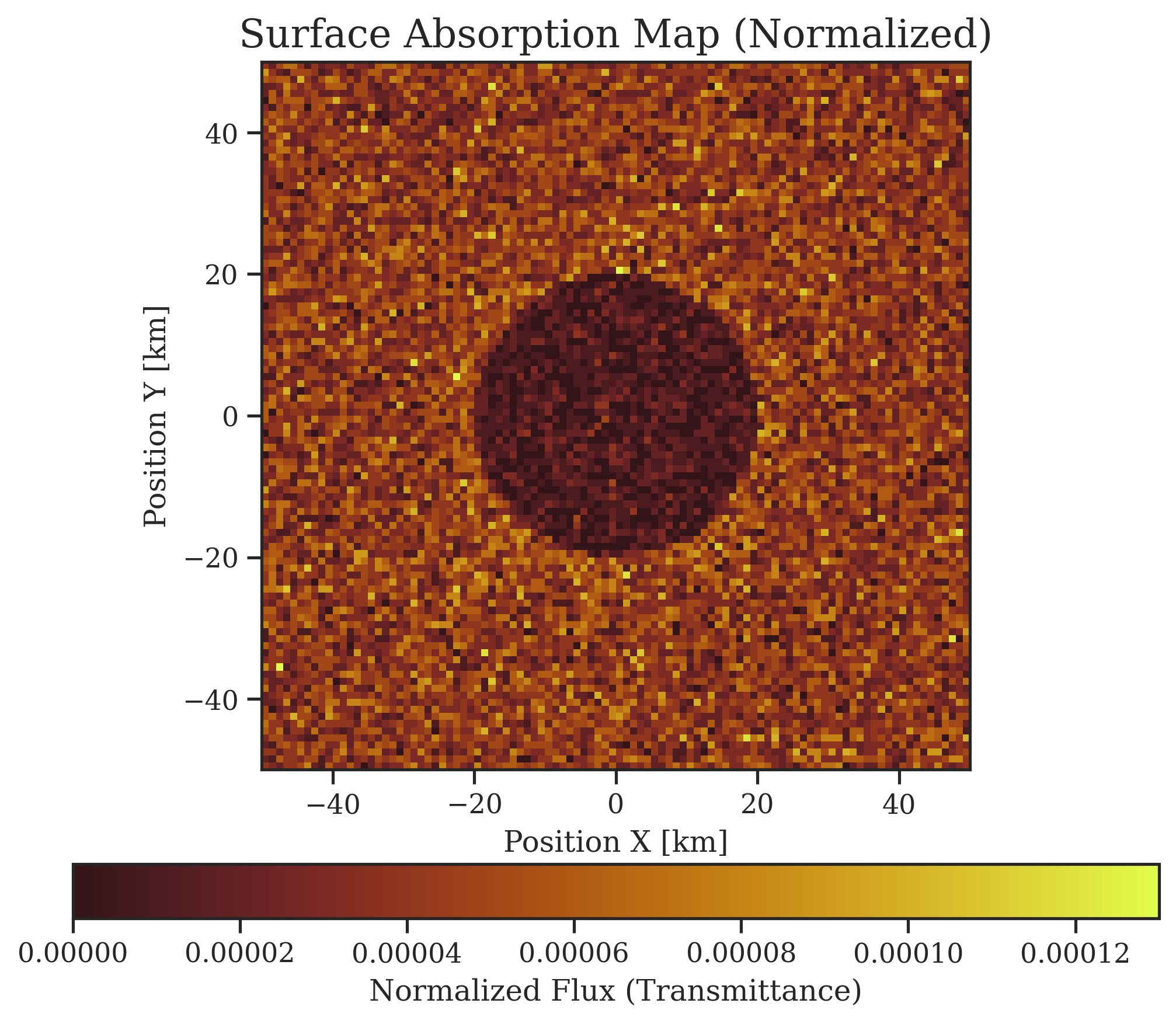
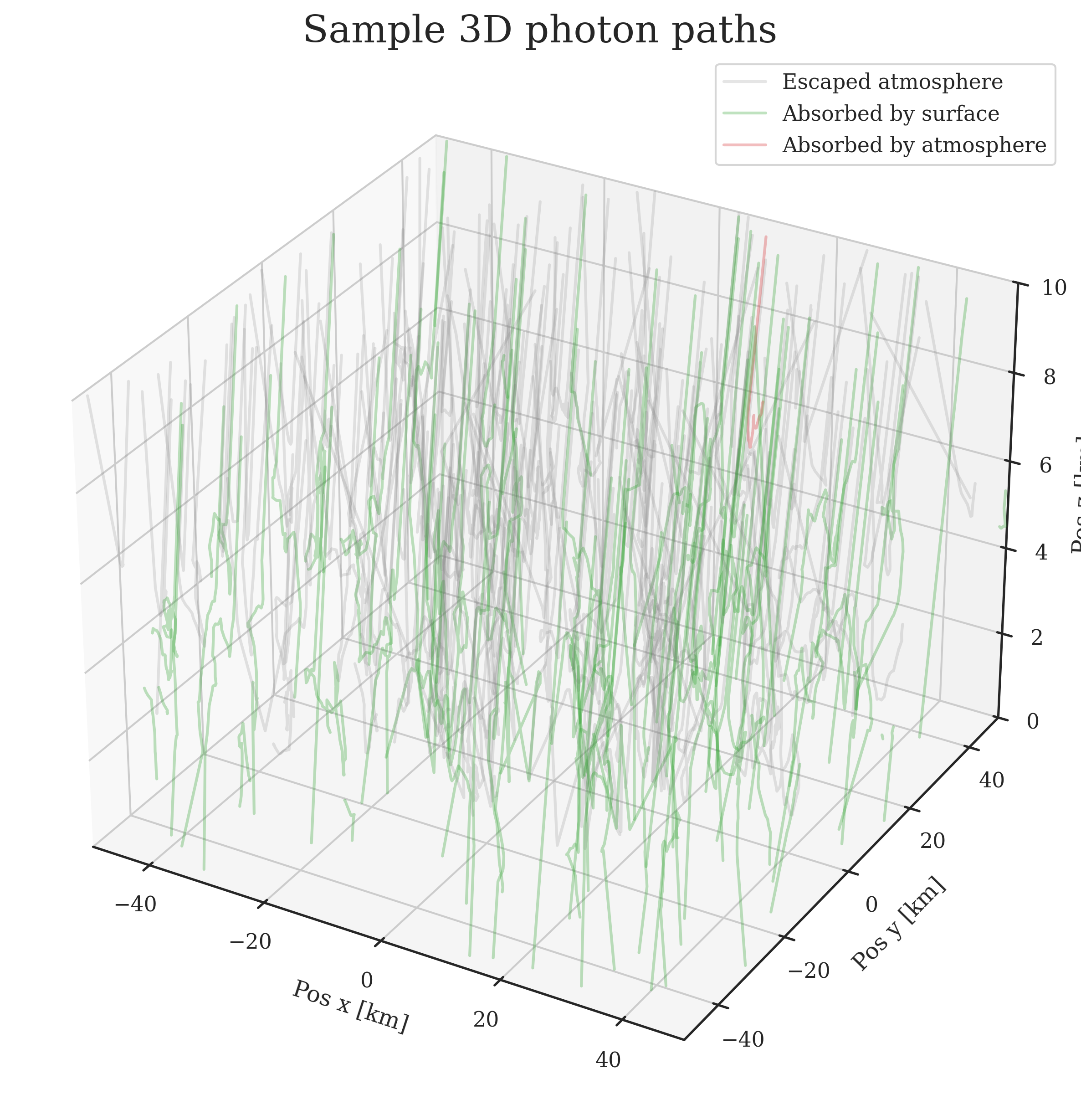
| 2D Surface absorption map | Sample photon paths |
|---|---|
 |
 |
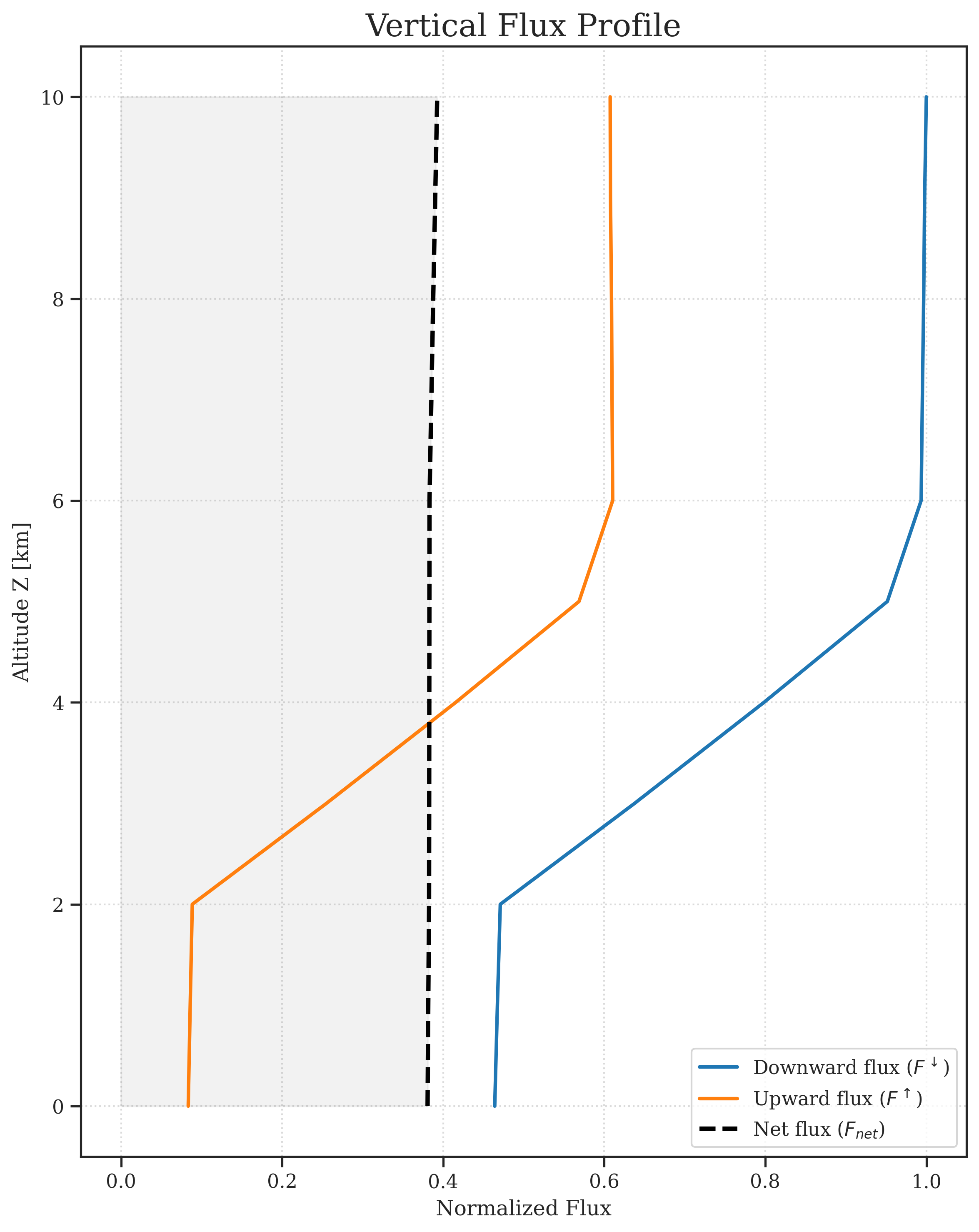
| Vertical flux profile | Vertical absorption profile |
 |
 |
Overview:
This project simulates the propagation of light through a plane-parallel atmosphere over a horizontally mixed surface and its interactions with the ground boundary. Developed as a student project, created to learn computational physics and software development.
Physical model
- Analog Monte Carlo Approach: Light is simulated using discrete photon packets. Final flux is calculated as a fraction of the total detected packets.
- Plane-parallel approximation: The atmosphere consists of horizontally uniform layers.
- Multi-material atmospheric layers: Layers can consist of multiple atmospheric materials simultaneously. A photon is assigned a material randomly when it is initialized and again when it crosses into a new layer. Each material has its own extinction coefficient, SSA and phase function.
- Custom Phase Functions: Henyey-Greenstein and Rayleigh phase functions are already implemented in the simulation, but any custom user-defined function can be constructed using the
Scatteringclass. - Surface Reflections: The surface consists of materials, each with its own albedo, a predefined BRDF reflection model (
Lambertian,Mirror), and aProceduralMapthat outputs material ID based on spatial coordinates. - Photon Properties: Light is treated as monochromatic, non-polarized particles. During the simulation they can be scattered, reflected, or absorbed.
- Incident Irradiance & Adjacency Effect: Custom detectors allow measuring downward/upward incident flux at any arbitrary altitude - helpful for visualizing the adjacency effect.
Technical implementation:
- The simulation uses
numpyto simulate photons simultaneously in large batches. - The results are plotted using
matplotlibandseaborn(e.g., photon paths, flux profile, 2D ground flux maps) - The code uses multiprocessing to run batches in parallel.
Installation:
- Using
uv(install uv):
uv tool install atmorad-py
- Using
pip:
pip install atmorad-py
- Run the simulation:
atmorad --init
atmorad simulation.toml
- Check
results/directory for simulation artifacts.
Project Structure
engine/: Divides photons into batches and runs the simulation.physics/: Contains a rotation function, scattering phase functions, reflection functions.environment/: Keeps track of the environment. ContainsScene,AtmosphereandSurfaceclasses.detectors/: Provides functionality for tracking photons during the simulation and generates results.output/: Handles results and figure generation.config/andbuilder.py: Parses.tomlconfiguration file and generates simulation context.cli.py: Provides CLI foratmorad.
Customization
You can define your own surface reflection algorithms and scattering phase functions using decorators as shown below:
import numpy as np
from atmorad import build_context, MCRadiationRunner, DataIO, ResultAnalyzer
from atmorad import SurfaceReflection, register_reflection, orientation
from atmorad import Scattering, register_scattering

# 1. Register a custom surface reflection
@register_reflection("custom-reflection")
class CustomReflection(SurfaceReflection):
    # Specify arbitrary custom parameters
    def __init__(self, param_1, param_2):
        self.param_1 = param_1
        self.param_2 = param_2
    def reflect(self, direction, rand_1, rand_2):
        # Your custom reflection physics here
        cos_theta = np.sqrt(rand_1)
        sin_theta = np.sqrt(1.0 - rand_1)

        # you can also use specified parameters
        # self.param_1, self.param_2

        phi = rand_2 * 2 * np.pi
        cos_phi, sin_phi = np.cos(phi), np.sin(phi)

        return orientation(cos_theta, sin_theta, cos_phi, sin_phi)

# 2. Register a custom scattering phase function
@register_scattering("custom-scattering")
class CustomScattering(Scattering):
    # Specify arbitrary custom parameters
    def __init__(self, g, resolution=1000):
        # Define a pdf array
        self.g = g
        cos_grid = np.linspace(-1, 1, resolution)

        pdf = (1 - g**2) / (2 * (1 + g**2 - 2 * g * cos_grid) ** 1.5)

        super().__init__(pdf_array=pdf, resolution=resolution)

# 3. Run the simulation using custom names in your config
if __name__ == "__main__":
    context = build_context("simulation.toml")
    runner = MCRadiationRunner(context)
    runner.run()

    # 4. Save and analyze results
    results = runner.get_results()
    outputs = DataIO(context.config)
    analyzer = ResultAnalyzer(results, context.config)

    outputs.save_all_artifacts(analyzer, results)
    outputs.save_metadata(context.config, results)
    outputs.save_results(results)
In simulation.toml you can specify your defined scatterings and reflections:
[atmosphere_materials.custom-atm-material]
ssa = 0.9
scattering = {type = "custom-scattering", g=0.8}

[surface_materials.custom-surf-material]
albedo = 0.5
reflection = {type = "custom-reflection", param_1=2, param_2=1.3} # match param names defined in python
Then you can use your defined materials for atmospheric layers and surface maps:
[[layer]]
z_range_km = [0, 2]
materials = [{type = "custom-atm-material", weight = 1.0}]

# ...

[surface]
name = "uniform"
material = "custom-surf-material"
References and Literature
- (in Polish) Script for Lecture about Radiative Processes in the Atmosphere, Prof. K. Markowicz, Faculty of Physics, University of Warsaw, 2013.
Acknowledgments
- This project was inspired by the lectures on Radiative Processes in the Atmosphere by Prof. K. Markowicz, Faculty of Physics, University of Warsaw.
- Large Language Models were used for code debugging and learning best Python practices (e.g.
dataclasses,__init__.pyimport interfaces, class responsibilities, config parsing).
Contributing
Feel free to open an Issue or submit a Pull Request if you'd like to contribute or report a bug.
Release history Release notifications | RSS feed


Download files
Download the file for your platform. If you're not sure which to choose, learn more about installing packages.
Source Distribution
Built Distribution
Filter files by name, interpreter, ABI, and platform.
If you're not sure about the file name format, learn more about wheel file names.
Copy a direct link to the current filters
File details
Details for the file atmorad_py-0.1.1.tar.gz.
File metadata
- Download URL: atmorad_py-0.1.1.tar.gz
- Upload date:
- Size: 105.2 kB
- Tags: Source
- Uploaded using Trusted Publishing? No
- Uploaded via: uv/0.11.3 {"installer":{"name":"uv","version":"0.11.3","subcommand":["publish"]},"python":null,"implementation":{"name":null,"version":null},"distro":{"name":"Ubuntu","version":"24.04","id":"noble","libc":null},"system":{"name":null,"release":null},"cpu":null,"openssl_version":null,"setuptools_version":null,"rustc_version":null,"ci":null}
File hashes
| Algorithm | Hash digest | |
|---|---|---|
| SHA256 |
3fadecfec3386911c8a4e3b2dddace255168dfb5f1331801edb01fbff18e3fcf
|
|
| MD5 |
59516aa3fa50fc8f0d1c8215dd337efb
|
|
| BLAKE2b-256 |
242b708e9aa2e5adc28797f45ec8c91d0177ebc8d591911bf7279c2d2e8a1fdd
|
File details
Details for the file atmorad_py-0.1.1-py3-none-any.whl.
File metadata
- Download URL: atmorad_py-0.1.1-py3-none-any.whl
- Upload date:
- Size: 35.7 kB
- Tags: Python 3
- Uploaded using Trusted Publishing? No
- Uploaded via: uv/0.11.3 {"installer":{"name":"uv","version":"0.11.3","subcommand":["publish"]},"python":null,"implementation":{"name":null,"version":null},"distro":{"name":"Ubuntu","version":"24.04","id":"noble","libc":null},"system":{"name":null,"release":null},"cpu":null,"openssl_version":null,"setuptools_version":null,"rustc_version":null,"ci":null}
File hashes
| Algorithm | Hash digest | |
|---|---|---|
| SHA256 |
700a3782d82dab47109b738e4c702fc895fe89e74870dd9d38e8c58b1312ec18
|
|
| MD5 |
5f7ab232929135221999ad7c0ce7571a
|
|
| BLAKE2b-256 |
eb15c6c485e84a00c4fddc61bbe855439c6fe96a88eedbb26063c75862480202
|






