
attention-map-diffusers
Relation-aware attention capture and visualization for Hugging Face Diffusers image and video pipelines.





Visualization
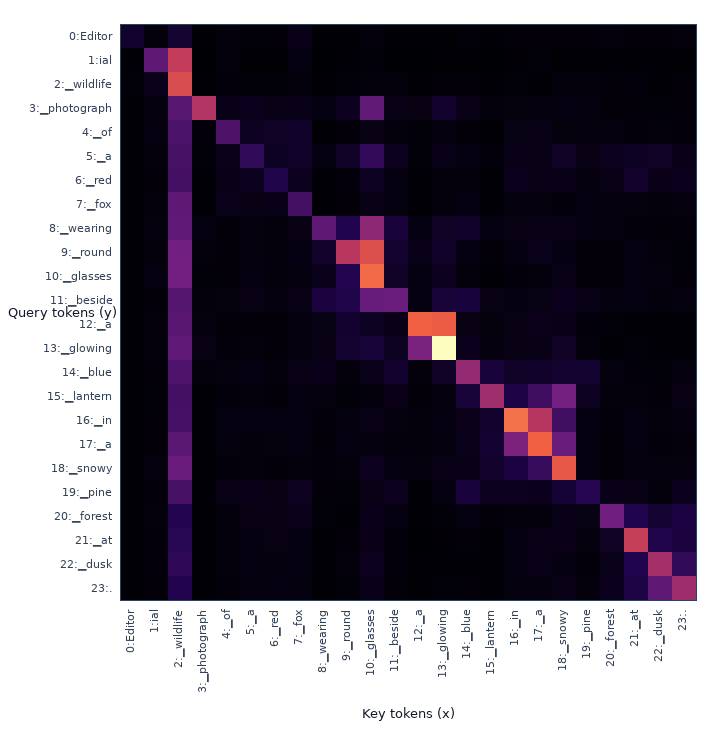
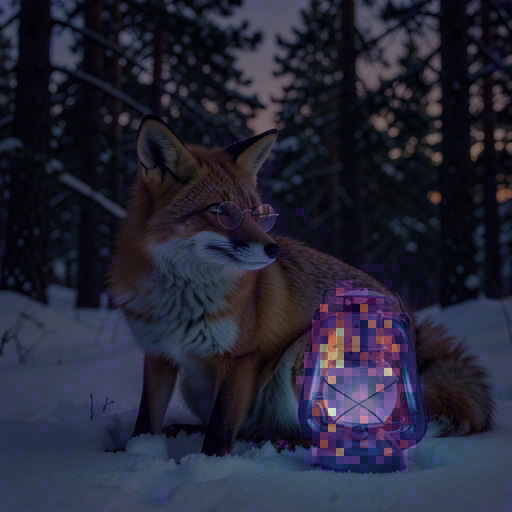
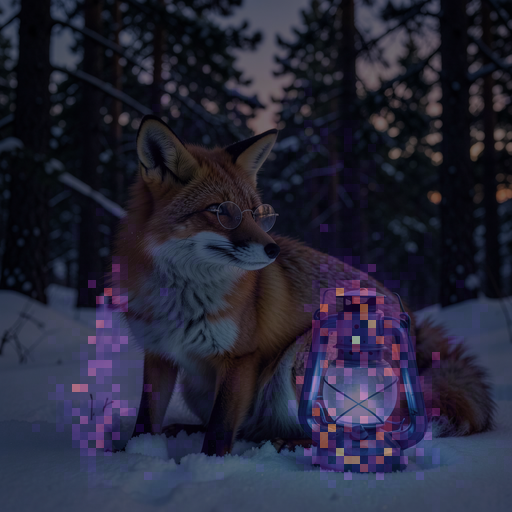
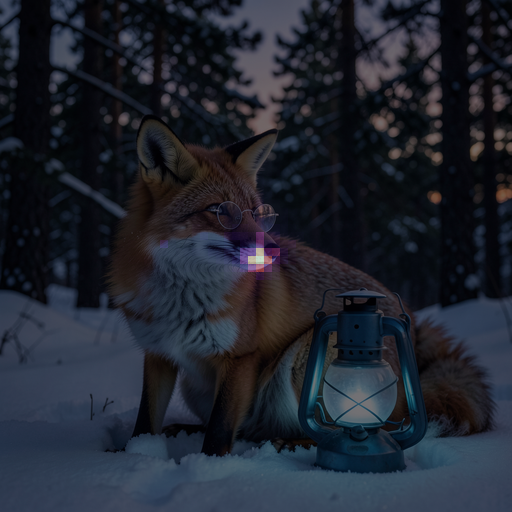
Image · FLUX.2 Klein
Prompt: Editorial wildlife photograph of a red fox wearing round glasses beside a glowing blue lantern in a snowy pine forest at dusk.
| text→text | text→image · lantern |
|---|---|
 |
 |
image→text · lantern |
image→image · center patch |
 |
 |
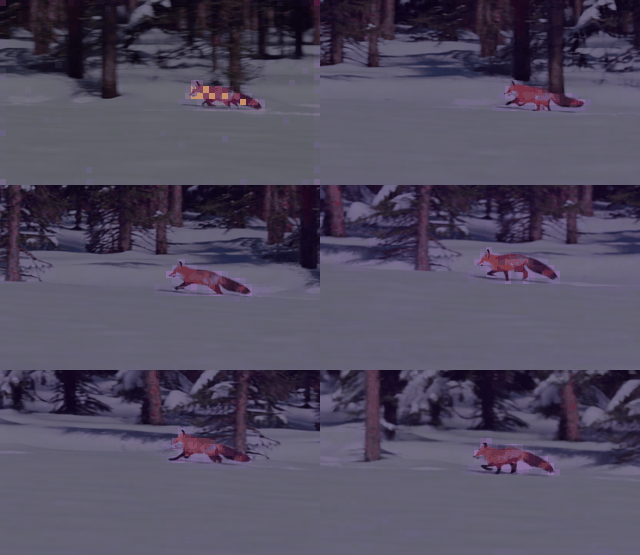
Video · Wan 2.1 T2V 1.3B
Prompt: A cinematic tracking shot of a red fox running across pristine snow in a pine forest, detailed fur, natural winter light, smooth motion, stable camera.
video→text · fox
video→video · center patch
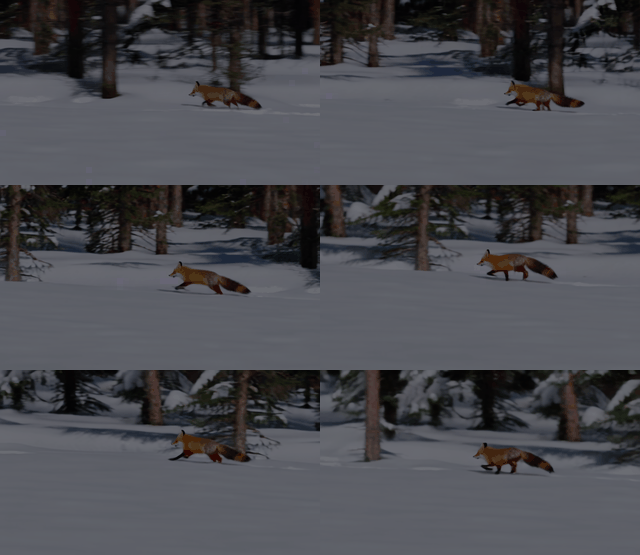
Wan exposes cross-attention (video→text) and spatial-temporal self-attention
(video→video), so the table shows every relation in its denoiser.
Spatial examples are attention overlays, so the generated source is not shown
again. Video maps preserve the patch grid as (T,H,W); each GIF also has
per-frame PNG output. Spatial labels are off by default.
Compatible models
Requires Python 3.10+ and diffusers>=0.39.0.
| Key | Checkpoint | Relations |
|---|---|---|
flux2-klein |
black-forest-labs/FLUX.2-klein-4B |
image/text all |
z-image-turbo |
Tongyi-MAI/Z-Image-Turbo |
image/text all |
prx-pixel |
Photoroom/prxpixel-t2i |
image→text, image→image |
flux-schnell |
black-forest-labs/FLUX.1-schnell |
image/text all |
flux-dev |
black-forest-labs/FLUX.1-dev |
image/text all |
sd3-5 |
stabilityai/stable-diffusion-3.5-medium |
image/text all |
sd3 |
stabilityai/stable-diffusion-3-medium-diffusers |
image/text all |
sana |
Efficient-Large-Model/Sana_1600M_1024px_diffusers |
image→text, image→image |
sdxl |
stabilityai/stable-diffusion-xl-base-1.0 |
image→text, image→image |
sd |
sd2-community/stable-diffusion-2-1 |
image→text, image→image |
cogvideox-2b |
THUDM/CogVideoX-2b |
video/text all |
wan2.1-t2v-1.3b |
Wan-AI/Wan2.1-T2V-1.3B-Diffusers |
video→text, video→video |
hunyuan-video-1.5 |
hunyuanvideo-community/HunyuanVideo-1.5-Diffusers-480p_t2v |
video/text all |
“image/text all” is text→text, text→image, image→text, and image→image. “video/text all” is text→text, text→video, video→text, and video→video.
Install
pip install attention-map-diffusers==1.0.0
Image quick start
import torch
from diffusers import Flux2KleinPipeline
from attention_map_diffusers import AttentionCapture, text_tokenizers

prompt = "A red fox beside a glowing blue lantern in a snowy forest."
pipe = Flux2KleinPipeline.from_pretrained(
    "black-forest-labs/FLUX.2-klein-4B", torch_dtype=torch.bfloat16
).to("cuda")

with AttentionCapture(
    pipe,
    relations=["text->text", "text->image", "image->text", "image->image"],
    offload="cuda",
) as capture:
    images = pipe(prompt=[prompt], num_inference_steps=4).images

capture.compute().save(
    "outputs/attention", tokenizer=text_tokenizers(pipe),
    prompts=[prompt], images=images,
)
Video quick start
import torch
from diffusers import WanPipeline
from attention_map_diffusers import AttentionCapture, VisualizationConfig, text_tokenizers

prompt = "A cinematic tracking shot of a red fox running across snow in a pine forest."
steps = 50
pipe = WanPipeline.from_pretrained(
    "Wan-AI/Wan2.1-T2V-1.3B-Diffusers", torch_dtype=torch.bfloat16
).to("cuda")
pipe.scheduler.set_timesteps(steps, device="cuda")
last_timestep = [float(pipe.scheduler.timesteps[-1])]

with AttentionCapture(
    pipe,
    relations=["video->text", "video->video"],
    timesteps=last_timestep,
    relation_query_indices={"video->video": "center"},
    offload="cpu",
    max_capture_bytes=16 * 1024**3,
) as capture:
    videos = pipe(
        prompt=[prompt], num_inference_steps=steps,
        height=480, width=832, num_frames=81,
    ).frames

for component in pipe.components.values():
    if isinstance(component, torch.nn.Module):
        component.to("cpu")
torch.cuda.empty_cache()
capture.compute(compute_device="cuda").save(
    "outputs/attention", tokenizer=text_tokenizers(pipe),
    prompts=[prompt], videos=videos,
    visualization_config=VisualizationConfig(max_items=16, video_fps=16),
)
The shared runner contains native model defaults and reproducible metadata:
python demo/run_attention_demo.py --model flux2-klein --relations all
python demo/run_attention_demo.py --model wan2.1-t2v-1.3b --relations all
Output and controls
attention/
  metadata.json                         # provenance + capture settings
  raw/<relation>/*.pt                   # only with --save-raw
  raw-components/<relation>/<encoder>/ # token-concatenated encoders
  visuals/<relation>/aggregate/batch-000/
    maps/*.png                          # image attention
    maps/*.gif                          # video attention
    maps/<encoder>/*                    # token-concatenated encoders
    maps/<item>/frames/*.png
    overlays/                           # generated-media overlays, separate
- The final timestep and head mean are retained by default.
- Use
--capture-timesteps alland--save-layer-mapsfor every timestep and layer. The default 8 GiB cumulative capture guard prevents silent RAM/VRAM exhaustion. - Every image→image query patch is rendered by default. Video→video defaults to
the center query patch because a full
(query T×H×W)²tensor is impractical; use--large-relation-query-indices sample:9orallexplicitly. - Raw
.pttensors are optional and are never required for visualization. - CFG stored as separate denoiser calls (HunyuanVideo 1.5) is tagged per call; visualizations use the conditional call by default while raw capture keeps both.
- Token-axis concatenation is preserved. SD3 saves fused-CLIP and T5 maps separately (including all four text→text component pairs); HunyuanVideo 1.5 separates ByT5 and MLLM after its mask-based token reordering and records its two MLLM token-refiner layers as MLLM→MLLM maps. Feature-axis fusion such as SDXL CLIP-L+G remains one mathematically inseparable map.
- Capture fails with a layer/processor report if any denoiser attention module is unsupported, preventing silently incomplete results.
- Use
--show-spatial-labelsonly when token/patch titles are wanted.
Validation
python -m pytest -q
python demo/run_attention_demo.py --model all --relations all --dry-run
python demo/audit_attention_coverage.py --model all
python demo/validate_generation_parity.py --model cogvideox-2b --num-frames 9
Citation
@software{baek_attention_map_diffusers_2026,
  author = {Baek, Wooyeol and Baek, Seungyeol},
  title = {attention-map-diffusers},
  version = {1.0.0},
  year = {2026},
  publisher = {Zenodo},
  doi = {10.5281/zenodo.18304023},
  url = {https://doi.org/10.5281/zenodo.18304023}
}
1 maintainer

Download files
Download the file for your platform. If you're not sure which to choose, learn more about installing packages.
Source Distribution
Built Distribution
Filter files by name, interpreter, ABI, and platform.
If you're not sure about the file name format, learn more about wheel file names.
Copy a direct link to the current filters
File details
Details for the file attention_map_diffusers-1.0.0.tar.gz.
File metadata
- Download URL: attention_map_diffusers-1.0.0.tar.gz
- Upload date:
- Size: 59.3 kB
- Tags: Source
- Uploaded using Trusted Publishing? No
- Uploaded via:
twine/7.0.0 CPython/3.10.18
File hashes
| Algorithm | Hash digest | |
|---|---|---|
| SHA256 |
a6ed2716b9eb12e5a148920f0d0e5edb5ec8ff05267c6a093dd6f284da586a56
|
|
| MD5 |
a701e2890ca6be6d9d09a89a74b65504
|
|
| BLAKE2b-256 |
bf39210d23ce0a524a8f7a6f62f0cac4a7613054d5a3206716d8fc7eae876055
|
File details
Details for the file attention_map_diffusers-1.0.0-py3-none-any.whl.
File metadata
- Download URL: attention_map_diffusers-1.0.0-py3-none-any.whl
- Upload date:
- Size: 51.3 kB
- Tags: Python 3
- Uploaded using Trusted Publishing? No
- Uploaded via:
twine/7.0.0 CPython/3.10.18
File hashes
| Algorithm | Hash digest | |
|---|---|---|
| SHA256 |
b50ead0760a96cce4a92de5fad71f23b0a49dd2c9580c5fe72a1ace4610630c4
|
|
| MD5 |
23f4da38c43b299df95d411cdd202939
|
|
| BLAKE2b-256 |
6e6797757662ce3984625bb8cf93f1642e8d469019b776889006a870ec888a81
|







